Choosing the right display matters just as much as choosing the right camera when color accuracy is the goal. For grading, you need dependable HDR performance, consistent calibration, and the right connections for your workflow.
This roundup focuses on monitors that can handle demanding studio color work, from desktop reference displays to bright production monitors for live sets and multi-source review.
Best 10 Hdr Monitor for Color Grading Studio Picks for 2026
Reference HDR Color Grading
ASUS ProArt PA32UCXR 32" Mini-LED

- 1600-nit peak Mini-LED panel
- Built-in motorized colorimeter
- Supports Dolby Vision, HDR-10, HLG
Best For: Colorists who want a bright, calibratable HDR reference display.
Multi-View Production HDR
osee Mega 22S4 21.5" Director Monitor
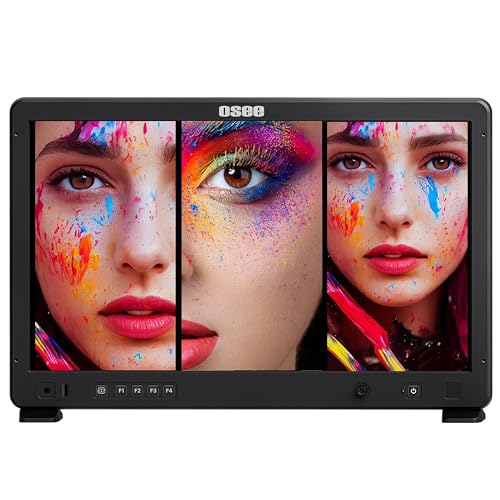
- 1500-nit daylight-viewable panel
- Split-screen and PIP/PBP modes
- Waveform, vectorscope, false color tools
Best For: Crews that need a bright, multi-input monitor for live production.
OLED Color Precision
ASUS ProArt PA27DCE-K 27" 4K OLED

- 4K HDR OLED with 1,000,000:1 contrast
- True 10-bit and 99% DCI-P3
- Includes X-rite i1 calibrator
Best For: Colorists who want OLED contrast and built-in calibration tools.
Broadcast 8K Monitoring
LILLIPUT Q28-8K 28" Production Monitor

- 12G-SDI, 12G-SFP, HDMI 2.0 inputs
- Quad view with 3D-LUT support
- HDR and gamma tools included
Best For: Broadcast setups that need multi-input monitoring with HDR features.
Flagship HDR Mastering Pick
ASUS ProArt PA32UCDM 32 Inch 4K 240Hz OLED Professional Monitor for Mac

- 31.5-inch 4K QD-OLED panel
- 1000 nits peak, DisplayHDR True Black 400
- E < 1 accuracy with calibration support
Best For: High-end color grading studios needing OLED HDR precision
Broadcast HDR Utility Monitor
FEELWORLD FVM215 21.5" 1000nit High Bright 3G SDI 4K HDMI Broadcast Monitor

- 21.5-inch 1000-nit panel
- HDMI and 3G-SDI connectivity
- Waveform, false color, 3D LUT support
Best For: Production teams needing a bright HDR monitor with broadcast tools
Portable HDR Secondary Display
16" OLED Portable Monitor, 2K 2048x1280

- 100% DCI-P3 OLED panel
- 10-bit color depth with strong contrast
- USB-C and Mini HDMI connectivity
Best For: Mobile editors and colorists needing a compact review display
Reference-Grade HDR
ASUS ProArt PA32UCR-K 32 Inch 4K

- 32-inch 4K mini-LED panel with 1,000-nit peak brightness
- 99.5% Adobe RGB, 98% DCI-P3, 100% sRGB coverage
- Includes hardware calibration and X-Rite i1 calibrator
Best For: Colorists needing a large HDR reference display with strong calibration tools
Field Production HDR
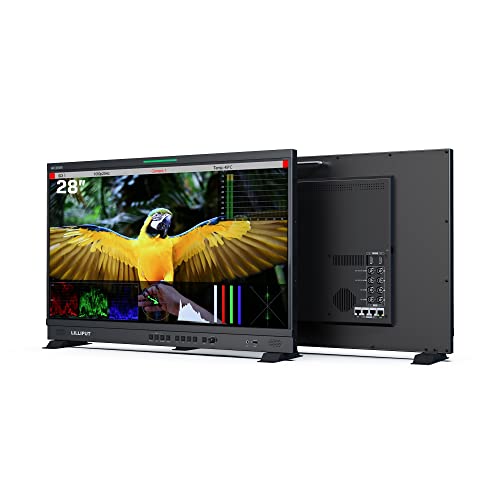
- 12G-SDI and 4K HDMI 2.0 for pro video inputs
- Quad-split multiview with waveform, histogram, and vector tools
- HDR and 3D-LUT support for monitoring workflows
Best For: Crews that need SDI connectivity and multiview monitoring in production
Compact Studio HDR
ASUS ProArt PA16USV 15.6" 4K SDI

- 15.6-inch 4K IPS panel with Calman Verified calibration
- 100% sRGB and 100% Rec.709 coverage
- 12G-SDI, USB-C, HDMI, and USB hub support
Best For: Portable grading and on-set monitoring with SDI connectivity
Reference HDR Color Grading – ASUS ProArt PA32UCXR 32" Mini-LED
If you need an hdr monitor for color grading studio work, the ASUS ProArt PA32UCXR is built around accuracy, brightness, and workflow control. Its 32-inch 4K Mini-LED panel, built-in motorized colorimeter, and support for professional calibration tools make it a strong fit for grading rooms that need dependable HDR and wide-gamut performance.
Best For: Studio colorists and editors who want a high-brightness reference-style monitor with built-in calibration and broad HDR format support.
Pros:
- 2,304-zone Mini-LED backlight with 1600 nits peak and 1000 nits sustained brightness
- Built-in motorized colorimeter with support for self/auto calibration and Calman or ColourSpace CMS
- Wide-gamut coverage including 99% Adobe RGB and 97% DCI-P3
- Supports Dolby Vision, HDR-10, and HLG for flexible HDR workflows
Cons:
- 60Hz refresh rate is aimed at grading, not motion-heavy creative work
- Large 32-inch panel may be more monitor than some compact desks need
- Premium professional feature set will likely place it at the high end of the budget
Overall, this is the most complete monitor in the group for a dedicated HDR grading studio, especially if you value built-in calibration and strong sustained brightness. It looks designed to reduce dependency on extra hardware while keeping the workflow professional and repeatable.
Multi-View Production HDR – osee Mega 22S4 21.5" Director Monitor
The osee Mega 22S4 is a practical hdr monitor for color grading studio-adjacent production, especially when your workflow includes live sets, client monitoring, or multiple camera feeds. It combines a bright 1500-nit panel, split-screen viewing modes, and professional exposure tools so crews can check HDR material and framing in one place.
Best For: Production teams that need a bright, portable multi-view monitor for set monitoring and HDR-aware review.
Pros:
- 1500-nit daylight-viewable panel with a sun hood for bright environments
- Single, dual, triple, quad, and PIP/PBP split-screen viewing modes
- 3x HDMI and 3x 3G-SDI inputs for connecting multiple sources
- Includes waveform, vectorscope, false color, focus peaking, and anamorphic tools
Cons:
- 1080p resolution is not as detailed as a 4K grading monitor
- Rec.709 coverage means it is more production-focused than wide-gamut reference-focused
- Primarily a field/director monitor, not a traditional desktop grading display
This monitor makes sense when flexibility matters more than desktop-grade resolution. For HDR checks on set or in a smaller production suite, its brightness and multi-view layout are the real strengths.
OLED Color Precision – ASUS ProArt PA27DCE-K 27" 4K OLED
If you want an hdr monitor for color grading studio work with deep blacks and highly accurate color, the ASUS ProArt PA27DCE-K is a compelling OLED option. Its 4K HDR OLED panel, true 10-bit color, and hardware calibration support make it well suited to detailed grading tasks where contrast and color fidelity matter.
Best For: Editors and colorists who want OLED contrast and factory-grade accuracy in a 27-inch 4K display.
Pros:
- 4K HDR OLED panel with 1,000,000:1 contrast ratio
- True 10-bit color and 99% DCI-P3 coverage
- Supports HDR-10 and HLG for HDR workflows
- Includes X-rite i1 Display Pro calibrator and hardware calibration features
Cons:
- 80W USB-C power delivery is useful, but lower than some larger workstation-focused displays
- 27-inch size may feel smaller than a 32-inch reference-style grading monitor
- 60Hz refresh rate is standard for studio use rather than general motion work
For buyers who prioritize black level performance and color accuracy, this OLED model offers a very focused grading experience. It is especially attractive if you want a complete calibration package right out of the box.
Broadcast 8K Monitoring – LILLIPUT Q28-8K 28" Production Monitor
The LILLIPUT Q28-8K is a broadcast-style hdr monitor for color grading studio environments that also handle video production and monitoring infrastructure. With 12G-SDI, 12G-SFP, HDMI 2.0, quad view, 3D-LUT, and HDR support, it is aimed at professionals who need flexible signal handling more than desktop convenience.
Best For: Broadcast and production teams that need a multi-input studio monitor with HDR and 3D-LUT support.
Pros:
- 12G-SDI, 12G-SFP, and HDMI 2.0 inputs for broadcast-focused workflows
- Quad view plus 3D-LUT support for monitoring multiple sources and looks
- HDR and gamma tools for professional video review
- Includes remote control options such as RS422, GPI, and LAN
Cons:
- 300-nit brightness is much lower than the brighter HDR monitors in this roundup
- Not a wide-gamut or ultra-bright reference display based on the supplied specs
- More aligned with production monitoring than a dedicated color grading desktop setup
This is a versatile studio monitor when your workflow depends on SDI and multiple sources. It is best viewed as a production tool with HDR features rather than a high-brightness grading reference.
Flagship HDR Mastering Pick – ASUS ProArt PA32UCDM 32 Inch 4K 240Hz OLED Professional Monitor for Mac
If you need an hdr monitor for color grading studio work, the ASUS ProArt PA32UCDM is built around the priorities that matter most: deep contrast, wide gamut coverage, and verified color accuracy. Its 32-inch 4K QD-OLED panel, 1000-nit peak brightness, and DisplayHDR True Black 400 support make it a strong fit for HDR review and grading workflows where shadow detail and tonal separation matter.
Best For: Colorists and post-production studios that want a premium OLED reference-style display with strong HDR support and Thunderbolt 4 connectivity.
Pros:
- 31.5-inch 4K QD-OLED panel with 1000 nits peak brightness and 1000000:1 contrast for rich HDR image depth
- World-leading E < 1 color performance plus ASUS ProArt hardware calibration and profile write-back
- Wide gamut coverage: 100% sRGB, 99% DCI-P3, and BT.2020 support
- Multiple HDR formats including Dolby Vision, HLG, and HDR10
Cons:
- Premium feature set will likely place it at the high end of studio budgets
- Matte OLED finish and 32-inch size may be more than some portable or secondary setups need
This is the strongest all-around choice here for high-end color work, especially if you want OLED contrast and broad HDR format support in one workstation display.
Broadcast HDR Utility Monitor – FEELWORLD FVM215 21.5" 1000nit High Bright 3G SDI 4K HDMI Broadcast Monitor
The FEELWORLD FVM215 is a practical hdr monitor for color grading studio environments that also need on-set or control-room monitoring. Its 21.5-inch 1000-nit panel, HDMI and 3G-SDI connectivity, and built-in tools like waveform, vector scope, false color, and 3D LUT loading make it suited to production workflows where exposure and signal checks happen alongside viewing.
Best For: Studio production teams that need a bright, connected monitoring display with exposure tools and SDI support.
Pros:
- 1000-nit high-brightness 21.5-inch screen for visibility in brighter environments
- HDMI and 3G-SDI inputs fit broadcast and studio production setups
- Includes focus assist, false color, waveform, RGB parade, vector scope, and 3D LUT loading
- Factory color calibration via CALMAN software for improved accuracy
Cons:
- 1080p resolution is lower than the 4K displays used for detailed finishing work
- 8-bit panel and 1000:1 contrast are less advanced than OLED-based grading monitors
For teams that need monitoring tools more than a premium reference panel, this is a useful production-focused option with strong brightness and connectivity.
Portable HDR Secondary Display – 16" OLED Portable Monitor, 2K 2048×1280
This 16-inch OLED portable display is a flexible hdr monitor for color grading studio users who need a compact second screen rather than a main reference monitor. It offers 100% DCI-P3 coverage, 10-bit color depth, strong OLED contrast, and 500-nit peak brightness, which makes it useful for travel, client review, or desktop expansion when space is limited.
Best For: Editors and colorists who want a portable secondary display for grading checks, review sessions, or mobile work.
Pros:
- OLED panel with 100000:1 contrast and 100% DCI-P3 gamut coverage
- 10-bit color depth for richer gradations in photo and video work
- 500 nits peak brightness is strong for a portable display
- USB-C and Mini HDMI options make it easy to connect to many devices
Cons:
- 16-inch size makes it better as a secondary display than a primary studio reference monitor
- Listed 400 brightness in the details conflicts with the 500-nit note, so specs should be double-checked before buying
As a portable companion screen, it offers impressive OLED image quality for the size, but it is not the most complete choice for a dedicated grading suite.
Reference-Grade HDR – ASUS ProArt PA32UCR-K 32 Inch 4K
If you need an hdr monitor for color grading studio work, the ASUS ProArt PA32UCR-K is built around accuracy first. Its 32-inch 4K mini-LED panel, high peak brightness, and wide gamut coverage make it a strong fit for editors who want reliable HDR review, grading, and finishing on a desktop display.
Best For: Colorists and post-production teams who want a large, highly accurate HDR reference monitor with broad professional calibration support.
Pros:
- 32-inch 4K mini-LED panel with up to 1,000 nits peak brightness.
- Wide color coverage: 99.5% Adobe RGB, 98% DCI-P3, and 100% sRGB.
- Supports HDR-10 and HLG for flexible HDR workflows.
- Includes ASUS ProArt hardware calibration and an X-Rite i1 calibrator.
Cons:
- 60Hz refresh rate is geared to production work, not motion-focused tasks.
- Large 32-inch size may be more monitor than some small studios need.
This is a serious studio monitor for users who care more about color fidelity and HDR consistency than gaming extras. If your workflow depends on trustworthy grading and repeatable calibration, it offers the feature set to support that job.
Field Production HDR – LILLIPUT Q28-VBP 28" 12G-SDI
The LILLIPUT Q28-VBP is a practical hdr monitor for color grading studio environments that also need production monitoring and on-set connectivity. With 12G-SDI, 4K HDMI 2.0, quad-split multiview, and HDR plus 3D-LUT support, it is geared toward reviewing multiple feeds and checking image balance in real time.
Best For: Studio and field crews who need a production monitor with SDI connectivity, multiview, and HDR tools.
Pros:
- 12G-SDI and 4K HDMI 2.0 inputs for professional video workflows.
- Quad-split multiview makes it easier to compare sources or camera feeds.
- HDR and 3D-LUT support help with grading and monitoring.
- Includes waveform, histogram, audio vector, tally light, and RS-422 control.
Cons:
- 300 cd/m² brightness is modest for a display marketed around HDR use.
- Built more for production monitoring than a large desktop grading monitor.
This model stands out when connectivity and monitoring tools matter as much as the panel itself. For teams that need one screen to manage multiple sources and professional video inputs, it is a flexible production choice.
Compact Studio HDR – ASUS ProArt PA16USV 15.6" 4K SDI
If you want a compact hdr monitor for color grading studio work, the ASUS ProArt PA16USV gives you a portable 15.6-inch 4K IPS screen with SDI and HDMI support. It is designed for accurate monitoring, quick deployment, and editing setups where space is tight but professional connectivity still matters.
Best For: Editors and on-set teams who need a portable 4K HDR monitor with SDI input and solid factory calibration.
Pros:
- 15.6-inch 4K IPS panel with 3840 x 2160 resolution.
- Calman Verified and factory calibrated to Delta E < 2.
- 100% sRGB and 100% Rec.709 coverage for color-critical work.
- 12G-SDI, USB-C, HDMI, and USB hub add flexibility.
Cons:
- 400 nits peak brightness is useful, but not as high as larger HDR reference monitors.
- Smaller screen size may be limiting for long grading sessions.
This is a smart choice when portability and professional input options matter more than screen size. For mobile grading carts, field review, or a secondary studio display, it covers the essentials well.
How We Picked the Best Hdr Monitor for Color Grading Studio
For an Hdr Monitor for Color Grading Studio use, we prioritized panel accuracy, HDR format support, peak brightness, bit depth, calibration options, and professional inputs such as USB-C, HDMI 2.0/2.1, and SDI. We also considered whether a model is better suited to controlled-room grading or field monitoring.
Quick Comparison
In simple terms: OLED and QD-OLED models tend to offer stronger contrast and deeper blacks, which helps critical grading in darker rooms. Mini-LED options usually deliver higher sustained brightness and are a smart fit for HDR workflows that need more punch. Production monitors with SDI, waveform tools, and quad-view features are better for multi-camera review, client playback, and on-set decisions.
Key Buying Factors for Hdr Monitor for Color Grading Studio
Color Accuracy and Calibration
Look for low Delta E ratings, hardware calibration, and support for color standards such as DCI-P3, Rec. 709, and Adobe RGB depending on your deliverables. Built-in calibration tools are especially valuable for keeping the monitor consistent over time.
HDR Format Support
Good HDR monitoring should support common standards such as HDR10, HLG, and ideally Dolby Vision if your workflow requires it. More important than the logo is whether the display can sustain brightness and maintain shadow detail without clipping highlights.
Panel Type and Screen Size
OLED is excellent for contrast and black level detail, while Mini-LED often wins on brightness and sustained HDR output. Larger 32-inch displays are popular for timeline-heavy grading, while 27-inch models can suit tighter desks and dual-monitor setups.
Connectivity and Monitoring Tools
Studio buyers should check for USB-C power delivery, Thunderbolt, HDMI, and SDI as needed. On production monitors, tools like waveform, false color, focus assist, and LUT support can speed up review and matching.
Who Should Buy Which Hdr Monitor for Color Grading Studio?
If you need a desktop reference-style display for grading, choose a color-accurate 27- to 32-inch OLED or Mini-LED monitor with calibration support. If you work on set, in a truck, or across multiple cameras, a bright SDI production monitor is usually the better fit. Creators who travel may prefer a portable HDR display for client previews and lightweight edits, while high-end studios should lean toward the most accurate large-format models with robust calibration and professional connectivity.