Choosing a tablet teleprompter for content studio work comes down to clarity, compatibility, and how fast you can get from setup to recording. The right model can improve delivery, reduce retakes, and keep your workflow moving.
Below, we focus on teleprompters that fit real creator needs: tablet support, camera alignment, remote control convenience, and studio-friendly build quality.
Best 10 Tablet Teleprompter for Content Studio Picks for 2026
Studio-Ready Tablet Pick
NEEWER X12 14-inch Aluminum Alloy Teleprompter

- 75% light-transmission glass for readable scripts
- Remote and app control for scrolling and page turns
- Fits tablets up to 9.84" x 8.68" with carry case
Best For: Creators needing a portable teleprompter for teaching, vlogging, or livestreams
All-in-One Monitor Prompter
NEEWER X11 2-in-1 Teleprompter with Monitor

- Built-in 9-inch LCD monitor for prompting
- Screen mirroring setup keeps rig simple
- Can also work as a second monitor for computers
Best For: Live streamers and presenters who want an integrated prompting setup
Portable Pro Choice
Glide Gear TMP 100 12-inch Glass Teleprompter

- 70/30 beam splitter glass for clear prompting
- Fits tablets up to 10.5" x 8" and many iPads
- Collapsible design includes carry bag and mounting threads
Best For: Creators wanting a durable, travel-friendly studio teleprompter
Compact Foldable Pick
LENSGO TC7 9.7-inch Teleprompter

- Folds in one second for fast setup and storage
- App and remote control work with iOS and Android
- Supports tablets below 9.7 inches with accessory shoes
Best For: Creators needing a compact teleprompter for quick studio or mobile shoots
Studio-Ready Large-Tablet Pick
Desview T12S 12.9" Metal Teleprompter
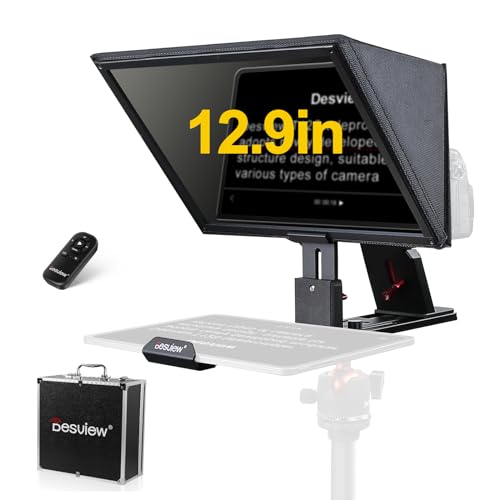
- Supports tablets up to 12.9 inches and common camera types
- Bluetooth remote and app simplify script control
- Metal build with carry case suits studio use and travel
Best For: Creators who want a durable, large-tablet teleprompter for studio filming
Compact Rail-System Choice
SMALLRIG 11" Tablet Teleprompter

- Fits tablets up to 11 inches but not smartphones
- Needs a separate 15mm LWS baseplate and rail support
- SmallGoGo app handles PDFs, Word, TXT, and images
Best For: Creators with a rail-based studio rig who want modular tablet prompting
Portable Large-Tablet Option
Desview P13 Foldable Teleprompter

- Supports tablets up to 12.9 inches, including iPad Pro
- Folds compactly and includes a padded storage bag
- Bluetooth remote and app handle TXT and DOCX scripts
Best For: Solo creators who need a portable large-tablet teleprompter for studio and location shoots
Compact Phone & Camera Prompter
9.3" Teleprompter for Phone & Camera

- 70/30 glass for clear script reflection
- Supports phone, DSLR, and mirrorless setups
- Bluetooth remote plus iOS/Android app control
Best For: Portable studio and on-location creators who need a compact all-round prompt setup
Tablet-Friendly Camera Prompter
Desview T3 Portable Teleprompter

- Fits tablets and smartphones up to 10 inches
- Includes 9 lens adapter rings for camera use
- Bluetooth remote and app control for hands-free prompting
Best For: iPad users and creators who want a portable camera-and-tablet teleprompter
Large-Screen Studio Prompter
NEEWER BASICS X12B 12" Teleprompter

- Large 12-inch HD display for easier reading
- No-assembly flip-open design for quick setup
- App and Bluetooth remote control included
Best For: Studio presenters and course creators who want a bigger tablet teleprompter
Studio-Ready Tablet Pick – NEEWER X12 14-inch Aluminum Alloy Teleprompter
If you want a tablet teleprompter for content studio use, the NEEWER X12 is built for a straightforward camera-and-script setup. Its 75% light-transmission beam splitter glass is designed for clear reading up to 10 ft / 3 m, and the adjustable hood helps reduce glare during recording sessions.
Best For: Creators who want a compact, app-controlled teleprompter for online teaching, vlogging, or live streaming.
Pros:
- 75% light-transmission glass supports clear script reading up to 10 ft / 3 m.
- Works with the included remote and NEEWER app for pausing, speeding, and page turns.
- Fits smartphones or tablets up to 9.84″ x 8.68″, including iPad Air and iPad Pro 11″.
- Collapsible aluminum alloy design includes a carry case for easier storage and transport.
Cons:
- Not compatible with wide-angle lenses.
- Camera lens focal length needs to be more than 28mm.
- Not compatible with iPad Pro 12″.
For a studio setup that values portability, this model covers the basics well without adding extra complexity. It is a practical choice if you want app control, tablet support, and a lightweight build in one package.
All-in-One Monitor Prompter – NEEWER X11 2-in-1 Teleprompter with Monitor
This tablet teleprompter for content studio workflows stands out because it includes a built-in 9-inch LCD monitor, so you do not need to rely on a separate tablet or phone for prompting. It is made for fast setups, screen mirroring, and recording or streaming where keeping eye contact matters.
Best For: Streamers and presenters who want an integrated prompting and monitoring setup for live video or conferencing.
Pros:
- Built-in 9-inch LCD monitor means no separate prompting device is required.
- Supports screen mirroring from a compatible phone or tablet with the included cable.
- Can double as an external monitor for Windows/macOS computers.
- Beam splitter glass uses multiple coating and 75% transmission to help reduce ghosting.
Cons:
- Voice sync is not supported.
- Phone mirroring is limited to iPhone and Android smartphones that support DP protocol.
- First-time HDMI use may require driver installation on a computer.
If you want fewer moving parts in a studio rig, the X11 is a strong all-in-one option. The built-in monitor makes it especially appealing for creators who prefer a more self-contained teleprompter system.
Portable Pro Choice – Glide Gear TMP 100 12-inch Glass Teleprompter
Glide Gear TMP 100 Teleprompter – DSLR, Tablet, Smartphone – 12" Glass, Carry Case, No Assembly
Check Price On AmazonFor a tablet teleprompter for content studio use, the Glide Gear TMP 100 focuses on compatibility and quick deployment. It fits smartphones and tablets up to 10.5″ x 8″ and uses 70/30 beam splitter glass to keep the script readable while preserving camera clarity.
Best For: Creators who want a durable, travel-friendly teleprompter with broad tablet support.
Pros:
- Fits devices up to 10.5″ x 8″, including iPad Air, iPad Mini, and original iPad models.
- 70/30 beam splitter glass is designed for clear script reflection and camera visibility.
- Collapsible design and carry bag make it easier to transport.
- Aluminum construction includes tripod mounting threads and accessory mounting options.
Cons:
- Does not fit iPad Pro.
- App is not included and must support mirror text functionality.
- At 5 pounds, it is less lightweight than some compact tablet models.
This is a solid pick if you want a dependable prompter that feels closer to a studio tool than a gadget. Its simple setup and wide device support make it easy to integrate into a recording workspace.
Compact Foldable Pick – LENSGO TC7 9.7-inch Teleprompter
The LENSGO TC7 is a practical tablet teleprompter for content studio creators who want a compact rig with quick setup. Its high-definition beam splitter glass is designed for clear prompting, and the fold-in-one-second design makes it easy to move between shoots.
Best For: Users who want a compact teleprompter for vlogging, teaching, interviews, or mobile studio work.
Pros:
- High-definition beam splitter glass helps keep prompts clear while filming.
- Supports tablets below 9.7 inches, plus smartphones and cameras.
- Includes remote control and APP compatibility for iOS and Android.
- Folds in one second and includes multiple cold shoes for accessories.
Cons:
- Tablet fit is limited to devices below 9.7 inches.
- Uses app-based workflow that may require script setup in the TCQI app.
- Best match is a 17mm wide-angle lens, which may not suit every camera setup.
If your studio priorities are speed, portability, and accessory mounting, the TC7 checks those boxes well. It is especially appealing for creators who want a smaller teleprompter they can fold and store quickly.
Studio-Ready Large-Tablet Pick – Desview T12S 12.9" Metal Teleprompter
If you want a tablet teleprompter for content studio use, the Desview T12S is built for larger-script workflows with support for tablets up to 12.9 inches. Its beam splitter glass, Bluetooth remote, and app control make it a practical fit for YouTube recording, live streaming, podcasting, and camera-based presentations.
Best For: Creators who need a durable, studio-friendly teleprompter for iPad-sized tablets and regular camera work.
Pros:
- Supports DSLR, mirrorless cameras, camcorders, and tablets up to 12.9 inches.
- Includes a Bluetooth remote and free app for script edits, scrolling speed, and text size.
- Zero-ghosting beam splitter glass is designed for clear prompting, even in bright outdoor environments.
- Tool-free assembly and a custom aluminum carry case help with fast setup and transport.
Cons:
- Bulky compared with compact portable teleprompters.
- Best suited to larger tablets rather than smaller mobile devices.
This is a strong choice if your studio setup centers on a full-size tablet and you want a more robust build for repeated use. The T12S emphasizes clarity, compatibility, and easy deployment over ultra-light portability.
Compact Rail-System Choice – SMALLRIG 11" Tablet Teleprompter
The SMALLRIG 3646 is a tablet teleprompter for content studio setups where you already use a 15mm LWS baseplate system. It supports tablets up to 11 inches, works with DSLR, mirrorless, and camcorder rigs, and uses the SmallGoGo app to turn PDFs, images, Word files, and TXT files into usable prompts.
Best For: Users with a rail-based camera rig who want a compact tablet teleprompter with flexible file support.
Pros:
- Supports iPads and tablets up to 11 inches.
- SmallGoGo app can extract text from PDFs, pictures, Word documents, and TXT files.
- Includes a top flag to help reduce glare and ghosting in challenging setups.
- Wide lens support from 49mm to 95mm and no vignetting at 22mm or longer focal lengths.
Cons:
- Requires a separate 15mm LWS baseplate and rail support system to work properly.
- Not compatible with smartphones.
This model makes the most sense if you already build around a supported rail system and want a teleprompter that stays focused on studio camera work. It trades broad out-of-box simplicity for a more modular setup with strong lens and file compatibility.
Portable Large-Tablet Option – Desview P13 Foldable Teleprompter
For a tablet teleprompter for content studio work that still travels well, the Desview P13 focuses on portability without giving up large-tablet support. It fits tablets up to 12.9 inches, includes a Bluetooth remote and smart app control, and folds down into a compact form with a storage bag for easier transport.
Best For: Solo creators and field producers who want a foldable teleprompter for large tablets and camera shoots.
Pros:
- Supports tablets up to 12.9 inches, including iPad Pro.
- Foldable design and included storage bag make it easier to carry.
- Foldable side light shield helps block ambient glare in brighter environments.
- Bluetooth remote and app support TXT and DOCX files with mirror/flip display.
Cons:
- Less compact than smaller teleprompter solutions when fully set up.
- Designed around standard DSLR and mirrorless mounting rather than smartphone use.
The P13 is a good fit if you want a large-tablet prompting setup but need something easier to pack than a more fixed studio unit. Its blend of portability, glare control, and app-based prompting makes it especially practical for creators moving between studio and location work.
Compact Phone & Camera Prompter – 9.3" Teleprompter for Phone & Camera
If you want a tablet teleprompter for content studio work that stays compact without feeling limited, this 9.3-inch model is built for flexible solo recording. It supports smartphones, DSLR, and mirrorless cameras, and its 70/30 beam-splitter glass is designed to keep script text readable while preserving natural eye contact.
Best For: Creators who want a portable prompting setup for studios, on-location shoots, and mixed phone/camera workflows.
Pros:
- 70/30 optical glass helps keep text clear while maintaining a natural camera-facing look.
- Supports smartphones, DSLR cameras, and mirrorless cameras for flexible setups.
- Includes a Bluetooth remote and app control for hands-free scrolling and script adjustments.
- Compact, lightweight build with a quick-release design for easier transport and setup.
Cons:
- Smaller 9.3-inch size may feel tight compared with larger tablet prompters.
- Best suited to lighter, more portable rigs rather than bulkier studio builds.
This is a practical pick if your priority is mobility and straightforward prompting rather than the biggest possible viewing area. It covers the core features most creators need for efficient recording sessions.
Tablet-Friendly Camera Prompter – Desview T3 Portable Teleprompter
This tablet teleprompter for content studio use is a strong choice if you want a more traditional iPad-ready setup with camera support. The Desview T3 fits tablets and smartphones up to 10 inches, uses 70/30 beam-splitter glass, and includes adapter rings for DSLR and mirrorless lenses, making it well suited to structured recording workflows.
Best For: Creators who use an iPad or smaller tablet and want a portable teleprompter for filming, streaming, or teaching.
Pros:
- Supports iPad, tablets, and smartphones up to 10 inches.
- Includes 9 lens adapter rings for DSLR and mirrorless camera compatibility.
- 70/30 beam-splitter glass with anti-reflection coating for clear prompting.
- Built-in cold shoe mounts and Bluetooth/app control add useful studio flexibility.
Cons:
- Tablet size is limited to devices up to 10 inches.
- Requires AAA batteries for the remote, which are not included.
The T3 balances portability with more complete camera support than a basic phone-only prompter. It is a sensible fit for creators who want an easy setup and dependable reading distance without moving to a larger platform.
Large-Screen Studio Prompter – NEEWER BASICS X12B 12" Teleprompter
If your focus is a tablet teleprompter for content studio production, the NEEWER BASICS X12B stands out for its larger 12-inch display and no-assembly design. It supports iPad and tablet use with camera setups, and its beam-splitter glass is designed to keep reflected text readable from up to 10 feet, which is useful for presentations, courses, and tutorial recording.
Best For: Studio creators who want a larger readout and an installation-free teleprompter for tablet-based recording.
Pros:
- 12-inch HD display offers a larger viewing area than smaller teleprompters.
- No-assembly, flip-open design makes setup and storage simple.
- Includes app and Bluetooth remote control for scroll speed, playback, and font adjustments.
- Compatible with iPad, iPad Air, iPad Pro 11″, and other smartphones.
Cons:
- Not for phone shooting, so it is not the most flexible option for smartphone-only users.
- Bulky enough that it may be less convenient than smaller portable models.
This model makes sense when readability and a roomier screen matter more than compact travel size. For studio work, it offers a straightforward setup and the kind of larger prompt area many presenters prefer.
How We Picked the Best Tablet Teleprompter for Content Studio
We looked for a Tablet Teleprompter for Content Studio use that balances image readability, tablet support, and practical setup. Priority went to models with stable mounts, usable mirrors or beam splitters, dependable remote/app control, and formats suited to both small creator spaces and more dedicated studio rigs.
We also considered portability, assembly time, tablet-size flexibility, and whether each design works well with common production setups like DSLR, mirrorless, webcam, and phone-based recording.
Quick Comparison
For fast-moving creators, compact and foldable units are easier to store and reset between shoots. Larger 12-inch to 14-inch options usually offer a more comfortable reading area and better visibility for longer scripts. If your studio relies on a specific tablet size, check compatibility first, since some models support up to 10 inches while others are built for 12.9-inch iPads or similar devices.
Key Buying Factors for a Tablet Teleprompter for Content Studio
Tablet Compatibility
Match the teleprompter to your tablet’s size and operating system. Some models are optimized for iPad Pro sizes, while others support smaller tablets or rely on companion apps for script display.
Camera and Mount Support
Make sure the frame works with your camera body, lens size, and tripod setup. A teleprompter that fits your tablet but clashes with your lens clearance will slow down production.
Glass Quality and Readability
Beam splitter quality affects how clearly you can read the script and how visible it is on camera. For studio work, prioritize clear text visibility, low distortion, and a practical viewing angle.
Setup Speed and Portability
If you record frequently or share gear across locations, choose a lightweight or no-assembly design. Foldable shields, carry cases, and app-controlled setup can save time between sessions.
Control Features
Remote controls and app support are especially useful when you need to adjust scroll speed without leaving the camera position. This matters most for solo creators, educators, and small teams.
Who Should Buy Which Tablet Teleprompter for Content Studio?
If you need a dependable all-around option, choose a larger model with broad tablet compatibility and sturdy construction. If your work happens in a fixed studio, a heavier metal build and larger glass area can improve comfort and consistency. If portability matters more than size, pick a compact model with quick assembly and a carry case. For tablet-first workflows, confirm the exact supported tablet dimensions before buying, especially if you rely on an iPad Pro or want room for future device upgrades.
In short, the best Tablet Teleprompter for Content Studio use is the one that fits your tablet, your camera, and how often you record. That combination matters more than any single feature.