If color accuracy matters in your studio, the right target can save hours of correction and keep every session consistent. From white balance to camera profiling, these tools help you build a more reliable workflow.
Below, we’ve rounded up the best options for photographers who need repeatable results, practical portability, and a target that fits real-world studio use.
Best 10 Professional Color Target for Studio Photography Picks for 2026
Studio-Ready Compact Chart

- 24 spectrally engineered colors plus grey card
- Compact with protective sleeve for easy transport
- Supports consistent color across cameras and lights
Best For: Portable color matching and white balance in studio or location shoots
Portable Hybrid Passport

- 24-patch target plus white balance and video charts
- Includes software for custom camera profiles
- Durable case and lanyard support on-the-go use
Best For: Hybrid photo/video creators needing compact color and white balance control
Expanded Color Control Kit
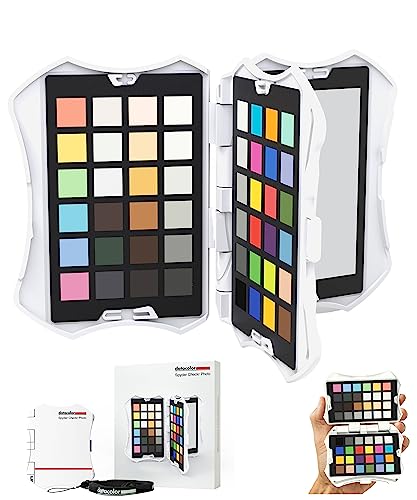
- 62 targets across four interchangeable cards
- Includes skin tones, grey scale, and black/white checks
- Supports HSL preset creation in editing software
Best For: Portrait and studio photographers who want a full-featured calibration workflow
Video Matching Target

- Vectorscope-optimized chips and skin tone row
- Large gray steps for exposure and contrast checks
- Neutral white balance side for mixed lighting
Best For: Video production and hybrid workflows that need color matching and exposure reference
Exposure Profiling Mini
Sekonic Exposure Profile Target Mini

- Precision grayscale surfaces for tonal profiling
- Compact folding design for travel and studio use
- Helps build repeatable exposure profiles
Best For: portable exposure calibration in studio and location workflows
Color Balance Pair

- Two charts with 12% and 18% gray references
- 18 color patches for correction in Photoshop or Lightroom
- Includes stand and user guide for tabletop use
Best For: compact studio white balance and color correction workflows
Large Video Reference
Calibrite ColorChecker Video XL

- Oversized 21 x 14.8 inch target for wide shots
- Gray levels and skin tones aid exposure and color balance
- Illumination chips help check even lighting
Best For: large-format shoots and multi-camera color reference work
Compact Studio Reference
DKK 5" x 7" Color Calibration Set

- Two 5" x 7" charts for repeatable calibration
- Colorbar and grayscale support white balance and exposure
- Includes frame stand and user guide
Best For: Portable studio and location calibration
Advanced Profiling Target
ColorChecker Digital SG Target

- 140 patches for advanced camera profiling
- Added skin tone references support natural rendering
- Includes gray scale steps and storage sleeve
Best For: Detailed profiling and skin tone accuracy
Neutral Exposure Tool
ColorChecker 3 Step Grayscale Target

- White, 18% gray, and black reference squares
- Spectrally neutral for exposure and white balance
- Useful for lighting ratio setup and editing
Best For: Fast grayscale reference for studio exposure control
Studio-Ready Compact Chart – Datacolor SpyderCheckr 24
If you need a professional color target for studio photography that travels easily, the Datacolor SpyderCheckr 24 is built for fast, repeatable camera matching. It gives you 24 spectrally engineered color targets plus a grey face target, making it a practical choice for consistent color across different cameras, lenses, and lighting conditions.
Best For: Photographers who want a compact target for color consistency, custom white balance, and portable on-location work.
Pros:
- 24 color targets plus a grey card for visual comparison and white balance work
- Designed for consistent color across camera systems, lenses, and lighting setups
- Compact size and protective sleeve make it easy to carry to location shoots
- Works with multiple camera types, including DSLR, smartphones, drones, and action cams
Cons:
- Smaller target set than larger, more expansive color charts
- Best suited to calibration workflows rather than general shooting use
Overall, this is a straightforward calibration tool for shooters who want dependable color control without carrying a large chart. It fits especially well into fast-paced studio and location workflows where consistency matters more than size.
Portable Hybrid Passport – ColorChecker Passport Video 2
The ColorChecker Passport Video 2 is a practical professional color target for studio photography and video work when you need color control in a compact, scene-ready format. It combines a 24-patch ColorChecker Classic target, a white balance target, and two video-focused targets, helping you handle mixed lighting and multi-camera matching with fewer setup steps.
Best For: Creators who switch between photo and video and want a small, durable target for camera matching and white balance.
Pros:
- Includes a 24-patch ColorChecker Classic for custom camera profiles
- Provides a white balance target plus two video targets for flexible workflows
- Useful for matching multiple cameras and handling mixed lighting conditions
- Compact protective case and lanyard make it easy to keep on hand
Cons:
- Smaller format than full-size studio charts
- Geared toward hybrid workflows, so it is not as specialized as dedicated photo-only targets
This Passport-style target is a good fit if you need color control that moves from stills to motion without taking much space in your kit. The included software support adds value for users building custom profiles and a more consistent editing starting point.
Expanded Color Control Kit – Datacolor SpyderCheckr Photo
If you want a professional color target for studio photography with more reference points than a basic chart, the Datacolor SpyderCheckr Photo offers a broad 62-target layout. It is designed to deliver accurate color from the start, with ultra-matte colors, deep blacks, and interchangeable cards that support portraits, exposure checks, and white/gray balancing.
Best For: Photographers who want a feature-rich calibration tool for portraits, color correction, and workflow automation.
Pros:
- 62 color targets across four interchangeable cards for broad calibration coverage
- Includes expanded skin tones, large targets, and a 12-step grey scale
- Designed to create HSL presets in supported editing software
- Portable ergonomic case makes it easy to handle in the field or studio
Cons:
- More complex than simpler one-card targets
- Likely more than casual shooters need if they only want basic white balance reference
This is a strong option for users who want a deeper calibration workflow and more flexibility across different subject types. Its larger target set is especially appealing when accuracy, skin tone control, and exposure reference all matter in the same session.
Video Matching Target – Calibrite ColorChecker Video
For creators who need a professional color target for studio photography and video production, the Calibrite ColorChecker Video is optimized for fast matching and exposure control. Its vectorscope-friendly color layout, skin tone row, large gray steps, and neutral white balance side make it a practical tool for multi-camera consistency and mixed lighting setups.
Best For: Video shooters and hybrid creators who need a target built for matching cameras, balancing exposure, and setting white balance.
Pros:
- Vectorscope-optimized layout with saturated and desaturated chromatic chips
- Large gray steps help with waveform, zebras, false color, and exposure matching
- Reverse side provides a spectrally neutral white balance reference
- Helpful for matching multiple cameras in changing or mixed lighting
Cons:
- Primarily designed for video workflows rather than still photography alone
- Larger target format may be less convenient than pocket-sized alternatives
This target is best viewed as a workflow tool for users who need dependable color and exposure reference in motion production. If your priority is fast on-set matching rather than a broad stills calibration system, it fits the job well.
Exposure Profiling Mini – Sekonic Exposure Profile Target Mini
If you need a professional color target for studio photography that is built around exposure profiling rather than broad color patch matching, this compact Sekonic target is aimed at repeatable meter calibration and tonal consistency. Its grayscale reference surfaces help photographers refine highlight retention, shadow detail, and overall exposure balance across different lighting setups.
Best For: Photographers who want a portable exposure calibration target for studio and location workflows.
Pros:
- Precision grayscale reference surfaces support accurate tonal profiling.
- Folding mini design is easy to pack for studio or on-location use.
- Built to help improve exposure consistency across multiple camera systems.
- Designed for integration into professional metering and calibration workflows.
Cons:
- Focused on exposure profiling, not a full color patch chart.
- Small size may be less convenient when you want a larger in-frame reference.
This is a practical choice if your priority is measurable exposure precision and repeatability. For photographers optimizing metering workflows, the compact form makes it easy to keep in the kit without sacrificing reference quality.
Color Balance Pair – DKC-Pro White Balance Charts
For a professional color target for studio photography focused on white balance and post-production correction, this DKC-Pro set gives you dual gray references and coated color patches in a compact 5″ x 7″ format. The charts are designed to support accurate color correction in workflows using tools like Photoshop and Lightroom.
Best For: Studio photographers who want a compact white balance and color calibration chart set with stand.
Pros:
- Includes two cards, giving you a convenient backup or multi-set workflow.
- 12% and 18% gray references support white balance and exposure setting.
- 18 color patches are designed for digital color correction and analysis.
- Comes with a frame stand and user guide for tabletop use.
Cons:
- Smaller chart size may be less suitable for long-distance framing.
- Primarily aimed at color correction rather than exposure profiling alone.
This set fits well in a studio kit when you want a straightforward, tabletop-ready reference for color and white balance work. The coated target surfaces and included stand make it a practical option for controlled shooting environments.
Large Video Reference – Calibrite ColorChecker Video XL
If your professional color target for studio photography needs to stay readable in wide shots or large setups, this ColorChecker Video XL offers an oversized reference with grayscale steps, skin tones, and illumination chips. Although built for video workflows, it can also support exposure and color balance checks where a larger in-frame target is useful.
Best For: Large-format shoots and multi-camera productions that need an easy-to-read color and exposure reference.
Pros:
- Large 21 x 14.8 inch format stays visible in wide-angle or long-distance shots.
- Vectorscope-optimized color chips support faster color balancing.
- Large gray levels and grayscale steps help with exposure and contrast control.
- Illumination check chips help verify even lighting across large sets.
Cons:
- Its size makes it less convenient for small studio setups or travel kits.
- Built primarily for video workflows rather than still-photo charting.
This is the strongest option here when visibility matters more than portability. For large scenes, multi-camera work, or studio environments with wide framing, the oversized layout makes the reference easier to use consistently.
Compact Studio Reference – DKK 5" x 7" Color Calibration Set
If you want a professional color target for studio photography that is easy to carry and quick to set up, this DKK 5″ x 7″ set gives you a practical reference for white balance and color calibration. The included colorbar, grayscale combo, and frame stand make it useful for consistent image quality across photo and video workflows.
Best For: Photographers and video creators who need a compact calibration target for portable studio or location work.
Pros:
- Includes two 5″ x 7″ charts for repeatable calibration references.
- Combines a colorbar and grayscale for white balance and exposure checks.
- Comes with a frame stand and user guide for simple setup.
- Compact size makes it easy to transport between shoots.
Cons:
- Smaller format may be less ideal for larger studio setups.
- Focused on calibration basics rather than expanded color patch coverage.
This is a straightforward choice when you need a durable, portable reference that helps keep color and exposure consistent without taking up much space. It is best suited to creators who value convenience and a simple workflow.
Advanced Profiling Target – ColorChecker Digital SG Target
For anyone shopping for a professional color target for studio photography, this 140-patch Digital SG target is built for advanced camera profiling, white balance, and color analysis. Its expanded color space coverage and added skin tone references make it especially useful when accurate rendering matters across demanding studio workflows.
Best For: Photographers and video teams needing detailed profiling and skin tone accuracy in controlled or mixed-light productions.
Pros:
- 140-patch layout expands color space coverage for profiling.
- Includes additional skin tone references for more natural rendering.
- Gray scale steps support white balance and neutral tonality checks.
- Storage sleeve helps protect the target during transport and on set.
Cons:
- Larger chart may be more than casual users need.
- More specialized than a basic gray card or simple calibration target.
This target stands out when you need deeper color reference data than a basic chart can provide. It is a strong fit for studio and location work where profiling consistency and skin tone fidelity are priorities.
Neutral Exposure Tool – ColorChecker 3 Step Grayscale Target
If your priority is a professional color target for studio photography that focuses on exposure and white balance, this 3 step grayscale target keeps things simple and effective. With white, 18% gray, and black reference squares, it gives you a clear neutral guide for lighting setup and color correction.
Best For: Studio photographers and video crews who need a fast grayscale reference for exposure control and neutral white balance.
Pros:
- White, 18% gray, and black squares help evaluate highlights and shadows.
- Spectrally neutral surfaces are engineered for equal RGB reflectance.
- Useful for fast white balance from a first reference shot.
- Supports lighting ratio setup in studio production.
Cons:
- Does not include a full color patch set.
- Less suited to advanced color profiling than larger targets.
This is a practical choice when neutral tone control matters more than broad color coverage. It works well as a dependable studio reference for quick exposure checks and consistent correction decisions.
How We Picked the Best Professional Color Target for Studio Photography
We focused on tools that support the needs of a Professional Color Target for Studio Photography: accurate neutral references, dependable patch layouts, practical size options, and compatibility with common capture and editing workflows. We also considered portability, build quality, and whether a target is better suited to stills, video, or mixed use.
Quick Comparison
If you need a fast starting point, think in three groups: compact targets for travel and on-set checks, mid-size charts for general studio portrait and product work, and larger reference panels for more controlled lighting setups. Some charts are optimized for profiling, while others are better for white balance and exposure consistency.
Key Buying Factors for Professional Studio Work
Target Purpose
Choose the chart based on the job. White balance cards are ideal for exposure and neutral color correction, while multi-patch reference targets are better for profiling a camera or building a more complete color workflow.
Patch Count and Layout
More patches usually mean more flexibility for advanced profiling, but they can also be slower to use. For most studio photographers, a simpler chart is faster for day-to-day sessions, while advanced users may prefer denser patch arrays for precision.
Size and Handling
Smaller targets are easy to carry and position quickly, but larger targets can be easier to read and more stable under studio lighting. Consider how often you switch setups and whether the target will live on a stand, be hand-held, or travel in a kit.
Consistency Across Lighting
Look for targets with clear neutrals and durable printing so the chart remains dependable under flash, continuous light, and mixed lighting conditions. This matters most when you want repeatable results across multiple sessions.
Who Should Buy Which Professional Color Target for Studio Photography?
Portrait and product photographers often do well with compact or mid-size targets for quick white balance checks and routine correction. Studio teams that need a tighter color workflow should lean toward advanced profiling charts with more patches. Video shooters may prefer targets optimized for vectorscope and waveform use, while photographers working across multiple cameras should choose a target that supports consistent cross-camera matching.
In short, the best choice depends on whether you need speed, portability, advanced profiling, or a larger reference surface. Match the chart to your workflow, and you’ll get cleaner color with less time spent correcting in post.