Choosing the right webcam for a home studio can make your videos look more polished, your meetings feel more professional, and your streaming setup easier to use.
Below, we focus on 10 standout options that balance image quality, audio, autofocus, and value for different home studio needs.
Best 10 Webcams for Home Studios Picks for 2026
Premium 4K Pick
Logitech Brio Ultra 4K HD Webcam for Streaming

- 4K at 30 fps with autofocus and 5x zoom
- RightLight 3 helps in glare and backlight
- Dual mics and Windows Hello support
Best For: Creators who want premium video quality and flexible framing
Best for Lit Setups
NexiGo N680E Pro 4K Webcam with Ring Light

- Built-in ring light with adjustable brightness
- PDAF autofocus and dual mics
- Privacy shutter plus tripod mount
Best For: Streamers who want a webcam with built-in lighting
AI Tracking Pick
OBSBOT Tiny SE 1080P 100FPS Webcam

- 1080p at 100 fps for smooth motion
- AI tracking with zone and body-part modes
- Gesture control and custom presets
Best For: Creators who move on camera and want automated framing
Balanced 4K Value

- 4K/30 fps support with PDAF autofocus
- Two mics and privacy cover included
- Software lets you tune brightness and contrast
Best For: People who want a straightforward 4K webcam with privacy features
Budget-Friendly Streaming Pick

- 1080p/30fps or 720p/60fps video
- Automatic light correction and autofocus
- Stereo audio with dual microphones
Best For: Creators who want a simple, dependable webcam for home-studio streaming and calls
Premium 4K Creator Choice

- 4K at 30fps or 1080p at 60fps
- PDAF autofocus and automatic light balancing
- Built-in privacy cover with dual mics
Best For: Creators who want a higher-end 4K webcam with strong autofocus and privacy cover
Classic 1080p Workhorse
Microsoft LifeCam Studio 1080p
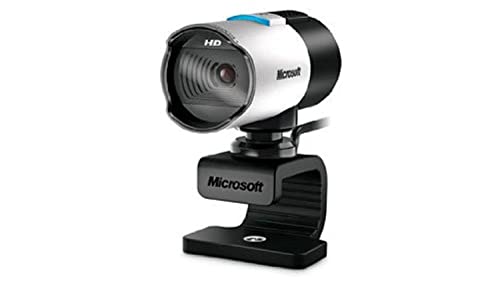
- 1080p widescreen sensor with autofocus
- TrueColor technology for bright video
- High-fidelity microphone built in
Best For: Users who want a straightforward 1080p webcam for everyday home-studio use
Dual-Camera AI PTZ 4K
EMEET PIXY for Streaming and Meetings

- 4K main camera with Sony sensor and PDAF focus
- AI tracking with 310° pan and 180° tilt
- 3-mic array with multiple sound modes
Best For: Creators who move on camera and want automated framing
Easy Plug-and-Play 1080p
Logitech Brio 101 for Home Office

- 1080p video with RightLight auto-light balance
- Built-in mic and privacy cover
- USB-A plug-and-play for common meeting apps
Best For: Users who want a simple, dependable webcam for calls
Professional 1080p Webcam
Poly Studio P5 for Home Office

- 1080p HD optics with vivid color rendering
- 80-degree field of view and low-light handling
- Directional mic and flexible mount options
Best For: Remote work and teaching in a compact home studio
Premium 4K Pick – Logitech Brio Ultra 4K HD Webcam for Streaming
If you want a standout option among webcams for home studios, the Logitech Brio brings true 4K detail, solid low-light handling, and flexible framing for polished streams or meetings. It’s built for creators who want a sharp image and dependable audio without needing a complicated setup.
Best For: Home studio users who want high-resolution video, adjustable framing, and Windows Hello support.
Pros:
- 4K video at 30 fps with autofocus and 5x digital zoom.
- RightLight 3 helps balance exposure and contrast in tricky lighting.
- Three field-of-view presets make framing easier for different setups.
- Dual microphones with noise reduction capture clear voice audio.
Cons:
- It is a higher-end webcam, so it may be more than casual users need.
- Best feature set depends on using the supported Logi Options+ software.
Overall, the Brio is a strong fit if your home studio needs a premium webcam that can handle both meetings and content work with minimal fuss.
Best for Lit Setups – NexiGo N680E Pro 4K Webcam with Ring Light
For webcams for home studios where lighting is always a challenge, the NexiGo N680E Pro adds a built-in ring light to help you look more consistent on camera. It combines 4K capture, 1080p 60 fps output, and PDAF autofocus for a creator-friendly setup that’s easy to plug in and use.
Best For: Streamers and home studio users who want better lighting built into the webcam.
Pros:
- Built-in tri-tone ring light with stepless brightness control.
- PDAF autofocus is designed for faster, more stable focusing.
- Dual noise-canceling microphones help keep audio clear.
- Plug-and-play USB-A setup with a privacy shutter and tripod mount.
Cons:
- The 4K output depends on software and settings used.
- The integrated light may be unnecessary if your studio already has strong lighting.
This is a smart choice if you want one webcam to cover both camera and lighting needs in a compact home studio setup.
AI Tracking Pick – OBSBOT Tiny SE 1080P 100FPS Webcam
If your home studio work involves moving around on camera, this OBSBOT model stands out among webcams for home studios thanks to its AI tracking and very smooth frame rate. It’s designed for creators who want automated framing, gesture controls, and flexible presets without stepping up to a more expensive PTZ rig.
Best For: Content creators who want AI tracking and smooth motion capture in a home studio.
Pros:
- 1080p at 100 fps and 720p at 150 fps for very smooth video.
- AI tracking includes zone tracking and body-part tracking.
- Gesture controls make zooming and tracking easier during recording.
- Custom presets help switch between shooting setups quickly.
Cons:
- It is only 1080p, not a 4K webcam.
- Some advanced features may be more than a simple meeting setup needs.
For creators who move, gesture, or switch shots often, this webcam offers a more advanced studio workflow than a basic fixed camera.
Balanced 4K Value – EMEET NOVA 4K Webcam for PC
The EMEET NOVA is a practical pick if you want a simple, privacy-minded webcam for home studios with 4K capability and clear built-in audio. It defaults to 1080p, but can be switched to 4K through supported software, making it a flexible option for meetings, learning, or light content creation.
Best For: Users who want a straightforward 4K webcam with good audio and adjustable image settings.
Pros:
- 4K/30 fps support with a PDAF autofocus system.
- Two built-in microphones capture voices clearly up to 8 feet away.
- EMEETLINK software allows brightness, contrast, and saturation adjustments.
- Privacy cover and plug-and-play USB setup keep things simple.
Cons:
- It defaults to 1080p unless you switch to 4K in software.
- Fixed 73° field of view limits framing flexibility.
In a home studio, this webcam works well when you want a dependable all-rounder with privacy protection and easier image tuning.
Budget-Friendly Streaming Pick – Logitech C922x HD Pro
If you want webcams for home studios that handle calls, recording, and casual streaming without a lot of fuss, the Logitech C922x HD Pro is a straightforward choice. It records in Full HD 1080p/30fps or 720p/60fps, adds automatic HD light correction, and includes autofocus to help keep your image usable in typical room lighting.
Best For: Home studio users who want reliable 1080p video, better low-light handling, and simple setup for meetings or streaming.
Pros:
- Full HD 1080p video at 30 fps, plus 720p at 60 fps
- Automatic lighting adjustment and autofocus for brighter, sharper-looking video
- Stereo audio with dual mics for more natural sound
- Includes XSplit VCam trial for background removal, replacement, and blur
Cons:
- No privacy shutter
- Not the highest-resolution option in this group
- Background effects require the included XSplit VCam software trial
The C922x is a practical pick if you mainly need dependable image quality rather than premium 4K detail. Its mix of light correction, autofocus, and stereo audio makes it an easy fit for a compact home studio.
Premium 4K Creator Choice – EMEET S600 4K Webcam
Among webcams for home studios, the EMEET S600 stands out if you want sharper-looking video for streaming or content creation. It offers 4K at 30fps or 1080p at 60fps, uses a Sony 1/2.55-inch sensor, and adds PDAF autofocus plus automatic light balancing to help keep your image stable and clear.
Best For: Streamers and creators who want a higher-end 4K webcam with strong autofocus, flexible framing, and built-in privacy protection.
Pros:
- 4K/30fps or 1080p/60fps output for detailed video
- PDAF autofocus for faster, more stable focusing
- Automatic light balancing helps manage shadows and highlights
- Built-in privacy cover and dual noise-canceling microphones
Cons:
- 4K resolution depends on supported software or apps like OBS/PotPlayer
- At 4K, the field of view is fixed at 73°
- More advanced than basic plug-and-play webcams if you only need simple calls
The S600 is a strong fit when your home studio needs better image quality and more control over framing and sound. It balances creator-focused features with a plug-and-play setup, so it can work for both everyday use and more polished video.
Classic 1080p Workhorse – Microsoft LifeCam Studio 1080p
If you want webcams for home studios that focus on dependable 1080p capture, the Microsoft LifeCam Studio is a solid older-school option. It uses a 1080p HD widescreen sensor, auto focus, ClearFrame Technology for smoother video, and TrueColor Technology to keep color looking bright in a range of lighting conditions.
Best For: Home studio users who want a straightforward 1080p webcam with strong color processing and a built-in microphone.
Pros:
- 1080p HD widescreen sensor for sharp 16:9 video
- Auto focus and high-precision glass lens optics
- TrueColor Technology for bright, colorful video
- High-fidelity microphone for more natural audio
Cons:
- No 4K option
- Bulkier standalone design than compact webcams
- Older model with fewer modern creator-focused extras
The LifeCam Studio makes sense if you care more about proven 1080p performance than extra bells and whistles. Its combination of autofocus, color processing, and a built-in mic keeps it practical for everyday home-studio work.
Dual-Camera AI PTZ 4K – EMEET PIXY for Streaming and Meetings
If you want webcams for home studios that do more than just sit on a monitor, the EMEET PIXY stands out with AI tracking, PTZ movement, and 4K capture in one package. It is built for creators who switch between talking-head shots, movement-heavy demos, and live presentations, while still keeping framing and focus under control.
Best For: Streamers, teachers, fitness presenters, and home studio users who want automated framing and strong built-in audio.
Pros:
- 4K main camera with a 1/2.55″ Sony sensor and PDAF focus for sharp, detailed video.
- Dual-camera AI system helps optimize autofocus, exposure, and skin tones across changing light.
- 310° pan and 180° tilt with AI tracking and gesture control for hands-free framing.
- Three microphone modes give you options for live streaming, podcasts, and music recordings.
Cons:
- 4K is limited to 30 FPS, so it is not the best pick for ultra-smooth high-frame-rate capture.
- Some features depend on EMEET STUDIO software for full control and presets.
- Tripod is sold separately if you do not want to use the clip mount.
This is a strong choice if you want a more studio-like webcam experience without building a separate multi-device setup. Its mix of AI tracking, PTZ flexibility, and integrated audio makes it especially practical for creators who move around on camera.
Easy Plug-and-Play 1080p – Logitech Brio 101 for Home Office
The Logitech Brio 101 is a straightforward pick for webcams for home studios when you want reliable 1080p video without extra setup. It focuses on the essentials: simple plug-and-play use, auto light balance, and a built-in mic for everyday calls and basic streaming.
Best For: Home office users and casual streamers who want a simple, affordable webcam that just works.
Pros:
- Full HD 1080p video with RightLight auto-light balance to reduce shadows.
- Integrated privacy cover adds quick, reliable physical privacy.
- Built-in microphone supports clear everyday video calls.
- USB-A plug-and-play design works with popular meeting platforms.
Cons:
- Fixed-focus design is less flexible than autofocus models.
- Limited to a 60-degree viewing angle, so it is not ideal for wider shots.
- Best suited to basic use rather than advanced creator workflows.
If your home studio needs are simple, the Brio 101 keeps things easy and dependable. It is a practical upgrade from a laptop camera, especially for meetings and light streaming where convenience matters more than advanced features.
Professional 1080p Webcam – Poly Studio P5 for Home Office
The Poly Studio P5 is a practical option in webcams for home studios if you want a polished image for meetings, teaching, or lightweight streaming. Its 1080p optics, 80-degree field of view, and automatic low-light handling are aimed at making you look composed in a compact workspace.
Best For: Remote workers, online instructors, and home studio users who want a professional-looking webcam with flexible mounting.
Pros:
- 1080p HD optics with vivid color rendering and an 80-degree field of view.
- Automatic low-light technology helps maintain a usable image in dim rooms.
- Directional microphone focuses on your voice instead of background noise.
- Tripod mount, monitor clamp, and removable camera head add placement flexibility.
Cons:
- Does not offer 4K resolution for users who want maximum detail.
- Field of view is tuned to frame you, not a wider studio setup.
- USB-A cable and wired design keep it simple but not especially advanced.
The Studio P5 makes sense if you care more about a clean, professional appearance than packed-in creator extras. It is especially useful for home setups where space is limited but image quality still needs to look intentional.
How We Picked These Webcams for Home Studios
We looked for Webcams for Home Studios that deliver dependable video quality, easy setup, and features that actually matter in a fixed desk or creator workspace. Priority went to models with strong low-light performance, autofocus or tracking, solid built-in microphones, and mounting options that work well on monitors, tripods, and small rigs.
We also considered whether a webcam suits common home studio use cases such as Zoom calls, livestreaming, online teaching, podcast-style video, and content creation. Features like privacy shutters, software controls, higher frame rates, and 4K support helped separate the more flexible picks from the basic ones.
Quick Comparison
For the simplest plug-and-play upgrade, a Full HD model may be enough. If you want sharper framing for recording or streaming, 4K options offer more room to crop and edit. If you need movement and camera-following ability, AI-powered PTZ or tracking webcams are worth a closer look. Creators who work in mixed lighting should pay special attention to autofocus speed and sensor quality, while frequent meeting users may value microphone clarity and privacy features more than resolution alone.
Key Buying Factors for Webcams for Home Studios
Resolution and Frame Rate
1080p is still a practical standard for calls and most content, but 4K gives you extra detail and flexibility in post-production. Higher frame rates can make motion look smoother, which matters for talking-head videos, live demos, and stream overlays.
Autofocus, Exposure, and Low-Light Performance
A good webcam should keep your face sharp without constant hunting. In home studios, lighting changes are common, so look for reliable autofocus, good auto-exposure behavior, and sensors that handle indoor light well.
Audio Quality
Built-in mics are convenient, but they vary widely. Dual microphones, noise reduction, and clearer voice pickup can help if you don’t always use a separate mic.
Mounting, Field of View, and Software
Monitor clips, tripod support, adjustable field of view, and companion software all affect how easy the webcam is to position and fine-tune. These details matter more in a dedicated home studio than they do for casual occasional use.
Who Should Buy Which Webcams for Home Studios?
If you want the best overall image quality for a polished studio look, choose a higher-end 4K webcam. If your priority is streaming or motion-heavy content, pick a model with higher frame rates or AI tracking. If you mainly need dependable video for work meetings and classes, a simpler 1080p webcam can be the most cost-effective choice. And if you already use a separate microphone or lighting kit, focus on image quality and software control rather than extras you may not need.
In the end, the best Webcams for Home Studios are the ones that match your lighting, space, and workflow—not just the highest spec sheet on paper.