Choosing the right MIDI connection can make a home studio feel far more responsive, organized, and easy to use. The best USB MIDI adapters help you record, edit, and perform without fighting driver issues or messy setup steps.
In this roundup, we focus on practical options for keyboards, synths, controllers, and host-based setups, with an eye on reliability, compatibility, and value.
Best 10 USB Midi Interfaces Picks for 2026
Standalone routing pick
CME U6MIDI Pro 3-in-3-out MIDI Interface

- 3-in/3-out standalone MIDI interface
- USB-C plug-and-play across major OSs
- Built-in routing, split, merge, and filter tools
Best For: Users who want advanced MIDI routing for hybrid hardware and computer setups
Budget cable pick
LEKATO USB MIDI Cable, 6.5Ft, 1 In 1 Out
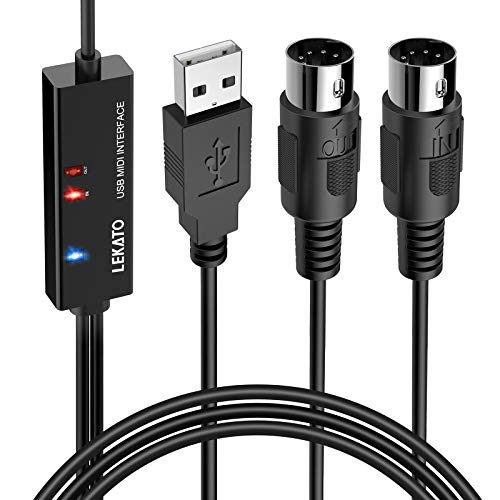
- Simple plug-and-play cable design
- LEDs show power and MIDI activity
- Supports up to 16 channels
Best For: Users who need an affordable single-device MIDI connection to a computer
Hybrid host pick
CME H2MIDI Pro Compact USB Host MIDI Interface

- USB host mode for class-compliant devices
- USB-C computer mode with 2-in/2-out ports
- Routing, filtering, mapping, and preset storage
Best For: Hybrid setups that need USB host support and computer connectivity
Long-reach cable pick
ESI MIDIMATE eX 2m USB MIDI Cable

- 2m cable for extra reach
- Up to 32 inputs or outputs
- Optional Windows driver for advanced use
Best For: Users who want a longer plug-and-play MIDI cable for studio or stage use
Advanced USB Host Routing
CME H4MIDI WC Advanced USB Host MIDI Interface

- USB host mode for class-compliant MIDI gear
- USB-C client mode with 4-in/4-out virtual ports
- Routing tools for thru, split, merge, and filtering
Best For: Standalone hardware rigs, pedalboards, and advanced MIDI routing
Simple Plug-and-Play Cable
FORE MIDI to USB Interface Cable

- 1-in/1-out MIDI interface with 16 channels
- Plug and play with built-in driver support
- Compatible with iOS, Android, Windows, and Mac OS
Best For: Basic keyboard, synth, and drum module connections
Premium Low-Latency Cable

- Plug-and-play across major operating systems
- UxMIDI Tools for filtering, routing, merge, and split
- Supports all MIDI channels and messages
Best For: Low-latency computer-to-MIDI connections with advanced tools
Compact USB-C MIDI Link
LEKATO MIDI Cable, 1 In/1 Out for Keyboard and Studio

- USB-C plug-and-play setup
- 1 in/1 out with LED indicators
- Supports 16 MIDI channels
Best For: Simple Windows, Mac, or iPad MIDI connections
Flexible 5-Pin Adapter Cable
USB to MIDI Cable for Keyboard and PC

- Works with Windows and Mac systems
- Includes USB to Type-C adapter
- 16-channel 1 in/1 out MIDI design
Best For: Keyboard users needing computer recording with optional mobile support
Studio-Ready MIDI Cable
GREATLINK 16-Channel USB to MIDI for Daw Work
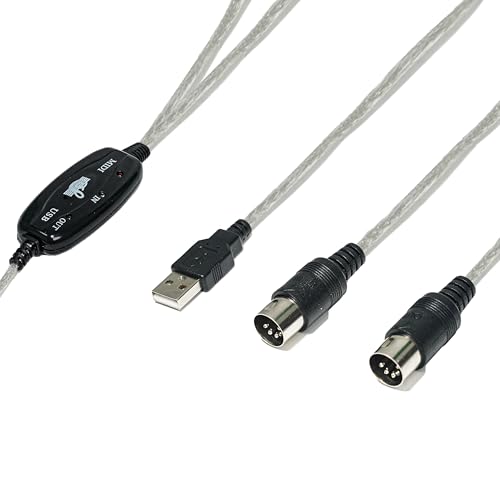
- No-driver plug-and-play setup
- Low-latency MIDI transmission
- LED indicators for signal activity
Best For: Home studio recording and live performance workflows
Standalone routing pick – CME U6MIDI Pro 3-in-3-out MIDI Interface
If you want usb midi interfaces that can do more than basic computer-to-keyboard hookups, the CME U6MIDI Pro is built for flexible routing in modern and standalone rigs. Its single USB-C connection works across major desktop and mobile platforms, while the 3-in/3-out DIN layout and onboard routing tools make it easier to split, merge, and filter MIDI without extra gear.
Best For: Players and producers who need a compact interface with serious routing control for keyboards, synths, drum machines, and hybrid setups.
Pros:
- Plug-and-play over one USB-C port with wide OS support, including macOS, Windows, iOS, Android, Linux, and Chrome OS
- Standalone 3-in/3-out MIDI interface with router, filter, split, merge, and thru functions
- Supports all MIDI channels and messages, including clock, sysex, MIDI timecode, and MPE
- Designed for accurate transmission with very low latency and no signal dropout
Cons:
- Requires the free UxMIDI Tools software for advanced configuration
- Focused on MIDI only, with no audio features
This is a strong pick if you want one of the more capable usb midi interfaces for both computer-based production and hardware-only routing. The extra control is especially useful when you need reliable synchronization and flexible MIDI management in a compact box.
Budget cable pick – LEKATO USB MIDI Cable, 6.5Ft, 1 In 1 Out
The LEKATO cable is a straightforward option among usb midi interfaces when you just need a direct path between a MIDI keyboard or synth and a computer. Its 1-in/1-out design keeps setup simple, and the built-in indicators help you confirm incoming and outgoing data during editing or recording.
Best For: Musicians who want a basic plug-and-play MIDI-to-USB cable for home recording, practice, or simple DAW control.
Pros:
- Plug and play with built-in driver support on Windows and macOS
- 1-in/1-out design with LEDs for power and signal transfer
- Supports up to 16 input and output channels
- 6.5 ft cable length gives some flexibility around a desk or keyboard stand
Cons:
- Only offers a basic cable-style connection, not a multi-port interface
- Compatibility is geared toward standard MIDI instrument-to-computer use
This is a practical no-frills choice if you only need one MIDI connection and prefer a simple cable over a larger interface box. It fits best in lean setups where ease of use matters more than routing features.
Hybrid host pick – CME H2MIDI Pro Compact USB Host MIDI Interface
For hybrid rigs, this usb midi interface stands out because it can connect USB class-compliant controllers directly to 5-pin DIN hardware without needing a computer. The H2MIDI Pro also adds USB-C computer connectivity, so it works well whether you are building a desk setup or linking modern controllers to legacy gear.
Best For: Keyboardists, producers, and guitar-oriented MIDI users who need USB host support plus flexible routing in one compact unit.
Pros:
- USB host mode lets you connect class-compliant USB MIDI devices without a computer
- USB-C client mode provides 2-in/2-out virtual MIDI ports for computer setups
- Supports routing, filtering, mapping, splitting, and up to 4 saved presets
- Handles advanced MIDI data like clock, sysex, MTC, and MPE with low-latency performance
Cons:
- Only one 5-pin DIN MIDI I/O pair is built in
- Advanced setup features depend on the HxMIDI Tools software
If your workflow mixes USB controllers with older hardware, this model is especially compelling. It combines host functionality, software-based control, and broad OS support in a very small package.
Long-reach cable pick – ESI MIDIMATE eX 2m USB MIDI Cable
The ESI MIDIMATE eX is a cable-style option for users who want a longer reach from their computer to MIDI gear. As one of the more practical usb midi interfaces for simple recording or editing tasks, it supports up to 32 inputs or outputs and is designed for fast plug-and-play use on PC, Mac, and iOS devices.
Best For: Players and home-studio users who need a longer MIDI cable with broad compatibility and easy setup.
Pros:
- 2m / 6.5 ft cable length gives extra placement flexibility
- Supports up to 32 inputs or outputs for extensive MIDI setups
- Plug and play with no driver required for basic use
- Optional Windows driver adds multi-device and multi-client support
Cons:
- Cable-style design is less flexible than a full desktop interface for routing-heavy setups
- Best features on Windows rely on the optional ESI MIDI Port driver
This is a good fit if you want a simple, durable cable interface with enough reach for awkward studio layouts. It focuses on convenience and compatibility rather than advanced onboard routing.
Advanced USB Host Routing – CME H4MIDI WC Advanced USB Host MIDI Interface
If you’re comparing usb midi interfaces for a setup that needs both computer-based and standalone routing, the CME H4MIDI WC is built for flexibility. It can act as a USB host for class-compliant MIDI gear, connect to a computer over USB-C, and handle advanced routing tasks like thru, split, merge, mapper, and filtering.
Best For: Players and producers who want a compact USB MIDI interface for standalone hardware routing, pedalboards, and multi-device setups.
Pros:
- Standalone USB host mode supports class-compliant MIDI devices without a computer.
- USB-C client mode offers 4 inputs and 4 outputs of virtual MIDI ports.
- HxMIDI Tools lets you configure routing, filtering, mapping, and presets.
- Flexible power options include 5V USB or 9V DC for stage or studio use.
Cons:
- Best value only if you need advanced routing, not just simple MIDI in/out.
- Optional WIDI Bluetooth MIDI requires an extra module.
- More features may be overkill for basic keyboard-to-DAW connections.
This is a strong pick if you want one interface that can bridge modern USB MIDI gear and traditional 5-pin MIDI hardware. Its compact design and preset management make it especially practical for mobile rigs and pedalboard-friendly setups.
Simple Plug-and-Play Cable – FORE MIDI to USB Interface Cable
For buyers who want a straightforward usb midi interface, this FORE cable keeps the setup simple: connect a 5-pin MIDI device to a computer, laptop, or compatible mobile device and start recording. It is bus-powered, plug and play, and includes an LED indicator to show power and signal transfer status.
Best For: Musicians who want a basic 1-in/1-out MIDI-to-USB cable for keyboards, synths, drums, and other standard MIDI hardware.
Pros:
- Plug-and-play design with built-in driver support and no difficult installation.
- Works with iOS, Android, Windows, and Mac OS systems.
- LED indicators help confirm power and data transfer status.
- 6.5-foot cable is convenient for typical desk or studio setups.
Cons:
- Only provides 1 MIDI in and 1 MIDI out.
- Requires a USB A-C adapter for some Type-C devices, and it is not included.
- Lacks the advanced routing and filtering features of higher-end interfaces.
This is a practical budget-style option if you only need reliable MIDI connection between one instrument and a computer. It focuses on core functionality and keeps the workflow easy for everyday recording and editing.
Premium Low-Latency Cable – CME U2MIDI Pro USB MIDI Cable
If you’re shopping usb midi interfaces for fast, dependable computer-to-instrument connections, the CME U2MIDI Pro is a feature-rich cable-style option. It supports plug-and-play operation across major operating systems and adds software-based filtering, mapping, and routing for more control over how your MIDI data behaves.
Best For: Producers and performers who want a premium USB-to-MIDI cable with advanced event processing and low-latency performance.
Pros:
- Supports plug and play on macOS, iOS, Windows, Android, Linux, and ChromeOS.
- Includes UxMIDI Tools for filtering, routing, merging, and splitting MIDI.
- Claims close to zero latency and jitter with a high-speed optocoupler.
- Handles all MIDI channels and messages, including clock, sysex, MTC, and MPE.
Cons:
- Only offers a single 1-in/1-out MIDI connection.
- Best suited to users who want software tools and advanced control, not minimal basics.
- Like most cable interfaces, it may be more than you need for a simple one-device setup.
This model stands out if you want a compact interface with serious MIDI processing features built in. It is a strong choice when accuracy, compatibility, and software control matter more than having multiple ports.
Compact USB-C MIDI Link – LEKATO MIDI Cable, 1 In/1 Out for Keyboard and Studio
If you want a straightforward USB MIDI interface for connecting a keyboard, synthesizer, or drum pad to a computer, this LEKATO cable keeps the setup simple. It offers 1 in/1 out MIDI connectivity, plug-and-play operation over USB-C, and indicator lights that make it easier to confirm the signal path during recording or editing.
Best For: Players who want a basic USB-C MIDI cable for Windows, Mac, or iPad setups without extra driver hassle.
Pros:
- Plug-and-play USB Type-C connection with built-in driver support
- 1 in/1 out design with LED indicators for power and signal activity
- Supports up to 16 input and output channels
- Made for low-latency MIDI transmission with EMI resistance
Cons:
- Compatibility may vary with older or vintage synthesizers
- Best suited to standard MIDI setups rather than specialized gear
This is a practical choice if you need a simple, modern MIDI cable that focuses on easy setup and reliable day-to-day use. The USB-C design and status lights add convenience, while the compatibility note is worth checking if you use older hardware.
Flexible 5-Pin Adapter Cable – USB to MIDI Cable for Keyboard and PC
This USB MIDI interface is built for connecting a compatible keyboard or piano to a computer for recording and editing. The NUOSIYA cable supports 1 in/1 out MIDI operation, works with a wide range of Windows and Mac systems, and includes a Type-C adapter for mobile device setups.
Best For: Keyboard players who want a flexible MIDI-to-USB cable for computer recording and occasional mobile use.
Pros:
- Compatible with common Windows and Mac operating systems
- 1 in/1 out MIDI interface with 16-channel support
- Includes a USB to Type-C adapter for phone or iPad use
- Depression-style connector design is meant to make plugging in easier
Cons:
- Some older devices or RCA-only gear may need extra adapters
- Mobile compatibility depends on using the correct adapter
For players who need a practical cable rather than a larger interface box, this model covers the basics well. It emphasizes broad computer compatibility, stable MIDI transfer, and a design that aims to reduce wear during frequent connect-and-disconnect use.
Studio-Ready MIDI Cable – GREATLINK 16-Channel USB to MIDI for Daw Work
For users shopping for USB MIDI interfaces for home studio or performance use, this GREATLINK cable is positioned as a simple plug-and-play option. It connects MIDI keyboards, pianos, synthesizers, and controllers to Windows, Mac, and Android devices, while the built-in LED indicators help you monitor input and output activity.
Best For: Studio musicians and producers who want a no-driver MIDI cable for recording, live use, or music production.
Pros:
- Plug-and-play setup with no software installation required
- Low-latency transmission for accurate timing
- Smart LED indicators show MIDI input/output activity
- Works with most MIDI instruments and major DAWs
Cons:
- Listed connector details are more limited than some competing cables
- As with most MIDI cables, compatibility depends on the instrument and DAW setup
This is a solid pick if you want a direct MIDI-to-USB cable that keeps the setup lean. Its focus on low latency, indicator lights, and broad cross-platform compatibility makes it especially appealing for straightforward studio workflows.
How We Picked the Best USB Midi Interfaces
We prioritized stable connectivity, straightforward setup, and broad device support. For USB Midi Interfaces, that means looking closely at USB compatibility, MIDI input/output behavior, cable length, host support, and whether the adapter is better suited to a computer-based studio or a standalone keyboard rig.
We also weighed real-world usability: clean driver handling, low-latency performance, and features like filtering or mapping that can simplify more complex setups.
Quick Comparison
If you mainly need a simple link between a keyboard and a computer, a basic MIDI-to-USB cable may be enough. If you work with multiple devices, a host interface or multi-port model is usually the smarter buy. Compact adapters suit portable rigs, while advanced units are better for musicians who switch between studio and live workflows.
Key Buying Factors for USB Midi Interfaces
Compatibility
Check whether the interface supports your operating system and your gear’s connection type, including USB-A, USB-C, or USB host mode. Some devices are made for computer-to-MIDI use, while others are designed to connect directly to class-compliant keyboards and synths.
Channel and Port Needs
Single-cable adapters are fine for basic recording, but multi-port units are more useful if you run several instruments or want cleaner routing. More ports can also help reduce cable swaps and keep a studio setup organized.
Stability and Latency
Look for plug-and-play operation, solid shielding, and dependable signal timing. A well-made interface should avoid dropouts and keep note timing tight enough for both editing and performance.
Extra Features
Some USB Midi Interfaces add filtering, mapping, or host functionality. Those extras are helpful if you use multiple controllers, need to manage complex MIDI data, or want an interface that can grow with your setup.
Who Should Buy Which USB Midi Interfaces?
Beginners and casual home-recording users can usually start with a simple MIDI-to-USB cable. Keyboard players who want a direct computer link should focus on reliable plug-and-play options. Producers with multiple instruments may prefer a multi-port interface or a host-capable model for better routing and expansion. If you need modern laptop connectivity, consider a USB-C-friendly model so you do not rely on extra adapters.
In short, the best choice depends on how you work today and how much your setup may expand later. A simpler interface is often enough for one keyboard and one computer, while advanced users benefit from stronger routing, more ports, and broader compatibility.