Turning an unused SATA SSD or hard drive into portable storage can be a simple, cost-effective upgrade—but the enclosure you choose determines compatibility, speed, durability, and ease of use.
We compared 10 portable hard drive enclosures across tool-free installation, USB connectivity, UASP support, drive size compatibility, and desktop versus travel-friendly use cases.
Best 10 Portable Hard Drive Enclosures Picks for 2026
Best Type-C/Type-A Pick
BENFEI Tool-Free SATA Enclosure

- USB-C and USB-A connection options
- Tool-free installation with hot-swapping
- Up to 5 Gbps and supports drives up to 6TB
Best For: Flexible connections across newer and older devices
Best Protected Fit
UGREEN 2.5-Inch USB 3.0 Enclosure

- EVA foam helps cushion the installed drive
- USB 3.0 and UASP support up to 5 Gbps
- Fits 7mm/9.5mm drives up to 6TB
Best For: Drive recovery, backups, and protected everyday portability
Best Simple Upgrade
SABRENT Tool-Free SATA Enclosure

- Tool-free, plug-and-play installation
- Up to 5 Gbps over USB 3.0 with UASP
- Backwards compatible with USB 2.0 and 1.1
Best For: Straightforward SSD or notebook-drive reuse
Best Aluminum USB-C Choice

- USB 3.1 Gen 2 and UASP support
- Aluminum body aids passive heat dissipation
- Tool-free and supports drives up to 6TB
Best For: USB-C systems and high-speed 2.5-inch SSD use
Best Compact SATA Pick
BENFEI 2.5-Inch Tool-Free Enclosure

- Tool-free installation for 2.5-inch SATA drives
- UASP support with included Type-C/Type-A cable
- Supports drives up to 6TB
Best For: Portable 2.5-inch SATA HDD and SSD use
Best Versatile Drive Size Option
SABRENT 2.5/3.5-Inch SATA Enclosure
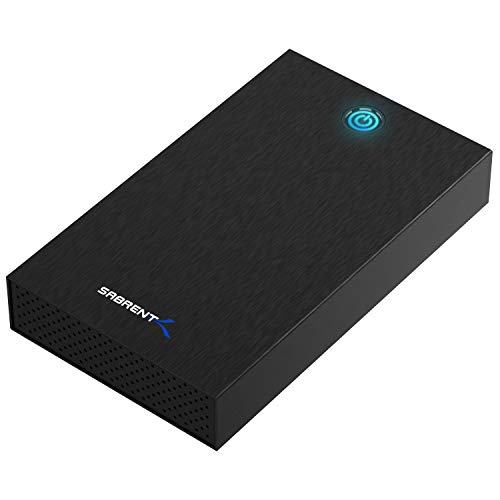
- Supports 2.5-inch and 3.5-inch SATA drives
- Tool-free design with UASP and USB 3.0
- Includes a 12V/2A power adapter
Best For: Desktop and laptop SATA drive reuse
Best Transparent Portable Pick
ORICO 2.5-Inch Clear SATA Enclosure

- Transparent case shows the installed drive
- Tool-free setup with UASP and USB 3.0
- Supports 2.5-inch SATA drives up to 6TB
Best For: Visible, lightweight 2.5-inch drive storage
Best for Desktop-Size Drives
ORICO 3.5-Inch Tool-Free Enclosure

- Supports one 3.5-inch SATA drive up to 20TB
- Includes 12V/2A power adapter and USB 3.0 cable
- Tool-free setup with UASP support
Best For: High-capacity desktop HDD or SSD conversion
Best for Visible Drive Swapping
ORICO Clear 2.5-Inch USB-C Enclosure

- Clear housing keeps the installed drive visible
- USB-C delivers up to 5Gbps with UASP
- Tool-free design fits 7mm and 9.5mm drives
Best For: Portable 2.5-inch drive access and identification
Best Budget Portable Pick
ORICO 2.5-Inch USB 3.0 Enclosure

- Fits 7mm and 9.5mm drives up to 6TB
- Bus-powered tool-free installation
- Lightweight ABS design with UASP support
Best For: Simple portable access to 2.5-inch SATA drives
Best Type-C/Type-A Pick – BENFEI Tool-Free SATA Enclosure
For shoppers comparing portable hard drive enclosures, the BENFEI model stands out for its flexible Type-C and Type-A connection options. It supports 2.5-inch SATA SSDs and HDDs, offers tool-free installation, and uses UASP for faster transfers when paired with compatible hardware.
Best For: Users who want one compact enclosure that can connect to newer USB-C devices and traditional USB-A ports.
Pros:
- Includes USB Type-C/Type-A connectivity for broad device compatibility.
- Tool-free, plug-and-play installation with hot-swapping support.
- Supports transfer rates up to 5 Gbps with UASP.
- Works with 2.5-inch, 7/9.5mm SATA drives up to 6TB.
Cons:
- Designed for 2.5-inch drives only.
- UASP performance requires compatible hardware and software.
The BENFEI is a practical all-around choice for drive upgrades, file transfers, and repurposing an older laptop drive. Its included connection flexibility and 18-month warranty add useful convenience for everyday storage tasks.
Best Protected Fit – UGREEN 2.5-Inch USB 3.0 Enclosure
The UGREEN 2.5-inch enclosure is a solid option among portable hard drive enclosures for transferring files, recovering data, or expanding storage. It combines USB 3.0 and UASP support with EVA foam protection and a detachable cable.
Best For: Users who want added internal cushioning and a removable cable for a 2.5-inch SATA drive.
Pros:
- Supports up to 5 Gbps transfers with UASP acceleration.
- EVA foam helps protect the installed drive from shakes and scratches.
- Supports 7mm and 9.5mm 2.5-inch SATA HDDs and SSDs up to 6TB.
- Includes a detachable 12-inch USB 3.0 cable.
Cons:
- Uses a USB-A connection rather than USB-C.
- Drives with screws may need them removed to fit.
- The drive itself is not included.
With its cushioning, safety protections, and broad operating-system compatibility, this UGREEN enclosure is well suited to routine backups and drive recovery. It is especially useful when protecting a 2.5-inch drive matters as much as transfer speed.
Best Simple Upgrade – SABRENT Tool-Free SATA Enclosure
The SABRENT EC-UASP keeps the portable hard drive enclosure experience straightforward. Its tool-free design accepts a standard 2.5-inch SATA drive, requires no drivers, and supports up to 5 Gbps through USB 3.0 while remaining compatible with older USB ports.
Best For: Buyers seeking a simple enclosure for installing or reusing a 2.5-inch SATA SSD or notebook hard drive.
Pros:
- Tool-free installation and plug-and-play operation.
- Supports UASP SATA III and transfer rates up to 5 Gbps on USB 3.0.
- Backwards compatible with USB 2.0 and USB 1.1.
- Works with Windows and Mac systems and supports hot-swapping.
Cons:
- Uses USB 3.0 rather than USB-C.
- USB 2.0 connections are limited to up to 480 Mbps.
- The supplied warranty is one year.
The EC-UASP is a sensible pick when ease of installation and broad legacy compatibility are priorities. It avoids unnecessary setup steps while providing the speed expected from a USB 3.0 enclosure with a compatible drive and host.
Best Aluminum USB-C Choice – UGREEN USB-C SATA Enclosure
For newer computers and USB-C accessories, this aluminum UGREEN model is one of the more capable portable hard drive enclosures in the group. It supports USB 3.1 Gen 2, UASP, tool-free installation, and 2.5-inch SATA drives up to 6TB without requiring an external power supply.
Best For: USB-C users who want a faster, aluminum enclosure for a 2.5-inch SATA SSD or HDD.
Pros:
- USB 3.1 Gen 2 and UASP support for high-speed transfers.
- Aluminum construction helps dissipate heat without a cooling fan.
- Tool-free, plug-and-play installation with no extra power supply.
- Compatible with 2.5-inch SATA I/II/III drives up to 6TB.
Cons:
- The included cable is USB-C to USB-C; USB-A devices require a suitable cable.
- It supports one 2.5-inch drive rather than larger desktop drive formats.
This enclosure is a strong match for USB-C laptops, desktops, and compatible consoles. Its aluminum body and chipset-based heat dissipation make it particularly appealing for sustained SSD use, while the tool-free design keeps drive installation quick.
Best Compact SATA Pick – BENFEI 2.5-Inch Tool-Free Enclosure
If you need portable hard drive enclosures for a 2.5-inch SATA drive, the BENFEI offers a simple, travel-friendly option. Its tool-free design, included USB Type-C/Type-A cable, and UASP support make it suitable for moving files or repurposing an older laptop drive.
Best For: Users who want a compact enclosure for a 2.5-inch SATA HDD or SSD up to 6TB.
Pros:
- Tool-free, plug-and-play installation with hot-swapping support.
- Supports SATA I/II/III drives and UASP transfer protocol.
- Includes a USB Type-C/Type-A 10Gbps cable.
- Works with Windows, Linux, and MacOS 8.0 and above.
Cons:
- Only supports 2.5-inch drives measuring 7mm or 9.5mm thick.
- Supports one drive at a time.
The BENFEI is a practical choice when portability and easy installation matter most. Its 18-month warranty adds useful reassurance for routine file transfers and drive reuse.
Best Versatile Drive Size Option – SABRENT 2.5/3.5-Inch SATA Enclosure
The SABRENT is one of the more flexible portable hard drive enclosures because it accepts both 2.5-inch and 3.5-inch SATA HDDs and SSDs. It uses a tool-free design and includes a 12V/2A adapter, making it suitable for desktop drives that need external power.
Best For: Users who need one enclosure for compatible 2.5-inch and 3.5-inch SATA drives.
Pros:
- Fits both 2.5-inch and 3.5-inch SATA HDDs and SSDs.
- Tool-free drive swapping with USB 3.0 and UASP support.
- Includes the required 12V/2A AC power adapter.
- Aluminum shell and internal shock-absorbing tray help with durability and heat dissipation.
Cons:
- Requires a wall outlet and is not USB bus-powered.
- USB-A connection may require a separate adapter for USB-C-only computers.
- Not compatible with SAS, M.2, NVMe, or IDE/PATA drives.
Choose the SABRENT when drive-size flexibility is more important than a fully bus-powered setup. Before buying, confirm that your drive is SATA and that its physical dimensions fit the enclosure.
Best Transparent Portable Pick – ORICO 2.5-Inch Clear SATA Enclosure
The ORICO stands out among portable hard drive enclosures with its transparent case, which lets you see the installed drive without opening the enclosure. It is designed for 2.5-inch SATA drives and includes a 50cm USB-A cable for flexible placement.
Best For: Users who want a lightweight, see-through enclosure for a 2.5-inch SATA HDD or SSD.
Pros:
- Clear case makes the installed drive visible.
- Tool-free, plug-and-play installation with hot-swapping support.
- Supports UASP and USB 3.0 with backward compatibility for USB 2.0 and 1.1.
- Blue LED indicates operating status.
Cons:
- Limited to 2.5-inch 7mm or 9.5mm SATA drives.
- Uses a USB-A cable, so USB-C-only computers may need an adapter.
- Plastic construction may offer less ruggedness than an aluminum enclosure.
The ORICO is a convenient pick for quick drive swaps and easy visual identification. Its compact format and compatibility with computers, TVs, and PS4 make it useful for everyday external storage tasks.
Best for Desktop-Size Drives – ORICO 3.5-Inch Tool-Free Enclosure
For shoppers seeking portable hard drive enclosures for a full-size desktop drive, this ORICO model supports one 3.5-inch SATA HDD or SSD up to 20TB. It includes the external power adapter required for 3.5-inch drives, plus USB 3.0 connectivity and UASP support for transfers up to 5Gbps.
Best For: Converting a 3.5-inch SATA drive into an external desktop or laptop storage device.
Pros:
- Supports 3.5-inch SATA I, II, and III drives up to 20TB.
- Tool-free, plug-and-play installation with no driver or reboot required.
- Includes a 12V/2A power adapter and USB 3.0 cable.
- Internal anti-shock sponge, heat-resistant ABS construction, and automatic sleep mode.
Cons:
- Designed for one 3.5-inch drive and is less compact than 2.5-inch enclosures.
- Requires the included power adapter for 3.5-inch drives.
- Hard drive or SSD is not included.
This is a practical choice when capacity and compatibility with desktop-sized drives matter more than pocket-sized portability. Its tool-free design and included power supply simplify setup, while UASP can help compatible systems make better use of the USB 3.0 connection.
Best for Visible Drive Swapping – ORICO Clear 2.5-Inch USB-C Enclosure
This clear ORICO case is one of the more convenient portable hard drive enclosures for 2.5-inch SATA drives. Its transparent shell lets you view the installed drive, while USB-C connectivity, UASP support, and a tool-free design make it useful for moving files between computers and other compatible devices.
Best For: Users who want a compact 2.5-inch enclosure with a transparent housing and USB-C connection.
Pros:
- Fits 7mm and 9.5mm 2.5-inch SATA I, II, and III HDDs or SSDs up to 6TB.
- USB-C interface supports up to 5Gbps and UASP, with USB 2.0 and 1.1 backward compatibility.
- Clear PC housing protects against scratches while allowing the drive to remain visible.
- Tool-free, plug-and-play installation with hot-swapping and an included USB-A cable.
Cons:
- Limited to one 2.5-inch drive.
- Plastic construction may offer less ruggedness than a metal enclosure.
- Drive is not included.
The transparent design is the standout feature, especially for anyone who frequently identifies or swaps drives. It offers a useful mix of portability, USB-C connectivity, broad operating-system support, and simple installation without requiring an extra power supply.
Best Budget Portable Pick – ORICO 2.5-Inch USB 3.0 Enclosure
If you need straightforward portable hard drive enclosures for a laptop-size SATA drive, this ORICO model keeps the setup simple. It accepts 7mm and 9.5mm 2.5-inch HDDs or SSDs, connects over USB 3.0, and requires no separate power supply.
Best For: Portable storage expansion, drive recovery, and file transfers from 2.5-inch SATA drives.
Pros:
- Supports 7mm and 9.5mm 2.5-inch SATA I, II, and III drives up to 6TB.
- Tool-free, plug-and-play installation with hot-swap support.
- USB 3.0 supports up to 5Gbps and UASP on compatible systems.
- Lightweight ABS body requires no extra power supply and is available in multiple colors.
Cons:
- Uses a USB 3.0 connection rather than USB-C.
- Supports one 2.5-inch drive only.
- Hard drive or SSD is not included.
This enclosure is a sensible everyday option for older laptop drives, spare SSDs, and basic storage expansion. Its low-weight design and bus-powered operation make it easy to carry, while UASP support adds performance potential when the connected computer supports it.
How We Picked the Best Portable Hard Drive Enclosures
We focused on enclosures that support common SATA-based 2.5-inch or 3.5-inch hard drives and SSDs. The selection includes USB-A, USB-C, and dual-connector designs, along with tool-free models that make drive installation faster. We also considered stated transfer speeds, UASP support, construction, power requirements, size compatibility, and practical features such as included cables and transparent or aluminum housings.
Because USB performance depends on the computer, cable, drive, and enclosure controller, advertised speeds should be treated as maximum interface ratings rather than guaranteed real-world results.
Quick Comparison
| Best For | Recommended Type | What to Look For |
|---|---|---|
| Travel and everyday backups | 2.5-inch USB 3.0 or USB-C | Tool-free fit, compact body, UASP |
| Modern laptops and tablets | USB-C SATA enclosure | Native USB-C connection and 5Gbps support |
| Maximum SATA performance | USB 3.x enclosure with UASP | 6Gbps SATA support and quality controller |
| Desktop hard drives | 3.5-inch enclosure | Dedicated power adapter and stable cooling |
Key Buying Factors for Portable Hard Drive Enclosures
Drive Size and Thickness
Most portable models support 2.5-inch SATA drives, commonly in 7mm or 9.5mm thicknesses. A 3.5-inch desktop drive requires a larger enclosure and external power supply, so confirm the supported format before buying.
USB Connector and Speed
USB 3.0 and USB 3.2 Gen 1 connections generally provide up to 5Gbps, while SATA III drives can support up to 6Gbps internally. A USB-C plug can be convenient, but USB-C describes the connector shape—not necessarily a faster protocol. Check whether the enclosure includes the cable you need.
UASP Support
UASP can improve command handling and reduce overhead with compatible computers and operating systems. It is particularly useful for SSDs and frequent file transfers, although it will not make a mechanical hard drive perform like an SSD.
Power, Protection, and Installation
Tool-free designs are convenient for occasional drive swaps, while screw-secured enclosures may hold the drive more firmly. A 2.5-inch drive usually draws power over USB; 3.5-inch models typically need a 12V adapter. For travel, prioritize a compact enclosure with a secure lid and good cable fit.
Who Should Buy Which Portable Hard Drive Enclosures?
Choose a compact 2.5-inch tool-free enclosure if you are repurposing a laptop drive, creating a portable backup, or moving files between computers. Choose a USB-C model if your laptop has limited USB-A ports and you want a direct connection without an adapter. For the best chance of consistent SSD performance, select a SATA III enclosure with UASP and a reputable controller. If you are housing a full-size desktop drive, choose a powered 3.5-inch enclosure instead; its larger design and adapter are necessary for reliable operation.