A hard drive enclosure with cooling fan can turn bare SATA drives into practical external storage while helping manage heat during long transfers, backups, and multi-drive workloads. The right model depends on your drive sizes, connection speed, bay count, and whether you need RAID or simple plug-and-play access.
We selected 10 enclosures and docking-style systems covering single-drive use, dual- and multi-bay storage, USB-A and USB-C connectivity, tool-free installation, hot swapping, and RAID-oriented setups. Use the guide below to narrow the choices before comparing individual products.
Best 10 Hard Drive Enclosure with Cooling Fan Picks for 2026
Best Multi-Drive Pick
CENMATE 2-Bay Enclosure with Cooling Fan

- Supports two 2.5-inch or 3.5-inch SATA drives
- Tool-free and hot-swappable design
- USB A/C 3.0 with daisy-chain expansion
Best For: Flexible two-drive desktop storage
Best Single-Drive Dock
SABRENT USB 3.0 SATA Dock with Fan
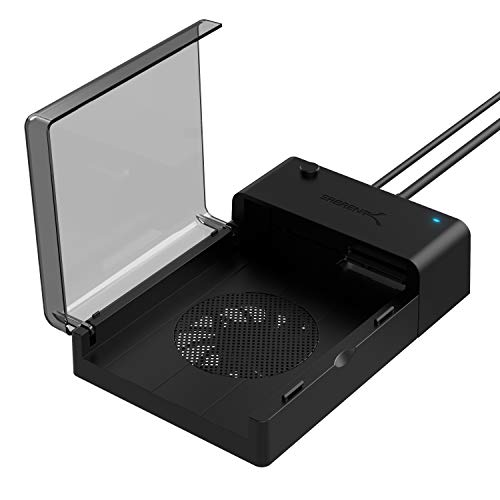
- Supports 2.5-inch and 3.5-inch SATA drives
- Hot-swappable plug-and-play setup
- Supports drives up to 22TB
Best For: Backups, cloning, and occasional drive access
Best High-Capacity Setup
SABRENT 5-Bay USB-C Dock with Fan

- Docks up to five 2.5-inch SATA drives
- USB-C transfer rates up to 10Gbps
- Switchable 80mm cooling fan
Best For: Multi-drive 2.5-inch storage management
Best 3.5-Inch Enclosure

- Designed for one 3.5-inch SATA drive
- Adjustable 60mm fan with on/off control
- USB 3.0 plug-and-play connectivity
Best For: Single-drive desktop storage expansion
Best for Maximum Capacity
CENMATE 4-Bay Cooling-Fan Enclosure

- Four bays accommodate 2.5-inch and 3.5-inch drives
- Supports up to 80TB total storage
- USB A/C 3.0 and eSATA connections included
Best For: Multi-drive storage expansion without RAID or NAS
Best Single-Drive Value
FIDECO SATA Enclosure with Fan

- Accepts one 2.5-inch or 3.5-inch SATA drive
- USB 3.0 and UASP support provide up to 5Gbps
- Works with Windows, Mac, and Linux
Best For: Single-drive backups, upgrades, and SATA drive access
High-Capacity Pick
Yottamaster PS500C3 5-Bay Enclosure

- Holds five SATA HDDs or SSDs
- Supports up to 110TB total storage
- 80mm fan and USB-C connectivity
Best For: Large direct-attached storage setups without hardware RAID
Fast Expansion Pick
CENMATE 2-Bay 10Gbps Enclosure

- USB 3.2 Gen 2 supports up to 10Gbps
- Tool-free hot-swappable drive bays
- Accepts 2.5-inch and 3.5-inch SATA drives
Best For: Fast two-drive expansion with flexible USB-A/C connectivity
RAID Flexibility Pick

- Supports four RAID and disk modes
- Fits two 2.5-inch or 3.5-inch SATA drives
- Aluminum body with built-in cooling fan
Best For: Flexible two-drive storage with RAID 0 or RAID 1 options
Best Multi-Drive Pick – CENMATE 2-Bay Enclosure with Cooling Fan
If you need a hard drive enclosure with cooling fan for flexible desktop storage, the CENMATE 2-bay model supports both 2.5-inch and 3.5-inch SATA HDDs and SSDs. Its tool-free trays, USB A/C 3.0 connectivity, and hot-swappable design make drive changes straightforward.
Best For: Users who need two-drive external storage, broad drive-size compatibility, and expansion through daisy chaining.
Pros:
- Supports two 2.5-inch or 3.5-inch SATA drives, with up to 20TB per drive.
- Built-in 2-inch fan and aluminum-alloy construction help manage heat.
- Tool-free, hot-swappable design with USB A/C 3.0 connectivity.
- Supports daisy chaining for expansion across up to three devices.
Cons:
- Fan noise is rated around 40–50 decibels, so it may not suit noise-sensitive users.
- It is a DAS enclosure and does not support RAID or NAS.
The CENMATE is a practical choice when capacity and drive flexibility matter more than silent operation or RAID features. USB 3.0 provides up to 5Gbps transfer rates, while the dual-bay layout keeps future storage upgrades convenient.
Best Single-Drive Dock – SABRENT USB 3.0 SATA Dock with Fan
The SABRENT EC-DFFN is a straightforward hard drive enclosure with cooling fan for accessing one 2.5-inch or 3.5-inch SATA HDD or SSD. It uses a lay-flat dock design, supports hot swapping, and connects over USB 3.0 without requiring drivers.
Best For: Users who regularly connect one bare SATA drive for backups, file transfers, or drive cloning.
Pros:
- Accepts standard 2.5-inch and 3.5-inch SATA hard drives and SSDs.
- Built-in fan helps keep the installed drive cool.
- Hot-swappable, plug-and-play operation requires no drivers.
- Supports drives up to 22TB and includes downloadable Acronis cloning software.
Cons:
- Only one drive can be docked at a time.
- USB 3.0 connectivity provides up to 5Gbps rather than newer USB-C speeds.
This dock suits occasional drive access and migration work without the complexity of a multi-bay enclosure. Its combination of cooling, hot swapping, and large-capacity support makes it useful for practical backup and cloning tasks.
Best High-Capacity Setup – SABRENT 5-Bay USB-C Dock with Fan
For managing several smaller drives, the SABRENT DS-5R15 is a hard drive enclosure with cooling fan that docks up to five 2.5-inch SATA HDDs or SSDs simultaneously. USB-C connectivity reaches up to 10Gbps, and the included 80mm fan can be switched on or off.
Best For: Users who need simultaneous access to multiple 2.5-inch drives and want faster USB-C connectivity.
Pros:
- Five independent bays accept 2.5-inch SATA HDDs and SSDs up to 15mm tall.
- USB 3.2 Gen 2×1 USB-C connection supports up to 10Gbps.
- Switchable 80mm active-cooling fan supports either cooling or quieter operation.
- Hot-swappable, tool-free, plug-and-play design works with Windows, macOS, and Linux.
Cons:
- It is designed for 2.5-inch drives and does not accommodate 3.5-inch disks.
- The five-bay design requires the included 12V/3A power adapter.
The DS-5R15 is the strongest option here for a multi-drive 2.5-inch workflow. Individual bay LEDs and a switchable fan add useful control, while the powered USB-C connection helps support all five bays.
Best 3.5-Inch Enclosure – Vantec NexStar HX with Fan
Vantec NexStar HX, 3.5" SATA III Hard Drive Enclosure USB 3.0 With Fan (NST-387S3-BK)
Check Price On AmazonThe Vantec NexStar HX is a hard drive enclosure with cooling fan designed for one 3.5-inch SATA drive. It combines an aluminum enclosure, ventilation, and a large 60mm fan with adjustable speed and on/off control for desktop storage expansion.
Best For: Users adding a single high-capacity 3.5-inch SATA drive to a Windows, Mac, or Linux computer.
Pros:
- Designed specifically for 3.5-inch SATA III drives and supports capacities up to 16TB.
- 60mm fan includes on/off and variable-speed control.
- USB 3.0 supports transfer rates up to 5Gbps and is backward compatible with USB 2.0 and 1.1.
- Hot-swappable, plug-and-play operation requires no drivers.
Cons:
- Supports only one 3.5-inch drive.
- It is not intended for 2.5-inch drives.
- Power-saving mode requires connection to a working computer system.
This Vantec enclosure is a focused choice for users who want a cooled external home for one large desktop hard drive. The adjustable fan gives more control than a fixed-speed design, while USB 3.0 keeps setup simple.
Best Overall – Yottamaster 2-Bay Cooling-Fan Enclosure
For shoppers seeking a hard drive enclosure with cooling fan, the Yottamaster DY200C3 combines two 3.5-inch bays, tool-free drive swapping, and USB-C connectivity. Its 48TB maximum capacity and airflow-focused design make it suitable for large storage collections and demanding workflows.
Best For: Video editors, photographers, and users building a high-capacity desktop storage setup.
Pros:
- Supports two 3.5-inch drives up to 24TB each, for 48TB total.
- Magnetic tool-free cover enables quick drive installation and swapping.
- 60mm fan and straight air duct are designed to improve cooling during continuous use.
- Supports UASP, TRIM, automatic sleep, and multiple safety protections.
Cons:
- Limited to two drive bays and 3.5-inch drives.
- USB 3.1 Gen1 transfer rate is specified at up to 5Gbps.
The Yottamaster is a strong all-around choice when cooling, capacity, and convenient drive access matter more than RAID features. Its plug-and-play support for Windows, Mac, and Linux also broadens its usefulness.
Best for Maximum Capacity – CENMATE 4-Bay Cooling-Fan Enclosure
The CENMATE is a hard drive enclosure with cooling fan built for users who need several drives in one desktop unit. It accepts 2.5-inch and 3.5-inch SATA HDDs or SSDs, supports up to 80TB total, and includes USB-A, USB-C, and eSATA connectivity.
Best For: Personal or small-business users consolidating multiple SATA drives without RAID or NAS functionality.
Pros:
- Four bays support 2.5-inch and 3.5-inch drives up to 80TB total.
- Includes USB A/C 3.0 and eSATA connection options.
- Aluminum-alloy construction and an integrated fan help manage heat.
- Includes a 12V power adapter for stable operation.
Cons:
- Does not provide RAID or NAS functionality.
- Fan noise is listed at approximately 40–50 decibels.
- Hot-swapping is not supported; eSATA access to multiple bays requires computer-side RAID support.
Choose the CENMATE when four-bay capacity is the priority. It offers broad drive compatibility and flexible connections, but buyers should account for the stated fan noise and the limitations of its eSATA implementation.
Best Single-Drive Value – FIDECO SATA Enclosure with Fan
For a simpler setup, the FIDECO is a compact hard drive enclosure with cooling fan for one 2.5-inch or 3.5-inch SATA drive. It uses USB 3.0 with UASP support, includes a 12V power adapter, and works with Windows, Mac, and Linux without requiring drivers.
Best For: Users who need a straightforward enclosure for accessing or backing up one SATA HDD or SSD.
Pros:
- Supports both 2.5-inch and 3.5-inch SATA HDDs and SSDs.
- USB 3.0 offers transfer speeds up to 5Gbps and supports UASP.
- Plug-and-play compatibility with Windows, Mac, and Linux.
- Includes a 12V power adapter and one-year warranty.
Cons:
- Holds only one drive.
- Does not support IDE hard drives.
- A new HDD may need to be initialized before the computer recognizes it.
The FIDECO makes sense for individual drive access, upgrades, and basic backups rather than multi-drive storage. Its broad SATA form-factor support and UASP compatibility provide useful performance in a compact, uncomplicated package.
High-Capacity Pick – Yottamaster PS500C3 5-Bay Enclosure
For users who need substantial expansion, this hard drive enclosure with cooling fan holds up to five 2.5- or 3.5-inch SATA HDDs or SSDs. Its USB-C connection, aluminum shell, removable trays, and 80mm fan make it a practical choice for storage-heavy workflows, while its non-RAID design keeps each disk independent.
Best For: Video editors, photographers, and users building a large direct-attached storage pool without hardware RAID.
Pros:
- Supports five drives with up to 110TB total capacity.
- Accepts both 2.5-inch and 3.5-inch SATA HDDs and SSDs.
- Includes an aluminum shell, ventilation openings, and an 80mm cooling fan.
- USB 3.1 Gen 1 Type-C provides up to 5Gbps interface speed.
Cons:
- Does not support hardware RAID; software RAID is required.
- Five-drive operation must remain within the 78W power limit.
- USB-C host compatibility is required for the included interface.
The PS500C3 stands out when capacity and drive count matter most. Choose it if independent disks and software-managed storage fit your setup; look elsewhere if built-in RAID is essential.
Fast Expansion Pick – CENMATE 2-Bay 10Gbps Enclosure
This hard drive enclosure with cooling fan is designed for faster two-drive transfers, using USB 3.2 Gen 2 with up to 10Gbps signaling. It supports 2.5- and 3.5-inch SATA drives, offers tool-free hot swapping, and includes both USB-A and USB-C connectivity for flexible desktop or laptop use.
Best For: Users who want quick two-drive storage expansion, hot-swappable bays, and broad host-device compatibility.
Pros:
- USB 3.2 Gen 2 supports up to 10Gbps interface speed.
- Tool-free bays support hot swapping without powering down.
- Works with 2.5-inch and 3.5-inch SATA HDDs and SSDs.
- Includes USB-A/C connectivity and supports daisy chaining up to three devices.
Cons:
- The fan operates at approximately 40–50 decibels.
- It is a DAS enclosure with no RAID or NAS function.
- Actual transfer speeds depend on the drives and connected computer.
With faster USB 3.2 Gen 2 connectivity and convenient hot swapping, this CENMATE model is well suited to active file-transfer workflows. Its lack of RAID makes it better for flexible expansion than redundancy-focused storage.
RAID Flexibility Pick – CENMATE 2-Bay RAID Enclosure
For users prioritizing drive-management options, this hard drive enclosure with cooling fan supports two 2.5- or 3.5-inch SATA HDDs or SSDs and provides four storage modes: RAID 0, RAID 1, Normal, and JBOD. Its aluminum construction, 2-inch fan, and USB 3.0 connection make it a straightforward desktop storage enclosure.
Best For: Users who want selectable RAID modes for performance, mirroring, independent disks, or combined capacity.
Pros:
- Offers RAID 0, RAID 1, Normal, and JBOD modes.
- Supports two 2.5-inch or 3.5-inch SATA HDDs or SSDs.
- Aluminum construction and a built-in 2-inch fan support cooling.
- Includes USB-A/C 3.0 connectivity and plug-and-play compatibility.
Cons:
- USB 3.0 provides up to 5Gbps rather than 10Gbps.
- Fan noise is approximately 40–50 decibels.
- Changing or resetting RAID configurations can result in data loss.
This model is the most suitable of the three when built-in RAID choices are central to the buying decision. Handle array changes carefully, and consider the faster 10Gbps CENMATE enclosure if transfer speed matters more than RAID.
How We Picked the Best Hard Drive Enclosure with Cooling Fan
We focused on features that have the greatest effect on everyday usability: compatibility with 2.5-inch and 3.5-inch SATA HDDs or SSDs, cooling-fan design, connection standards, power requirements, installation method, and the number of supported drives. We also included both compact enclosures and larger direct-attached storage units so the list covers portable expansion, drive cloning, backups, media libraries, and workstation storage.
Because specifications vary by model, verify the manufacturer’s stated interface speed, drive-capacity limit, operating-system support, and RAID behavior before purchase. A USB 3.x label does not guarantee identical real-world performance across every computer, cable, or installed drive.
Quick Comparison
- For one drive: Choose a simple dock or single-drive enclosure such as the SABRENT USB 3.0 dock or FIDECO model.
- For flexible two-drive storage: Consider a CENMATE or Yottamaster two-bay enclosure with tool-free access.
- For several drives: The five-bay SABRENT and Yottamaster options provide more expansion for desktop storage pools.
- For high-speed transfers: Prioritize the 10Gbps CENMATE model, provided your computer supports USB 3.2 Gen 2.
- For RAID use: Select the CENMATE RAID enclosure and confirm the supported RAID modes meet your backup or redundancy plan.
Key Buying Factors for a Hard Drive Enclosure with Cooling Fan
Drive Fit and Bay Layout
Check whether the enclosure supports 2.5-inch drives, 3.5-inch drives, or both. Most 3.5-inch HDDs require an external power adapter, while 2.5-inch SSDs may have lower power demands. Multi-bay designs are useful for backups and storage expansion but occupy more desk space.
Cooling and Noise
A fan helps move heat away from drives during sustained activity, particularly in tightly packed multi-bay units. Look for accessible ventilation and consider fan noise if the enclosure will sit near a workstation, bedroom, or recording setup. Cooling cannot replace good airflow or a healthy drive.
Connection Speed and Compatibility
USB 3.0, USB 3.1, USB 3.2, USB-C, and eSATA can differ in maximum bandwidth and connector type. Choose a model that matches your computer and use a suitable cable. The installed HDD or SSD may remain the performance bottleneck.
Access, Power, and Data Protection
Tool-free trays and hot-swap support simplify drive changes, but always eject or unmount drives before removal. RAID can improve availability or performance in some configurations, but it is not a substitute for an independent backup.
Who Should Buy Which Hard Drive Enclosure with Cooling Fan?
Buy a compact single-drive dock if you mainly read old drives, clone disks, or perform occasional backups. Choose a two-bay unit if you want a balance of capacity and desk space. A four- or five-bay enclosure suits users building a larger local media library, archive, or backup target. Select the 10Gbps model for frequent large-file transfers, and choose the RAID version only if you understand its modes and have a separate backup strategy.