Choosing the right MIDI hub can make a crowded studio feel simple again. The best multiport MIDI interfaces reduce cable clutter, improve routing reliability, and give you more control over keyboards, drum machines, and sound modules.
Below, we focus on practical options for modern PC, Mac, and standalone workflows, from compact USB host models to larger port-rich interfaces built for bigger rigs.
Best 10 Multiport Midi Interfaces Picks for 2026
Compact 8-Port Hub for Flexible Routing
ESI M4U eX 8-Port USB 3.0 MIDI Interface

- 8 adaptable MIDI ports with auto configuration
- Built-in USB 3.0 hub with three connectors
- Standalone routing and merging without a computer
Best For: Small studios and live setups needing an easy 8-port MIDI hub
16-Way Thru and Filter Box
THRU-16 MIDI Splitter + Filter and Switch
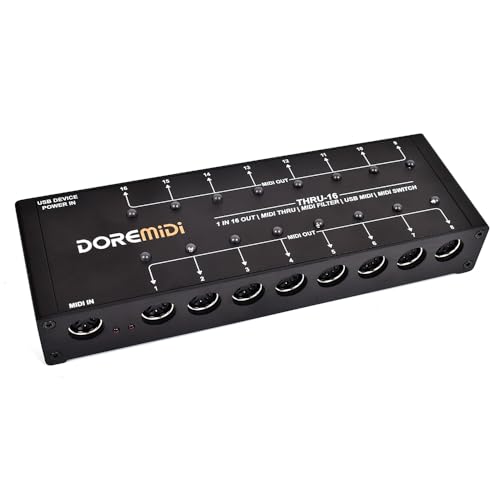
- Splits 1 MIDI input into 16 outputs
- Per-output switches and indicator lights
- Editable filters for each output
Best For: Users who need one MIDI source routed to many destinations with filtering
High-Capacity 16-Port Studio Interface
ESI M8U eX 16-Port USB 3.0 MIDI Interface

- 16 adaptable MIDI ports with auto configuration
- Integrated USB 3.0 hub with three connectors
- Standalone routing and merging for larger rigs
Best For: Large studios and live rigs that need a 16-port MIDI hub
Networked MIDI Hub for Complex Rigs
iConnectivity mioXL 8 In x 12 Out Interface

- 8 DIN inputs and 12 DIN outputs
- 10 USB-MIDI host ports plus Ethernet RTP-MIDI
- 22 virtual network ports for flexible routing
Best For: Complex studio systems that need networked MIDI and many device connections
Compact USB Host Bridge
CME H2MIDI Pro for Hybrid MIDI Setups

- Standalone USB host for class-compliant MIDI devices
- Expandable to 8 USB MIDI ports with a hub
- USB-C connection with routing and preset tools
Best For: Hybrid rigs that need USB host support and DIN integration
Simple MIDI Splitter
MIDI Thru 6 for Simple Expansion

- 1-in, 6-out MIDI splitter for basic distribution
- USB powered and plug-and-play
- Sends input messages to all six outputs
Best For: One-controller-to-many-device MIDI splitting
Compact Pedalboard Interface
CME U4MIDI WC for Compact Routing

- 2-in, 2-out MIDI I/O with zero latency
- Standalone power via 5V USB or 9V DC
- Routing tools for thru, split, merge, and filter
Best For: Pedalboard and guitar rigs needing compact standalone MIDI control
4x4 USB MIDI Router
XMSJSIY USB MIDI Interface Box
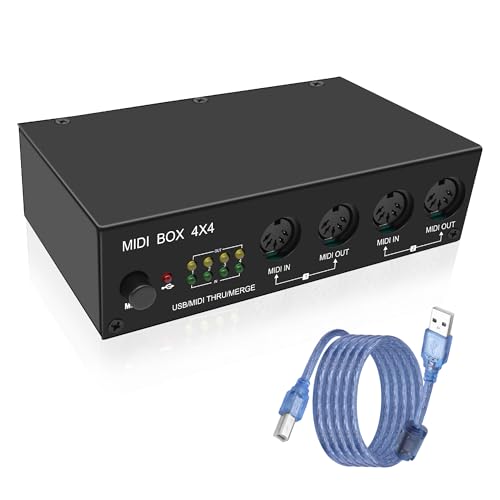
- 4 in / 4 out routing for split, merge, and thru use
- LEDs show power, USB, and MIDI activity
- Metal build with silicone feet for stability
Best For: compact studios needing a simple 4x4 USB MIDI router
Host + Router Pack
CME H4MIDI WC with 4 Short MIDI Cables
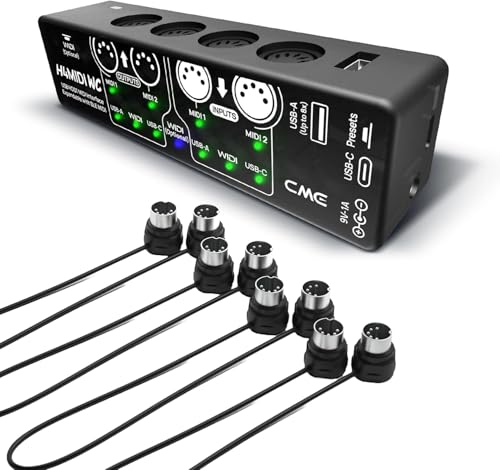
- Standalone USB host mode for class-compliant MIDI devices
- USB-C connection with 4 in / 4 out virtual ports
- Includes four 1-ft 5-pin DIN cables
Best For: compact hybrid setups that need routing, mapping, and filtering
Wireless Bluetooth MIDI Adapter

- Bluetooth MIDI reduces cable clutter
- Plug-and-play setup with no driver install
- Works with iOS, Android, Mac, and Windows
Best For: wireless MIDI setups for keyboards, synths, and drum machines
Compact 8-Port Hub for Flexible Routing – ESI M4U eX 8-Port USB 3.0 MIDI Interface
If you want a practical option in multiport midi interfaces, the ESI M4U eX focuses on simple setup, low-latency performance, and flexible routing. Its class-compliant USB 3.0 design works without driver installation, while the built-in USB hub makes it easier to keep a compact studio or live rig organized.
Best For: Players and producers who need an 8-port interface with standalone routing and USB hub convenience.
Pros:
- 8 adaptable MIDI ports with automatic input/output configuration
- Class-compliant USB 3.0 connectivity for Windows and macOS
- Built-in USB 3.0 hub with three connectors for expanding a setup
- Standalone operation for routing and merging without a computer
Cons:
- Only provides 8 MIDI ports, which may be limiting for larger rigs
- Advanced multi-device features on Windows depend on the optional driver
The M4U eX is a strong fit if you value straightforward operation and need an interface that can double as a small routing hub. It keeps the feature set focused on reliable MIDI handling rather than extra complexity.
16-Way Thru and Filter Box – THRU-16 MIDI Splitter + Filter and Switch
For setups that need controlled distribution, this THRU-16 stands out among multiport midi interfaces by turning one MIDI input into 16 outputs. Each output can be switched on or off and assigned its own filters, which makes it useful when you need to send different MIDI data to different destinations without rewiring your rig.
Best For: Keyboardists and MIDI users who want one input split across many outputs with per-output filtering.
Pros:
- Converts 1 MIDI input into 16 MIDI outputs
- Each output has its own switch and indicator light
- Editable MIDI filters per output for more precise control
- Supports notes, CC, program change, clock, time code, and SysEx
Cons:
- Designed as a splitter/filter, not a full multi-in/multi-out interface
- Does not include the broader computer-routing features of networked MIDI systems
If your priority is distributing one MIDI source cleanly to many devices, the THRU-16 offers a focused solution. It is especially useful when you want quick hardware control over routing and filtering at each output.
High-Capacity 16-Port Studio Interface – ESI M8U eX 16-Port USB 3.0 MIDI Interface
Among multiport midi interfaces, the ESI M8U eX is built for bigger rigs that need lots of simultaneous connections without driver hassle. It offers 16 adaptable MIDI ports, class-compliant USB 3.0 connectivity, and standalone routing, making it a practical choice for studios that combine keyboards, synths, and other gear.
Best For: Large MIDI setups that need 16 ports, USB hub expansion, and standalone operation.
Pros:
- 16 adaptable MIDI ports with automatic configuration
- Class-compliant USB 3.0 support for Windows, macOS, iOS, and iPhone
- Integrated USB 3.0 hub with three connectors
- Standalone operation with routing and merging capabilities
Cons:
- Larger and heavier than simpler 8-port interfaces
- Maximum sample rate is listed at 48 KHz in the supplied details
This is the most capable option in the group for users who need more ports and a more central studio hub. It keeps the workflow simple while covering larger MIDI ecosystems.
Networked MIDI Hub for Complex Rigs – iConnectivity mioXL 8 In x 12 Out Interface
If you need multiport midi interfaces that can bridge hardware, computers, and mobile devices, the mioXL is built for that job. With 8 DIN inputs, 12 DIN outputs, USB host ports, Ethernet RTP-MIDI, and class-compliant connectivity, it is aimed at users who want flexible routing across a wide MIDI ecosystem.
Best For: Advanced studios and hybrid rigs that need networked MIDI routing across many devices.
Pros:
- 8 in x 12 out 5-pin DIN MIDI ports
- 10 USB-MIDI host ports for class-compliant peripherals
- Ethernet RTP-MIDI with 22 virtual network ports
- Plug-and-play operation with no drivers required
Cons:
- More complex than basic USB-only MIDI interfaces
- Best used when you truly need network and multi-device routing features
The mioXL is the most connectivity-rich choice here, especially if your setup spans multiple computers or networked devices. It is designed for routing flexibility first, which makes it well suited to demanding MIDI environments.
Compact USB Host Bridge – CME H2MIDI Pro for Hybrid MIDI Setups
If you’re comparing multiport midi interfaces for a setup that mixes modern USB gear with traditional 5-pin DIN hardware, the CME H2MIDI Pro is built for exactly that job. It works as a standalone USB host, so you can connect class-compliant USB MIDI devices directly to legacy MIDI gear without a computer, while also offering USB-C computer connectivity for hybrid studio or stage rigs.
Best For: Players and producers who need a compact interface for bridging USB MIDI devices, DIN hardware, and computer-based workflows.
Pros:
- Standalone USB host mode lets you connect USB class-compliant controllers, keyboards, drum machines, and synths without a computer.
- Expandable host side supports up to 8 USB MIDI device ports with a standard USB hub.
- USB-C computer connection provides 2-in-2-out virtual MIDI ports and broad OS compatibility.
- Includes HxMIDI Tools for routing, filtering, mapping, splitting, and preset storage.
Cons:
- Built around one 5-pin DIN MIDI I/O, so it is not a large multi-DIN patchbay.
- Advanced configuration depends on the companion software for routing and mapping.
Overall, the H2MIDI Pro stands out when you want a tiny but flexible MIDI bridge rather than a large rack-style interface. Its strength is combination use: USB host expansion, computer connectivity, and detailed routing tools in one compact unit.
Simple MIDI Splitter – MIDI Thru 6 for Simple Expansion
For basic multiport midi interfaces use cases, the MIDI Thru 6 Box is a straightforward way to send one MIDI input to six outputs with no extra setup. It’s designed as a plug-and-play splitter for 5-pin MIDI gear, making it useful when you want the same performance data sent to multiple synths or sound modules at once.
Best For: Keyboardists and setup builders who need a simple 1-in, 6-out MIDI splitter for sending one controller to multiple devices.
Pros:
- 1-in, 6-out layout lets one MIDI source feed up to six devices.
- All MIDI messages at the input are sent to every thru output.
- USB-powered operation keeps it simple and avoids batteries.
- Compatible with standard MIDI commands and major DAWs on common desktop OS platforms.
Cons:
- It is a splitter, not a full routing interface with merge or advanced editing features.
- Uses standard 5-pin MIDI connections rather than USB MIDI device hosting.
In practice, this box is best when you want reliable duplication rather than complex MIDI management. It keeps signal distribution simple, which can be exactly what a live rig or small studio setup needs.
Compact Pedalboard Interface – CME U4MIDI WC for Compact Routing
If you want multiport midi interfaces coverage in a compact pedalboard-friendly format, the CME U4MIDI WC is a practical 2-in-2-out option. It offers zero-latency, jitter-free MIDI transmission over USB-C and can also run standalone with external power, making it a strong fit for rigs that need dependable MIDI control without a computer always attached.
Best For: Guitarists and pedalboard users who need a durable, compact 2-in-2-out MIDI interface with standalone power options.
Pros:
- 2-in, 2-out MIDI I/O with zero-latency, jitter-free transmission.
- Standalone operation with either 5V USB or 9V DC power.
- Compact, reinforced design suited to pedalboard setups.
- UxMIDI Tools supports MIDI thru, split, merge, mapper, and filter functions.
Cons:
- Only provides two MIDI inputs and two outputs, so it is smaller than larger multiport hubs.
- Bluetooth MIDI is optional rather than built in as a core feature.
This interface makes sense when space matters more than sheer port count. It gives you the core routing features many guitar and pedal setups need, while staying portable and easy to power.
4×4 USB MIDI Router – XMSJSIY USB MIDI Interface Box
If you want multiport midi interfaces for a compact studio, this 4-in/4-out USB MIDI box is built for splitting, merging, and routing multiple devices without a lot of extra setup. It works with class-compliant USB MIDI gear and adds clear status LEDs, so it’s easier to see when signals are moving.
Best For: Producers who need a straightforward 4×4 MIDI router for keyboards, controllers, and other USB MIDI devices.
Pros:
- 4-input and 4-output design supports split, merge, and thru functions.
- Works with USB 2.0/1.0/1.1 MIDI devices and common DAWs.
- LED indicators show power, USB operation, and MIDI activity.
- Metal housing and silicone feet add durability and stability.
Cons:
- Only one operating unit is included.
- Connectivity details may not fit every setup if you need specialized ports.
For a simple hardware-centric MIDI routing solution, this XMSJSIY box covers the basics well and adds helpful visual feedback. It looks especially practical for users who want a stable multi-device USB MIDI hub with mode switching built in.
Host + Router Pack – CME H4MIDI WC with 4 Short MIDI Cables
Among multiport midi interfaces, this CME unit stands out because it works as a standalone USB host and also connects to a computer over USB-C. That makes it a flexible choice if you need MIDI routing, mapping, or filtering in both hardware-only and computer-based setups.
Best For: Players and producers who want a portable MIDI host with routing tools and included short DIN cables.
Pros:
- Standalone USB host mode connects class-compliant USB MIDI gear without a computer.
- USB-C computer mode offers 4 inputs and 4 outputs of virtual MIDI ports.
- HxMIDI Tools supports thru, split, merge, mapper, and filter functions.
- Includes four 1-ft 5-pin DIN MIDI cables for tight spaces.
Cons:
- Some advanced features rely on the companion HxMIDI Tools software.
- Optional Bluetooth expansion requires a separate WIDI Core module.
This is a strong fit if you want more than simple pass-through routing. The combination of host capability, software control, and bundled short cables makes it especially useful for compact rigs and flexible hybrid setups.
Wireless Bluetooth MIDI Adapter – FORE USB MIDI Interface A+B
If you’re comparing multiport midi interfaces and want to cut cable clutter, this FORE adapter focuses on wireless Bluetooth MIDI with simple plug-and-play pairing. It supports both Bluetooth and PC connection modes, making it a practical option for devices with 5-pin DIN MIDI ports.
Best For: Musicians who want a wireless MIDI link for keyboards, synths, drum machines, or mobile device workflows.
Pros:
- Wireless Bluetooth MIDI design helps reduce messy cabling.
- Plug, pair, and play setup with no driver installation required.
- Supports iOS, Android, macOS, and Windows use cases.
- Offers multiple working modes, including device-to-device connections.
Cons:
- iOS and iPad use requires working through the app-based connection steps.
- Not a traditional multi-port hardware router in the same way as a wired interface.
This model is best viewed as a wireless MIDI bridge rather than a full studio router. If your priority is cleaner setup and low-latency wireless transmission, it offers a focused and portable solution.
How We Picked Multiport Midi Interfaces
We prioritized real-world usability over spec-sheet hype. The strongest Multiport Midi Interfaces in this roundup offer dependable timing, enough ports for expansion, broad compatibility with current computers, and useful standalone features when you want the interface to work without a DAW.
We also looked at whether each model is better suited to simple keyboard-to-computer setups, multi-device studio routing, or more advanced signal management with filtering, merging, and routing tools.
Quick Comparison
For compact home setups, smaller USB or host-based units are usually the easiest choice. For a synth-heavy studio, higher-port count models offer better long-term flexibility. If you need to distribute one MIDI source to many destinations, a thru splitter-style unit may be the most practical. Wireless and Bluetooth options can help in mobile or clutter-sensitive environments, but wired connections are still the safer choice for mission-critical timing.
Key Buying Factors for Multiport Midi Interfaces
Port Count and Directionality
Look closely at how many inputs and outputs you actually need. Some units prioritize multiple DIN ports, while others focus on USB host connectivity or routing one input to many outputs. If your rig includes several keyboards, modules, and controllers, choose more ports than you think you need today.
USB Host, DIN, and Standalone Support
Not all Multiport Midi Interfaces serve the same role. A USB host interface is ideal for connecting class-compliant controllers without a computer. A DIN-based interface is better when you need traditional 5-pin hardware routing. Standalone operation is a major advantage if you want the interface to keep working at a live show or in a hardware-only setup.
Routing, Filtering, and Merging
For larger systems, features like channel filtering, merging, and remapping can save time and reduce MIDI conflicts. These tools matter most when multiple devices share the same channels or when you need to isolate specific data streams.
Compatibility and Reliability
Check whether the interface is class-compliant and supported on both Mac and Windows if cross-platform use matters. A solid connection matters more than flashy extras, especially when syncing sequencers, drum machines, and instruments that must stay tight.
Who Should Buy Which Multiport Midi Interfaces?
If you want a simple studio interface for a handful of devices, a compact model is usually enough. If you run multiple synths, racks, and controllers, step up to higher-port Multiport Midi Interfaces with standalone routing. If you mostly need to split one signal to many destinations, choose a thru box with filtering. If you travel or jam wirelessly, a Bluetooth-capable option may be convenient, but wired remains best for the most dependable performance.
In short, match the interface to your workflow: compact for basic setups, high-port for expansion, and feature-rich for complex routing.