The best headphones for calls make conversations clearer while reducing distractions from your surroundings. This lineup includes practical choices for office meetings, remote work, commuting, and everyday phone calls.
We’ve included USB headsets, Bluetooth models, earbuds, and noise-canceling headphones so you can match your setup, comfort preferences, and budget to the right call-ready design.
Best 10 Headphones for Calls Picks for 2026
Best Wireless Workstation Pick

- Environmental noise cancellation and boom microphone
- Up to 35 hours of operation
- Bluetooth plus Windows USB dongle
Best For: Remote workers needing long wireless call sessions
Best Simple Wired Option

- Integrated microphone for calls
- Inline controls for volume and playback
- Lightweight USB-C wired design
Best For: Users wanting uncomplicated calls without charging
Best Multipoint Battery Life

- Dual pairing for laptop and smartphone
- Up to 40 hours of talk time
- Noise cancellation and charging stand
Best For: Hybrid workers switching between phone and computer calls
Best Plug-and-Play Value

- USB-A plug-and-play setup
- Rotating noise-canceling microphone
- Inline mute and volume controls
Best For: Computer users who prefer a simple wired headset
Best Work Call Headset

- ANC and ENC support clearer conversations
- USB-A dongle enables plug-and-play PC/Mac use
- Flip-to-mute mic and 35-hour talk time
Best For: Frequent computer-based meetings and customer calls
Best Versatile Call Headphones

- Hybrid ANC reduces up to 90% of external noise
- Connects to two Bluetooth devices at once
- Offers up to 60 hours of battery life
Best For: Work, travel, music, and occasional calls
Best Compact Call Earpiece
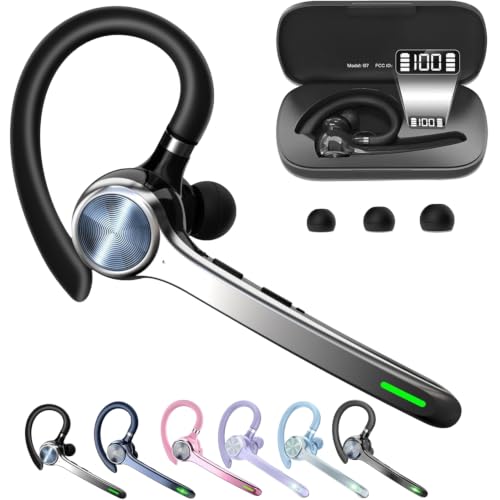
- Lightweight single-ear design for hands-free calls
- Dedicated mute button works during phone calls
- Charging case supports up to 72 hours total use
Best For: Mobile calls in quieter environments
Best Budget Earbuds

- ENC noise reduction for clearer calls
- Bluetooth 5.4 with a 15-meter range
- Up to 36 hours with the charging case
Best For: Portable calling, workouts, and everyday listening
Best for Office Calls
WX-HS003 Wireless Work Headset

- AI microphone noise cancellation
- USB-A, USB-C, and Bluetooth connectivity
- Up to 65 hours of battery life
Best For: Remote work, meetings, and call-center shifts
Best Mainstream Pick
Sony WH-CH520 Wireless Headphones

- Built-in microphone for hands-free calls
- Up to 50 hours of battery life
- Multipoint connection for two devices
Best For: Everyday calls in quieter environments
Best Wireless Workstation Pick – PrancyBt KH120M Headset
The PrancyBt KH120M is a practical choice if you need headphones for calls across a home office, shared workspace, or call-center setting. Its environmental noise cancellation, boom microphone, mute button, Bluetooth connection, and Windows USB dongle support work-focused flexibility.
Best For: Remote workers and professionals who want wireless connectivity, long battery life, and a dedicated mute control.
Pros:
- Environmental noise cancellation is designed to reduce surrounding interference during calls.
- Up to 35 hours of operation supports long workdays and consecutive meetings.
- Bluetooth and the included USB dongle offer connection options for compatible computers.
- Adjustable headband, soft ear pads, and rotating earcups support extended wear.
Cons:
- The USB dongle works exclusively with Windows systems.
- It is not compatible with desk phones or landline telephones.
- The mute function works only during active calls or meetings.
The KH120M stands out for call-heavy work where wireless mobility and battery endurance matter. Check your computer compatibility before buying, especially if you use a non-Windows system or a desk phone.
Best Simple Wired Option – Apple EarPods USB-C
Apple EarPods are a straightforward wired option for headphones for calls on USB-C devices. The integrated microphone and cord remote let you answer calls, adjust volume, and control playback without managing a battery or wireless pairing.
Best For: USB-C device users who prefer lightweight wired earbuds for calls and everyday listening.
Pros:
- Built-in microphone is designed to capture your voice during phone and FaceTime calls.
- USB-C connectivity works with devices that have a USB-C port.
- Inline controls handle calls, volume, and media playback.
- Lightweight design weighs 1.12 ounces.
Cons:
- The wired design limits movement compared with wireless headsets.
- Compatibility depends on having a USB-C port.
- The supplied notes do not mention noise cancellation.
These EarPods make sense when simplicity, low weight, and direct USB-C connection are more important than wireless freedom or active noise control. They are especially convenient for quick calls and general device use.
Best Multipoint Battery Life – KH53 Wireless Headset
The KH53 is a strong contender among headphones for calls if you move between a computer and smartphone. It combines environmental noise cancellation, a one-touch mute button, dual pairing, a charging stand, and up to 40 hours of talk time for busy work schedules.
Best For: Hybrid workers who switch between laptop and phone calls and want extended battery life.
Pros:
- Dual pairing supports simultaneous connection to a laptop and smartphone.
- Environmental noise cancellation and a flexible boom microphone support clearer calls.
- Provides up to 40 hours of talk time and includes a charging stand.
- The 33-foot Bluetooth range supports movement during meetings.
Cons:
- The USB dongle is intended for Windows PCs and is not compatible with desk phones or landlines.
- The mute function activates only during calls.
- The included MFB button controls smartphone functions, not computer apps.
Choose the KH53 when frequent device switching and battery endurance are priorities. Its feature set is well suited to hybrid work, though buyers should confirm how the controls and dongle fit their particular computer setup.
Best Plug-and-Play Value – Logitech H390 USB Headset
The Logitech H390 is a dependable wired pick for headphones for calls at a computer. Its USB-A plug-and-play connection, rotating noise-canceling microphone, inline mute and volume controls, and padded ear cushions keep setup simple for meetings and everyday conversations.
Best For: PC, laptop, and Chromebook users who want an easy wired headset without software installation.
Pros:
- USB-A plug-and-play setup requires no software installation.
- Rotating noise-canceling microphone can be moved out of the way when unused.
- Inline controls provide convenient volume adjustment and call muting.
- The 6.23-foot cable allows some freedom to stand and move.
Cons:
- The wired USB-A design does not provide Bluetooth mobility.
- It is designed for PC audio applications rather than desk-phone connectivity.
- The supplied specifications list no additional noise-control feature beyond the microphone design.
The H390 is a sensible low-complexity choice for computer calls, especially when you value immediate USB setup and physical controls. Its long cable adds flexibility, but check that your device has a USB-A port.
Best Work Call Headset – M112 ANC Wireless Headset
If you need headphones for calls in a busy office or home, the M112 combines ANC for what you hear with ENC for clearer outgoing speech. Its USB-A dongle, Bluetooth 5.4, and flip-to-mute microphone make it especially practical for computer-based meetings.
Best For: Remote workers and office professionals handling frequent Zoom, Teams, or customer calls on a PC or Mac.
Pros:
- Hybrid ANC and ENC help reduce surrounding noise and improve voice clarity.
- Dedicated Qualcomm USB-A dongle provides plug-and-play computer connectivity.
- Flip-to-mute boom offers a quick, physical way to mute the microphone.
- Up to 35 hours of talk time after a two-hour charge.
Cons:
- The dongle is not compatible with landlines, desk phones, or VoIP phones.
- The USB dongle uses USB-A, which may require an adapter on some newer devices.
This is the most call-focused option in the group, thanks to its boom mic, ENC, dongle, and flip-to-mute control. Choose it when reliable computer calling and long wearing sessions matter more than compact portability.
Best Versatile Call Headphones – Soundcore Q20i ANC Headphones
The Soundcore Q20i are over-ear headphones for calls that also suit travel, commuting, gaming, and everyday listening. Their dual-device Bluetooth connection can switch between a laptop and phone, while ANC and Transparency modes help adapt to different environments.
Best For: People who want one pair of wireless headphones for office meetings, phone calls, travel, and music.
Pros:
- Hybrid ANC uses four microphones and is rated to reduce up to 90% of external noise.
- Dual connections allow simultaneous pairing with two devices.
- Up to 40 hours of battery life with ANC or 60 hours in Normal mode.
- Soundcore app supports EQ customization, listening modes, and firmware updates.
Cons:
- It does not include a dedicated computer dongle.
- The supplied details describe a microphone but provide less call-specific microphone control than a boom-headset design.
The Q20i is a flexible pick if calls are only one part of your day. Its long battery life, app controls, and dual-device pairing make it more adaptable than a dedicated work headset, though specialized call features are more limited.
Best Compact Call Earpiece – HEIBAS G7 Bluetooth Headset
For hands-free calls without bulky over-ear headphones, the HEIBAS G7 is a lightweight, single-ear Bluetooth earpiece with a charging case. It supports dual connection, includes a dedicated mute button for phone calls, and provides up to 18–23 hours of talk time from the earpiece.
Best For: Mobile users who prefer a compact, single-ear headset for extended phone conversations.
Pros:
- Compact design is intended to remain comfortable and unobtrusive.
- Individual mute button simplifies muting during phone calls.
- Charging case provides up to 72 hours of total music or talking time.
- Supports dual connection with Bluetooth-enabled phones and computers.
Cons:
- It has no listed noise-control system, so it may be less suitable for noisy environments.
- The mute function is limited to phone calls according to the supplied notes.
- It is not water resistant.
The G7 is a practical alternative to full-size headphones for calls when portability and one-ear comfort are priorities. Its long-lasting case is useful for frequent mobile conversations, but the lack of noise control makes it better for relatively quiet settings.
Best Budget Earbuds – A90 Pro Wireless Earbuds
If you want compact headphones for calls, the A90 Pro wireless earbuds combine built-in microphones with ENC call-noise cancellation to help keep conversations clear. Bluetooth 5.4, touch controls, and automatic pairing make them practical for commuting, home use, and everyday calls.
Best For: People who prefer lightweight, in-ear headphones for calls, workouts, and portable listening.
Pros:
- ENC noise reduction is designed to improve voice clarity in noisy environments.
- Bluetooth 5.4 supports stable connections up to 15 meters.
- Up to 36 hours of total battery life with the charging case and USB-C fast charging.
- IP7 waterproofing, multiple ear-tip sizes, and touch controls support active use.
Cons:
- Six to eight hours of listening per charge is less than some over-ear alternatives.
- In-ear earbuds may not suit users who prefer an on-ear or over-ear fit.
The A90 Pro is a feature-rich choice for buyers who want affordable headphones for calls in a small true-wireless design. Its call-focused ENC, water resistance, and charging-case battery make it especially versatile for daily mobility.
Best for Office Calls – WX-HS003 Wireless Work Headset
For work-focused headphones for calls, the WX-HS003 pairs an AI noise-cancelling microphone with USB-A, USB-C, and Bluetooth connectivity. Its over-ear-style work design, one-tap mute, and long battery life are suited to meetings, customer service, and extended office shifts.
Best For: Remote workers, call-center staff, and professionals who need flexible connections across computers and mobile devices.
Pros:
- AI noise-cancelling microphone is designed to reduce up to 97% of ambient noise.
- Bluetooth 6.0 provides a stated range of up to 49 feet, with USB adapters for broader compatibility.
- Up to 65 hours of battery life, plus a five-minute charge for up to two hours of use.
- One-tap microphone mute and adjustable, padded construction support long work sessions.
Cons:
- The larger on-ear headset is less pocketable than true wireless earbuds.
- Its work-oriented feature set may be more than needed for casual music listening.
This is the strongest fit of the three for structured work calls. The dedicated microphone, mute control, multi-connection options, and 65-hour battery are particularly useful when meetings and calls fill the workday.
Best Mainstream Pick – Sony WH-CH520 Wireless Headphones
The Sony WH-CH520 are straightforward headphones for calls with a built-in microphone, lightweight on-ear construction, and hands-free calling. They also offer multipoint connection, allowing you to switch between two devices, which is useful for balancing a phone and computer.
Best For: Buyers who want a familiar brand, comfortable everyday headphones, and simple calling features for compatible Bluetooth devices.
Pros:
- Built-in microphone supports hands-free calling without taking out your phone.
- Up to 50 hours of battery life with quick charging.
- Multipoint connection supports switching between two devices.
- Lightweight adjustable design with cushioned ear pads for extended wear.
Cons:
- There is no listed noise-control feature, so they may be less suitable for noisy calls.
- They are not water resistant.
- The on-ear design may provide less outside-noise isolation than sealed earbuds.
The WH-CH520 is a sensible everyday option when you value comfort, battery life, and simple device switching over advanced call-noise reduction. Choose it for quieter environments and general phone or computer calls.
How We Picked the Best Headphones for Calls
We focused on features that directly affect call quality and daily usability: microphone performance, connection options, comfort, controls, background-noise handling, and compatibility. The selection includes wired USB models for dependable plug-and-play use, Bluetooth headsets for mobility, and headphones with dedicated dongles for easier computer pairing.
Because call needs vary, this list also considers wearing style. Over-ear and on-ear headphones can provide longer-wearing comfort, while earbuds and single-ear headsets are lighter and more discreet. Product claims such as noise cancellation and AI microphone processing should be viewed alongside the headset’s design, fit, and connection method.
Quick Comparison
- Best for straightforward computer calls: USB headsets with built-in microphones offer simple setup and consistent connectivity.
- Best for flexible workstations: Wireless headsets with Bluetooth and USB dongles can switch between phones and computers more easily.
- Best for travel and general listening: Bluetooth headphones with active noise cancellation help reduce surrounding sound between calls.
- Best for lightweight wear: Earbuds and single-ear Bluetooth headsets minimize bulk during mobile conversations.
- Best for compatibility-conscious buyers: Wired USB-C or USB-A models avoid battery concerns but require the matching port or adapter.
Key Buying Factors for Headphones for Calls
Microphone Clarity
A boom microphone usually places the pickup closer to your mouth and can be a strong choice for meetings. Built-in microphones are more compact, but performance depends heavily on placement and noise processing. Look for mute controls, flip-to-mute functionality, or an easy-to-reach mute button if you take frequent calls.
Connection and Compatibility
Bluetooth is convenient for phones and tablets, while a USB dongle can provide simpler computer pairing and may reduce connection issues. Check whether the headset uses USB-A, USB-C, Bluetooth, or a combination. Wired models are useful when you want a reliable connection without charging.
Noise Control and Listening Comfort
Active noise cancellation can make it easier to hear callers in busy environments, but it does not replace a good microphone. Also consider passive isolation, ear-cup size, clamping pressure, weight, and whether the headset can be worn comfortably for several hours.
Battery Life and Controls
Wireless buyers should check rated battery life, charging time, and whether the headset supports use while charging. On-headset volume and call controls are convenient, particularly when your computer or phone is positioned away from you.
Who Should Buy Which Headphones for Calls?
Choose a wired USB headset if you mainly work at one desk and want dependable setup with no battery management. Choose a Bluetooth headset with a dongle if you regularly move between a laptop and phone. Choose ANC headphones if you need to focus in shared spaces and also want a strong option for music or travel. Choose earbuds for a compact, portable design, especially when you take calls on the go. Choose a single-ear headset if you need to stay aware of nearby conversations or surroundings.
Before buying, confirm your device ports, preferred wearing style, return policy, and whether the microphone has the controls you use most. Those details often matter more for productive calls than premium audio specifications alone.