The best audio interface with low latency makes recording, monitoring, and streaming feel immediate, without distracting echoes or delayed instrument response. The right model also needs dependable drivers, suitable inputs, and enough connectivity for your setup.
We compare 10 options for musicians, podcasters, streamers, and home producers, from compact two-channel interfaces to more capable multi-input models.
Best 10 Audio Interface with Low Latency Picks for 2026
Best Overall
Focusrite Scarlett 2i2 4th Gen

- Two mic and instrument inputs
- Auto Gain and Clip Safe simplify recording
- Includes a broad software bundle
Best For: Home musicians wanting a flexible starter interface
Best for Guitarists

- Built for guitar effects and VST apps
- Footswitch and expression pedal inputs
- Portable iOS, Windows, and Mac support
Best For: Guitarists building a computer or mobile effects rig
Best Converter Performance

- ESS Sabre32 Ultra DAC technology
- 120 dB measured output dynamic range
- Includes two recording software titles
Best For: Producers focused on clean conversion and monitoring
Best for Vintage Tone

- Vintage mode emulates classic 610 preamps
- 24-bit/192 kHz recording support
- Works with desktop and selected mobile devices
Best For: Solo creators wanting vintage-style preamp character
Best Value for Mobile Recording

- 24-bit/192kHz recording support
- Direct zero-latency monitoring
- Two combo inputs with 48V phantom power
Best For: Portable home recording and mobile creators
Best Budget Starter

- Zero-latency USB/Direct monitoring
- Combo input plus instrument input
- Includes MPC Beats and Ableton Live Lite
Best For: Entry-level recording, podcasting, and streaming
Best Monitoring Flexibility

- Four zero-latency monitoring modes
- Dual combo inputs and four outputs
- 24-bit/192kHz recording with PAD switches
Best For: Recording, streaming, and podcast setups needing flexible monitoring
Versatile 4-Input Pick

- 4x4 USB audio and MIDI interface
- Four MIDAS mic preamps with phantom power
- 24-bit/192 kHz support with ultra-low latency
Best For: Multi-mic recording and growing home studios
Budget Direct-Monitoring Pick
Wrugste 2-in/2-out USB Interface

- Two combo XLR/¼-inch inputs
- Direct monitoring for real-time listening
- Includes cables, adapter, and +48V phantom power
Best For: Simple home recording, podcasting, and streaming
Modern Creator Pick
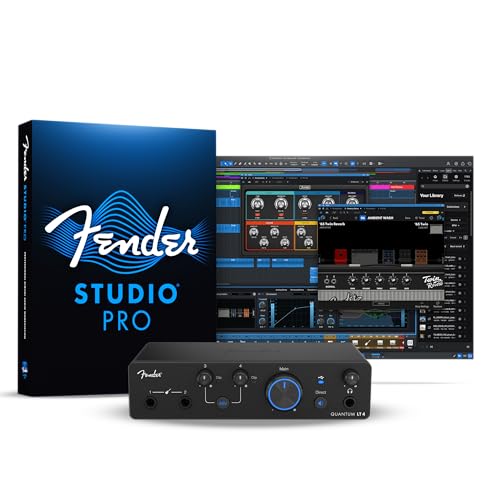
- 4x2 USB-C interface with low-latency drivers
- Dual mic preamps and dual instrument inputs
- Loopback, balanced outputs, and headphone amp
Best For: Guitarists, producers, streamers, and content creators
Best Overall – Focusrite Scarlett 2i2 4th Gen
The Focusrite Scarlett 2i2 4th Gen is a strong all-around audio interface with low latency for home recording, vocals, guitar, and compact desktop setups. Its two inputs, 192 kHz support, and included software make it a practical starting point for producing, mixing, and mastering.
Best For: Home musicians who want flexible recording features and an extensive software bundle.
Pros:
- Two mic preamps and Hi-Z instrument inputs support vocals and guitar.
- 120 dB dynamic range, 24-bit/192 kHz operation, and Air modes support detailed recordings.
- Auto Gain and Clip Safe help simplify level setting and prevent clipping.
- Includes Pro Tools Intro+, Ableton Live Lite, Cubase LE, and Hitmaker Expansion.
Cons:
- It has two audio inputs, so larger recording sessions require additional equipment.
- The included USB-A to USB-C cable may require an adapter for some setups.
With useful gain-assistance features, two versatile inputs, and broad software support, the Scarlett 2i2 is an easy recommendation for most first-time and intermediate creators seeking responsive monitoring and recording.
Best for Guitarists – XSONIC Xtone Mobile Interface
The XSONIC Xtone is a focused choice for guitarists seeking an audio interface with low latency for effects, amp simulation, and VST-based setups. It combines a pure guitar input with expression-pedal and footswitch connections in a lightweight design.
Best For: Guitarists using mobile or computer-based effects applications.
Pros:
- Designed specifically for guitar effects and VST applications.
- Supports 192 kHz audio and a stated 108 dB dynamic range.
- Includes footswitch and expression pedal inputs for performance control.
- Works with iOS, Windows, and Mac and can be powered directly by compatible devices.
Cons:
- Its single-channel design is less suitable for recording multiple sources at once.
- The listed software support is centered on guitar applications rather than general studio production.
- The BIAS FX Essential package claim is for iOS only.
For guitar-focused playing and effects processing, the Xtone prioritizes portability and responsive operation over multi-input recording versatility.
Best Converter Performance – MOTU M2 USB-C Interface
The MOTU M2 is a two-channel USB-C audio interface with low latency suited to creators who place a high value on conversion and headphone monitoring. Its ESS Sabre32 Ultra DAC technology and stated 120 dB output dynamic range target detailed, clean playback.
Best For: Home studios and producers prioritizing converter quality and headphone output performance.
Pros:
- ESS Sabre32 Ultra DAC technology is designed for high-quality analog sound.
- Outputs offer a measured 120 dB dynamic range.
- The mic inputs list a measured -129 dBu EIN.
- Includes Ableton Live Lite and MOTU Performer Lite.
Cons:
- The supplied notes do not specify detailed input or output connector configurations.
- It is a two-channel interface, which limits simultaneous recording capacity.
- The listed operating-system detail mentions Windows only.
The M2 is most compelling when clean conversion and a strong headphone output matter more than a large input count or extensive bundled production tools.
Best for Vintage Tone – Universal Audio Volt 1
The Universal Audio Volt 1 is a compact audio interface with low latency for solo recording and mobile-friendly production. Its Vintage mode is designed to emulate the character of UA’s classic 610 preamps, while 24-bit/192 kHz operation supports detailed capture.
Best For: Solo musicians and beginners who want vintage-style preamp coloration and guided software resources.
Pros:
- Vintage mode provides the sound of UA’s classic 610 preamps.
- Supports up to 24-bit/192 kHz recording quality.
- Compatible with Mac, Windows, iPad, and iPhone, with suitable accessories for some mobile setups.
- Includes access to LUNA and listed music-production tools and tutorials.
Cons:
- The compact model is best suited to solo or small recording setups.
- iPhone and some iPad configurations require an external power supply and Apple adapter.
- Its listed warranty is one year.
The Volt 1 stands out for its characterful Vintage mode and approachable software ecosystem, making it a good fit for creators who want a simple interface with a more classic preamp flavor.
Best Value for Mobile Recording – PIYONE Q2 Alloy Red
If you want an audio interface with low latency for home recording, the PIYONE Q2 combines direct monitoring with a portable USB-C design. Its two combo inputs, 48V phantom power, and 24-bit/192kHz recording support make it flexible for vocals, guitar, and other sources.
Best For: Home musicians and mobile creators who want plug-and-play USB-C connectivity, high-resolution recording, and straightforward monitoring.
Pros:
- Direct monitoring supports silent, zero-latency tracking.
- Two XLR/TRS combo inputs accommodate microphones, instruments, and line sources.
- USB-C provides data transfer and bus power without an external supply.
- Supports 24-bit/192kHz recording and includes a 3.5mm headphone output.
Cons:
- Only two input channels are available.
- The supplied details list Windows compatibility, while broader mobile compatibility is described in the product features.
The Q2 is a practical choice when portability and direct monitoring matter more than extensive I/O. Its illuminated controls and high-resolution support add useful convenience for a compact home setup.
Best Budget Starter – M-AUDIO M-Track Solo
The M-AUDIO M-Track Solo is a compact audio interface with low latency for basic recording, podcasting, and livestreaming. Its USB/Direct monitoring switch, combo microphone/line input, and separate instrument input cover common beginner setups.
Best For: Beginners, podcasters, and streamers who need an affordable two-channel interface for guitar, vocals, or line-level sources.
Pros:
- USB/Direct switch enables zero-latency monitoring.
- Offers a combo XLR/line input plus a dedicated line/instrument input.
- Includes phantom power for condenser microphones.
- Comes with MPC Beats and supports Ableton Live Lite.
Cons:
- Recording resolution is limited to 48kHz.
- It uses USB Type-B rather than USB-C.
- Monitoring outputs are limited to a 1/8-inch headphone output and stereo RCA outputs.
For straightforward two-input recording, the M-Track Solo keeps the setup simple and portable. Its direct monitoring and included software make it especially approachable for first-time creators.
Best Monitoring Flexibility – BlueAVS AR013
The BlueAVS AR013 is an audio interface with low latency aimed at recording, streaming, and podcasting setups that need flexible monitoring. It pairs dual combo inputs with four monitoring modes, balanced outputs, PAD switches, and 24-bit/192kHz support.
Best For: Creators who need dual-input recording, multiple real-time monitoring options, and USB-C connectivity for computers and mobile-compatible workflows.
Pros:
- Provides zero-latency monitoring with Off, Mono, Crossfeed, and Stereo modes.
- Two XLR/TRS combo inputs support microphones, guitars, and line-level equipment.
- 24-bit/192kHz recording and multiple sample rates suit major DAWs.
- Independent 48V phantom power and PAD switches support condenser microphones and louder sources.
Cons:
- It remains a two-channel input interface despite offering four outputs.
- At 1.3 pounds, it is less lightweight than some compact two-input alternatives.
The AR013 stands out when monitoring control is a priority. Its four modes and balanced TRS outputs offer more routing flexibility than a basic starter interface, while USB-C and broad software compatibility support varied creator workflows.
Versatile 4-Input Pick – Behringer U-PHORIA UMC404HD
The Behringer U-PHORIA UMC404HD is a practical audio interface with low latency for recording several microphones or instruments at once. Its 4×4 USB connectivity, MIDI I/O, 24-bit/192 kHz support, and four MIDAS-designed preamps make it suitable for a more developed home or project studio.
Best For: Musicians and home studios needing four simultaneous inputs, MIDI connectivity, and flexible routing.
Pros:
- Four inputs and four outputs support multi-mic and instrument recording.
- Four MIDAS-designed mic preamps include +48V phantom power.
- Offers 24-bit/192 kHz resolution, MIDI I/O, and ultra-low-latency computer connectivity.
- Impact-resistant metal chassis is designed for durability.
Cons:
- Its larger four-channel layout may be more than a simple one- or two-input setup requires.
- The supplied compatibility notes list older Windows and Mac OS X requirements rather than newer platform details.
Choose this model when input count and expansion matter more than having the smallest desktop footprint. It is a strong feature set for recording multiple sources, though buyers should confirm current operating-system compatibility before purchase.
Budget Direct-Monitoring Pick – Wrugste 2-in/2-out USB Interface
The Wrugste 2-in/2-out interface is aimed at straightforward recording, podcasting, and streaming. As an audio interface with low latency, its direct-monitoring modes let you hear the preamp input in real time, while combo inputs accept microphones, guitars, and line-level sources.
Best For: Beginners, podcasters, and solo musicians who want a simple two-input setup with direct monitoring.
Pros:
- Combo XLR/¼-inch inputs handle microphones, instruments, and line-level signals.
- Mono and stereo direct-monitoring modes are designed for delay-free monitoring.
- Includes +48V phantom power for compatible condenser microphones.
- Package includes an XLR cable, USB cables, adapter, and user manual.
Cons:
- It provides only two input and two output channels.
- The product details list 96 kHz as the maximum sample rate, despite the title referencing 192 kHz.
- The supplied notes identify it as a lesser-known brand, so buyers may want to weigh support expectations carefully.
This is a practical entry-level option when easy connections and zero-delay direct monitoring are priorities. Its included accessories add convenience, but the conflicting sample-rate information is worth verifying before ordering.
Modern Creator Pick – Fender Quantum LT 4
The Fender Quantum LT 4 combines four-channel connectivity with USB-C, low-latency drivers, and loopback routing. For creators seeking an audio interface with low latency, it adds two high-gain MAX-HD mic preamps, dual instrument inputs, balanced outputs, and a headphone amp for recording and content production.
Best For: Guitarists, producers, streamers, and growing creators who want flexible monitoring and Fender software integration.
Pros:
- 4×2 USB-C design includes two mic preamps and two instrument inputs.
- Custom low-latency drivers and direct-monitoring control support responsive recording.
- Loopback routing, balanced outputs, and a headphone amp suit streaming and podcasting.
- Registration provides access to the Fender Studio app and Fender Amp & FX Pack.
Cons:
- Some software benefits require registration and use of the Fender Studio ecosystem.
- It has two mic preamps rather than four, despite its four-channel designation.
The Quantum LT 4 is a compact, feature-rich choice for users who record instruments and also create streamed or loopback content. Its software bundle and Fender-focused tools add value, while the 4×2 layout offers useful flexibility without becoming overly large.
How We Picked the Best Audio Interface with Low Latency
We focused on interfaces that offer practical low-latency monitoring, reputable connection standards, and recording quality suitable for modern home studios. The selection includes USB-C and USB models, compact two-input designs, and larger interfaces with four or more inputs.
We also considered microphone preamp features, phantom power, instrument compatibility, output flexibility, driver support, portability, and overall value. Published specifications such as sample rate and bit depth matter, but stable real-world performance and an easy workflow are just as important.
Quick Comparison
| Best For | What to Look For |
|---|---|
| Solo recording | Two combo inputs, direct monitoring, and a headphone output |
| Guitar and bass | A dedicated instrument input and fast monitoring response |
| Podcasts and streaming | Clear preamps, phantom power, and convenient output control |
| Small bands | Four or more inputs and independent gain control |
| Mobile recording | Compact construction, USB-C compatibility, and device support |
Key Buying Factors for an Audio Interface with Low Latency
Monitoring and Driver Performance
Low latency depends on more than a product label. Direct monitoring can route an input straight to your headphones, while well-designed drivers and suitable buffer settings reduce delay when monitoring through recording software. Check operating-system compatibility before buying, especially if you use newer macOS, Windows, iPadOS, or another mobile platform.
Inputs, Outputs, and Expansion
Two inputs are enough for a vocalist and instrument, but four inputs provide more flexibility for interviews, stereo sources, or simultaneous performers. Combo XLR/TRS inputs accept microphones and line-level equipment. MIDI, extra line outputs, and multiple headphone connections can also be valuable as your setup grows.
Recording Quality and Power
24-bit recording is standard for serious production, while sample rates up to 192 kHz are common across this group. More important for most users are clean preamps, usable gain range, low noise, and 48V phantom power for condenser microphones. Confirm that the interface supplies enough power for your microphone and headphones.
Build, Controls, and Compatibility
Front-panel gain knobs, clear meters, and a dedicated monitor mix control make recording easier. A compact metal enclosure is useful for travel, while USB-C can simplify connection to newer computers. Some interfaces may require adapters, external power, or specific cables when used with tablets and phones.
Who Should Buy Which Audio Interface with Low Latency?
Choose a compact two-input model if you are recording vocals, guitar, voiceovers, or one stereo source. These interfaces are typically the easiest starting point and offer the simplest low-latency workflow.
Choose a mobile-focused interface if portability and guitar processing are priorities. Verify app, cable, and device compatibility before purchasing.
Choose a four-input interface for podcasts with multiple guests, small ensembles, or a setup likely to expand. The additional inputs can cost more, but they reduce the need to upgrade later.
Choose a higher-end home-studio model if you want more refined monitoring, stronger metering, premium preamps, or a more polished production workflow. For beginners, prioritize stable drivers and useful connectivity over headline sample-rate numbers.