The best USB PTZ cameras make it easier to cover a room, follow a speaker, and deliver a polished video feed without constantly adjusting the camera. The models in this roundup range from straightforward 1080p conference cameras to 4K systems with AI tracking, optical zoom, HDMI, PoE, and NDI support.
Use the buying guide below to narrow your choices by room size, streaming workflow, installation requirements, and budget.
Best 10 USB Ptz Cameras Picks for 2026
Best Simple Conference Choice
Logitech PTZ Pro 2 1080p USB Camera
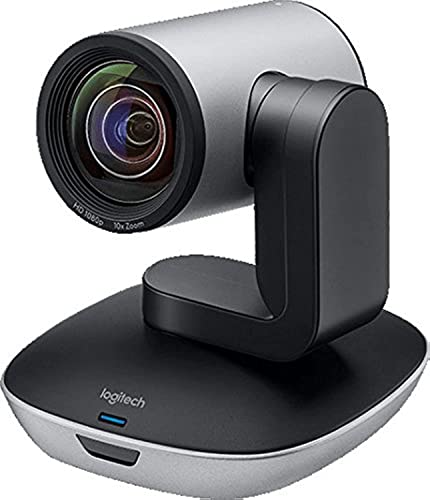
- 1080p video at 30fps
- 90-degree viewing angle
- 3X optical zoom with smooth PTZ movement
Best For: Conference rooms, training environments, and events
Best NDI Production Pick

- Official NDI HX3-certified network video
- 4K/30fps and 1080p/60fps HDMI output
- Customizable Gen 3 AI tracking
Best For: NDI production, churches, broadcasts, and events
Best Budget Room Coverage
NexiGo P610 10X USB PTZ Camera

- 1080p video with 10X optical zoom
- Autofocus or manual focus
- Quiet PTZ movement with remote presets
Best For: Small and medium conference rooms, classes, and meetings
Best All-in-One System
TONGVEO 1080p AI Auto-Tracking PTZ Camera

- 1080p at 60fps via USB 3.0 or HDMI
- AI face and humanoid tracking
- Includes Bluetooth speakerphone
Best For: Small-to-medium conference rooms needing integrated video and audio
Best Professional USB PTZ Camera

- 4K HDMI and USB with 20x optical zoom
- SDI, NDI, IP, and PoE connectivity
- AI presenter tracking and auto-framing
Best For: Live production, churches, studios, and event video
Best AI Tracking Pick – iuZee 4K 20X USB PTZ Camera
For demanding USB PTZ cameras setups, the iuZee combines 4K video, 20X optical zoom, and AI tracking with USB 3.0, HDMI, and LAN outputs. PoE support and browser-based control add flexibility for streaming and installed production systems.
Best For: Churches, classrooms, conferences, events, and live production where automated subject tracking and long-range detail matter.
Pros:
- 4K video at up to 30fps with a 20X optical zoom lens.
- AI face and body tracking includes presenter and auto-framing modes.
- USB 3.0, HDMI, LAN, PoE, RTMP, RTSP, and SRT support.
- Supports desktop, tripod, wall, and ceiling installation.
Cons:
- A PoE switch is required for PoE installation.
- Its extensive broadcast features may be more than basic meeting users need.
This is a feature-rich choice for buyers who want one camera to handle USB conferencing, network streaming, and professional multi-output workflows, backed by a three-year limited warranty and lifetime online support.
Best Simple Conference Choice – Logitech PTZ Pro 2 1080p USB Camera
The Logitech PTZ Pro 2 is a straightforward option among USB PTZ cameras for conference rooms and professional video applications. It delivers 1080p video, a wide viewing angle, optical zoom, and smooth pan, tilt, and preset movement through a USB connection.
Best For: Conference rooms, training spaces, large events, and Windows or macOS users seeking an established USB video solution.
Pros:
- 1080p video at 30fps with autofocus and 3X optical zoom.
- 90-degree viewing angle helps include more participants.
- Enhanced pan, tilt, and zoom motors provide smoother preset changes.
- Processes video in the camera to help free application bandwidth.
Cons:
- It is limited to 1080p rather than 4K resolution.
- Optical zoom is shorter than the 10X and 20X models in this roundup.
Choose this model when dependable USB connectivity and uncomplicated 1080p conferencing are more important than network streaming, PoE, or advanced AI tracking features.
Best NDI Production Pick – FoMaKo 4K 20X USB PTZ Camera
The FoMaKo K20UH stands out among USB PTZ cameras for networked video production, combining 4K output, 20X optical zoom, official NDI HX3 certification, and Gen 3 AI tracking. HDMI 2.0, USB 3.0, LAN, and PoE support make it suitable for multi-camera workflows.
Best For: Churches, broadcasters, educators, and event producers using NDI, OBS, vMix, or other multi-camera streaming systems.
Pros:
- 4K/30fps output and 1080p/60fps uncompressed HDMI video.
- Official NDI 6 and NDI HX3 certification supports network production.
- Gen 3 tracking allows adjustments for sensitivity, framing, target position, and lost-target action.
- 20X optical zoom, 340-degree pan, and 120-degree tilt provide broad coverage.
Cons:
- Its NDI and production features may require a more involved setup.
- PoE operation requires compatible network equipment.
For buyers building an NDI-based system, this is the most production-oriented option here. Its flexible tracking controls and broad connection choices also leave room to expand beyond a basic USB-only setup.
Best Budget Room Coverage – NexiGo P610 10X USB PTZ Camera
The NexiGo P610 is a practical entry point among USB PTZ cameras for small and medium-sized rooms. It offers 1080p video, 10X optical zoom, autofocus or manual focus, quiet PTZ movement, and USB output for meetings, streaming, education, and church services.
Best For: Small and medium conference rooms that need optical zoom and flexible framing without moving to a 4K or network-production camera.
Pros:
- 10X optical zoom helps frame both full-room views and speaker close-ups.
- 1080p video with 2D and 3D noise reduction supports low-light clarity.
- Autofocus and manual focus modes offer setup flexibility.
- Remote control provides quiet pan, tilt, and up to 10 presets.
Cons:
- No built-in microphone is included.
- Mounting hardware is not included.
- It does not offer 4K, LAN, HDMI, or PoE outputs in the supplied specifications.
This model makes sense when USB connectivity and useful optical zoom are the priorities. Plan to add a separate microphone and mounting solution, especially for a permanent room installation.
Best All-in-One System – TONGVEO 1080p AI Auto-Tracking PTZ Camera
This TONGVEO system is a practical choice among USB PTZ cameras when you need both video and room audio in one package. Its 1080p camera provides 60fps output over USB 3.0 or HDMI, while the included Bluetooth speakerphone supports wireless or USB connections for small-to-medium meeting spaces.
Best For: Small-to-medium conference rooms, hybrid meetings, online classes, and teams wanting an integrated camera and speakerphone.
Pros:
- AI face and humanoid tracking helps keep a speaker framed automatically.
- 1080p video at 60fps with simultaneous HDMI and USB 3.0 output.
- Includes a Bluetooth speakerphone with a stated 16.4-foot pickup range and 6–8 hours of battery life.
Cons:
- The PTZ camera itself is wired; only the speaker is wireless.
- Its 3x optical zoom is less suited to long-distance framing than higher-zoom models.
Choose this model if a straightforward video-and-audio conference setup matters more than 4K resolution or extensive networking features. The all-in-one design can simplify deployment, especially where a separate microphone and speaker would add clutter.
Best for Long-Range Detail – KATOVJJTS 4K PTZ Camera with 20x Zoom
For buyers comparing USB PTZ cameras for larger rooms, venues, or streaming setups, this KATOVJJTS model emphasizes image detail and reach. It combines 4K video at 30fps with a 20x optical zoom and USB 3.0, HDMI, Ethernet, and PoE connectivity.
Best For: Church services, larger conference spaces, live production, and streaming workflows that benefit from optical zoom and network control.
Pros:
- 4K UHD output at 30fps provides sharper detail than standard 1080p models.
- 20x optical zoom supports close-up shots from a distance.
- Offers USB, HDMI, Ethernet, PoE, RTSP, RTMP, and H.264/H.265 support.
- Includes a remote, mounting bracket, HDMI cable, USB 3.0 cable, and RS232 cable.
Cons:
- It is heavier and more substantial than a typical desktop webcam.
- 4K output is limited to 30fps rather than 60fps.
- The feature set may be more than needed for simple laptop-based calls.
This is the strongest fit when camera placement, zoom range, and flexible signal distribution are priorities. Its Ethernet and PoE capabilities also make it more adaptable to installed or production-oriented environments than a USB-only camera.
Best for AI Framing – TONGVEO 1080p 3x AI Auto-Tracking PTZ
This TONGVEO camera is a versatile USB PTZ cameras option for meetings, teaching, and streaming when automatic speaker framing is useful. It combines 1080p 60fps video, a 93-degree wide-angle lens, 3x optical zoom, HDMI and USB 3.0 output, and up to 255 position presets.
Best For: Mid-sized meeting rooms, remote learning, presenters, and creators using Zoom, Teams, OBS, YouTube, or Facebook Live.
Pros:
- AI auto-tracking can keep one speaker framed without constant manual adjustment.
- Wide 93-degree viewing angle helps cover groups in tighter spaces.
- 1080p video at 60fps with simultaneous HDMI and USB 3.0 output.
- Supports up to 255 presets for quickly recalling camera positions.
Cons:
- Tracking handles one person at a time and is not designed for high-speed motion.
- It uses 3x optical zoom, so it offers less reach than a 20x model.
- The supplied notes identify the focus type as manual focus.
This model makes sense for users who want smooth, flexible framing in a conference or presentation space without moving up to a more complex 4K production camera. Its wide lens and preset support add practical versatility, while the tracking limitations are worth considering for fast-moving or multi-person subjects.
Best 4K USB PTZ Camera – Wide-Angle AI Tracker
If you want a high-resolution option among USB PTZ cameras, this TONGVEO model combines 4K capture over HDMI with USB 3.0 connectivity, AI subject tracking, and a wide 92° view. It is suited to presenters, services, classrooms, and conference spaces where flexible positioning matters.
Best For: Churches, educators, conference rooms, and streamers who need wide coverage with AI tracking and both USB and HDMI outputs.
Pros:
- Captures up to 4K at 30fps through HDMI and provides 1080p output through USB.
- AI facial and human tracking helps keep a speaker centered.
- 3x optical zoom and a 92° wide-angle lens cover both nearby groups and distant subjects.
- Supports 340° pan, 90° tilt, presets, and RS232/RS485 control.
Cons:
- USB output is limited to 1080p rather than 4K.
- The modest 3x optical zoom is less suitable for very distant subjects.
This is a practical choice when wide framing and 4K HDMI output are more important than long-range zoom. Its USB plug-and-play setup also makes it approachable for computer-based conferencing and streaming.
Best Long-Zoom USB PTZ Camera – 20x Smooth Tracking
For rooms where the camera must cover distant speakers, this TONGVEO is one of the more reach-focused USB PTZ cameras. It pairs 20x optical zoom with 1080p at 60fps, AI tracking modes, HDMI and USB 3.0, and extensive preset control.
Best For: Large churches, lecture spaces, conference rooms, and productions that need smooth motion and clear close-ups from a distance.
Pros:
- 20x optical zoom preserves detail better than digital zoom for distant subjects.
- 1080p at 60fps supports smooth motion for streaming and recording.
- AI supports single-person tracking and multi-person auto framing.
- Near-silent PTZ movement and up to 255 presets support repeatable camera operation.
Cons:
- Resolution is Full HD rather than 4K.
- The included cable is USB 2.0, despite the camera offering USB 3.0 connectivity.
Choose this model when optical reach and fluid 60fps video matter more than maximum resolution. Its plug-and-play compatibility with Zoom, OBS, vMix, Teams, and YouTube helps simplify deployment.
Best Professional USB PTZ Camera – 4K NDI Production Hub
This TONGVEO stands out among USB PTZ cameras for production-oriented connectivity. It combines 4K/30fps HDMI and USB output with 20x optical zoom, SDI, NDI, IP streaming, PoE, and AI tracking for more advanced multi-source or live-event setups.
Best For: Churches, studios, event producers, and streamers who need SDI, NDI, PoE, and flexible network-based control.
Pros:
- Provides 4K/30fps through HDMI and USB, with IP/NDI output up to 1080p.
- 20x optical zoom supports detailed shots from substantial distances.
- SDI supports long cable runs up to 300 feet, and PoE can carry power and data over one network cable.
- Includes presenter tracking and auto-framing modes with browser and software control.
Cons:
- AI tracking handles one person at a time and is not intended for high-speed motion.
- Network streaming is limited to 1080p.
- A joystick controller for multi-camera operation is purchased separately.
This is the strongest fit for buyers building a more professional video workflow rather than a simple webcam setup. Its combination of SDI, NDI, PoE, and 4K local outputs offers considerable flexibility, provided you can make use of the added infrastructure.
How We Picked These USB Ptz Cameras
We focused on features that have the greatest effect on real-world conference, classroom, worship, and live-streaming performance. That includes resolution, optical zoom, pan and tilt control, autofocus, tracking reliability, frame rates, and the available connection options.
We also considered workflow flexibility. USB is important for plug-and-play use with computers and video-conferencing software, while HDMI, LAN, PoE, NDI, and SDI can make a camera more useful in installed AV systems or multi-camera productions. Products with different zoom ranges and tracking capabilities are included so buyers can match the camera to their room rather than simply choosing the highest specification.
Quick Comparison
| Best For | Features to Prioritize | Recommended Type |
|---|---|---|
| Small meeting rooms | USB, autofocus, wide field of view | 1080p camera with 3x to 10x optical zoom |
| Medium conference rooms | Preset positions, stronger zoom, speaker tracking | 1080p or 4K model with 10x to 20x optical zoom |
| Churches and auditoriums | Long optical zoom, HDMI, LAN, PoE | 4K PTZ camera with 20x optical zoom |
| Professional streaming | NDI, multiple outputs, reliable tracking | 4K network PTZ camera with NDI and PoE |
Key Buying Factors for USB Ptz Cameras
Resolution and Frame Rate
Choose 4K when you need to crop, digitally reframe, or show distant subjects with more detail. A 1080p camera can still be the practical choice for video calls, especially when bandwidth and storage are limited. For smooth motion, look for 60fps support when available.
Optical Zoom and Field of View
Optical zoom preserves detail as you frame a speaker farther away; it is more useful than relying on digital zoom. Three times zoom suits small rooms, while 10x or 20x is better for stages, sanctuaries, lecture halls, and other deep spaces. A wide-angle view helps cover a group at close range.
AI Tracking and Controls
AI auto-tracking can keep a presenter centered, but performance depends on lighting, movement, and whether multiple people are in view. Remote controls, presets, manual pan-tilt operation, and autofocus remain valuable when you need predictable framing.
Connectivity and Compatibility
USB 3.0 is usually the simplest connection for Zoom, Teams, OBS, and similar software. HDMI provides a direct video output, while LAN and PoE can simplify permanent installations. NDI is particularly useful for network-based production, but confirm that your switch, software, and network can support it.
Who Should Buy Which USB Ptz Cameras?
- For everyday meetings: Choose a compact 1080p model with USB, autofocus, and a wide viewing angle.
- For larger rooms: Select 10x to 20x optical zoom, camera presets, and dependable remote control.
- For churches and live events: Favor 4K, long optical zoom, HDMI, LAN, and PoE; NDI is useful for network production.
- For presenters who move around: Choose AI tracking, but keep manual controls and preset positions available as a backup.
- For multi-camera systems: Look for matching outputs, network protocols, and control features across every camera.
Before buying, verify operating-system support, mounting options, cable lengths, and the software settings required for tracking or NDI. The right USB PTZ camera is the one that fits your room and workflow, not necessarily the one with the longest feature list.