A good headphone stand does more than keep your headset off the desk. The right model can add convenient USB or wireless charging, organize controllers and accessories, and reduce cable clutter around a gaming or work setup.
We compared 10 headphone stands with charging across power options, stability, storage, lighting, and desk-friendly design to help you choose the best fit for your space and devices.
Best 10 Headphone Stands with Charging Picks for 2026
RGB Gaming Pick
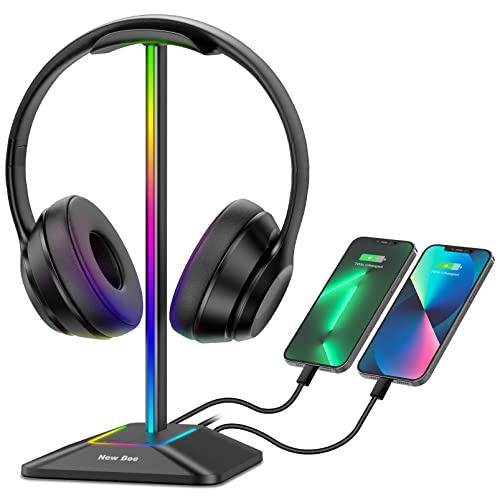
- Seven RGB lighting modes
- USB-C and USB charging ports
- Stable aluminum base with TPU rest
Best For: Gamers wanting lighting and wired charging
Power Hub Pick

- Three USB charging ports
- Two AC outlets rated to 1250W
- Built-in electrical protection features
Best For: Multi-device gaming and office desks
Multi-Device Dock
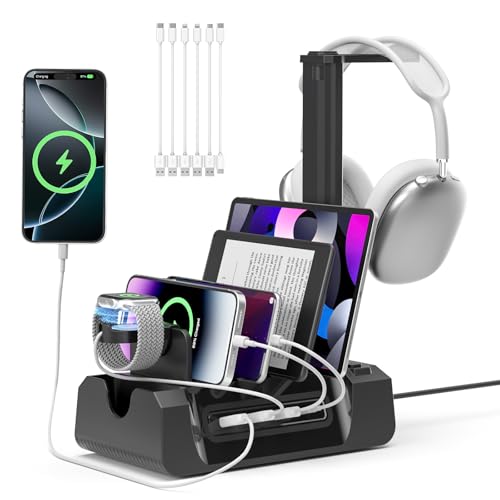
- Four USB ports and two AC outlets
- Includes six mixed charging cables
- Holds headphones and a smartwatch
Best For: Shared desks with varied devices
Wireless Charging Pick
Hiwe 2-in-1 Wireless Charging Stand

- Up to 15W wireless charging
- Additional USB charging port
- Foldable, space-saving design
Best For: Qi-compatible phones and earbuds
Best RGB Desktop Organizer
KDD USB A&C Charging Headphone Stand
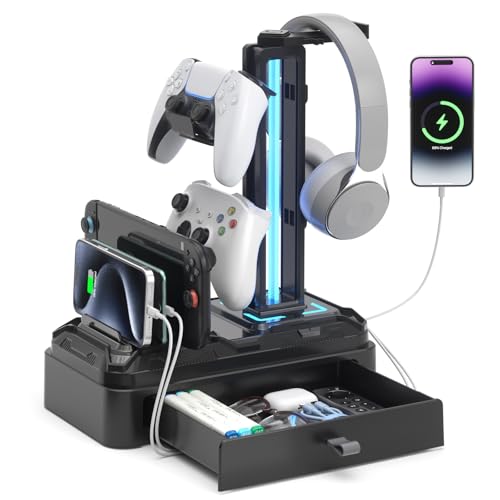
- USB-A and USB-C charging ports
- Nine RGB modes with memory
- Rotating hook, drawer, and device slot
Best For: Gaming desks needing charging and accessory storage
Best Wireless Charging Station
Suguder 15W 4-in-1 Headphone Stand
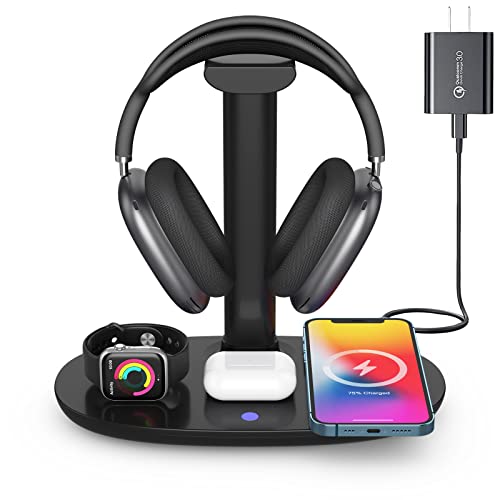
- Up to 15W wireless phone charging
- Charges phone, earbuds, and watch together
- Detachable headphone holder and adapter included
Best For: Multi-device Apple or Samsung desktop setups
Best Aluminum RGB Stand
New Bee Wireless Charging Headphone Holder

- Wireless charging plus three wired ports
- Seven RGB lighting modes
- Aluminum body with non-slip base
Best For: Gaming and work desks needing sturdy multi-port charging
Best Rotatable Charging Stand
KDD Headphone & Controller Stand

- Wireless charging plus two USB and one USB-C port
- Rotates 360 degrees and stores headset cables
- Holds one headset and multiple controllers
Best For: Gamers organizing a headset, controllers, and charging on one desktop
Best Dual-Headset Charging Stand

- Stores two headphones at once
- Three USB charging ports and two AC outlets
- Nine RGB lighting effects with selectable colors
Best For: Shared gaming desks and setups with multiple headsets
Best Single Headset Power Stand

- One headset hanger with three USB charging ports
- Two AC outlets for gaming and desktop devices
- RGB lighting with nine effects
Best For: Individual gaming setups needing headset storage and desk power
RGB Gaming Pick – New Bee RGB Headphone Stand
If you want headphone stands with charging that also add personality to a gaming desk, the New Bee RGB model combines a stable aluminum holder with USB-C and USB ports. Its lighting and compact tabletop design make it a practical accessory for a headset setup.
Best For: Gamers who want RGB lighting, broad headphone compatibility, and wired device charging.
Pros:
- Seven RGB lighting modes add customizable desk ambiance.
- USB-C and standard USB ports can charge phones, tablets, and other devices.
- Aluminum construction, a weighted base, and silicone pads help keep the stand stable.
- TPU cushioning helps protect the headphone headband from scratches and deformation.
Cons:
- Wireless charging is not supported.
- Charging performance depends on the connected device and port.
This is a strong choice when appearance and stability matter as much as basic charging convenience. Choose it over a multi-device dock if you mainly need a dedicated headset stand with USB expansion.
Power Hub Pick – Headphone Stand with Charger
Among headphone stands with charging, this desktop model stands out by combining headset storage with three USB charging ports and two AC outlets. It is designed for users who want to reduce desk clutter while powering several gaming or office devices.
Best For: Gaming desks and workstations that need both headphone storage and multiple charging connections.
Pros:
- Includes one USB-C port, two USB 3.0 ports, and two AC outlets.
- USB charging supports automatic device detection and charging up to 2.4 amps.
- AC outlets are rated for a total output of 1250W.
- Multi-protection circuitry helps guard against overload, short circuits, and over-current conditions.
Cons:
- The supplied details do not indicate wireless charging.
- Its power-hub design may occupy more desk space than a basic headphone stand.
This option makes the most sense when a headphone hanger and power strip are needed in one unit. It is more feature-rich than a simple USB stand, particularly for gaming setups with several nearby devices.
Multi-Device Dock – KDD Charging Station
This KDD station expands the idea of headphone stands with charging into a broader desktop organizer. It holds headphones and a watch while providing USB ports, AC outlets, and six included charging cables for phones, tablets, consoles, and other devices.
Best For: Households or desks that charge several types of devices and want centralized cable storage.
Pros:
- Includes four USB ports and two AC outlets.
- Comes with six mixed charging cables and a USB-C to USB-C adapter.
- Detachable baffles allow devices to be positioned flat or sideways.
- Stores headphones and a smartwatch in addition to charging other devices.
Cons:
- The multi-device design is less minimal than a dedicated headset stand.
- The supplied details do not mention wireless charging.
- Its plastic enclosure may appeal less to shoppers seeking a metal stand.
If you need more than headset storage, this is one of the most versatile choices in the group. The included cables and adjustable dock layout are especially useful for shared spaces with varied charging needs.
Wireless Charging Pick – Hiwe 2-in-1 Wireless Charging Stand
For shoppers specifically seeking headphone stands with charging without plugging in a phone, the Hiwe combines a headset holder with a 15W wireless charging surface. It also includes a USB port and a foldable design intended to keep a desktop tidy.
Best For: Users with Qi-compatible phones or earbuds who want wireless charging beside their headphones.
Pros:
- Supports up to 15W wireless charging for compatible phones and earbuds.
- Includes a USB charging port for additional wired devices.
- Foldable construction helps save desk space when stored or moved.
- Temperature, overcurrent, overvoltage, short-circuit, and foreign-object protections are built in.
Cons:
- Wireless charging may not work through magnetic, grip, or credit-card cases.
- Cases are supported up to 5mm, according to the supplied details.
- Wireless charging requires a compatible device.
This is the clearest fit for a cable-light desk where a phone or earbuds can be placed directly on the stand. Its extra USB port adds flexibility, while the foldable structure helps keep the footprint manageable.
Best RGB Desktop Organizer – KDD USB A&C Charging Headphone Stand
If you want headphone stands with charging that also help organize a gaming desk, the KDD combines USB-A and USB-C ports with RGB lighting, a rotating headphone hook, and extra storage. Its drawer and device slot give small accessories and phones a dedicated place.
Best For: Gamers who want wired charging, customizable RGB lighting, and added desktop storage.
Pros:
- Offers two USB ports and one USB-C port for charging multiple devices.
- Includes nine lighting modes with a memory function.
- Has a 360-degree rotating hook, removable controller hook, device slot, and storage drawer.
- Rubber pads and protective hook coverings help stabilize and protect devices.
Cons:
- The USB-C port is not compatible with iPhone charging.
- Its tower-style footprint is relatively tall at 11.22 inches.
The KDD is a feature-rich choice when storage and visual customization matter as much as charging. It is especially practical for gaming setups with several small accessories, though iPhone users should plan around the USB-C limitation.
Best Wireless Charging Station – Suguder 15W 4-in-1 Headphone Stand
Among headphone stands with charging, the Suguder stands out as a multi-device wireless charging station. It can charge a compatible phone, AirPods, and Apple Watch while holding over-ear headphones, with a detachable stand and included adapter for added flexibility.
Best For: Users who want one desktop station for headphones, a phone, earbuds, and an Apple Watch.
Pros:
- Supports up to 15W wireless charging for compatible devices.
- Can charge a compatible phone, AirPods, and iWatch simultaneously.
- Includes a detachable headphone stand and a Type-C-to-Lightning cable for AirPods Max.
- Provides heat dissipation and multiple charging protections, including over-current and foreign-object detection.
Cons:
- Wireless charging requires compatible devices.
- Simultaneous charging requires an 18W or 24W power input, though an adapter is included.
- The listed phone and watch compatibility is focused on specific models.
The Suguder is a strong space-saving option for users invested in a compatible Apple or Samsung setup. Its multi-device design reduces cable clutter, while the detachable headphone holder adds everyday flexibility.
Best Aluminum RGB Stand – New Bee Wireless Charging Headphone Holder
The New Bee is a practical pick among headphone stands with charging, pairing wireless charging with two USB-C ports, one USB port, and RGB lighting. Its aluminum construction, rubber headphone rest, and non-slip base are designed for stable everyday desk use.
Best For: Users who want a sturdy, illuminated headset stand with several charging and connectivity ports.
Pros:
- Combines wireless charging with two USB-C ports and one USB port.
- Offers seven RGB lighting modes and a long-press light control.
- Aluminum construction and a silicone non-slip base support stability.
- Soft rubber contact points help protect the headphone headband from scratches.
Cons:
- The supplied notes do not specify the wireless charging wattage.
- USB ports support charging and file transfer, but the product still requires a connected cable.
The New Bee balances desk aesthetics, charging convenience, and sturdy construction without adding storage features. It is a sensible choice for a standard gaming or work desk when broad headset compatibility and multiple ports are priorities.
Best Rotatable Charging Stand – KDD Headphone & Controller Stand
If you want headphone stands with charging that also organize gaming accessories, the KDD-752W combines a rotatable headset holder with controller storage and several charging options. Its wireless charging surface, two USB ports, and USB-C port help reduce desktop clutter, while the lighting adds a gaming-focused touch.
Best For: Gamers who need storage for one headset and multiple controllers alongside wireless and wired charging.
Pros:
- 360-degree rotatable headphone stand with cable storage.
- Holds one headset and up to two controllers, or four game controllers.
- Includes wireless charging, two USB ports, and one USB-C port.
- Offers nine lighting modes with lighting memory.
Cons:
- The USB-C port cannot charge an iPhone.
- Requires assembly, although the three parts are designed to assemble in about 30 seconds.
The KDD is a practical choice when accessory storage matters as much as charging. Its controller capacity and swivel design make it more versatile than a basic headset hanger, though users should check device compatibility before relying on the USB-C port.
Best Dual-Headset Charging Stand – KAFRI RGB Dual Stand
Among headphone stands with charging, the KAFRI RGB Dual Stand stands out for households or gaming setups that need to hold two headsets. It combines two headphone hangers with three smart USB charging ports and two AC outlets, creating a compact charging station for compatible desk devices.
Best For: Couples, shared gaming spaces, or users who keep two headsets and several USB-powered devices at the desk.
Pros:
- Holds two headphones with headbands up to 2.1 inches wide.
- Provides one USB-C and two USB-A charging ports.
- Includes two AC outlets with a stated total output of 1,250W.
- Offers nine RGB lighting effects with selectable colors.
Cons:
- Its dual-hanger design may take more desk space than a single-headset stand.
- USB charging output is rated up to 2.4 amps per port and 4 amps overall, so charging speed varies by device.
This KAFRI model is a strong fit if two people share a desk or you want separate storage for multiple headsets. The built-in outlets add flexibility, while the RGB lighting suits gaming setups that prioritize visual customization.
Best Single Headset Power Stand – KAFRI RGB Headphone Stand
The KAFRI RGB Headphone Stand is a compact option for shoppers seeking headphone stands with charging and built-in power access. It provides one USB-C port, two USB-A ports, and two AC outlets, while the single hanger keeps one headset stored above the desktop.
Best For: Individual gaming desks that need one headset holder plus charging for phones, consoles, and other accessories.
Pros:
- Combines a single headset hanger with three USB charging ports.
- Includes two AC outlets compatible with listed gaming and desktop devices.
- Offers nine RGB lighting effects.
- Includes a detachable 5-foot power cord.
Cons:
- The USB-C port cannot charge iPhone 15.
- It holds one headset, so it is less suitable for multi-headset setups.
For a solo gaming station, this KAFRI model balances headset storage with useful power access in a single unit. Its outlet and port selection is especially convenient for connected gaming gear, but confirm USB-C compatibility with your devices before buying.
How We Picked the Best Headphone Stands with Charging
We focused on the features that matter after the novelty wears off: charging versatility, stand stability, compatibility, cable management, and ease of access. Models with USB-A, USB-C, wireless charging, multiple ports, or extra storage were considered for different desk setups. We also looked at practical details such as non-slip bases, detachable hooks, rotating holders, outlet access, and RGB controls.
Because charging performance can depend on the included adapter, cable, and connected device, treat advertised wattage as a useful guideline rather than a guarantee. A stand is most valuable when it keeps your headset secure while making everyday charging genuinely convenient.
Quick Comparison
| Best For | Look For |
|---|---|
| Basic headset charging | USB charging port and a stable metal or reinforced base |
| USB-C devices | Native USB-C output, not only a USB-A port with an adapter |
| Wireless charging | Compatible charging pad with clearly stated wattage |
| Gaming desks | RGB lighting, controller storage, and multiple charging ports |
| Multiple devices | Several USB ports, included cables, or AC outlets |
| Two headsets | Dual-hanger design with enough base stability |
Key Buying Factors for Headphone Stands with Charging
Charging Type and Port Selection
Choose ports around the devices you actually use. USB-A remains broadly compatible, while USB-C is more convenient for newer phones, controllers, and accessories. Wireless charging reduces cable clutter but requires correct coil alignment and compatible devices. If you need to charge several products at once, check the total output and whether all ports can operate simultaneously.
Stability and Headset Protection
A stand should not tip when you lift the headset or connect a cable. Weighted bases, non-slip rubber feet, and padded or rounded contact points help protect both your desk and headband. Taller stands may suit large over-ear headphones, but they need a broad enough footprint to remain stable.
Storage, Lighting, and Desk Footprint
Controller hooks, watch holders, device slots, and detachable hangers can make a stand far more useful. RGB lighting is mainly an aesthetic feature, so prioritize construction and charging performance if desk space or budget is limited. Measure the available area, including room for plugs and cables, before buying.
Who Should Buy Which Headphone Stands with Charging?
Choose a straightforward USB model if you want an affordable place to hang one headset and top up a controller or phone. Pick a USB-C stand if your setup relies on newer devices and you want fewer adapters. Wireless-charging models suit users who regularly charge compatible phones or earbuds and prefer a cleaner desktop.
Gamers with several peripherals should consider a charging station with multiple ports, cable support, or controller storage. A dual-headphone stand makes sense for shared desks, couples, or anyone who keeps both a gaming headset and everyday headphones nearby. Finally, choose an RGB model when matching your setup matters—but make stability, port layout, and compatibility the deciding factors.