Choosing the right channel strip for podcast studio use can make a noticeable difference in voice clarity, dynamics, and overall production polish. The best models combine preamp quality, compression, de-essing, and practical routing in one dependable unit.
Whether you want a simple voice chain or a more advanced all-in-one solution, this roundup focuses on options that help podcasts sound more consistent and professional without adding unnecessary complexity.
Best 10 Channel Strip for Podcast Studio Picks for 2026
Broadcast Voice Channel Strip

- Compression, de-esser, enhancer, and gate in one rack unit
- XLR mic input plus 1/4" TRS line input
- Metering LEDs and insert jack for flexible routing
Best For: Podcasters who want a classic rackmount vocal strip with simple, voice-focused processing.
All-in-One Podcast Desk

- Two combo jacks with ultra-low-noise Revolution Preamps
- Built-in APHEX effects and touchscreen control
- Four faders plus six SMART pads for workflow control
Best For: Podcasters and creators who want an all-in-one tabletop production solution instead of a separate rack strip.
Tube Tone Channel Strip
PreSonus StudioChannel Tube Strip

- Class A 12AX7 tube preamp with tube drive
- VCA compressor and three-band EQ onboard
- Mic, line, and instrument inputs in a 1U rack
Best For: Podcasters and home studios that want a tube-style rack strip with compression and EQ in one box.
Flexible Mono Strip
ART Pro Channel III Rack Strip

- Switchable microphone impedance for input matching
- Selectable opto/FET compression voicings
- 4-band semi-parametric EQ for detailed shaping
Best For: Podcasters who want a flexible rack strip with switchable compression voicings and more detailed EQ control.
Studio-Grade Mono Control

- Class A mic/line preamp
- Custom transformer outputs
- Silk harmonic enhancement with compressor
Best For: Podcast creators wanting a premium mono strip with tone shaping and metering
All-in-One Recording Front End
ART VoiceChannel Tube Channel Strip With Digital Outs
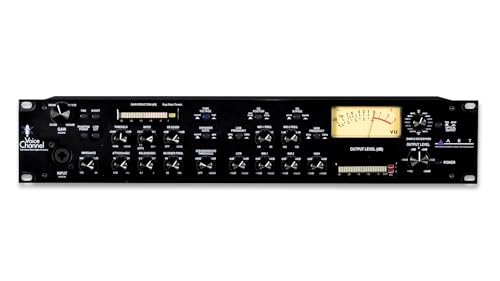
- Tube preamp with warm, defined sound
- Compressor, expander, de-esser, and gate
- USB plus ADAT, AES/EBU, S/PDIF, and TOSLink
Best For: Podcast studios that need flexible digital connectivity and vocal processing
Premium Mono Processing
SPL Channel One MK3 Premium Mono Channel Strip

- Discrete preamp with Lundahl transformers
- Transient Designer and tube saturation
- Compressor for added voice control
Best For: High-end podcast chains that want premium analog processing and tone shaping
Premium Analog Pick
All-Analogue SSL Channel Strip

- SSL 4000 Series-inspired analog sound
- Jensen transformer-balanced preamp
- B Series de-esser and 4-band EQ
Best For: podcasters wanting classic SSL-style vocal processing
Interface + Channel Strip
Neve USB Channel Strip Interface

- USB preamp/EQ channel strip with ADAT
- 24-bit/192kHz AD/DA conversion
- Insert send/return and headphone amp
Best For: podcasters needing a channel strip that doubles as an interface
DAW Control Pick
Panorama CS12 Plug-in Controller

- Controls channel strip plug-ins in a DAW
- Motorized fader and rotary encoders
- 3.5" TFT display with transport buttons
Best For: DAW-based podcasters who want tactile control of plug-ins
Broadcast Voice Channel Strip – dbx 286s Vocal Processor
If you want a straightforward channel strip for podcast studio voice work, the dbx 286s gives you the core tools in one rack unit: mic preamp, compression, de-essing, enhancement, and gating. It is built around a single mono channel and adds both XLR mic input and 1/4″ TRS line handling, so it can fit a simple spoken-word setup or accept other sources at mixdown.
Best For: Podcasters who want a classic rackmount vocal strip with simple, voice-focused processing.
Pros:
- Includes compression, de-esser, enhancer, and expander/gate in one unit
- Floating balanced XLR mic input plus 1/4″ TRS line input
- Insert jack lets you loop out to additional processors
- Metering LEDs make level and status checks easy at a glance
Cons:
- Single-channel design only
- Rackmount format may be more than some small desks need
- Best suited to users comfortable with hardware signal processing
The dbx 286s is a practical pick when you want proven voice shaping without building a chain from separate boxes. For a podcast studio that values hands-on control and simple signal flow, it covers the essentials cleanly.
All-in-One Podcast Desk – RØDECaster Duo Production Hub
The RØDECaster Duo is more than a channel strip for podcast studio use, but it solves a similar problem by putting mic preamps, processing, faders, and recording control into one compact production hub. With two Neutrik combo jacks, ultra-low-noise Revolution Preamps, built-in APHEX effects, and a touchscreen interface, it is aimed at creators who want an integrated workflow.
Best For: Podcasters and creators who want an all-in-one tabletop production solution instead of a separate rack strip.
Pros:
- Two combo jacks with high-gain Revolution Preamps for microphones or instruments
- Studio-grade APHEX processing, including Aural Exciter and Big Bottom
- Four broadcast-quality faders and a high-resolution touchscreen
- Six SMART pads with bank switching for quick production actions
Cons:
- Not a traditional rackmount channel strip
- Only four channels total
- May be more feature-rich than simple voice-only setups need
If your podcast studio benefits from mixing and processing in one device, the Duo is a strong streamlined option. It trades the simplicity of a standalone strip for a more complete production workflow.
Tube Tone Channel Strip – PreSonus StudioChannel Tube Strip
The PreSonus StudioChannel is a traditional channel strip for podcast studio users who want tube flavor plus onboard dynamics and EQ. It combines a Class A 12AX7 vacuum-tube preamp, VCA compressor, and three-band EQ in a rugged 1U rack chassis, with mic, line, and instrument inputs for flexible tracking.
Best For: Podcasters and home studios that want a tube-style rack strip with compression and EQ in one box.
Pros:
- Class A 12AX7 tube preamp with tube drive
- VCA compressor with auto attack/release and soft/hard knee
- Three-band EQ with variable-q mid band
- Mic, line, and instrument inputs in a 1U rackmount design
Cons:
- Heavier than some compact alternatives
- Single-channel unit only
- Tube-based design may be more than a basic spoken-word chain requires
This is a solid choice if you want more tonal shaping than a basic preamp can offer. For studios that like rack gear and want flexible control over voice tone, it checks the key boxes.
Flexible Mono Strip – ART Pro Channel III Rack Strip
The ART Pro Channel III is a mono channel strip for podcast studio setups that need input flexibility and multiple processing options in one rack unit. It features a tube channel strip design with switchable microphone impedance, selectable opto/FET compression voicings, and a 4-band semi-parametric EQ, making it suitable for users who like to shape a voice chain more deliberately.
Best For: Podcasters who want a flexible rack strip with switchable compression voicings and more detailed EQ control.
Pros:
- Switchable microphone impedance for input matching options
- Selectable opto/FET compression voicings
- 4-band semi-parametric EQ for more precise shaping
- Mono tube channel strip format keeps the signal chain focused
Cons:
- Single-channel design only
- Rackmount form factor may not suit very compact desk setups
- Requires some understanding of channel-strip controls to use fully
For creators who want more than a basic preamp, this ART strip offers several ways to tailor vocal tone and dynamics. It is a sensible pick when flexibility matters more than plug-and-play simplicity.
Studio-Grade Mono Control – Newton Channel Strip
If you’re building a channel strip for podcast studio use, the Newton Channel Strip is geared toward a clean, hands-on front end with serious hardware control. It combines a Class A mic/line preamp, custom transformer outputs, Silk harmonic enhancement, 8-segment LED metering, and compressor control in one mono unit.
Best For: Podcasters and creators who want a premium mono channel strip with transformer character and visible level control.
Pros:
- Class A mic/line preamp for a dedicated recording front end
- Custom transformer outputs for added output-stage character
- Silk harmonic enhancement for tonal shaping
- 8-segment LED meters plus compressor for practical gain management
Cons:
- Mono-only design, so it serves one source at a time
- Large footprint and 9.15-pound weight may not suit small desks
Overall, this is a straightforward choice if you want a robust analog channel strip that emphasizes preamp quality, metering, and tone shaping over portability.
All-in-One Recording Front End – ART VoiceChannel Tube Channel Strip With Digital Outs
For a channel strip for podcast studio setups that need flexible I/O, the ART VoiceChannel combines tube warmth, dynamics tools, and multiple digital output options in one unit. It’s designed as an input solution for recording, with compressor, expander, de-esser, and gate functions alongside USB direct-connect and formats including ADAT, AES/EBU, S/PDIF, and TOSLink.
Best For: Podcasters who want one box with tube preamp character and broad digital connectivity.
Pros:
- Tube preamp design aimed at warmth and definition
- Built-in compressor, expander, de-esser, and gate
- Wide digital connectivity: ADAT, AES/EBU, S/PDIF, TOSLink, and USB
- Direct computer/laptop connection for flexible studio routing
Cons:
- Feature set may be more complex than a simple vocal strip
- Single-channel design limits it to one source at a time
This is the most connectivity-focused option here, making it a practical fit when you want a recording front end that can integrate into different podcast or home studio workflows.
Premium Mono Processing – SPL Channel One MK3 Premium Mono Channel Strip
When you want a channel strip for podcast studio work with a premium analog signal path, the SPL Channel One MK3 brings together a discrete preamp, Lundahl I/O transformers, transient shaping, tube saturation, and compression. It’s a mono channel strip built around hardware processing and a substantial studio-grade chassis.
Best For: Creators who want a high-end mono channel strip with transformer-based I/O and extra tone control.
Pros:
- Discrete preamp for dedicated front-end capture
- Lundahl I/O transformers for high-end analog interfacing
- Transient Designer adds additional shaping control
- Tube saturation and compressor provide more tonal options
Cons:
- Mono-only layout suits one mic or source at a time
- Large and heavy unit may require a permanent rack setup
In practical terms, this is the most feature-rich analog option in the group if you value premium components and expanded sound-shaping tools for a podcast voice chain.
Premium Analog Pick – All-Analogue SSL Channel Strip
If you’re building a channel strip for podcast studio use and want a classic analog front end, the Solid State Logic Revival 4000 brings the signature SSL 4000 Series style in a compact 1U format. Its Jensen transformer-balanced preamp, B Series de-esser, and 4-band EQ make it a straightforward choice for shaping voice at the source.
Best For: Podcasters and studios that want an all-analogue SSL channel strip for premium vocal shaping.
Pros:
- Legendary SSL sound inspired by the iconic 4000 Series
- Compact 1U format for rack-based studio setups
- Includes Jensen transformer-balanced preamp
- Built-in B Series de-esser and 4-band EQ for voice control
Cons:
- All-analogue design may not suit users wanting built-in USB or digital connectivity
- Large, heavy unit at 12.19 pounds
- Plastic material construction may matter to some buyers
This is a focused analog channel strip for creators who want immediate, hardware-based control over podcast vocals. It fits best in a traditional rack studio where classic SSL processing is the priority.
Interface + Channel Strip – Neve USB Channel Strip Interface
For a channel strip for podcast studio setups that also needs to function as an interface, the Neve 1073SPX-D combines preamp/EQ channel strip processing with USB audio and ADAT I/O. It supports 24-bit/192kHz conversion, insert send/return, and a headphone amp, giving you a compact recording hub for voice work.
Best For: Podcasters who want a channel strip with built-in USB interface features and digital I/O.
Pros:
- USB audio interface with channel strip preamp/EQ
- 24-bit/192kHz AD/DA conversion
- Includes insert send/return and headphone amp
- ADAT I/O plus support for major DAWs on Windows and macOS
Cons:
- Only 2 channels, so it is not a large multichannel solution
- At 16.3 pounds, it is relatively heavy for a desktop unit
- May be more feature-rich than a simple podcast voice chain needs
This is the most versatile option here if you want one box to handle both channel-strip tone and audio interface duties. It suits podcasters who value conversion, routing, and software compatibility alongside the Neve workflow.
DAW Control Pick – Panorama CS12 Plug-in Controller
If your channel strip for podcast studio workflow lives inside your DAW, the Nektar Panorama CS12 is a dedicated plug-in controller rather than an audio processor. It adds transport buttons, a 3.5″ TFT display, a motorized fader, and rotary encoders so you can adjust channel-strip parameters without relying only on the mouse.
Best For: Podcasters who control channel strip plug-ins in a DAW and want hands-on hardware.
Pros:
- Built for channel strip plug-in control with DAW integration
- Motorized fader and rotary encoders for tactile adjustments
- 3.5″ TFT display for visual feedback
- USB-C connectivity and support for several DAWs
Cons:
- Does not process audio on its own
- Only controls one mixer channel at a time
- Best fit for Mac-based workflows rather than all platforms
This is the right pick when you want more control over software channel strips, not another preamp or interface. For editing-heavy podcast production, it can speed up workflow while keeping adjustments precise.
How We Picked the Best Channel Strip for Podcast Studio
We prioritized voice-focused processing, clean gain, useful onboard dynamics, and flexibility for real podcast workflows. We also looked at build quality, noise performance, ease of setup, and whether each unit suits solo hosts, interview shows, or multi-input production spaces.
Quick Comparison
For straightforward vocal control, simpler analog units can be ideal. For creators who want recording, routing, and monitoring in one box, integrated digital production tools are more practical. Premium studio users may prefer higher-end channel strips with stronger preamps and more refined EQ and compression sections.
Key Buying Factors for a Channel Strip for Podcast Studio
Preamp Quality
A clean, low-noise preamp matters most if you want natural-sounding speech and enough headroom for dynamic voices. Check gain range and whether the preamp handles lower-output microphones well.
Compression and De-Essing
Podcast voices often benefit from gentle compression to even out levels and a de-esser to tame harsh sibilance. Look for controls that are easy to dial in without overprocessing.
EQ and Tone Shaping
Some creators want only basic cleanup, while others want more detailed tonal control. A channel strip with flexible EQ can help you reduce rumble, sharpen presence, or warm up a thin voice.
Routing, Connectivity, and Workflow
Consider whether you need analog I/O, digital output, USB recording, or integration with a mixer or interface. The best choice depends on how your podcast studio is built and how many sources you record at once.
Noise Floor and Reliability
In spoken-word production, low hiss and stable operation matter more than flashy features. A dependable unit with quiet performance is especially important for voiceover, remote interviews, and long recording sessions.
Who Should Buy Which Channel Strip for Podcast Studio?
Solo podcasters usually do best with a simple, intuitive channel strip that speeds up setup and keeps voice levels consistent. Creators building a full podcast studio may prefer a more advanced unit with richer tone shaping and stronger connectivity.
If you want an all-in-one production workflow, prioritize systems that combine recording and monitoring features. If your goal is just to improve voice quality before an interface, focus on a classic channel strip with clean gain, compression, and de-essing. In short, match the feature set to your studio size, mic choice, and editing style rather than paying for extras you will not use.