Choosing the right 4K capture device for video studio work comes down to latency, passthrough, and compatibility with your camera or console setup.
Below, we focus on practical options for creators who want cleaner workflows, reliable recording, and fewer setup headaches.
Best 10 4K Capture Device for Video Studio Picks for 2026
Next-Gen Studio Pick
Elgato 4K X HDMI 2.1 Capture Card

- 4K144 capture with 1080p240 support
- HDMI 2.1, VRR passthrough, and HDR10
- USB 3.2 Gen 2 with ultra-low latency
Best For: High-end gaming and studio streaming setups
Value Audio-Friendly Pick
Guermok USB 3.0 HDMI Capture Card

- 1080p60 capture with 2K30 recording
- 4K60 pass-through with low latency
- Mic in and audio out for monitoring
Best For: Budget-conscious creators who need audio flexibility
Camera Studio Pick
Elgato Cam Link 4K HDMI to USB Capture

- Converts DSLR and camcorder HDMI to USB
- 1080p60 streaming with 4K60 support
- Ultra-low latency for synced monitoring
Best For: Camera-based studios and webcam-style streaming
Starter Capture Pick
Rybozen 4K USB 3.0 HDMI Capture Card
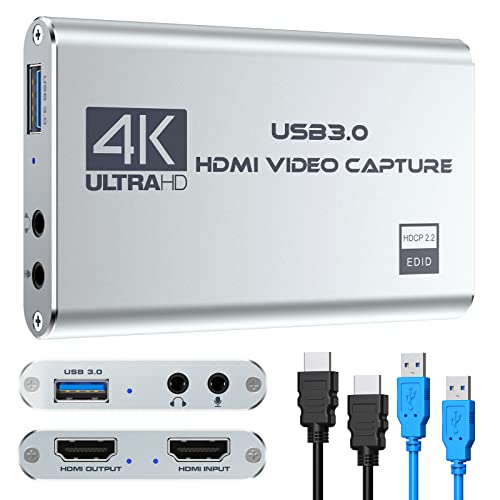
- 1080p60 recording over USB 3.0
- 4K60 input/output with HDMI loop-out
- Plug-and-play with mic-in support
Best For: Beginners needing a simple portable capture card
Pro-Grade 4K60 Capture
PORTTA DX20R HDMI Video Capture Card

- 4K@60Hz capture with ultra-low latency
- High-refresh passthrough up to 1080p@240Hz
- Windows, macOS, and Linux plug-and-play
Best For: Creators who need 4K60 capture and smooth high-refresh passthrough
Budget 4K HDMI Starter
Capture Card 4K HDMI Video Streaming to USB 3.0

- 1080p60 capture with 4K HDMI real-time preview
- Plug-and-play USB 3.0 setup with no drivers
- Works with PS5, Xbox, Switch, PC, camera, and OBS
Best For: Beginners who want an easy 1080p60 capture card with broad compatibility
Premium HDMI 2.1 Capture
AVerMedia GC553G2 Live Gamer Ultra 2.1

- 4K60 capture for streaming and recording
- HDMI 2.1 passthrough up to 4K144 HDR/VRR
- Low-latency monitoring with party chat support
Best For: Advanced creators needing HDMI 2.1 passthrough and 4K60 capture
Portable USB-C 1080P Capture Pick
Guermok 4K USB3.0 HDMI Capture Card

- 4K@30Hz input, 1080P@60Hz output
- USB-C and USB-A support with plug-and-play setup
- Works with OBS, consoles, cameras, and computers
Best For: Portable studio capture and everyday streaming
Creator-Friendly Loop-Out Option
acer USB 3.0 HDMI Capture Card

- 4K input with 1080P@60Hz capture
- HDMI loop-out for live monitoring
- Built-in mic-in for commentary and voice recording
Best For: Streamers who want monitoring and mic input in one device
Budget HDMI Capture Basic
Kedok 4K HDMI Video Capture Card

- Plug-and-play USB 3.0 capture with no external power
- HDMI loop-out plus mic-in for commentary
- Works with OBS, Twitch, YouTube, and VLC
Best For: Budget Windows streaming and basic recording
Next-Gen Studio Pick – Elgato 4K X HDMI 2.1 Capture Card
If you want a 4k capture device for video studio work that can also keep up with modern gaming hardware, the Elgato 4K X is built for high-frame-rate workflows. It supports HDMI 2.1, VRR passthrough, HDR10, and capture up to 1080p240, making it a strong fit when smooth monitoring and low-latency capture matter.
Best For: Creators who need a future-ready capture card for fast gaming, studio recording, and OBS-based streaming.
Pros:
- Captures up to 4K144 with support for 1080p240 high-frame-rate workflows.
- HDMI 2.1, VRR passthrough, and HDR10 support help with modern console setups.
- USB 3.2 Gen 2 offers ultra-low latency for streaming and monitoring.
- Works with OBS, Streamlabs, Zoom, Teams, and other major apps.
Cons:
- Requires a capable system and USB 3.2 Gen 2 for best performance.
- Its advanced feature set may be more than basic recording setups need.
Overall, this is the most advanced option in the group if your studio needs fast passthrough, modern HDMI support, and broad app compatibility. It is especially compelling for creators balancing high-end console capture with live production.
Value Audio-Friendly Pick – Guermok USB 3.0 HDMI Capture Card
The Guermok USB 3.0 model is a practical 4k capture device for video studio users who need solid compatibility and flexible audio without jumping to a premium price tier. It captures up to 1080p60 or 2K30, accepts up to 4K60 HDMI input, and adds mic input plus audio output ports for commentated workflows.
Best For: Streamers, presenters, and studio users who want a flexible capture card with extra audio connections.
Pros:
- Supports 1080p60 capture and 2K30 recording for everyday production needs.
- 4K60 HDMI pass-through with ultra-low latency for responsive monitoring.
- Mic in, audio in, headphone monitoring, and speaker output add versatility.
- Plug-and-play UVC/UAC compatibility with OBS, Zoom, Teams, and more.
Cons:
- Capture resolution is limited to 1080p60 rather than true 4K recording.
- Mic input is limited to standard 3.5mm TRS microphones.
This is a well-rounded choice when you want streaming-friendly features and better audio routing in a simple USB package. It is especially useful for setups that mix gameplay, meetings, and commentary.
Camera Studio Pick – Elgato Cam Link 4K HDMI to USB Capture
If your video studio uses a DSLR, mirrorless camera, camcorder, or action cam, the Elgato Cam Link 4K is a focused 4k capture device for video studio camera workflows. It turns an HDMI camera feed into a USB connection for streaming or recording in 1080p60, with support for 4K60 depending on camera and model compatibility.
Best For: Creators who want to use a dedicated camera as a webcam or live production source.
Pros:
- Designed to turn compatible cameras into a pro-quality webcam source.
- Supports streaming and recording in 1080p60, with 4K60 on supported setups.
- Ultra-low latency keeps video and audio in sync.
- Works with OBS, Zoom, Discord, PC, Mac, and iPad.
Cons:
- It is optimized for cameras rather than console or multi-input capture.
- Best results depend on having a compatible camera and the latest model.
This is the most specialized option here if your studio revolves around a camera feed instead of game consoles. It is especially appealing for live presenters, educators, and creators who want a simple HDMI-to-USB bridge.
Starter Capture Pick – Rybozen 4K USB 3.0 HDMI Capture Card
The Rybozen capture card is a straightforward 4k capture device for video studio users who want easy HDMI input, pass-through, and basic commentary support. It records up to 1080p60 over USB 3.0, accepts up to 4K60 input, and includes a 3.5mm mic-in port for voiceover or live narration.
Best For: Entry-level creators who want a portable, plug-and-play capture card for streaming and recording.
Pros:
- Captures in 1080p60 with USB 3.0 for live streaming and recording.
- Supports up to 4K60 input and output with HDMI loop-out.
- Includes mic-in for adding commentary during gameplay or production.
- Plug-and-play design with no driver or external power required.
Cons:
- Recording is limited to 1080p rather than 4K capture.
- Performance depends on correct software settings and system requirements.
This model makes sense when you want a simple, portable capture box that works with common software like OBS and QuickTime Player. It is best viewed as an accessible starter option rather than a high-end studio centerpiece.
Pro-Grade 4K60 Capture – PORTTA DX20R HDMI Video Capture Card
If you need a 4k capture device for video studio use that can handle both capture and passthrough, the PORTTA DX20R is built for high-refresh gaming and creator workflows. It supports 4K@60Hz capture, ultra-low latency, and passthrough up to 1080p@240Hz or 2K@120/144Hz, making it a strong fit for smooth live production setups.
Best For: Streamers and studio creators who want 4K60 capture with high-refresh passthrough and broad OS support.
Pros:
- Captures in 4K@60Hz with support for YUY2, NV12, and RGB24 formats.
- Passthrough supports up to 1080p@240Hz, 2K@120Hz, and 2K@144Hz for smooth gameplay monitoring.
- Includes VRR and HDR support for better image quality during capture and passthrough.
- Plug-and-play on Windows, macOS, and Linux with no driver installation required.
Cons:
- Utility software is optional, but advanced control features depend on downloading CapHub.
- Best suited to users who can take advantage of its higher-end passthrough and format options.
The DX20R stands out when your studio needs both strong capture specs and flexible monitoring features in one compact unit. Its combination of 4K60 capture, high-refresh passthrough, and utility controls makes it a practical choice for demanding setups.
Budget 4K HDMI Starter – Capture Card 4K HDMI Video Streaming to USB 3.0
For a simple 4k capture device for video studio basics, this Dcyfol capture card focuses on easy setup and dependable 1080p60 output. It offers 4K HDMI real-time preview, USB 3.0 connectivity, and broad compatibility with common gaming consoles, cameras, and streaming software.
Best For: Beginners and budget-minded creators who want a plug-and-play capture card for streaming or recording at 1080p60.
Pros:
- Plug-and-play USB operation with no drivers needed.
- Supports 1080p 60FPS capture and 4K HDMI real-time preview.
- Works with PS5, PS4, Switch, Xbox, PC, camera, OBS, Streamlabs, and XSplit.
- Includes HDMI loop-out for local monitoring while capturing.
Cons:
- Video capture resolution is 1080p, not 4K recording.
- Performance focus is on straightforward streaming rather than advanced studio features.
This is a practical entry-level choice if you want easy setup and broad device support without extra complexity. It makes the most sense when 1080p60 capture is enough and you mainly want reliable streaming and recording.
Premium HDMI 2.1 Capture – AVerMedia GC553G2 Live Gamer Ultra 2.1
If you’re shopping for a 4k capture device for video studio work and want more headroom for modern consoles, the AVerMedia GC553G2 brings 4K60 capture with HDMI 2.1 passthrough. It is aimed at smooth recording and streaming on PS5, PS5 Pro, Xbox, Switch, Mac, and PC while keeping gameplay monitoring responsive.
Best For: Advanced streamers and studio setups that need 4K60 capture, HDMI 2.1 passthrough, and low-latency monitoring.
Pros:
- Captures and streams in 4K60 resolution.
- HDMI 2.1 passthrough supports 4K144 HDR/VRR and 4K120.
- Low-latency design helps keep gameplay and stream output in sync.
- Supports party chat through the headset connection and includes 5.1 channel audio capture.
Cons:
- Feature set is geared toward advanced users and higher-end gaming setups.
- RGB lighting and software extras may be unnecessary if you only need basic capture.
The GC553G2 is the most feature-rich option here for modern console workflows and high-performance passthrough. It’s a strong pick when your studio needs 4K60 capture plus flexible monitoring and audio handling.
Portable USB-C 1080P Capture Pick – Guermok 4K USB3.0 HDMI Capture Card
If you need a practical 4k capture device for video studio use, this Guermok card is a compact USB 3.0 option focused on smooth 1080P recording and live capture. It accepts up to 4K@30Hz input and outputs up to 2K@30Hz or 1920×1080@60Hz, making it a solid fit for streaming, meetings, teaching, and basic studio workflows where reliability matters more than raw resolution.
Best For: Creators who want a small plug-and-play capture card for OBS, gaming, or studio recording on USB-C or USB-A systems.
Pros:
- Supports 4K@30Hz input with 1080P@60Hz capture output.
- Plug-and-play design with no external power or driver setup.
- Wide device support, including PS5/PS4, Switch, Xbox, cameras, and computers.
- Aluminum alloy housing helps with heat dissipation during use.
Cons:
- Designed for capture only, not direct screen casting to a monitor or TV.
- Best performance depends on using a USB 3.0 port; adapter use may affect recognition.
- Notes mention a restart may be needed after audio setup in OBS.
Overall, this is a straightforward capture card for users who want portability and simple setup. It is a strong fit when your priority is dependable 1080P live capture from common HDMI sources rather than advanced pass-through features.
Creator-Friendly Loop-Out Option – acer USB 3.0 HDMI Capture Card
For a 4k capture device for video studio setups that also needs easy monitoring, this Acer model is built around 4K input, 1080P@60Hz capture, and HDMI loop-out support. Its YUY2 output is positioned for richer color than MJPEG, and the included mic-in makes it easier to handle commentary or voice recording without extra adapters.
Best For: Streamers and creators who want loop-out monitoring plus built-in mic input for recording or live commentary.
Pros:
- 4K input with 1080P@60Hz capture for smooth streaming and recording.
- HDMI loop-out helps with live monitoring while capturing.
- Mic-in supports direct voice commentary from a headset or microphone.
- USB Type-A and Type-C ports plus broad device compatibility.
Cons:
- Capture resolution is listed at 1080P, not full 4K output.
- Needs a USB 3.0 port to run at USB 3.0 speeds.
- Best suited to users who want simple capture rather than advanced studio routing.
This is a practical all-around pick if you want a capture card that handles both video and commentary cleanly. The loop-out and mic input make it especially useful for small studio or desk-based setups where convenience matters.
Budget HDMI Capture Basic – Kedok 4K HDMI Video Capture Card
If you want a simple 4k capture device for video studio use, this Kedok model covers the basics with USB 3.0 capture, HDMI loop-out, and plug-and-play operation. It is aimed at users who need easy 1080P capture from HDMI sources such as consoles, cameras, and set-top boxes, with no driver installation or external power required.
Best For: Windows users who want an inexpensive, no-fuss capture card for gaming or basic recording.
Pros:
- Plug-and-play setup with automatic device detection.
- HDMI loop-out allows gameplay or source monitoring with no delay.
- Mic-in support lets you add commentary during streams or recordings.
- Compatible with common streaming apps like OBS, Twitch, YouTube, and VLC.
Cons:
- Operating system support in the notes is limited to Windows.
- Capture resolution is 1080P, so it is not a full 4K recording solution.
- Mic input only accepts a 3.5mm TRS standard microphone headset.
This is a straightforward choice for users who value ease of use and basic live capture over premium features. It works best as a budget-friendly entry point for Windows-based streaming or recording setups.
How We Picked the Best 4K Capture Device for Video Studio
For a 4K Capture Device for Video Studio use, we prioritized stable capture performance, low latency, dependable passthrough, USB and software compatibility, and support for common creator workflows like live streaming, camera recording, and hybrid studio production. We also weighed whether each model is better suited to cameras, consoles, or general-purpose capture.
Quick Comparison
In simple terms, higher-end HDMI 2.1 models are the best fit for demanding studio and gaming setups that need 4K passthrough and future-proofing. More affordable USB 3.0 options are usually the smarter pick if you mainly need 1080p60 capture with solid pass-through and broad compatibility. Camera-focused units are best when your priority is using a DSLR, mirrorless camera, or camcorder as a webcam or live studio source.
Key Buying Factors for a 4K Capture Device for Video Studio
Capture Resolution Vs. Passthrough
Don’t confuse what the device can capture with what it can pass through. Many models can accept a 4K signal but record at 1080p60 or 4K30. If you need a sharp monitoring feed on a 4K display while recording a lower-resolution stream, passthrough matters as much as capture quality.
Latency and Monitoring
Low latency is important for live camera switching, gaming overlays, and any studio workflow where you monitor audio and video in real time. If you plan to use the device as part of a live production chain, choose a model with proven low-lag performance and reliable audio sync.
Ports and Compatibility
Check whether the unit uses USB-A, USB-C, or both, and make sure your computer has enough bandwidth. Also confirm support for your OS, streaming app, and camera or console inputs. For a 4K Capture Device for Video Studio setups, compatibility often matters more than headline specs.
Audio Features
Mic input, audio output, and loop-through can be helpful if you want cleaner monitoring or separate commentary. If you use an external mixer or interface, make sure the capture card will not complicate your audio chain.
Who Should Buy Which 4K Capture Device for Video Studio?
If you want the most capable option for a modern studio or gaming rig, choose a high-end HDMI 2.1 model with strong passthrough and broader resolution support. If you need a simple, budget-friendly capture solution for streaming or basic recording, a 1080p60 USB 3.0 model is usually enough. If your studio centers on a camera rather than a console, a camera-friendly capture card can deliver the cleanest setup with the fewest extra adapters.
In the end, the best choice depends on whether you value maximum image quality, easiest setup, or the most versatile workflow. Match the card to your actual production needs, not just the highest spec on the box.