Choosing the right rackmount MIDI interface can make your setup faster, cleaner, and easier to expand. Whether you need simple 1-in/5-out routing or a larger studio-ready hub, the best option depends on your gear and workflow.
Below, we’ve narrowed the field to versatile picks for recording rigs, hardware synth setups, and live routing needs, with an eye on reliability, connectivity, and value.
Best 10 Rackmount Midi Interfaces Picks for 2026
Studio-Ready Multichannel
Tascam US-16x08 rackmount audio/MIDI interface

- 16 inputs and 8 outputs for larger sessions
- Eight Ultra-HDDA preamps with up to 56 dB gain
- DSP mixer with EQ and compression for monitoring
Best For: Project studios needing a rackmount interface for multitrack recording and monitoring
High-Density MIDI Router
MIDITECH MIDIFACE 16X16 16x16 MIDI interface

- 16 MIDI inputs and 16 MIDI outputs
- Per-port activity indicators for easy status checks
- USB powered, class compliant, and rackmount ready
Best For: Large MIDI setups that need lots of rackmounted connections
Compact Cross-Platform Pick
CME U6MIDI Pro 3-in-3-out MIDI interface

- 3-in-3-out MIDI with standalone routing tools
- Works across macOS, Windows, iOS, Android, Linux, and Chrome OS
- Supports low-latency MIDI, including MPE and timecode
Best For: Portable users who want flexible MIDI routing on many platforms
Filtered Port Expander
THRU-16 1-to-16 MIDI splitter and filter
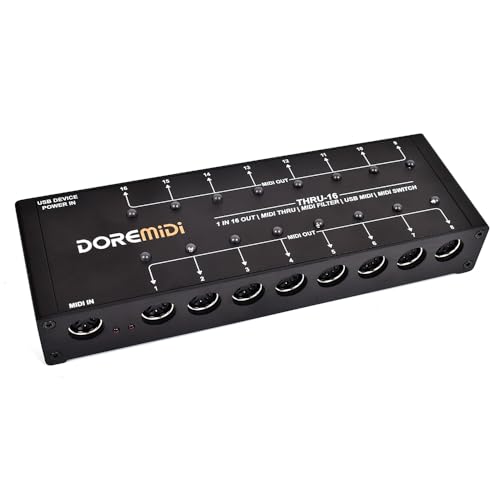
- Turns one MIDI input into 16 outputs
- Editable filters plus switches on each output
- Handles notes, CC, clock, time code, and SysEx
Best For: Keyboard rigs needing controlled MIDI splitting to many devices
Dual-Port USB MIDI Hub
Midiplus 2x2 USB MIDI interface

- 2 MIDI inputs and 2 MIDI outputs
- USB powered; no external supply needed
- Driver-free on Mac OS X and Windows XP+
Best For: Compact MIDI setups that need simple two-in/two-out connectivity
Five-Way MIDI Splitter
CME MIDI Thru5 WC 1-in-5-out MIDI Thru

- 1-in-5-out MIDI Thru routing
- USB-C power only; no MIDI over USB
- Supports notes, clock, sysex, timecode, and MPE
Best For: Clean MIDI splitting in compact studio or pedalboard setups
Audio-and-MIDI Interface Combo
Mackie Onyx Producer 2X2 USB Audio Interface with MIDI

- 2x2 audio interface with MIDI I/O
- 24-bit/192kHz recording with USB 2.0
- Two Onyx preamps with 48V phantom power
Best For: Small studios that need both audio recording and MIDI connectivity
MIDI Thru Routing Bundle
CME MIDI Thru5 WC + 4-Pack Cables
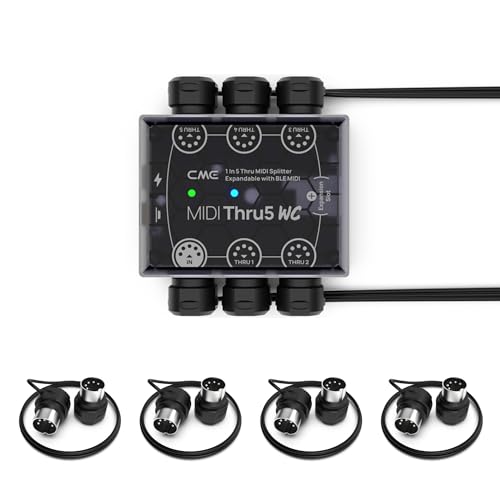
- 1-in/5-out MIDI Thru routing with very low latency
- Supports notes, controllers, clock, sysex, timecode, and MPE
- Includes four 1-foot 5-pin DIN cables for easy setup
Best For: Compact MIDI rigs that need clean, reliable signal distribution
Studio Audio/MIDI Hub
Arturia AudioFuse 16Rig Bundle

- 16-channel USB-C audio interface with MIDI I/O
- Dual ADAT I/O and wordclock for larger studio rigs
- 24-bit/192kHz conversion with included software suite
Best For: Hardware-heavy studios needing audio, MIDI, and expansion in one unit
Six-Output MIDI Splitter

- 1-in/6-out MIDI splitter for routing one source to six devices
- USB-powered with no batteries required
- Supports standard MIDI 16-channel commands and messages
Best For: Simple MIDI fan-out for keyboards, controllers, and synths
Studio-Ready Multichannel – Tascam US-16×08 rackmount audio/MIDI interface
If you need rackmount MIDI interfaces that can also handle a serious recording workload, the Tascam US-16×08 is built for big sessions. It combines 16 inputs, 8 outputs, and built-in DSP mixing, making it a practical choice for a compact studio setup where monitoring and capture both matter.
Best For: Recording musicians who want a rackmount interface for large multitrack sessions and low-latency monitoring.
Pros:
- Eight Ultra-HDDA mic preamps with up to 56 dB of gain
- 16 total inputs, including 8 mic/line inputs and 8 line inputs
- Eight balanced outputs for flexible monitoring and routing
- DSP mixer includes 4-band EQ and compression on each channel
Cons:
- Windows compatibility is listed, so it may not suit every platform
- It is primarily an audio interface rather than a dedicated MIDI hub
Overall, the US-16×08 makes sense when you want a rackmount unit that can manage a lot of inputs without adding complexity. Its monitoring tools and clean preamps are the standout features for project studios and drum tracking.
High-Density MIDI Router – MIDITECH MIDIFACE 16X16 16×16 MIDI interface
For buyers comparing rackmount MIDI interfaces, the MIDITECH MIDIFACE 16X16 stands out for sheer port count. With 16 MIDI inputs and 16 MIDI outputs in a 19-inch, 2U metal enclosure, it is designed for setups that need lots of physical MIDI connections and clear port activity feedback.
Best For: Large MIDI rigs that need many in and out ports in a rack-friendly format.
Pros:
- 16 MIDI inputs and 16 MIDI outputs
- Activity indicator for each MIDI port
- USB powered and class compliant with no driver installation required
- Rackmount metal housing in a 19-inch, 2U design
Cons:
- May be more interface than smaller studios need
- Detailed routing features are not highlighted in the supplied notes
This is a straightforward choice when you want a high-capacity MIDI interface that fits cleanly into a rack. The combination of class-compliant USB operation and port indicators should appeal to users managing multiple instruments or controllers.
Compact Cross-Platform Pick – CME U6MIDI Pro 3-in-3-out MIDI interface
The CME U6MIDI Pro is a compact option for users who want rackmount MIDI interfaces alternatives with strong routing flexibility in a tiny footprint. It offers 3-in-3-out MIDI, standalone routing tools, and broad device support, making it useful for modern studios built around computers and mobile devices.
Best For: Players and producers who want a small, cross-platform MIDI interface with routing and filtering.
Pros:
- 3-in-3-out MIDI interface with standalone routing, split, merge, and filter functions
- Supports major operating systems including macOS, Windows, iOS, Android, Linux, and Chrome OS
- Low-latency performance with support for notes, controllers, clock, sysex, MIDI timecode, and MPE
- USB-C plug-and-play design with lifetime updates through UxMIDI Tools
Cons:
- Far fewer ports than larger rackmount MIDI interfaces
- Not a rack unit, so it is aimed at portability rather than rack integration
For users who care more about smart MIDI handling than a full rack chassis, the U6MIDI Pro is a capable and flexible pick. Its broad compatibility and standalone routing features make it easy to drop into many different setups.
Filtered Port Expander – THRU-16 1-to-16 MIDI splitter and filter
If your search for rackmount MIDI interfaces is really about expanding one MIDI feed to many destinations, the THRU-16 is built for that job. It converts one MIDI input into 16 outputs, with per-channel filters and individual output switches for hands-on control.
Best For: Keyboard and MIDI rigs that need a 1-to-16 splitter with filters and output switching.
Pros:
- Converts one MIDI input into 16 MIDI outputs
- Each output has an editable MIDI filter
- Each output includes a switch and indicator light for quick control
- Supports MIDI notes, CC, PC, clock, time code, and SysEx
Cons:
- It is a splitter/filter, not a full multiport MIDI interface
- Port expansion is one-way from a single input
The THRU-16 is best treated as a focused utility device for distributing MIDI to many instruments. If your priority is controlled signal splitting with filtering per output, it offers a simple and specialized solution.
Dual-Port USB MIDI Hub – Midiplus 2×2 USB MIDI interface
If you need one of the more flexible rackmount MIDI interfaces for a simple computer-based setup, the Midiplus 2×2 keeps things straightforward. It offers 2 MIDI inputs and 2 MIDI outputs, USB power, and driver-free operation on Mac OS X and Windows XP and above, making it easy to drop into a studio or live rig.
Best For: Users who want a compact USB-powered MIDI interface with two-in/two-out connectivity and no driver installation.
Pros:
- 2 MIDI inputs and 2 MIDI outputs for a 32-channel-per-port setup
- USB powered, so no external power supply is needed
- Works with Mac OS X and Windows XP and above without a driver
- Includes a USB cable
Cons:
- Not a rackmount unit in the strict hardware sense
- Basic feature set compared with larger MIDI routing solutions
Overall, this is a practical pick if your priority is reliable MIDI I/O without extra setup. It fits best in smaller rigs where bus power and compatibility matter more than advanced routing features.
Five-Way MIDI Splitter – CME MIDI Thru5 WC 1-in-5-out MIDI Thru
For rackmount MIDI interfaces focused on distribution rather than computer connectivity, the CME MIDI Thru5 WC is built to split one MIDI input into five outputs with very low latency. It supports standard 5-pin MIDI connections, runs on USB-C power, and is designed to avoid data errors, bleeding MIDI, and signal dropout.
Best For: MIDI rigs that need clean one-to-five MIDI Thru splitting with compact hardware and USB-C-powered operation.
Pros:
- 1-in-5-out MIDI Thru design for connecting multiple devices
- Supports notes, controllers, clock, sysex, timecode, and MPE
- Close to zero latency with no jitter, according to the product notes
- Compact, lightweight housing for tight studio or pedalboard spaces
Cons:
- USB port is for power only, not MIDI data
- Requires standard 5V USB power source to operate
This is a strong utility piece when your main goal is accurate MIDI distribution. It makes the most sense in setups where stable thru routing matters more than interface-style computer integration.
Audio-and-MIDI Interface Combo – Mackie Onyx Producer 2X2 USB Audio Interface with MIDI
Mackie Audio Interface, Onyx Producer 2X2 USB Audio Interface with MIDI (Onyx Producer 2-2)
Check Price On AmazonIf you want rackmount MIDI interfaces that also handle audio recording, the Mackie Onyx Producer 2X2 is a versatile two-channel USB interface with MIDI I/O. It combines 24-bit/192kHz recording, two Onyx mic preamps, direct monitoring, and bus-powered USB 2.0 operation in a durable desktop-friendly design.
Best For: Musicians who want a compact audio interface with MIDI I/O for recording vocals, instruments, and external gear.
Pros:
- 2 in x 2 out audio interface with MIDI I/O
- 24-bit/192kHz recording and USB 2.0 connectivity
- Two Onyx mic preamps with 48V phantom power
- Zero-latency direct monitoring and headphone output
Cons:
- Only two channels, so it is not aimed at larger recording sessions
- More of an audio interface with MIDI than a dedicated MIDI router
As a combined recording and MIDI solution, this model is useful when you want fewer boxes on your desk. It is best suited to small studios, mobile setups, and players who need audio capture alongside MIDI connectivity.
MIDI Thru Routing Bundle – CME MIDI Thru5 WC + 4-Pack Cables
If you need rackmount MIDI interfaces-style routing in a compact setup, this CME bundle is built for clean 1-to-5 MIDI splitting with standard 5-pin DIN connections. It’s a practical choice when you want to distribute clock, notes, controllers, sysex, timecode, or MPE without adding jitter or latency concerns, and the included short cables help keep a rack or desktop rig tidy.
Best For: Keyboard, synth, pedal, and controller setups that need simple MIDI distribution with low-latency routing.
Pros:
- 1-in/5-out MIDI Thru design with close to zero latency and no jitter.
- Supports all MIDI channels and messages, including clock, sysex, timecode, and MPE.
- Standard 5-pin DIN connectivity works with a wide range of MIDI hardware.
- Includes four 1-foot low-profile MIDI cables for an immediate setup.
Cons:
- It is a MIDI Thru box, not a full audio/MIDI interface.
- Only provides five outputs, so larger rigs may need additional routing.
This bundle makes the most sense if your priority is dependable MIDI distribution rather than a feature-heavy interface. The included cables add convenience, and the USB bus-powered design keeps the setup straightforward for studio or stage use.
Studio Audio/MIDI Hub – Arturia AudioFuse 16Rig Bundle
For rackmount MIDI interfaces and high-channel studio connectivity, the Arturia AudioFuse 16Rig stands out as a serious hub for complex hardware setups. It combines 16-channel USB-C audio with MIDI I/O, ADAT, and wordclock support, making it useful when you need one unit to manage audio expansion and hardware synchronization in a larger studio.
Best For: Multi-device studios that want audio interfacing, MIDI routing, and digital expansion in one box.
Pros:
- 16 x TRS analog inputs and 12 analog outputs provide wide studio connectivity.
- Includes 1 MIDI In and 2 MIDI Out/Thru ports for routing and sync.
- Dual ADAT I/O and wordclock I/O support integration with larger systems.
- 24-bit/192kHz conversion and included software add extra value.
Cons:
- It is a bundle, so the microphone may be unnecessary if you only need the interface.
- Physical size is substantial, so it is better suited to dedicated studio space.
This is the most feature-rich option in the group if you need more than basic MIDI routing. Its strength is in combining interface, expansion, and synchronization tools, which can reduce the number of separate boxes in a hardware-heavy studio.
Six-Output MIDI Splitter – MIDI Thru 6 Box USB Interface
If you’re comparing rackmount MIDI interfaces alternatives for a simple distribution job, this MIDI Thru 6 Box keeps things focused and affordable. It takes one MIDI input and sends it to six outputs with standard 5-pin DIN connectivity, making it a straightforward way to fan out data to multiple keyboards or synths without added setup complexity.
Best For: Users who need a simple six-output MIDI splitter for controllers, keyboards, and synths.
Pros:
- 1-in/6-out routing lets one source feed up to six MIDI devices.
- Supports standard MIDI 16-channel commands and messages.
- USB-powered design requires no batteries.
- Works with common DAWs and major operating systems listed in the notes.
Cons:
- Functionality is limited to MIDI splitting rather than full audio interfacing.
- No rack-focused hardware details are provided, so it is more of a compact box than a rack unit.
This model is best viewed as a no-fuss MIDI splitter for small to medium hardware setups. It covers the core routing task well, but buyers who need more advanced interface features will want to look at a more complete studio hub.
How We Picked the Best Rackmount Midi Interfaces
We focused on real-world usability first: stable MIDI timing, enough ports for typical studio or stage setups, and dependable hardware that plays well with synths, drum machines, controllers, and DAWs. We also weighed whether each unit adds useful functions such as USB MIDI, thru routing, filtering, or combined audio and MIDI connectivity.
Because Rackmount Midi Interfaces are often chosen to simplify larger rigs, we favored models that are easy to integrate and reduce cable clutter without adding unnecessary complexity.
Quick Comparison
If you need a straightforward MIDI expansion box, a multi-thru unit is usually the simplest choice. If your setup also needs audio I/O, a combined audio/MIDI interface may offer better value. For larger hardware systems, a higher-port MIDI hub or splitter can be the more practical long-term solution.
Key Buying Factors for Rackmount Midi Interfaces
Port Count and Direction
Start by counting how many devices need to send and receive MIDI. Some setups only need one input split to multiple outputs, while others need multiple independent inputs and outputs for complex routing.
USB Vs. DIN Vs. Hybrid
USB MIDI is convenient for computer-based production, while traditional 5-pin DIN remains essential for older and many current hardware instruments. Hybrid units can bridge both worlds and are often the most flexible.
Routing and Filtering
Advanced routing, channel filtering, and thru control are useful if you want to prevent message conflicts, reduce MIDI loops, or separate devices by channel. These features matter most in larger systems.
Build Quality and Reliability
For rack use, prioritize sturdy chassis design, solid connectors, and consistent power behavior. In live environments, reliability matters more than extra features.
Audio Needs
If you also need microphone, line, or instrument inputs, a combined audio interface can save rack space and budget. If not, a dedicated MIDI unit may be the cleaner choice.
Who Should Buy Which Rackmount Midi Interfaces?
Home studio users with a few synths can usually get by with a compact MIDI thru or 2×2 interface. Producers building a larger hardware studio should look for higher-port Rackmount Midi Interfaces with flexible routing. Live performers often benefit most from units that emphasize fast setup, simple control, and rock-solid signal distribution.
If you’re unsure, choose the smallest unit that still leaves room for expansion. That usually keeps your setup simpler now and more future-proof later.