ZUMWALT P7 Laptop Screen Extender review: if you live in spreadsheets, browser tabs, code windows, or video calls, this portable triple-screen add-on can make a laptop feel far more capable.
It is not for everyone, but for the right buyer it can be a genuine workflow upgrade.
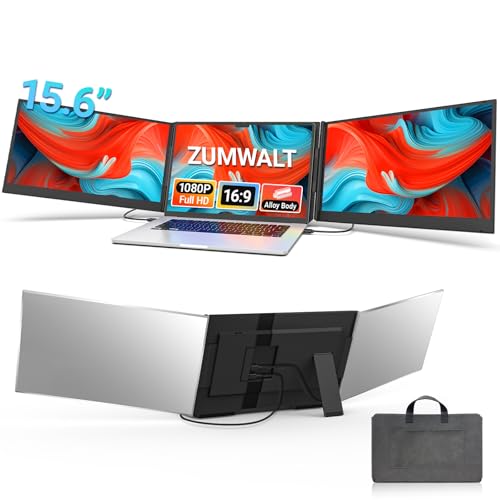
ZUMWALT P7 Review Summary
If you want to turn a single laptop into a portable three-screen workstation, the ZUMWALT P7 Laptop Screen Extender is built for exactly that job.
It is especially appealing for remote workers, students, coders, analysts, and presenters who need more screen space without carrying a full monitor setup.
What stands out most is the combination of two 15.6-inch 1080p IPS panels, a travel-friendly aluminum shell, and a design that tries to keep setup simple on supported devices.
In other words, this is a serious productivity accessory first and an entertainment device second.
If your day is constantly interrupted by Alt-Tab switching, the ZUMWALT P7 can reduce that friction in a meaningful way.
That said, this is not a universal plug-and-forget accessory.
Compatibility matters here, especially if you use a MacBook with Apple silicon or a laptop with limited USB-C functionality.
If your device matches the connection path well, the ZUMWALT P7 Laptop Screen Extender is one of the more practical portable multi-monitor solutions to consider.
Scorecard
| Category | Score | Why It Matters |
|---|---|---|
| Screen Expansion & Multitasking | 9.0/10 | Turns a single laptop into a triple-screen setup, making it much easier to manage multiple apps, tabs, and workflows at once. |
| Display Quality | 8.0/10 | Uses two 15.6-inch FHD 1080p IPS panels with 178° viewing angles and 280 nits brightness for a clear, wide viewing experience. |
| Portability | 8.0/10 | Built with an ultra-slim aluminum alloy shell, light weight, and a carry bag, so it is suited to travel and mobile work. |
| Compatibility | 7.0/10 | Works with 13 to 17.3-inch laptops and supports major platforms, but some devices need extra cabling or adapter steps. |
| Setup Convenience | 7.0/10 | Promoted as plug-and-play with reduced cable clutter, though certain MacBooks and non-full-featured USB-C laptops require additional connection methods. |
| Build & Stability | 8.0/10 | The aluminum shell and wider kickstand design suggest a more durable, stable portable monitor solution than many clip-on alternatives. |
Bottom line: buy it if your laptop is your main workstation and you want more usable space fast.
Skip it if your device compatibility is uncertain or if you prefer a lighter, single-screen portable monitor.
Key Features and Specifications of ZUMWALT P7
The ZUMWALT P7 Laptop Screen Extender is designed as a triple-screen laptop monitor attachment with two integrated 15.6-inch displays.
Here are the key specs and features buyers should pay attention to before ordering.
| Specification | Details |
|---|---|
| Brand / Model | ZUMWALT P7 |
| Display Count | Two extra screens for a triple-screen setup |
| Screen Size | 15.6 inches per display |
| Resolution | 1920 x 1080 (FHD) |
| Display Technology | IPS LCD |
| Refresh Rate | 60 Hz |
| Brightness | 280 cd/m² |
| Viewing Angle | 178 degrees |
| Aspect Ratio | 16:9 |
| Finish | Glossy |
| Compatible Laptop Size | 13 to 17.3 inches |
| Weight | About 4 lbs / 1.8 kg |
| Dimensions | 10 x 6 x 1.11 inches |
| Build Material | Ultra-slim aluminum alloy shell |
| Stand | 90° widened kickstand |
| Included Accessories | Carry bag, all necessary cables, power adapter |
| Operating Modes | Extend, mirror, portrait |
| Supported Platforms | Mac, Windows, Chrome, Switch |
| Connection Options | 2 USB-C to USB-C cables on supported devices; H5-T + HDMI + USB-A path for some systems |
For a product in this category, those numbers are fairly meaningful.
The 15.6-inch 1080p panels are large enough to be genuinely useful for side-by-side work, and the 280 nits brightness should be adequate in normal indoor conditions.
The aluminum chassis and widened kickstand also signal that ZUMWALT is trying to improve stability versus flimsier clip-on extenders.
One important detail is the connection flexibility.
If your laptop fully supports the needed USB-C functionality, setup should be relatively straightforward.
If not, the alternate cable path is more involved, but it exists for a reason: to broaden compatibility and make the product usable across more machines.
Check the ZUMWALT P7 on Amazon
Pros and Cons of ZUMWALT P7
Below is the practical ZUMWALT P7 Laptop Screen Extender pros and cons breakdown from a buyer’s perspective.
Pros
- Adds a true triple-screen workflow for heavy multitasking.
- Sharp enough for everyday work with 1080p IPS panels.
- Wide compatibility across common laptop and device ecosystems.
- Slim, durable aluminum construction feels travel-ready.
- Carry bag and included accessories make it easier to transport and use on the go.
- Flexible viewing modes for extending, mirroring, or portrait use.
Cons
- Some devices need extra cables or adapter-style setup instead of simple plug-and-play.
- MacBook users with M1/M2/M3 chips may need additional connection steps.
- Glossy finish can be more reflective in bright environments.
- The added screen hardware increases bulk compared with a basic single portable monitor.
The biggest advantage is obvious: more usable workspace without an external desk monitor.
The biggest compromise is equally obvious: you are trading portability and simplicity for more display area.
That tradeoff is worth it for productivity-focused buyers, but not for minimalists.
Who Should Buy ZUMWALT P7?
The ZUMWALT P7 Laptop Screen Extender is a strong match for people who depend on a laptop for serious daily work and regularly feel constrained by a single display.
If you are juggling emails, research, spreadsheets, video meetings, and documents, the extra screen real estate can save time and reduce workflow friction.
- Remote workers who need a compact office-like setup.
- Students who research, take notes, and attend class at the same time.
- Coders and developers who want code, logs, and preview windows open together.
- Analysts and finance users who live in tables, dashboards, and browser tabs.
- Presenters and consultants who need a mobile setup for client meetings.
- Travelers who want a monitor-like experience without carrying a full-size display.
You should probably skip it if you rarely multitask, if you mainly use your laptop for casual browsing, or if you want the lightest possible travel kit.
This is a productivity tool, not a lifestyle accessory.
How the Triple-Screen Setup Works
The design goal behind the ZUMWALT P7 is simple: attach two displays to your laptop so you can build a more efficient workspace wherever you are.
In practice, that means moving from one screen to three active work zones, which is a major difference for anyone used to constant window switching.
The product supports extend, mirror, and portrait modes, which matters more than many buyers realize.
Extend mode is the main reason to buy it, since it lets you keep communication apps, reference material, or monitoring tools visible while your center laptop screen handles the main task.
Mirror mode is useful for presentations, while portrait mode can help with long documents, coding, or feeds that benefit from a vertical layout.
What makes this setup attractive is the workflow logic.
On a standard laptop, every extra task usually means another layer of window management.
With the ZUMWALT P7 Laptop Screen Extender, the workspace becomes more structured, which is why screen expansion is the product’s biggest selling point.
Display Quality in Work and Entertainment Use
The two 15.6-inch panels are not just about size; they are about making the screen area usable.
The 1920 x 1080 resolution is the sweet spot for this category because it offers enough detail for office work, media, and browsing without demanding extreme GPU power.
For a portable accessory, that is a sensible design choice.
IPS technology and a 178-degree viewing angle are especially important here because side-mounted displays need consistent image quality when viewed from different positions.
The 280 nits brightness is respectable for indoor work and typical travel conditions, though it is not a high-brightness outdoor display.
In bright cafes or sunlit rooms, the glossy finish may reflect more than some buyers would like.
For office use, the image quality should feel clean and practical rather than premium or cinematic.
For entertainment, the 60 Hz refresh rate is fine for streaming and general viewing, but this is not the kind of panel aimed at high-refresh gaming.
If you want a portable monitor for productivity and occasional media, the display spec makes sense.
If you are shopping for gaming performance, there are better alternatives.
Travel-Friendly Design and Carrying Case
One of the most appealing parts of the ZUMWALT P7 is the travel-first hardware design.
The ultra-slim aluminum alloy shell helps it feel more durable than plastic-heavy attachments, while the widened kickstand gives the unit a more stable footprint on a desk or hotel table.
At around 4 lbs, this is not featherweight, but the weight is understandable once you factor in two integrated panels and the supporting frame.
The included leather carry bag is a meaningful bonus because it turns the extender into a more organized mobile kit rather than an awkward bundle of cables and hardware.
The absence of a top baffle or clip-style attachment also makes installation and removal easier.
That design choice matters because many laptop monitor attachments become frustrating when they add pressure or feel fiddly during setup.
Here, the emphasis seems to be on a cleaner, more convenient mounting experience.
Compatibility With Windows, Mac, Chrome, and Switch
Compatibility is where buyers need to slow down and do their homework.
The ZUMWALT P7 supports major ecosystems, including Windows, Mac, Chrome, and Switch, and it works with laptops from 13 inches to 17.3 inches.
That is a broad range, which is good news for households or teams with mixed devices.
However, not every machine will deliver the same plug-and-play experience.
The product is clearly happiest when the laptop has the right USB-C support for full functionality.
If your laptop lacks a full-featured USB-C port, or if you use an M1, M2, or M3 MacBook, you may need the alternate cable path.
That means the buying decision depends as much on your laptop’s port capabilities as it does on the monitor itself.
This is not a fatal flaw, but it is a decisive one.
Buyers should verify port support before ordering, because the wrong laptop can turn a simple productivity upgrade into an accessory compatibility project.
When You Need the Extra Cables or H5-T Adapter
The alternate connection route is the part most likely to affect satisfaction.
ZUMWALT notes that some systems require an H5-T + HDMI + USB-A cable setup, along with external power and driver installation.
That is a more involved process than standard USB-C usage, so it is worth treating this section as a caution flag rather than a footnote.
In practical terms, this means buyers should expect one of two experiences.
If your device supports the preferred connection path, you may enjoy a cleaner setup with less cable clutter.
If it does not, the product can still work, but you should be prepared for a more manual process.
The good news is that ZUMWALT includes the necessary cables and power adapter, which reduces the risk of extra accessory shopping.
The bad news is that the setup experience will not be equally smooth for everyone.
Compatibility is the biggest buying factor here, so this extender is best for people who can confidently confirm their port situation before purchase.
Alternatives to Consider Before You Buy
If you are still deciding whether the ZUMWALT P7 Laptop Screen Extender is the right fit, it helps to compare it with a few common Amazon-friendly alternatives.
Each option solves the “more screen space” problem in a different way.
- Portable dual monitor for laptops — a better choice if you want extra screen space but do not need full triple-screen expansion.
- Single-screen portable monitor 15.6 inch — ideal for buyers who want lower bulk and a simpler setup.
- USB-C laptop monitor extender — a broader search if you want to compare similar connection-based options.
- Triple screen laptop monitor attachment — useful if you want to compare different designs and mounting styles.
Compared with a single portable monitor, the ZUMWALT P7 is far more ambitious and far more useful for multitasking.
Compared with a dual-monitor setup, it gives you more room but also more bulk and a greater chance of compatibility hurdles.
Buying Advice and Final Verdict
If your main problem is not speed but screen congestion, the ZUMWALT P7 makes a strong case for itself.
It gives you a true triple-screen workspace in a portable format, and that alone can improve productivity for the right buyer.
Still, the best advice is to buy it only if your laptop compatibility looks solid.
The ZUMWALT P7 Laptop Screen Extender is most rewarding when you can use the preferred USB-C setup, because that is where it feels closest to plug-and-play.
If your system needs the alternate connection path, the product can still be worthwhile, but you should factor in the extra steps.
Best for: remote workers, students, coders, business travelers, and anyone who wants a compact, more organized multi-window setup.
Not ideal for: casual users, outdoor-heavy use, or buyers who need the lightest possible travel monitor.
Is ZUMWALT P7 Worth It?
Yes, for the right buyer, the ZUMWALT P7 Laptop Screen Extender is worth it. It delivers the core benefit you want from this category: more screen space, better multitasking, and a more efficient laptop workflow without the commitment of a desk setup.
The value comes from how well it solves a real problem.
If you constantly work across multiple apps or need a mobile workstation that feels closer to a full office setup, the ZUMWALT P7 is a smart, practical buy.
Its biggest strengths are the triple-screen productivity boost, the solid 1080p IPS panel spec, and the travel-friendly build.
The main drawback is compatibility complexity, especially for some MacBooks and laptops without full USB-C support.
That is why this product is best viewed as a high-value specialist tool rather than a universal accessory.
Final verdict: buy the ZUMWALT P7 if you want a portable multi-monitor workflow and your laptop is compatible.
If not, a simpler single portable monitor may be the safer choice.