If you need one device to switch cameras, encode the stream, and keep production simple, a video switcher with streaming encoder can be the smartest upgrade.
Below, we focus on compact live production tools built for multicam streaming, recording, and fast setup across events, studios, churches, and creator workflows.
Best 10 Video Switcher with Streaming Encoder Picks for 2026
All-in-One Mobile Production

- Switches, encodes, records, and streams in one unit
- Supports HDMI, USB-A, and multiple IP sources
- Built-in AMOLED touchscreen simplifies control
Best For: Mobile creators and small teams needing a standalone live production box
4K Multi-Camera Value Pick

- 4K60 input with 1080p60 output and low latency
- 4 HDMI inputs plus multi-view, loop-through, and UVC streaming
- PTZ control and professional audio mixing features
Best For: Churches, studios, and crews needing 4K HDMI switching with PTZ control
Portable Touchscreen Streaming Studio
SPROLINK NeoLIVE MD8 Portable Switcher
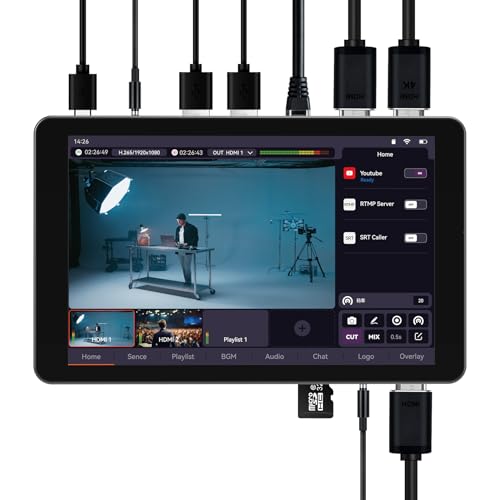
- Switcher, encoder, recorder, and monitor in one portable unit
- Supports up to 8 sources, including remote RTMP/SRT feeds
- Built-in apps handle vertical and horizontal streaming
Best For: Mobile and vertical-content creators who need battery-powered streaming
Broadcast-Style HDMI Streamer

- 4 HDMI inputs plus dual HDMI outputs for monitoring
- Streams to 3 platforms and supports USB OBS/vMix output
- Includes SD/SSD recording, audio controls, and overlays
Best For: Churches, conferences, and events needing broadcast-style control
Hybrid Live Studio Switcher
Stream 1 Live Streaming Switcher

- 4 HDMI inputs plus AUX with PGM/AUX output routing
- Dual RTMPS streaming with recording and playback
- PTZ control for up to 4 cameras and portrait mode support
Best For: Creators who want multi-input switching, dual streaming, and PTZ control
Compact Multi-Cam Control

- 4 HDMI inputs plus USB 3.0 webcam-style output
- 2-inch LCD preview screen for live monitoring
- LAN remote control with XPOSE software
Best For: Solo streamers needing a compact switcher for simple multi-cam workflows
Feature-Rich 4K Producer
4K HDMI Video Mixer Switcher M1

- 4K HDMI inputs with USB, webcam, and NDI HX support
- Records to USB and SD while streaming to two platforms
- Includes PTZ control plus keying, PIP, and DSK effects
Best For: Event producers wanting a versatile 4K live switching and encoding hub
Compact 4K Streaming Hub
SPROLINK Neolive R5 4K HDMI Switcher

- 4 HDMI inputs with two 4K60 sources
- Built-in RTMP, NDI, SRT, and USB UVC output
- PTZ control, audio mixing, chroma key, and recording
Best For: Creators and small production teams needing an all-in-one HDMI streaming switcher
Broadcast I/O Workhorse

- 4 HDMI and 4 SDI inputs for flexible source mixing
- Built-in encoder with NDI|HX3, RTMP, SRT, and USB capture
- 5.5-inch screen, PTZ control, and dual recording
Best For: Broadcast-style live productions needing HDMI and SDI together
Pro Hybrid Streaming Switcher
SPROLINK Neolive R5S PRO 8-Input Mixer

- 4 SDI + 4 HDMI inputs with two 4K60 HDMI sources
- Built-in NDI, SRT, RTMP, USB UVC, and recording
- Super Source, PTZ joystick, and 5.5-inch FHD screen
Best For: Advanced teams needing a hybrid SDI/HDMI live production switcher
All-in-One Mobile Production – Magewell Director Mini 55110
If you want a video switcher with streaming encoder that can also record and monitor without a laptop, the Magewell Director Mini is built for that job. It combines switching, encoding, streaming, recording, and scene control in one compact unit, with support for HDMI, USB-A, and multiple IP sources.
Best For: Mobile creators, event producers, and small teams who need a standalone live production system with touchscreen control.
Pros:
- All-in-one design handles switching, encoding, recording, monitoring, and streaming.
- Supports up to 2 HDMI inputs, 2 USB-A inputs, and up to 3 simultaneous IP sources.
- Built-in 5.44-inch AMOLED touchscreen for on-device scene control and previewing.
- Hardware encoding supports H.264/H.265 up to 1080p60 with multi-destination streaming.
Cons:
- Streaming and recording are capped at 1080p60 rather than 4K output.
- Cellular connectivity requires a USB modem, which is not included.
- Best suited to compact productions rather than large input counts.
The Director Mini stands out when portability and self-contained operation matter more than rack-style expansion. It is a strong fit for creators who want a touchscreen production box that can travel, switch, stream, and record in one workflow.
4K Multi-Camera Value Pick – FoMaKo KC602 4K HDMI Switcher
The FoMaKo KC602 is a video switcher with streaming encoder aimed at users who want 4K inputs, live production controls, and recording in one tabletop unit. It offers four HDMI inputs, a 5.5-inch display, and built-in support for RTMP/RTMPS streaming plus USB recording.
Best For: Churches, studios, and event crews that need 4K HDMI switching with PTZ control and strong audio features.
Pros:
- Supports 4K60 input and 1080p60 output with low-latency processing.
- Includes 4 HDMI inputs, multi-view output, loop-through, and USB 3.0 UVC streaming.
- Can control up to 4 PTZ cameras and store 9 presets for quick angle changes.
- Strong audio section includes XLR balanced input, phantom power, EQ, and monitoring tools.
Cons:
- Recording output is 1080p60, not 4K.
- Bulkier control layout may be more than casual streamers need.
- Best suited to users comfortable with more advanced production tools.
Overall, the KC602 is built for productions that value input flexibility, PTZ control, and audio mixing as much as video switching. It makes the most sense for users who want more broadcast-style control in a single HDMI switcher.
Portable Touchscreen Streaming Studio – SPROLINK NeoLIVE MD8 Portable Switcher
If you want a video switcher with streaming encoder that travels easily, the SPROLINK NeoLIVE MD8 is designed as a portable all-in-one live studio. It combines switching, encoding, recording, and an 8-inch touchscreen monitor, while also supporting built-in vertical and horizontal streaming workflows.
Best For: Mobile creators, outdoor streamers, and vertical-content producers who want built-in app streaming and battery power.
Pros:
- All-in-one unit includes switcher, encoder, recorder, and 8-inch touchscreen.
- Supports up to 8 signal sources, including HDMI, UVC camera, USB drive, and remote network feeds.
- Built-in apps support both landscape streaming to 3 platforms and portrait streaming to 2 platforms.
- 8000mAh battery and fast charging make it practical for field use.
Cons:
- HDMI output is 1080p rather than 4K.
- Some advanced workflows depend on built-in app/platform support.
- Designed for portability first, so it may not suit larger fixed studio setups.
The NeoLIVE MD8 is a smart choice when you need flexibility for both phone-based and camera-based streaming. Its battery, touchscreen, and built-in app support make it especially useful for creators who produce content on the move.
Broadcast-Style HDMI Streamer – Osee GoStream Deck HDMI Pro
The Osee GoStream Deck HDMI Pro is a video switcher with streaming encoder built for users who want strong I/O, on-device control, and multiformat streaming without relying on a PC. It combines four HDMI inputs, dual HDMI outputs, USB-C connectivity, Ethernet streaming, and built-in recording support.
Best For: Churches, conferences, podcasts, and live events that need a control-panel style switcher with flexible streaming and overlay tools.
Pros:
- 4 HDMI inputs and 2 HDMI outputs support multiview and monitoring.
- Streams to 3 platforms or via OBS/vMix through USB output.
- Includes recording to SD card or USB SSD while supporting playback of MP4 files.
- Offers audio controls, EQ, limiter, chroma key, PIP, and graphics overlay tools.
Cons:
- Does not include the larger touchscreen style interface found on some competitors.
- Best features are aimed at users who need broadcast-style production controls.
- Advanced workflow options may be more than a simple single-camera stream requires.
For buyers who want a hands-on HDMI production deck with practical streaming and graphics features, the GoStream Deck is a solid fit. It leans toward structured live production where monitoring, audio control, and overlays matter.
Hybrid Live Studio Switcher – Stream 1 Live Streaming Switcher
If you want a video switcher with streaming encoder for multi-camera productions, the Stream 1 is built around flexible live routing and creator-focused control. It offers up to 4 HDMI inputs plus an AUX channel, dual RTMPS streaming, PTZ control, recording, playback, and both landscape and portrait livestreaming in one unit.
Best For: Streamers and small production teams that want multi-input switching, dual-platform streaming, and PTZ camera control in a single box.
Pros:
- Up to 4 HDMI inputs plus AUX, with PGM and AUX outputs that can send any source or a clean feed.
- Dual RTMPS streaming and NDI-updatable design for more flexible live delivery.
- Built-in PTZ control for up to 4 cameras, with remote control from PC or smartphone.
- Recording, instant playback, chroma/luma key, PIP layouts, and support for landscape and 9:16 portrait streaming.
Cons:
- Some of the more advanced functions may be more than casual users need.
- Best fit for users who will take advantage of the PTZ and multi-output workflow.
This is a feature-packed choice for creators who need switching, encoding, recording, and camera control in one live production device. Its strongest advantage is how many broadcast-style tools it combines without giving up portrait streaming support.
Compact Multi-Cam Control – FEELWORLD LIVEPRO L1 V1
The FEELWORLD LIVEPRO L1 V1 is a practical video switcher with streaming encoder features for smaller live productions. With 4 HDMI inputs, USB 3.0 output, real-time switching, and a built-in LCD preview screen, it keeps multi-camera streaming straightforward for solo operators.
Best For: Solo streamers and small crews who want a compact, easy-to-manage switcher for camera mixing and USB streaming.
Pros:
- 4 HDMI inputs and 1 HDMI output, all supporting 1080p.
- USB 3.0 output appears as a webcam for use with common streaming software.
- 2-inch LCD screen with preview of PGM, PST, and input signals.
- LAN-based remote operation through XPOSE without extra software installation.
Cons:
- Limited to 1080p input and output based on the supplied specs.
- More compact feature set than larger, studio-focused switchers.
For users who value simplicity over maximum complexity, this switcher covers the essentials well. It is especially appealing if you want a small unit that can be fixed on a tripod and still handle real-time multi-camera production.
Feature-Rich 4K Producer – 4K HDMI Video Mixer Switcher M1
If you need a video switcher with streaming encoder features and a broader input set, the M1 is built for more involved live productions. It combines 4K HDMI inputs, USB and SD recording, dual-platform IP streaming, PTZ control, and a full set of effects for polished event coverage.
Best For: Event producers and streamers who want 4K-capable inputs, recording options, and more advanced audio and effects tools.
Pros:
- Multi-signal design with 4K HDMI inputs, additional HDMI sources, USB, webcam support, and NDI HX input capability.
- Records simultaneously to USB and SD card, with a separate UVC streaming output.
- Dual-platform IP streaming plus USB-A 3.1 plug-and-play streaming support.
- Strong production tools including chroma key, luma key, logo insertion, PIP, DSK, PTZ control, and portrait/landscape switching.
Cons:
- More feature-dense than basic streamers, so setup may take more time.
- Some NDI functionality is noted as upgradeable rather than fully standard in the base package.
The M1 is the most all-in-one option in this group, especially if you want switching, encoding, monitoring, recording, and PTZ control together. It is best suited to users who need flexible production tools and expect to grow into them.
Compact 4K Streaming Hub – SPROLINK Neolive R5 4K HDMI Switcher
If you want a video switcher with streaming encoder that can handle small-to-mid size live productions without extra hardware, the SPROLINK Neolive R5 is built around flexibility. It combines 4 HDMI inputs, built-in RTMP/NDI/SRT streaming, USB 3.0 UVC output, and recording to USB, SD, or external drives, making it a practical choice for creators who need switching, encoding, and monitoring in one box.
Best For: Live streaming teams, churches, podcasts, and event producers who need a compact 4K HDMI switcher with built-in encoding.
Pros:
- 4 HDMI inputs with two 4K60-capable sources for multi-camera productions
- Built-in hardware encoder for direct RTMP streaming plus NDI and SRT support
- USB 3.0 UVC output works with OBS, Zoom, Teams, Streamlabs, and vMix
- PTZ control, audio mixer, chroma key, and recording in one unit
Cons:
- Only HDMI inputs, so SDI-based camera setups need adapters or a different model
- 4K support is limited to two inputs, not all four
- Best suited to users comfortable with web-based control and live production workflows
The Neolive R5 stands out if you want streaming, capture, and basic production tools built into a single switcher. It’s a strong fit when simplicity matters more than large-format I/O.
Broadcast I/O Workhorse – Tenveo 4K60 HDMI/SDI Switcher
The Tenveo PC500 is a strong option if you need a video switcher with streaming encoder that can work in broadcast-style environments. With 4 HDMI inputs, 4 SDI inputs, built-in encoding, IP streaming, USB capture, and a 5.5-inch screen, it gives live producers a lot of flexibility for multi-camera workflows without relying on a separate PC for the core stream.
Best For: Churches, studios, conferences, and event crews that need both HDMI and SDI input support with built-in streaming.
Pros:
- Mixes 4 HDMI and 4 SDI inputs for more source compatibility
- Built-in encoding with RTMP, SRT, RTSP, NDI|HX3, and UVC streaming support
- Simultaneous streaming to two platforms and dual recording capability
- PTZ control, web browser control, and a 5.5-inch FHD screen for monitoring
Cons:
- More advanced feature set may be more than casual streamers need
- 1080p60 output rather than full 4K output
- Some features are strongest in structured live production setups, not quick plug-and-play use
This model makes the most sense when your setup includes a mix of SDI and HDMI gear and you want one device to manage switching, encoding, monitoring, and recording. It is especially appealing for teams that value broadcast-style connectivity.
Pro Hybrid Streaming Switcher – SPROLINK Neolive R5S PRO 8-Input Mixer
If you need a more advanced video switcher with streaming encoder, the SPROLINK Neolive R5S PRO is built for hybrid productions. It combines 4 SDI and 4 HDMI inputs, built-in NDI and hardware streaming, USB 3.0 UVC output, and a 5.5-inch FHD screen, giving you a lot of control over multi-camera live workflows in one unit.
Best For: Professional live streaming teams, churches, esports, and studios that want an 8-input hybrid switcher with built-in encoding.
Pros:
- 8 total inputs with both SDI and HDMI support, including two 4K60 HDMI inputs
- Built-in NDI, SRT, RTMP streaming plus USB 3.0 UVC output
- Super Source supports split-screen and PiP layouts
- PTZ joystick, browser control, audio mixer, and recording/playback tools
Cons:
- Designed for more complex productions, so it may feel bulky for simple streams
- Only select any 4 active sources from the 8 inputs at once
- Best value comes when you actually need SDI, HDMI, PTZ, and streaming together
The R5S PRO is the most feature-rich pick here if your workflow needs mixed input types and production-level live switching. It’s a capable centerpiece for teams that want routing, streaming, and monitoring in one platform.
How We Picked the Best Video Switcher with Streaming Encoder
We looked for models that combine live switching and onboard encoding in a single unit, with practical features such as multiple HDMI or SDI inputs, touchscreen control, recording support, PTZ compatibility, and common streaming outputs like USB, RTMP, or NDI. We also prioritized devices that make sense for real-world use, including portability, clear monitoring, and flexible input counts.
Quick Comparison
In this roundup, the most important difference is input format and workflow. Some units are built around HDMI-only setups for creators and smaller rigs, while others add SDI for longer cable runs and more pro-style systems. Screen size, touch control, and built-in app support can also matter if you want an all-in-one Video Switcher with Streaming Encoder that is easy to operate without a separate control surface.
Key Buying Factors for a Video Switcher with Streaming Encoder
Inputs and Connectivity
Choose the number and type of inputs based on your cameras and sources. HDMI is common for mirrorless cameras, computers, and consumer gear, while SDI is better for larger venues and longer distances. If you expect to expand later, leave room for extra sources.
Streaming and Output Options
Check whether the unit supports the platform and workflow you need. Dual RTMP, USB 3.0, HDMI program out, and NDI can all be useful depending on whether you stream to one destination, multiple platforms, or a local production chain.
Recording and Playback
Built-in recording and clip playback can save time during live events, especially when you want backup files or quick roll-ins without extra gear.
Control and Monitoring
Touchscreens, PTZ control, and clearly labeled audio/video controls can make a big difference during fast-paced productions. A larger screen is helpful if you often switch live without an external monitor.
Portability and Workflow
If you travel often, look for a compact chassis, low power needs, and an interface that is easy to learn. If your setup stays in one place, prioritize rugged I/O and broader expandability over size.
Who Should Buy Which Video Switcher with Streaming Encoder?
Creators and solo streamers usually benefit most from a compact HDMI-based Video Switcher with Streaming Encoder and simple on-device control. Churches, schools, and event teams may want SDI support, more inputs, and reliable recording for long sessions. If you stream to multiple platforms or want a more advanced production workflow, look for dual streaming, PTZ control, and network-based features such as NDI. For the most straightforward setup, choose the model that matches your current cameras and streaming destinations first, then add extra headroom for future growth.