Choosing a ptz camera for video production studio work comes down to more than resolution. You need reliable tracking, clean output options, smooth control, and enough zoom to cover different studio layouts without constant repositioning.
This roundup focuses on models that suit live production, streaming, worship, education, and hybrid studio setups, with an emphasis on practical features that matter during real shoots.
Best 10 Ptz Camera for Video Production Studio Picks for 2026
Flagship 4K NDI PTZ
FoMaKo K600N for live studio and worship

- 4K 60fps with NDI HX3 support
- 20x optical zoom and Gen 3 AI tracking
- HDMI, USB3.0, 3G-SDI, LAN, and PoE
Best For: Studios and churches needing flexible live-production connectivity
Broadcast-Ready AI PTZ
AVKANS Move 4K for production teams
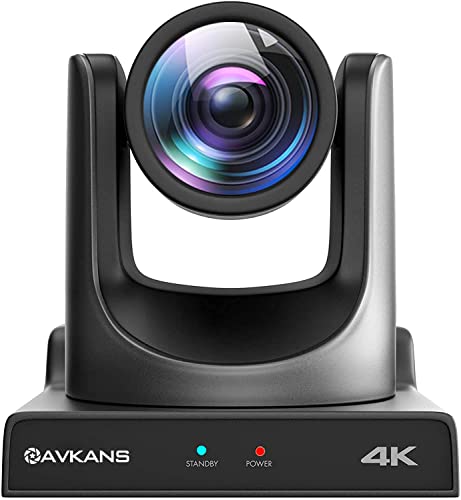
- 20x zoom with SDI, HDMI, USB, and IP
- Gen-2 AI tracking with Presenter Lock
- Compatible with OBS, vMix, Wirecast, and StreamDeck
Best For: Production teams needing flexible control and software integration
Premium PTZR 4K60
OBSBOT Tail 2 for cinematic studio motion

- 4K@60fps with 1/1.5-inch CMOS sensor
- 5x optical zoom and 12x hybrid zoom
- PTZR design with advanced AI tracking
Best For: High-end studios wanting cinematic tracking and vertical shooting
Studio-Ready Auto-Tracking
PTZOptics Move SE 30x 1080p PTZ Camera

- 30x optical zoom for flexible framing
- Auto-tracking helps reduce operator workload
- HDMI, SDI, NDI, USB, and IP outputs
Best For: Studios and live events needing tracked 1080p production
All-in-One 4K Tracking
TONGVEO 4K NDI AI Auto-Tracking PTZ

- 4K/30FPS on HDMI and USB
- AI tracking with Presenter Tracking and Auto-Framing
- NDI, SDI, PoE, and USB3.0 support
Best For: Teams that want 4K capture plus NDI and AI tracking
Premium NDI HX Production
PTZOptics Move 4K 12X NDI|HX PTZ Camera

- 4K 60fps support for high-end production
- Native NDI|HX with SDI, HDMI, USB, and IP
- Built-in auto-tracking without extra software
Best For: Production studios wanting 4K, NDI|HX, and automatic tracking
Editor’s Pick
FoMaKo 4K 30x PTZ for Live Production

- 30x optical zoom with 4K support
- NDI 6 / HX3 certified for streaming
- AI tracking with multiple outputs
Best For: Studios and live-stream teams needing NDI and long zoom reach
Budget NDI Choice
AVKANS 20X PTZ with AI Tracking

- 20x optical zoom with 1080p60
- Simultaneous NDI, HDMI, SDI, USB
- Updated firmware adds AI tracking
Best For: Budget studio and church setups needing versatile outputs
Pro Broadcast Upgrade

- 4K 60FPS with 30x optical zoom
- AI Auto Tracking 3.0 and FreeD
- Tally light plus PoE and Dante-ready
Best For: Advanced studios and large live events
Flagship 4K NDI PTZ – FoMaKo K600N for live studio and worship
If you need a ptz camera for video production studio work that can handle live switching, streaming, and multi-camera workflows, the FoMaKo K600N brings a strong feature set. It combines 4K 60fps output, NDI HX3, 20x optical zoom, AI auto-tracking, and several connection options for flexible studio integration.
Best For: Studios, churches, and live streaming setups that want NDI, 4K60, and tracking in one camera.
Pros:
- Supports NDI HX3 with 4K 60fps output for low-latency live production.
- Offers HDMI 2.0, USB3.0, 3G-SDI, LAN, and PoE for versatile deployment.
- Includes Gen 3 AI auto-tracking with adjustable sensitivity, framing, and tracking modes.
- 20x optical zoom and autofocus help keep subjects clear during movement and zooming.
Cons:
- 3G-SDI output is listed at 1080p60 rather than 4K.
- Feature depth may be more than needed for simple single-camera use.
- Best fit is for users comfortable with studio-style setup and configuration.
This is a capable all-in-one option if your studio needs broadcast-style connectivity and automated subject tracking. The mix of NDI, 4K60, and multiple outputs makes it especially practical for multi-source live production.
Compact AI PTZ Kit – EMEET PIXY for creator-style studio shooting
For a ptz camera for video production studio use where fast autofocus and simple framing matter, the EMEET PIXY Kit is built around a dual-camera AI system. It combines a 4K main camera, PDAF focus, 1/2.55″ Sony sensor, tripod support, and PTZ tracking features aimed at creators, teaching, and streaming.
Best For: Solo creators, streamers, and presenters who want compact AI tracking with built-in audio.
Pros:
- Dual-camera design pairs a 4K imaging camera with an AI assist camera for tracking and exposure support.
- PDAF and AI autofocus are designed for quick 0.2s focusing.
- Includes a tripod with 360° swivel head for flexible portrait or landscape framing.
- Three-mic array offers Live, Noise Canceling, and Original Sound modes.
Cons:
- 4K operation is listed at 30fps, not 60fps.
- USB 2.0 connectivity is less studio-focused than pro video interfaces.
- Designed more as a compact creator camera than a full broadcast PTZ system.
The PIXY Kit makes sense when you want a smaller, easier-to-place camera that still gives you AI framing and usable audio. It is especially appealing for setups that prioritize convenience, portability, and quick setup over traditional broadcast I/O.
Broadcast-Ready AI PTZ – AVKANS Move 4K for production teams
If your search for a ptz camera for video production studio use leans toward a more traditional broadcast setup, the AVKANS Move 4K is positioned for pro workflows. It offers 20x zoom, AI auto-tracking, SDI/HDMI/USB/IP outputs, and compatibility with common production software and control hardware.
Best For: Churches, studios, and event teams that want a flexible pro camera with software and joystick control.
Pros:
- 20x zoom with SDI, HDMI, USB, and IP outputs supports varied production pipelines.
- Gen-2 AI auto-tracking includes Presenter Lock technology for following a chosen subject.
- Works with OBS, vMix, Wirecast, Livestream Studio, Tricaster, and StreamDeck.
- Lifetime tech support and free online training are included in the listed support package.
Cons:
- USB is listed as 2.0, which may limit workflow flexibility compared with newer connections.
- It is a heavier, more installed-style camera at 3.43 kg.
- Best suited to users who will take advantage of its pro controls and integrations.
This model stands out when your studio needs control, tracking, and output flexibility rather than a simple plug-and-play webcam approach. It is a strong fit for teams building a serious live production environment.
Premium PTZR 4K60 – OBSBOT Tail 2 for cinematic studio motion
For a ptz camera for video production studio projects that need premium image quality and advanced motion control, the OBSBOT Tail 2 stands out. It brings 4K@60fps, a 1/1.5″ CMOS sensor, 5x optical zoom, AI Tracking 2.0, and a PTZR design that can switch into vertical shooting.
Best For: High-end creators and studios that want cinematic output, advanced tracking, and vertical shooting support.
Pros:
- 4K@60fps capture with a 1/1.5″ CMOS sensor and 50MP still frame capability.
- 5x optical zoom plus 12x hybrid zoom for closer framing.
- AI Tracking 2.0 supports group tracking, single-target lock, and auto zoom.
- PTZR design adds seamless portrait/landscape switching and strong stabilization.
Cons:
- Premium feature set may exceed what smaller productions need.
- Advanced capabilities suggest a more involved setup than basic PTZ cameras.
- Some workflows may not require the vertical-shooting PTZR design.
The Tail 2 is built for users who want more than standard PTZ movement, especially when cinematic quality and flexible framing matter. Its mix of high-end optics, tracking, and output options makes it a serious studio tool.
Studio-Ready Auto-Tracking – PTZOptics Move SE 30x 1080p PTZ Camera
If you need a ptz camera for video production studio use, the PTZOptics Move SE 30x is built around flexibility and easy operation. It offers 1080p Full HD at 60 FPS, auto-tracking, and simultaneous HDMI, SDI, NDI, USB, and IP outputs, making it a practical fit for live production setups that need multiple connection options.
Best For: Studios, classrooms, conferences, and live broadcast teams that want auto-tracking plus broad output compatibility.
Pros:
- 30x optical zoom gives you a wide framing range for different studio shot sizes.
- Auto-tracking can reduce the need for constant manual camera operation.
- Simultaneous HDMI, SDI, NDI, USB, and IP outputs support flexible studio workflows.
- Multiple control methods include IR remote, network, RS-232, RS-485, web UI, app, and USB.
Cons:
- Only records in 1080p, so it is not the right pick if your studio requires 4K capture.
- The camera uses wired connectivity, which may limit placement flexibility compared with wireless options.
Overall, this is a strong production-friendly PTZ option when you want reliable tracking and a wide range of output standards in one camera. Its feature set is especially useful for teams that need to integrate into existing live streaming and switching setups.
All-in-One 4K Tracking – TONGVEO 4K NDI AI Auto-Tracking PTZ
For a ptz camera for video production studio setups that need modern connectivity, the TONGVEO 4K NDI PTZ Camera brings together 4K/30FPS output, AI auto-tracking, and professional interfaces. HDMI and USB can deliver 4K, while IP/NDI supports up to 1080p, so it is aimed at live streaming and studio workflows that value flexibility.
Best For: Studios, houses of worship, and streaming teams that want NDI, AI tracking, and multiple output options.
Pros:
- 4K/30FPS via HDMI and USB gives you a sharper capture option for direct connections.
- Official NDI license plus PoE support make network-based setup simpler.
- AI tracking includes Presenter Tracking and Auto-Framing modes.
- SDI output with locking connectors is useful for longer cable runs up to 300 ft.
Cons:
- IP/NDI streaming is limited to up to 1080p, not full 4K.
- It tracks one person at a time and is not intended for high-speed motion.
This is a feature-rich choice for productions that want camera automation and network integration in one package. It is especially appealing if your studio setup depends on OBS, vMix, Zoom, or similar software and you want a camera that can slot in quickly.
Premium NDI HX Production – PTZOptics Move 4K 12X NDI|HX PTZ Camera
If you want a ptz camera for video production studio work with 4K detail and a simpler install path, the PTZOptics Move 4K 12X is designed for that role. It includes SDI, HDMI, USB, and IP outputs, comes native with NDI|HX, and adds built-in auto-tracking so teams can produce without dedicating a separate operator.
Best For: Studios and production teams that want 4K PTZ performance, NDI|HX, and built-in tracking.
Pros:
- 4K 60fps capability gives the camera headroom for higher-end production needs.
- Native NDI|HX plus SDI, HDMI, USB, and IP outputs support versatile studio integration.
- Built-in auto-tracking works without running software on another computer.
- Web UI includes tutorial functions that can help newer operators get started.
Cons:
- 12x optical zoom is less reach than some larger-zoom PTZ cameras.
- The feature set is strong, but it may be more than a basic studio needs.
This model stands out for studios that want a polished, modern PTZ workflow with tracking and network streaming built in. The 5-year limited parts and labor warranty also makes it appealing for buyers thinking about long-term use.
Editor’s Pick – FoMaKo 4K 30x PTZ for Live Production
If you need a ptz camera for video production studio use with strong zoom range and flexible outputs, the FoMaKo K30NS is built around practical live workflow features. It offers 4K support, 30x optical zoom, AI auto-tracking Gen 3, and compatibility with NDI 6 / NDI HX3, plus HDMI, 3G-SDI, USB3.0, LAN, and PoE for easier setup in multi-camera environments.
Best For: Studios, churches, schools, and streaming teams that want a feature-rich PTZ with NDI and long zoom reach.
Pros:
- 30x optical zoom with 15x digital zoom for close shots across a room.
- NDI 6 and NDI HX3 certification for network-based production workflows.
- AI Auto-Tracking Gen 3 with adjustable tracking modes and sensitivity.
- Multiple outputs, including HDMI, 3G-SDI, USB3.0, LAN, and PoE support.
Cons:
- Bundled setup and accessory details are more focused on live production than studio-specific rigging.
- Best value comes from matching it with compatible switchers, controllers, or software.
Overall, this is a strong all-around PTZ option when you want a single camera that can cover livestreaming, switching, and tracked presenters without giving up zoom reach. The official NDI support and broad software compatibility make it especially practical for production setups that need flexibility.
Budget NDI Choice – AVKANS 20X PTZ with AI Tracking
For a ptz camera for video production studio setups where budget and connectivity matter, the AVKANS AV-E20-NDI focuses on the essentials. It delivers up to 1080p60, a 20x optical zoom lens, official NDI support, and simultaneous NDI, HDMI, SDI, and USB video outs, which makes it easier to use in a small studio or multi-camera live stream.
Best For: Budget-conscious creators, houses of worship, and production teams that want NDI plus SDI/HDMI/USB flexibility.
Pros:
- Official NDI camera with compatibility for vMix, OBS, ProPresenter, StreamYard, Streamlabs, Wirecast, and Zoom.
- Simultaneous NDI, HDMI, SDI, and USB outputs for live production and recording.
- 20x optical zoom and up to 1080p60 video quality with PoE support.
- Newer firmware adds AI auto-tracking modes, including presenter, zone, and hybrid tracking.
Cons:
- Top resolution is 1080p60 rather than 4K.
- Some setup details rely on browser or CMS control workflows instead of a more premium control experience.
This model makes sense if you want a practical NDI PTZ without paying for higher-end 4K features. Its broad output support and updated tracking firmware give it plenty of flexibility for streaming, recording, and simple studio production.
Pro Broadcast Upgrade – Tenveo 4K 60FPS NDI PTZ
If you’re shopping for a ptz camera for video production studio work that needs more broadcast-style features, the Tenveo VX30M-Ultra is the most ambitious option here. It combines 4K 60FPS output, a 30x optical zoom lens, AI Auto Tracking 3.0, NDI-based IP production, and pro tools like tally light and FreeD support for larger live workflows.
Best For: Broadcast-style studios, large live events, and advanced multi-camera productions.
Pros:
- 4K 60FPS video with a 1/1.8-inch 8.42MP CMOS sensor.
- 30x optical zoom plus 16x digital zoom for distant subjects.
- AI Auto Tracking 3.0 with presenter, auto framing, and zone tracking options.
- Pro features include tally light, FreeD support, PoE, and Dante AV-H upgradeability.
Cons:
- Feature depth may be more than simple single-camera streams need.
- Dante AV-H is an upgrade option rather than a standard included feature.
This is the strongest pick if your production environment values broadcast integration and advanced control as much as image quality. The mix of 4K60, tracking flexibility, and professional workflow tools makes it a serious step up for larger studios and event productions.
How We Picked the Best Ptz Camera for Video Production Studio
We focused on the features that matter most in a Ptz Camera for Video Production Studio environments: image quality, zoom range, tracking behavior, connectivity, low-latency output options, and control flexibility. We also favored models that can fit common studio workflows, including HDMI, SDI, USB, IP, NDI, and PoE where available.
Because studio needs vary, we included a mix of value-focused and higher-end options so you can match the camera to your room size, switching setup, and production demands.
Quick Comparison
For large studios or longer shooting distances, look closely at models with 20x to 30x optical zoom. If you need a cleaner network-based workflow, NDI or NDI HX support can simplify routing and reduce cable clutter. For smaller rooms, a 4K camera with solid auto-tracking and USB or HDMI output may be the better fit.
Also consider whether you need 4K 60fps for smoother motion, or whether 1080p is enough for your deliverables. In many cases, the right choice is the model that balances zoom, tracking, and output compatibility with your existing switcher or encoder.
Key Buying Factors for a Ptz Camera for Video Production Studio
Image Quality and Frame Rate
Resolution is important, but so is motion handling. A 4K camera is useful for cropping and future-proofing, while 60fps can help fast movement look cleaner on stream or during live switching.
Zoom and Field of View
Optical zoom matters more than digital zoom for studio work. A wider lens can help in tighter rooms, while 20x or 30x zoom is better for larger stages, presenters at a distance, or multi-use rooms.
Tracking and Presets
Auto-tracking can save time in one-person or small-team productions, but it should be predictable and easy to override. Strong preset support is equally important for fast cuts between talent positions, wide shots, and close-ups.
Connectivity and Workflow
Match the camera to your switcher and recording setup. HDMI is simple, SDI is useful for longer cable runs, USB helps with direct-to-computer workflows, and NDI can streamline networked productions. PoE can also reduce power and cable complexity.
Who Should Buy What
If you run a smaller studio or content space, prioritize easy setup, USB/HDMI output, and dependable tracking. If you manage a church, campus, or event environment, look for longer zoom, PoE, and network outputs. For larger or more demanding production studios, choose a higher-end 4K model with SDI, NDI, fast autofocus, and stronger control options.
In short, the best choice is the camera that fits your room size, switching method, and operator count—not just the one with the biggest spec sheet.