A video switcher with multiview lets you monitor several camera feeds while selecting, composing, and sending the right source to your stream or display. The best models combine clear preview layouts with the inputs, audio tools, and output formats your production actually requires.
This roundup covers compact HDMI switchers, SDI-capable systems, touchscreen mixers, ISO recording models, and dedicated multiview hardware. Use the guide below to narrow the list by workflow, resolution, connectivity, and control needs.
Best 10 Video Switcher with Multi View Picks for 2026
Best All-in-One Streaming Deck

- 4 HDMI inputs with dual-output MultiView monitoring
- Records, plays back media, and streams to up to 3 platforms
- Physical controls plus audio, keying, and graphics tools
Best For: Multi-camera live productions needing streaming, recording, and monitoring
Best for HDMI-Centric Productions
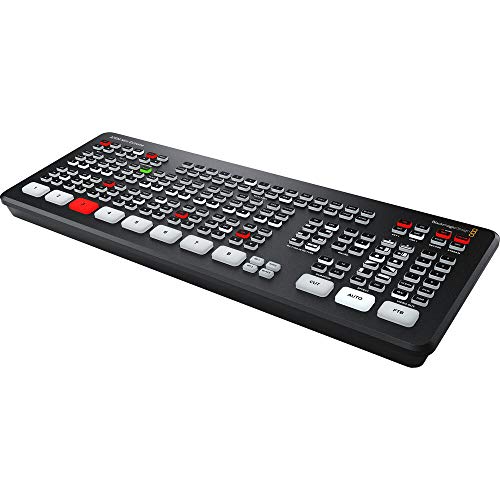
- Eight HDMI inputs for larger multi-camera setups
- 10-bit HD switching with embedded two-channel audio
- Re-sync and format conversion on every HDMI input
Best For: HDMI-based live productions with many connected sources
Best Hybrid SDI/HDMI Option

- Four SDI and four HDMI inputs plus USB-C and NDI HX
- Supports MultiSource, PIP, chroma key, and DSK
- Streams to up to 3 platforms with multiple control methods
Best For: Mixed SDI/HDMI live events and flexible production systems
Best Budget Multiviewer

- Six layouts including quad, PIP, and one-large-three-small
- Seamless switching across four HDMI inputs
- 1080p 60Hz support with scaling and 3.5mm audio output
Best For: Simple HDMI monitoring, gaming, security, and home studio setups
Best Compact HDMI Pick

- Four HDMI inputs with multiview output
- Built-in streaming, recording, and audio mixing
- Transitions and keyers for polished live cuts
Best For: Compact four-camera HDMI livestreams
Best Touchscreen Workflow

- Four HDMI and one SDI input
- Built-in 10.1-inch touchscreen multiview
- USB 3.0 computer streaming output
Best For: Event crews needing touchscreen monitoring and mixed inputs
Best Advanced Hybrid Production

- Four HDMI plus four SDI inputs
- Eight ISO feeds and program recording
- XLR audio, IP video, and triple RTMP streaming
Best For: Large hybrid productions needing ISO recording and advanced routing
Best Touchscreen Value

- 4 HDMI plus 1 SDI input
- 10.1-inch touchscreen multi-view
- USB 3.0 streaming and built-in effects
Best For: Multi-camera events needing a large integrated preview screen
Best Compact 4K Option

- Four HDMI inputs with 4K support
- Dual HDMI program and preview outputs
- Lightweight design with UVC webcam mode
Best For: Portable HDMI-based streaming and entry-level productions
Best Professional Multi-Camera Hub

- Four HDMI and four SDI inputs
- Customizable multi-view and program outputs
- PTZ, NDI|HX3, recording, and multi-platform streaming
Best For: Professional productions using mixed video sources and PTZ cameras
Best All-in-One Streaming Deck – GoStream Deck HDMI Pro
The Osee GoStream Deck is a practical video switcher with multi view for creators who need HDMI camera inputs, audio control, recording, playback, and direct streaming in one unit. Its four HDMI inputs and two HDMI outputs support multi-view monitoring, while the built-in control surface enables PC-free operation.
Best For: Live events, churches, conferences, podcasts, weddings, and multi-camera productions needing integrated streaming and recording.
Pros:
- Four HDMI inputs and two HDMI outputs support source connections plus MultiView monitoring.
- Records to an SD card or USB SSD and can play MP4 files during production.
- Streams to up to three platforms and supports landscape or portrait orientations.
- Includes audio effects, chroma key, PIP, graphics overlays, and a physical T-Bar.
Cons:
- Its broad feature set may require time to learn.
- The HDMI-focused design does not provide the SDI inputs found on the GoStream Duet.
This is a strong choice when you want a self-contained production hub rather than a basic source selector. The control panel, recording features, overlays, and direct streaming make it especially versatile for live programs.
Best for HDMI-Centric Productions – ATEM Mini Extreme
The Blackmagic Design ATEM Mini Extreme is an eight-input video switcher with multi view designed for HDMI-based live production. All eight HDMI inputs include re-sync and frame-rate/format conversion, helping accommodate multiple HD sources in a streamlined setup.
Best For: HDMI multi-camera productions using desktop or laptop-based workflows and requiring many source inputs.
Pros:
- Provides eight HDMI video inputs for larger source setups.
- Supports 10-bit HD switching with two-channel embedded audio.
- Includes video input re-sync on all eight inputs.
- Frame-rate and format converters are available on every HDMI input.
Cons:
- It is limited to HDMI connectivity based on the supplied specifications.
- The notes do not specify built-in SDI support or analog audio connections.
Choose the ATEM Mini Extreme when input count and HDMI compatibility are the priorities. Its eight re-synchronized inputs make it a better fit than four-input models for productions with several cameras or other HDMI sources.
Best Hybrid SDI/HDMI Option – GoStream Duet
Osee GoStream Duet Multiple Camera SDI and HDMI Live Stream Video Mixer Switcher
Check Price On AmazonThe Osee GoStream Duet is a flexible video switcher with multi view for productions combining professional SDI cameras with HDMI equipment. It accepts four SDI inputs, four HDMI inputs, USB-C, NDI HX sources, and playback media, while supporting multiple control methods and landscape or portrait output.
Best For: Live events and installations that mix SDI and HDMI cameras or need expanded source flexibility.
Pros:
- Combines four SDI inputs, four HDMI inputs, USB-C, NDI HX, and media playback options.
- Offers MultiSource, chroma key, pattern key, PIP, Luam Key, and DSK effects.
- Supports MIX, DIP, WIPE, and T-Bar transitions.
- Can stream to up to three platforms through Ethernet or compatible software workflows.
Cons:
- Its extensive connectivity and effects may be more than a simple HDMI setup requires.
- The free NDI HX license requires downloading the latest firmware to unlock it.
The GoStream Duet stands out for mixed-format systems. It offers a useful bridge between SDI infrastructure and HDMI devices, with enough keying, transition, control, and streaming options for more advanced live productions.
Best Budget Multiviewer – PORTTA 4×1 HDMI Multiviewer
The PORTTA 4×1 HDMI Multiviewer is a compact video switcher with multi view for displaying and switching four HDMI sources on one screen. It offers six viewing layouts, including quad, side-by-side, PIP, full-screen, and one-large-three-small modes, with seamless switching up to 1080p at 60Hz.
Best For: Home studios, gaming setups, security monitoring, classrooms, and simple HDMI source-viewing systems.
Pros:
- Provides six viewing modes for monitoring several HDMI sources at once.
- Seamless switching helps avoid waiting when changing sources in full-screen mode.
- Supports up to 1080p at 60Hz with scaler up and down functions for 1080p and 720p.
- Includes IR remote and RS232 control, plus 3.5mm audio output.
Cons:
- It has four HDMI inputs and one output, making it more limited than production switchers.
- Its supplied features focus on viewing and switching rather than live streaming or recording.
- It supports 1080p rather than higher-resolution formats.
This PORTTA model is best viewed as a straightforward multiview monitoring tool rather than a complete broadcast mixer. Its small size, broad HDMI compatibility, and multiple layouts make it useful when simple source display is the main goal.
Best Compact HDMI Pick – ATEM Mini Pro
The Blackmagic Design ATEM Mini Pro is a practical video switcher with multi view for compact HDMI productions. Its four-input layout, built-in streaming, recording, audio mixing, and multiview output make it well suited to straightforward multicamera workflows.
Best For: Education, business presentations, esports, and internet livestreaming with up to four HDMI cameras.
Pros:
- Four-camera multiview for monitoring connected HDMI sources.
- Built-in streaming, recording, and six-input, two-channel audio mixer.
- Includes multiple transitions, keyers, and a downstream keyer.
Cons:
- Inputs are HDMI-only, without SDI connectivity.
- Designed around four HDMI inputs rather than larger productions.
The ATEM Mini Pro is a strong choice when portability and an integrated workflow matter more than extensive input expansion. It keeps switching, monitoring, streaming, and basic audio control in a compact unit.
Best Touchscreen Workflow – FEELWORLD L4
The FEELWORLD L4 is a video switcher with multi view that emphasizes hands-on monitoring through its built-in 10.1-inch touchscreen. With four HDMI inputs, one SDI input, a T-bar, and buttons, it supports flexible multicamera switching for events and live production.
Best For: Weddings, churches, sports events, online classes, live commerce, and concerts using HDMI and SDI sources.
Pros:
- Combines four HDMI inputs with one SDI input.
- Large touchscreen previews inputs and provides on-screen setup controls.
- USB 3.0 output supports streaming to a computer, while PTZ control is supported with a controller.
Cons:
- At 4.4 pounds, it is less compact than small desktop switchers.
- The supplied notes do not specify built-in recording or direct streaming.
The L4 stands out for operators who want a dedicated preview surface instead of relying entirely on an external monitor. Its mixed HDMI/SDI connectivity also gives medium-sized productions more camera flexibility.
Best Advanced Hybrid Production – GoStream Duet 8 ISO
The Osee GoStream Duet 8 ISO is a high-capacity video switcher with multi view for productions that need HDMI, SDI, recording, and network sources in one workflow. It combines eight camera inputs with ISO recording, professional audio tools, layered graphics, and direct multi-destination streaming.
Best For: Churches, event crews, podcasts, panels, interviews, and hybrid productions using HDMI, SDI, IP video, and professional audio.
Pros:
- Four HDMI 2.0 and four 3G-SDI inputs, with HDMI signals up to 4K60.
- Records eight ISO feeds plus the program output in H.264 or H.265.
- Includes XLR audio, multiview layouts, layered graphics, and streaming to up to three RTMP destinations.
Cons:
- Its extensive feature set may be more than simple livestreams require.
- Output is specified as up to 1080p despite HDMI input support up to 4K60.
For demanding productions, the GoStream Duet 8 ISO offers considerably more routing, recording, audio, and streaming flexibility than compact switchers. It is the strongest fit here when preserving every camera angle and integrating varied source types are priorities.
Best Touchscreen Value – FEELWORLD L4
If you want a video switcher with multi view for a medium-sized live production, the FEELWORLD L4 combines five video inputs with a built-in 10.1-inch touchscreen. Its tactile controls, live-streaming connection, and production effects make it practical for events, presentations, and multi-camera broadcasts.
Best For: Churches, weddings, sports, e-learning, live commerce, and creators who want a large integrated preview screen.
Pros:
- Connects up to four HDMI sources and one SDI source.
- Large 10.1-inch touchscreen supports input preview and settings control.
- Includes chroma key, logo overlay, picture-in-picture, 13 transitions, and two-channel audio mixing.
- USB 3.0 supports live streaming to a connected computer.
Cons:
- The unit is heavier than the compact RGBlink option at 1.46 kg.
- Its listed input configuration is less extensive than the Tenveo PC500.
The FEELWORLD L4 is a strong choice when an easy-to-read multi-view display and straightforward hands-on operation matter more than advanced network production features. The T-bar, buttons, and touchscreen give operators several ways to manage a live show.
Best Compact 4K Option – RGBlink Mini V3
The RGBlink Mini V3 is a compact video switcher with multi view for smaller multi-camera setups. It provides four HDMI inputs, dual HDMI outputs for program and preview, and UVC webcam mode, while optional TAO Cloud activation adds functions such as recording, PTZ control, and chroma key.
Best For: Portable creators, entry-level live streamers, and users who need a lightweight HDMI switcher with 4K input support.
Pros:
- Four HDMI inputs support multi-camera productions and compatible devices.
- Dual 1080p HDMI outputs can be used for program and preview feeds.
- Compact 0.49 kg design with a 2.1-inch touchscreen and T-bar.
- Supports UVC webcam mode and recording to USB drives up to 2TB.
Cons:
- Recording and selected advanced features require optional TAO Cloud licensing.
- The 2.1-inch screen is substantially smaller than the FEELWORLD L4 display.
- A 35W-or-higher USB-C power adapter is recommended for stable operation.
The Mini V3 makes sense if portability and HDMI connectivity are priorities. Before buying, account for the activation requirements and confirm that the available licensed features match your workflow.
Best Professional Multi-Camera Hub – Tenveo PC500
For demanding productions, the Tenveo PC500 is a video switcher with multi view built around broad connectivity and professional control. It combines HDMI and SDI inputs, customizable outputs, PTZ and NDI|HX3 support, recording, and multiple streaming protocols in a larger production-oriented system.
Best For: Churches, studios, conferences, universities, sports, and other productions using PTZ cameras or mixed HDMI/SDI sources.
Pros:
- Provides four HDMI inputs, four SDI inputs, USB input, and NDI|HX3 support.
- Outputs can be customized for program, auxiliary, input, preview, or multi-view feeds.
- Supports PTZ camera control, presets, cruise tracks, and AI tracking triggers.
- Streams through UVC, SRT, RTMP, RTSP, and NDI|HX3, with support for two platforms simultaneously.
Cons:
- Its professional feature set may be more than a simple single-operator stream requires.
- Video inputs can accept 4K60, but output is specified at up to 1080p60.
- The supplied notes do not specify the display size beyond identifying a 5.5-inch FHD screen.
The PC500 is the most capable choice here for facilities that need mixed connections, network workflows, PTZ management, and recording in one device. It is best suited to buyers prepared to configure a more advanced live-production system.
How We Picked the Best Video Switcher with Multi View
We focused on models that make multi-camera production easier to monitor and control, rather than judging them by input count alone. Selection factors included multiview visibility, HDMI or SDI compatibility, switching responsiveness, streaming and recording options, audio connectivity, output flexibility, and ease of setup.
The list spans entry-level switchers for simple HDMI productions and more capable systems for studios, houses of worship, classrooms, events, and live-streaming teams. Some products emphasize portability and built-in screens, while others provide ISO recording, XLR audio, cloud control, or expanded professional connectivity.
Quick Comparison
| Best For | What to Look For | Typical Strength |
|---|---|---|
| Basic multi-camera streaming | HDMI inputs, USB output, simple multiview | Lower cost and easy setup |
| Professional camera systems | SDI, genlock-friendly workflows, balanced audio | Longer cable runs and reliable integration |
| Mobile productions | Built-in touchscreen, compact design, direct controls | Fast operation without a separate monitor |
| Post-production flexibility | ISO recording, multiple outputs, storage support | More editing options after the event |
| Presentation and display routing | PIP, seamless switching, audio extraction | Flexible viewing and distribution |
Key Buying Factors for a Video Switcher with Multiview
Inputs and Camera Compatibility
Match the switcher to your cameras before comparing features. HDMI is common on consumer and mirrorless cameras, while SDI is better suited to professional cameras and longer cable runs. Check the exact input count, connector type, supported resolutions, and whether HDMI and SDI inputs can be used simultaneously.
Multiview Layout and Screen Size
A multiview display is useful only when you can clearly identify each source, preview, program output, audio meters, and recording or streaming status. Built-in screens improve portability, but a larger external monitor may be preferable for detailed production work. Confirm the available layouts and whether the multiview output is separate from the program output.
Resolution, Frame Rates, and Outputs
Verify support for your intended frame rate, especially if you use 4K cameras or 60-fps content. Some switchers accept higher-resolution sources but produce a 1080p program output. Also check for USB webcam output, HDMI program output, SDI output, network streaming, and recording destinations.
Audio and Production Tools
Look for the audio inputs you actually use, such as 3.5mm, RCA, or XLR, plus phantom power or independent level control when needed. Chroma key, picture-in-picture, transitions, lower thirds, and ISO recording can significantly change the workflow, but they may add setup complexity.
Who Should Buy Which Video Switcher with Multi View?
Choose a compact HDMI model if you stream with a few consumer cameras and want straightforward switching. A touchscreen mixer is a strong choice for portable events and operators who prefer direct control. Select an SDI-capable system for professional cameras, long cable runs, or mixed HDMI/SDI installations.
Buy an ISO-capable switcher when you need separate camera recordings for editing later. For presentations, distributed displays, or simple source monitoring, a dedicated multiviewer with PIP may be more appropriate than a full production mixer. Before ordering, confirm compatibility with your cameras, microphones, computer, streaming platform, and preferred output resolution.