Choosing a video switcher with built in recording can simplify your entire production setup by combining switching, monitoring, streaming, and capture in one device. That means fewer boxes, fewer cables, and faster setup times.
Whether you’re producing live events, classes, church services, or hybrid streams, the right model depends on your camera inputs, recording needs, and workflow preferences.
Best 10 Video Switcher with Built in Recording Picks for 2026
Professional 4K Live Production
4K HDMI Video Mixer Switcher with LCD

- Records 1080p 60FPS to USB storage
- Supports 4K60 input with loop-through output
- Built-in 5.5-inch screen and PTZ control
Best For: Churches and studios needing 4K input plus direct recording
Dual-Stream Creator Pick
Stream 1 Live Streaming Switcher

- Records high-bitrate Full HD video
- Supports dual RTMP streaming to two destinations
- PTZ control and instant playback included
Best For: Creators wanting recording, playback, and dual streaming
Portable Multiview Controller
Mixer Plus Compact Video Switcher

- Built-in 4-inch multiview screen
- 4 HDMI inputs with zero-latency switching
- PTZ, keying, and overlay tools included
Best For: Portable multi-camera streams and compact production setups
Multi-Format Studio Switcher
C2S HDMI & SDI 5.5" Video Mixer

- Records high-bitrate Full HD video with playback
- 5.5-inch screen with MV and Meeting modes
- PTZ control and vertical livestream support
Best For: Technical productions needing recording, playback, and multi-format inputs
Hybrid PTZ Switcher
KC800 4K 60FPS HDMI Multi-Cam Mixer
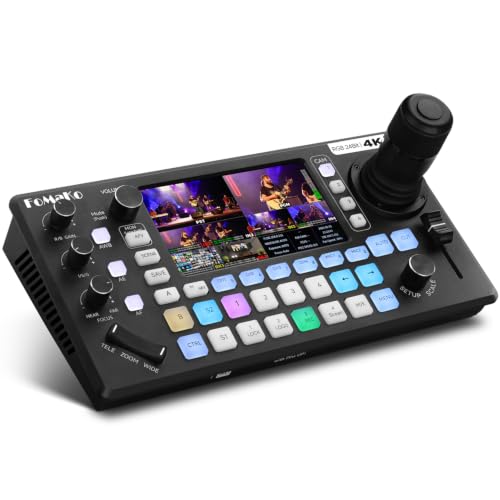
- Built-in USB/SD recording with no PC required
- 4D joystick controls up to 4 PTZ cameras
- 4 HDMI inputs plus pro audio I/O
Best For: Solo operators and event teams needing PTZ control with onboard recording
Monitoring-Focused Switcher
CINETREAK Stream Master 4 HDMI

- 10-inch screen for multiview monitoring
- Records Full HD video with instant playback
- Dual RTMPS streaming and 4-camera PTZ control
Best For: Conferences and live events needing a large screen and dual streaming
Portable All-In-One Kit
Osee GoStream Duet Kit 14-inch

- Includes switcher, 14-inch monitor, fan, and plates
- 4 HDMI/SDI inputs with 2 HDMI outputs
- Runs on AC, DC, or USB power bank
Best For: Mobile streamers who want a bundled all-in-one production kit
Compact Cloud-Ready 4K Choice
Mini V3 4K HDMI Switcher with Recording

- 4 HDMI inputs with dual HDMI outputs
- USB recording to drives up to 2TB
- UVC webcam mode for easy streaming
Best For: Small multi-cam creators who want compact switching with optional recording and effects
Broadcast-Focused All-in-One
Neolive R5S PRO 4K60 Video Switcher

- 4 SDI plus 4 HDMI inputs
- Record to USB, SD card, or HDD
- Built-in NDI, SRT, and RTMP support
Best For: Broadcast-style productions that need mixed SDI/HDMI inputs and flexible recording
Pro Multi-Camera Recorder
Tenveo PC500 4K60 HDMI/SDI Switcher

- 4 HDMI and 4 SDI inputs
- USB recording plus UVC output
- NDI|HX3, SRT, RTMP, and RTSP support
Best For: Professional multi-camera productions needing flexible inputs and network streaming
Professional 4K Live Production – 4K HDMI Video Mixer Switcher with LCD
If you want a video switcher with built in recording for multi-camera streaming, the KC602 is built around pro-level flexibility: 4K60 input support, 1080p60 recording, and a 5.5-inch control screen for fast operation. It’s a strong fit for creators who need reliable switching, monitoring, and capture in one unit.
Best For: Churches, studios, and live producers who want 4K input handling plus direct 1080p recording.
Pros:
- Records 1080p 60FPS directly to USB drives or portable hard drives.
- Supports 4K60 input and 4K loop-through output for flexible monitoring or backup workflows.
- Built-in 5.5-inch HD display, 31 buttons, 3 knobs, and T-bar for hands-on control.
- Includes PTZ control for up to 4 cameras with 9 presets.
Cons:
- Recording tops out at 1080p rather than 4K.
- The feature set is geared more toward advanced users than casual streamers.
Overall, the KC602 stands out if your priority is a production switcher that can manage multiple inputs, stream, and record without adding extra gear. Its mix of 4K handling, audio controls, and PTZ support makes it a capable all-in-one choice.
Dual-Stream Creator Pick – Stream 1 Live Streaming Switcher
The Stream 1 is a practical video switcher with built in recording for creators who want live switching, dual streaming, and playback in one compact workflow. With 4 HDMI inputs, AUX access to the media library, and portrait/landscape support, it’s built for flexible streaming setups.
Best For: Creators who need recording, playback, and dual RTMP streaming in a versatile switcher.
Pros:
- Records high-bitrate Full HD video and includes instant playback.
- Supports dual RTMP streaming to two destinations at once.
- Handles up to 4 HDMI inputs plus an AUX channel for media.
- Includes PTZ control for up to 4 cameras and remote IP management.
Cons:
- Recording is Full HD rather than 4K.
- Advanced features like NDI are only noted as updatable.
For users who care more about streaming flexibility than raw resolution, the Stream 1 offers a strong mix of recording, switching, and studio tools. The portrait mode, PIP options, and keying features make it useful for social platforms and more polished productions.
Portable Multiview Controller – Mixer Plus Compact Video Switcher
Mixer Plus is a compact video switcher with built in recording-style workflow support for live production, thanks to its built-in 4-inch screen, multiview monitoring, and broad switching controls. It’s a good fit if you need a portable HDMI switcher for streaming, classes, events, or OBS use.
Best For: Portable multi-camera streams, online classes, and compact production setups.
Pros:
- Built-in 4-inch display provides real-time multiview monitoring.
- Supports 4 HDMI inputs with zero-latency switching.
- Offers 30 transition effects, 4 user presets, and multiple broadcast tools.
- Includes PTZ control, chroma key, luma key, PIP, DSK, and logo overlay.
Cons:
- No explicit built-in recording feature is listed in the notes.
- Designed around HDMI sources only.
Mixer Plus is best viewed as a portable control center for live switching and monitoring rather than a full recording solution. If your priority is compact size, multiview visibility, and flexible output routing, it brings a lot to a small footprint.
Multi-Format Studio Switcher – C2S HDMI & SDI 5.5" Video Mixer
The C2S is a video switcher with built in recording features aimed at more technical productions that need HDMI/SDI flexibility, PTZ control, and a 5.5-inch screen for monitoring. It supports meetings, vertical livestreaming, and multi-source workflows, making it a strong all-around studio tool.
Best For: Technical live productions that need recording, playback, and multi-format inputs.
Pros:
- Enables recording of high-bitrate Full HD video files with instant playback.
- Offers 4 HDMI inputs, AUX access, PGM/AUX outputs, and two USB ports.
- Includes a 5.5-inch screen with MV mode and Meeting Mode for monitoring.
- Supports PTZ control, wireless IP management, PIP, and vertical livestreaming.
Cons:
- Recording is limited to Full HD rather than 4K.
- Feature depth may be more than casual streamers need.
For teams that need a more production-focused switcher, the C2S offers plenty of control and monitoring options. Its recording, playback, and multi-format support make it well suited to conferences, live events, and studio-style broadcasts.
Hybrid PTZ Switcher – KC800 4K 60FPS HDMI Multi-Cam Mixer
If you want a video switcher with built in recording that also handles PTZ control, the KC800 is built for compact multi-camera workflows. It combines 4K HDMI switching, a 4D joystick for up to 4 PTZ cameras, and direct recording to USB or SD without needing a PC.
Best For: Solo operators, churches, weddings, and live production setups that want switching, PTZ control, and onboard recording in one unit.
Pros:
- Built-in recording to USB disk or SD card in MP4/TS formats
- Integrated 4D joystick controls up to 4 PTZ cameras via VISCA/VISCA-over-IP
- 4 HDMI inputs, 3 HDMI outputs, and UVC plug-and-play support
- Pro audio support with 2 XLR inputs, 2 3.5mm inputs, and headphone monitoring
Cons:
- Recording is limited to media-based workflows rather than internal storage
- Best suited to users who need PTZ control, so it may be more than basic switchers require
The KC800 stands out as an all-in-one option for users who want control and recording in the same box. Its combination of PTZ handling, audio inputs, and dual recording media makes it practical for lean production teams.
Monitoring-Focused Switcher – CINETREAK Stream Master 4 HDMI
This video switcher with built in recording is aimed at productions that want a larger viewing surface and flexible output handling. The Stream Master 4 HDMI adds a 10-inch screen, dual RTMP streaming, PTZ control for up to four cameras, and recording with instant playback for live event work.
Best For: Conferences, live events, and multi-source setups that benefit from a big monitor and dual-stream output.
Pros:
- 10-inch screen supports clearer monitoring and meeting-style multiview
- Records high-bitrate Full HD video and includes instant playback
- Built-in PTZ control for up to 4 cameras via VISCA
- Dual RTMPS streaming lets you broadcast to two destinations at once
Cons:
- Recording is described as Full HD rather than 4K
- Feature set is broader than a basic switcher, which may be more than casual users need
For teams that prioritize monitoring and simultaneous distribution, this model offers a strong balance of screen space, routing flexibility, and camera control. The recording and playback tools make it especially useful when you need to review or repurpose live content quickly.
Portable All-In-One Kit – Osee GoStream Duet Kit 14-inch
If portability matters, this video switcher with built in recording is packaged as a full mobile rig rather than just a mixer. The GoStream Duet Kit includes a 14-inch monitor, 4 HDMI/SDI inputs, USB-C I/O, and enough power flexibility to support field-style streaming setups.
Best For: Mobile creators and compact production crews that need an all-in-one switcher kit they can carry and set up quickly.
Pros:
- All-in-one bundle includes switcher, 14-inch screen, fan, and mounting plates
- 4 HDMI/SDI inputs with 2 HDMI outputs for flexible monitoring and PGM routing
- Can be powered by AC, DC, or a USB power bank
- Built-in USB-C I/O and support for NDI activation
Cons:
- The kit weighs about 5kg, so it is portable but not ultra-light
- Its value depends on needing the bundled monitor and accessories
The Duet Kit is a smart choice when you want a ready-made production station instead of assembling separate pieces. Its strength is convenience: quick setup, multiple power options, and enough connectivity for mobile live streaming.
Compact Cloud-Ready 4K Choice – Mini V3 4K HDMI Switcher with Recording
If you want a video switcher with built in recording for small live productions, the Mini V3 focuses on flexibility and compact control. It offers 4 HDMI inputs, dual HDMI outputs, UVC webcam mode, and direct recording to USB drives, with optional TAO Cloud features for PTZ control, chroma key, and logo overlay.
Best For: Entry-level creators, streamers, and small multi-cam setups that need compact switching with optional recording and effects.
Pros:
- 4 HDMI inputs with dual HDMI outputs for program and preview workflows
- Direct USB recording support up to 2TB drives
- UVC webcam mode for easy connection to OBS and major streaming platforms
- Touch screen, T-bar control, and 15 transition effects
Cons:
- Recording and some advanced features require optional TAO Cloud activation
- Best performance calls for a 35W+ USB-C power adapter
- Fewer input options than larger SDI/HDMI production switchers
The Mini V3 is a practical pick if you need a compact switcher that can record and stream without adding a larger rack-style system. Its feature set is strongest when you value portability, touch control, and upgradeable functions over maximum I/O.
Broadcast-Focused All-in-One – Neolive R5S PRO 4K60 Video Switcher
The SPROLINK Neolive R5S PRO is a video switcher with built in recording aimed at more demanding productions. With 4 SDI and 4 HDMI inputs, NDI support, USB/SD/HDD recording, and multiple simultaneous outputs, it gives you a lot of routing and capture flexibility in one unit.
Best For: Broadcast-style live streaming, churches, esports, and studio crews that need SDI and HDMI together with robust recording options.
Pros:
- 8 total inputs with 4 SDI and 4 HDMI sources
- Built-in NDI, SRT, and RTMP streaming support
- Record to USB drive, SD card, or HDD at 1080p60
- PTZ joystick, web browser control, and super source compositing
Cons:
- Larger, more complex setup than a simple HDMI-only switcher
- Advanced features may be more than casual users need
- Recording is capped at 1080p60 based on the supplied notes
This is the strongest option here if you want one box that can handle switching, streaming, monitoring, and recording in a more professional production workflow. It is especially appealing if your setup mixes SDI and HDMI cameras and you want more control at the operator level.
Pro Multi-Camera Recorder – Tenveo PC500 4K60 HDMI/SDI Switcher
The Tenveo PC500 is built for users who want a video switcher with built in recording plus more advanced live production tools. It combines 4 HDMI inputs, 4 SDI inputs, PTZ and NDI camera control, USB recording, and multiple streaming outputs for a more complete production workflow.
Best For: Professional live streaming setups, events, churches, classrooms, and studios that need SDI, HDMI, recording, and network streaming support.
Pros:
- 4 HDMI inputs and 4 SDI inputs, including two 4K60 HDMI inputs
- Dual recording/streaming workflow with USB recording and UVC output
- Supports NDI|HX3, SRT, RTMP, and RTSP over Ethernet
- Built-in PTZ and NDI camera control with browser-based management
Cons:
- Designed for professional use, so it may be more involved than a basic creator switcher
- Recording output is listed through USB2.0 in the supplied notes
- More capabilities mean a steeper setup curve for first-time buyers
If your priority is production flexibility rather than minimal size or simplicity, the PC500 is a strong fit. It stands out for combining a broad input set, network streaming options, and recording in a single control surface.
How We Picked the Best Video Switcher with Built in Recording
We focused on practical features that matter in real-world production: input flexibility, built-in recording, stream reliability, monitoring quality, and control options. A strong Video Switcher with Built in Recording should help you move quickly between sources while keeping recording and streaming stable.
We also looked for models that suit different budgets and use cases, from compact HDMI switchers to more advanced HDMI/SDI systems with PTZ control, dual streaming, and larger integrated displays.
Quick Comparison
If you mainly use mirrorless cameras or consumer HDMI gear, an HDMI-only switcher is usually the easiest choice. If your setup includes longer cable runs, broadcast cameras, or mixed signal sources, HDMI/SDI models offer more flexibility. Larger screens can make monitoring easier, while built-in joystick or PTZ controls are useful for solo operators.
Key Buying Factors for a Video Switcher with Built-In Recording
Input Types and Channel Count
Check how many sources you need today and whether you may add more later. Four-input models are common for small productions, while 4 HDMI plus 4 SDI or similar hybrid designs are better for growing systems.
Recording Format and Storage Workflow
Look at whether recording goes to USB storage, SD media, or another device. Make sure the format is easy to edit and that the unit supports the recording quality you actually need, not just the highest possible output resolution.
Streaming and Output Options
If you stream live, confirm support for USB webcam output, RTMP, dual RTMP, or NDI where relevant. Matching your output options to your platform and encoder setup is essential.
Monitoring and Control
Built-in screens can speed up setup, especially on compact productions. PTZ control, macro functions, keying tools, and touchscreen or joystick interfaces can also reduce the number of separate devices you need.
Who Should Buy Which Video Switcher with Built in Recording?
Choose a compact HDMI model if you want the simplest all-in-one workflow for classes, webinars, or small live events. Choose an HDMI/SDI switcher if you need longer cable runs, more robust connectivity, or multi-camera flexibility. If you run frequent productions with one-person operation, prioritize a Video Switcher with Built in Recording that also offers clear monitoring, fast source switching, and dependable streaming features.