Choosing the best video switcher for events depends on more than the number of inputs. Your cameras, venue, crew, streaming platform, audio setup, and need for live previews all affect which model makes sense.
We’ve gathered 10 options spanning portable HDMI switchers, hybrid HDMI/SDI systems, integrated audio-video consoles, and production-focused units so you can match your event workflow to the right features.
Best 10 Video Switcher for Events Picks for 2026
Best All-Around Value

- Four HDMI inputs with multiview
- Built-in streaming and recording
- Integrated keying and audio mixing
Best For: Multicamera livestreams and presentations
Best Professional Connectivity
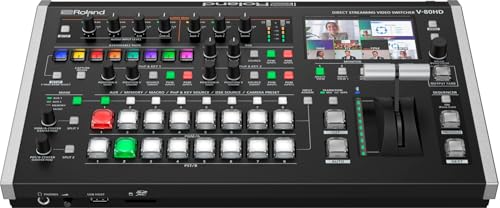
- Eight-channel SDI and HDMI switching
- 4K HDMI inputs with HD downscaling
- PTZ control and seven output options
Best For: Conferences and professional event production
Best for Integrated Streaming

- Streams to three platforms simultaneously
- Records and plays media internally
- Includes keying, overlays, and audio effects
Best For: Feature-rich conferences and livestreams
Best for Solo Operators

- 14-channel audio mixer included
- Automatic switching and keying tools
- Eight presets and remote-control app
Best For: Compact HDMI events run by one operator
Flexible Streaming Hub

- Four SDI and four HDMI inputs plus USB-C and NDI HX
- Portrait and landscape support with advanced keying
- Streams to up to three platforms
Best For: Hybrid, multi-camera events with varied sources
Audio-First Production

- Six video inputs across HDMI and USB
- Integrated XLR audio with Revolution Preamps
- Direct streaming and isolated recording support
Best For: Presenter-led events needing strong audio control
Eight-Input HDMI Control

- Mixes up to eight HDMI sources
- Built-in multi-viewer and AUX output
- Macros, presets, keying, and 18-channel audio
Best For: HDMI event presentations and broadcasts
Touchscreen Production Pick

- 10.1-inch touchscreen with real-time preview
- Four HDMI and one SDI input
- Chroma key and logo overlay included
Best For: Multi-camera events needing touchscreen control and mixed HDMI/SDI inputs
Advanced Event Production Pick

- Four HDMI and four SDI inputs
- Records eight ISO feeds plus program output
- XLR audio and triple RTMP streaming
Best For: Large event productions needing recording, audio control, and network streaming
Portable Event Pick
Mixer Plus 4-Channel HDMI Switcher

- Built-in 4-inch multiview screen
- Four HDMI inputs with zero-latency switching
- PTZ control, keying, PIP, and AUX routing
Best For: Portable HDMI event setups needing integrated monitoring and flexible outputs
Best All-Around Value – Blackmagic ATEM Mini Pro
The Blackmagic Design ATEM Mini Pro is a practical video switcher for events that need multicamera HDMI production, built-in streaming, recording, and monitoring in a compact unit. Its four HDMI inputs, multiview, transitions, keyers, and audio mixer cover a wide range of presentations, classes, esports streams, and business productions.
Best For: Multicamera livestreams, education, business presentations, and smaller broadcast-style productions.
Pros:
- Four HDMI inputs with 10-bit 4:2:2 video support.
- Built-in streaming, recording, and four-camera multiview.
- Includes transitions, upstream and downstream keying, and a six-input audio mixer.
- Compact 1.2-pound design with USB-C and Ethernet connectivity.
Cons:
- Inputs are HDMI-only, which may limit integration with SDI cameras.
- The four-input layout may be restrictive for larger productions.
The ATEM Mini Pro is a strong choice when you want a capable, portable video switcher for events without assembling separate streaming, recording, and audio hardware.
Best Professional Connectivity – Roland V-80HD
The Roland Professional V-80HD is a video switcher for events designed for productions that combine SDI and HDMI sources. With eight channels, frame-rate-converting SDI inputs, 4K-capable HDMI inputs with HD downscaling, broad output options, audio mixing, and PTZ control, it suits more demanding event workflows.
Best For: Conferences, houses of worship, in-person events, studios, and professional streaming setups.
Pros:
- Eight-channel design with four 3G SDI and four HDMI inputs.
- Two HDMI inputs support 4K sources with HD downscalers and through outputs.
- Seven total outputs include SDI, HDMI, USB-C, and LAN.
- Built-in audio mixing, effects, and PTZ camera control.
Cons:
- Its professional feature set may be more than small events require.
- The supplied notes do not specify detailed software-update support.
The V-80HD stands out for venues that need flexible source compatibility and multiple distribution paths, particularly when SDI, HDMI, streaming, and PTZ cameras must work together.
Best for Integrated Streaming – Osee GoStream Deck
The Osee GoStream Deck is a feature-packed video switcher for events with four HDMI inputs, dual HDMI outputs, direct streaming, recording, playback, and a hands-on control panel. It is built for productions that want graphics, audio control, and multichannel streaming without relying entirely on a computer.
Best For: Conferences, worship services, weddings, podcasts, education, and portrait or landscape livestreams.
Pros:
- Four HDMI inputs, two HDMI outputs, USB-C connectivity, Ethernet, and SD card support.
- Can stream to three platforms simultaneously through Ethernet.
- Supports recording, media playback, audio effects, keying, PIP, and graphics overlays.
- Physical PVW/PGM buses, T-bar, macros, and optional PC control software.
Cons:
- Its many functions may require more setup and learning than a basic switcher.
- The supplied warranty is one year.
Choose the GoStream Deck when an event workflow benefits from built-in media playback, audio shaping, overlays, and direct multistreaming in one compact control surface.
Best for Solo Operators – Roland V-1HD+
The Roland V-1HD+ is a compact video switcher for events that combines HDMI switching with a 14-channel audio mixer. Its familiar controls, automatic switching assistance, effects and keying engine, memory presets, and remote-control app make it suitable for operators who need a streamlined setup.
Best For: Live events, livestreaming, and productions managed by a single operator.
Pros:
- Combines a standalone HDMI switcher with a 14-channel audio mixer.
- Compact design with an interface intended for quick learning and setup.
- Provides automatic video switching, effects, keying, graphics, and lower-thirds support.
- Eight memory presets help recall visual layouts, with optional remote control through the V-1HD+ Remote app.
Cons:
- It provides four HDMI ports, which may not suit larger multicamera events.
- The supplied notes do not indicate built-in Ethernet streaming.
The V-1HD+ is a sensible choice for compact productions where one person needs accessible video and audio control, especially when HDMI sources and fast setup are priorities.
Flexible Streaming Hub – Osee GoStream Duet
Osee GoStream Duet Multiple Camera SDI and HDMI Live Stream Video Mixer Switcher
Check Price On AmazonThe Osee GoStream Duet is a versatile video switcher for events that need a broad mix of SDI, HDMI, USB-C, NDI HX, and playback sources. It supports landscape and portrait workflows, multiple control options, keying effects, and streaming to up to three platforms at once.
Best For: Multi-camera events, hybrid productions, and streamers needing flexible input support and direct distribution.
Pros:
- Accepts four SDI, four HDMI, USB-C, NDI HX, and SD/SSD playback sources.
- Includes chroma key, luma key, pattern key, PIP, DSK, and several transition modes.
- Supports Ethernet or smartphone-hotspot streaming and works with OBS and vMix.
- Offers GUI, computer software, and Bitfocus Companion control options.
Cons:
- The free NDI HX license requires the latest firmware download to unlock.
- Its extensive feature set may require more setup than a simpler switcher.
The GoStream Duet is a strong value-oriented choice when an event setup mixes professional camera connections with network sources and software-based streaming.
Audio-First Production – RØDECaster Video
The RØDECaster Video combines video switching and audio production in one unit, making it a practical video switcher for events with microphones, presenters, and live streaming requirements. It handles up to six video sources, customizable scenes, overlays, recording, and direct streaming.
Best For: Events where high-quality microphone mixing, scene control, and streamlined streaming are equally important.
Pros:
- Switches up to six sources through four HDMI and two USB inputs.
- Provides two Neutrik combo inputs with high-gain Revolution Preamps.
- Supports scenes, graphics, chroma keying, transitions, and media playback.
- Offers Wi-Fi or Ethernet streaming, USB output, and isolated recording to external storage.
Cons:
- Its video inputs are limited to HDMI and USB, without SDI connectivity.
- The supplied notes do not specify a current software-update date.
Choose this model when the event depends on integrated audio handling as much as video switching. Inspect Mode and audio-based auto-switching can also simplify live operation.
Eight-Input HDMI Control – Roland V-8HD HDMI Switcher
The Roland V-8HD is a compact HDMI video switcher for events, presentations, and broadcasts that use several HDMI cameras or sources. Its built-in preview monitor, AUX output, automated switching tools, still store, and 18-channel digital audio mixer support more structured live productions.
Best For: HDMI-based event productions that need multiple inputs, monitoring, graphics, and repeatable switching control.
Pros:
- Mixes up to eight HDMI sources in a lightweight, compact design.
- Includes a built-in multi-viewer monitor and support for an external display.
- Provides AUX routing, macros, sequencing, preset memories, and automated switching.
- Combines five-layer effects and keying with an 18-channel digital audio mixer.
Cons:
- The workflow is HDMI-only, so SDI sources are not supported.
- It has a one-year manufacturer warranty.
The V-8HD is a well-rounded fit for HDMI-centered event crews that value onboard monitoring and repeatable operation without adding a separate preview system.
Touchscreen Production Pick – FEELWORLD L4 5-Input Switcher
The FEELWORLD L4 is a practical video switcher for events that need a clear operator interface and flexible camera connectivity. Its 10.1-inch touchscreen provides real-time preview, while the T-bar and physical buttons offer alternative ways to switch sources.
Best For: Multi-camera events, live streaming setups, and operators who want touchscreen control with HDMI and SDI compatibility.
Pros:
- Large 10.1-inch touchscreen with intuitive menu navigation and real-time preview.
- Supports four HDMI inputs plus one SDI input for up to five camera sources.
- Includes chroma key, logo overlay, and HDMI, SDI, and USB 3.0 outputs.
Cons:
- Its supported output formats do not include 4K output.
- The feature set may be more than needed for a simple one- or two-camera setup.
The L4 stands out when on-device monitoring and straightforward hands-on control matter. It is a versatile choice for event crews that need several camera inputs and built-in presentation tools without relying entirely on a separate preview monitor.
Advanced Event Production Pick – Osee GoStream Duet 8 ISO
The Osee GoStream Duet 8 ISO is a video switcher for events built for larger, more demanding productions. It combines four HDMI 2.0 inputs, four 3G-SDI inputs, ISO recording, professional audio tools, network video support, and direct multi-destination streaming in one production system.
Best For: Event crews, churches, panels, podcasts, and broadcast-style productions that need extensive recording, audio, and streaming capabilities.
Pros:
- Provides eight inputs across HDMI and SDI, with HDMI support up to 4K60.
- Records eight individual ISO feeds plus the program output using H.264 or H.265.
- Includes XLR and 3.5mm audio connections, phantom power, audio processing, and up to three RTMP destinations.
- Supports NDI|HX, SRT, RTMP, UVC webcams, layered graphics, and multi-source layouts.
Cons:
- Its broad feature set may require more setup and training than a basic switcher.
- The listed workflow supports 4K input but 1080p output.
This is the strongest fit for productions where recovering missed moments, shaping audio, and distributing a finished program are all important. Its ISO recording and hybrid connectivity can reduce the need for additional converters and recording hardware.
Portable Event Pick – Mixer Plus 4-Channel HDMI Switcher
The Mixer Plus is a compact video switcher for events where portability and on-device monitoring are priorities. It combines four HDMI inputs with a built-in 4-inch multiview screen, transition effects, scene presets, and production tools for streaming, classes, presentations, and smaller live shows.
Best For: Portable HDMI-only event setups, online classes, YouTube productions, OBS or Zoom workflows, and multi-camera operators who need integrated monitoring.
Pros:
- Compact design with a built-in 4-inch multiview display.
- Supports four HDMI sources, zero-latency switching, 30 transition effects, and four scene presets.
- Offers PTZ control over IP plus chroma key, luma key, PIP, DSK, and logo overlay.
- Flexible AUX output can provide program, preview, clean feeds, multiview, or individual inputs.
Cons:
- It accepts HDMI sources only, with no SDI input listed.
- The 4-inch screen is convenient for monitoring but smaller than the displays on larger switchers.
The Mixer Plus is a sensible choice when a traveling operator wants a self-contained control surface without carrying a separate multiview monitor. Its HDMI-only design keeps the setup simple, while the AUX routing and keying tools add flexibility for compact productions.
How We Picked the Best Video Switcher for Events
We compared these switchers by looking at input formats, number of sources, switching controls, multiview and preview options, streaming or recording support, audio connectivity, portability, and setup complexity. We also considered whether each model suits a small presentation, a hybrid meeting, a concert, a conference, or a multi-camera broadcast.
Because event requirements vary widely, the list includes both approachable units for small crews and more capable systems for operators who need SDI connectivity, ISO recording, advanced transitions, or integrated audio control.
Quick Comparison
| Best For | Recommended Type | What to Prioritize |
|---|---|---|
| Small presentations and online events | Compact HDMI switcher | Simple controls, USB streaming, portability |
| Conferences and panel discussions | HDMI mixer with multiview | Multiple camera inputs, preview monitoring, audio flexibility |
| Large venues and long cable runs | SDI-capable switcher | SDI inputs, reliable signal distribution, rack or field compatibility |
| Hybrid events | Switcher with streaming and recording | Stable encoding, clean output, redundant recording options |
| Professional production teams | Advanced multi-input system | ISO recording, layered switching, robust audio and monitoring |
Key Buying Factors for a Video Switcher for Events
Input Types and Resolution
Start by checking whether your cameras and computers use HDMI, SDI, or both. HDMI works well for short cable runs and compact setups, while SDI is generally better for professional venues and longer distances. Confirm supported resolutions and refresh rates before buying, especially if you plan to mix cameras with presentation laptops.
Number of Inputs and Outputs
Count every source, including cameras, slides, playback devices, and backup feeds. Leave at least one spare input if possible. Also verify output requirements: a stream, projector, confidence monitor, recorder, and venue display may each need a separate output or routing option.
Monitoring and Switching Controls
A built-in multiview, preview screen, or clearly labeled preview/program workflow can reduce mistakes during live production. Physical buttons are often faster under pressure, while touchscreens and software controls may provide more configuration options.
Streaming, Recording, and Audio
If the switcher will feed an online audience, look for dependable USB or network streaming support. Recording can provide a valuable backup or post-event file. Check audio inputs, embedded-audio handling, headphone monitoring, delay controls, and compatibility with microphones or an external mixer.
Portability and Operation
For mobile crews, weigh the unit, power requirements, connector layout, and setup time. A compact model may be preferable for a classroom or corporate meeting, while a larger console can be worth the space when several operators and sources are involved.
Who Should Buy Which Video Switcher for Events?
Choose a Compact HDMI Model If…
You run small events, webinars, classes, interviews, or presentations with a few HDMI cameras and want a portable setup that is easy to learn.
Choose a Hybrid HDMI/SDI Model If…
Your production uses a mixture of consumer and professional cameras, or you need the flexibility to expand from short HDMI connections to longer SDI runs.
Choose an Integrated Audio-Video System If…
You want fewer separate devices and need straightforward control of microphones, music, cameras, and streaming from one console.
Choose an Advanced Multi-Input Switcher If…
You produce larger conferences, concerts, worship services, or broadcast-style events where multiview monitoring, ISO recording, extensive routing, and dedicated operator controls justify the added cost and complexity.