The best USB-C hard drive enclosures make it easy to reuse SATA drives, upgrade storage, recover files, or build a portable external drive without buying a preassembled model. The right enclosure can also improve transfer speeds, simplify cable connections, and keep a bare drive protected.
This roundup covers compact 2.5-inch cases, larger 3.5-inch enclosures, dual-bay docks, and cloning stations. Use the buying guide below to match the enclosure’s drive support, interface speed, power requirements, and features to your setup.
Best 10 USB C Hard Drive Enclosures Picks for 2026
Best High-Speed Enclosure
ORICO Aluminum 3.5-Inch USB-C Enclosure

- USB 3.2 Gen 2 with UASP support
- Fits 2.5- and 3.5-inch SATA drives up to 20TB
- Includes USB-C/A cable and power adapter
Best For: Fast, flexible single-drive storage expansion
Best Dual-Drive Dock

- Two bays for simultaneous SATA drive access
- Offline cloning without a computer
- Supports 2.5- and 3.5-inch SATA drives
Best For: Drive cloning, upgrades, and two-drive workflows
Best Stand-Up Design
RSHTECH Aluminum USB-C SATA Enclosure

- Supports drives up to 24TB
- USB-A/USB-C 2-in-1 cable included
- Vertical stand, vents, and automatic sleep mode
Best For: Desktop use with flexible placement and high capacity
Best Budget Dock
SABRENT USB 3.0 SATA Drive Dock

- Tool-free access to 2.5- and 3.5-inch SATA drives
- UASP support with Windows, macOS, and Linux
- Includes a 12V adapter for 3.5-inch drives
Best For: Simple, affordable bare-drive access
Best for Fast USB-C Transfers
Cable Matters 10Gbps Aluminum Enclosure

- Supports 2.5-inch SATA SSDs and HDDs
- Aluminum housing assists protection and heat dissipation
- Includes USB-C and USB cables
Best For: Fast backups, drive diagnostics, and added USB-C storage
Best Budget-Friendly Pick
UGREEN 2.5-Inch SATA Enclosure
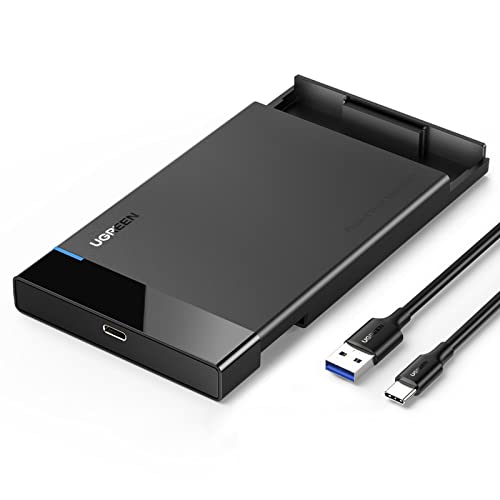
- Tool-free plug-and-play installation
- Supports UASP and up to 6Gbps SATA transfers
- Includes a detachable USB-A-to-USB-C cable
Best For: Simple portable storage and routine file transfers
Best with Extra Features
POSUGEAR 2.5-Inch USB-C Enclosure

- Up to 6Gbps USB 3.1 transfer rate with UASP and TRIM
- Tool-free sliding installation with no external power
- Protective shell and compatibility with drives up to 4TB
Best For: Fast, portable 2.5-inch SATA drive storage
Best for Flexible Connections
BENFEI 2.5-Inch USB-C/USB-A Enclosure

- Works with both USB Type-C and Type-A connections
- Supports 2.5-inch SATA drives up to 6TB
- Tool-free design backed by an 18-month warranty
Best For: Mixed-port setups and higher-capacity 2.5-inch drives
Best for Higher-Speed SSD Use
BENFEI 6Gbps 2.5-Inch Enclosure

- JMS580 chipset supports transfer rates up to 6Gbps
- Includes a detachable USB-C/USB-A 10Gbps cable
- Supports drives up to 6TB with an 18-month warranty
Best For: Fast SSD transfers across USB-C and USB-A devices
Best High-Speed Enclosure – ORICO Aluminum 3.5-Inch USB-C Enclosure
If you want a fast, versatile option among USB C hard drive enclosures, the ORICO DD35-C3 supports both 3.5-inch and 2.5-inch SATA drives. Its USB 3.2 Gen 2 interface, UASP support, aluminum shell, and included USB-C/USB-A cable make it suitable for backups, storage expansion, and data transfers.
Best For: Users seeking a high-capacity enclosure with broad device compatibility and faster USB-C connectivity.
Pros:
- Supports 3.5-inch and 2.5-inch SATA HDDs and SSDs up to 20TB.
- USB 3.2 Gen 2 interface supports up to 10Gbps and UASP.
- Includes a USB-C to USB-C/A cable and 12V/2A power adapter.
- Tool-free installation with aluminum housing, heat dissipation, and protective circuitry.
Cons:
- Designed for one drive at a time.
- Requires the included power adapter for stable 3.5-inch drive operation.
The ORICO is a strong all-around pick when speed, capacity, and USB-C flexibility matter. It is especially practical for desktop drives, though users needing dual-drive access should consider a docking station instead.
Best Dual-Drive Dock – SABRENT USB-C Dual-Bay Cloner
The SABRENT EC-CH2B stands out among USB C hard drive enclosures for its two-bay design and offline cloning feature. It accepts bare 2.5-inch and 3.5-inch SATA drives, allowing you to access two drives independently or copy one drive to another without connecting a computer.
Best For: Drive upgrades, backups, and users who regularly work with two bare SATA drives.
Pros:
- Two bays support simultaneous reading and writing of separate SATA drives.
- Offline 1-to-1 cloning requires no computer.
- Tool-free, hot-swappable design with drive-access LEDs.
- USB-C connection and plug-and-play operation on Windows and Mac.
Cons:
- Supports SATA drives only; M.2, NVMe, IDE/PATA, and Molex-connected drives are excluded.
- Offline cloning runs up to 60MBps and requires the target drive to be the same size or larger.
- The included cable is USB-C on the dock end, so USB-A-only computers need another cable or adapter.
This is the most useful choice for hands-on drive management rather than a compact, enclosed portable drive. Its dual-bay layout and computer-free cloning are valuable for migrations, while the SATA-only limitation requires careful drive compatibility checks.
Best Stand-Up Design – RSHTECH Aluminum USB-C SATA Enclosure
For shoppers comparing USB C hard drive enclosures, the RSHTECH RSH-339STC combines a USB-C connection with a practical vertical stand. It supports one 2.5-inch or 3.5-inch SATA drive up to 24TB and includes a detachable USB-A/USB-C cable for connecting to newer and older host devices.
Best For: Users who want a high-capacity single-drive enclosure that can sit vertically or lie flat.
Pros:
- Supports 2.5-inch and 3.5-inch SATA drives up to 24TB.
- Includes a 2-in-1 USB-A/USB-C cable for broad host compatibility.
- Aluminum housing, vents, and removable stand aid placement and heat management.
- Features UASP support, sleep mode, power/activity LEDs, and an electronic power button.
Cons:
- Designed for one SATA drive at a time.
- Advertised USB transfer rate is up to 5Gbps, with UASP support up to 6Gbps.
The RSHTECH is a sensible desktop enclosure for users who value capacity and flexible positioning. Its 24TB support and dual-connector cable are strong practical advantages, while the single-bay design is less suitable for cloning or multi-drive access.
Best Budget Dock – SABRENT USB 3.0 SATA Drive Dock
The SABRENT EC-DFLT is a straightforward drive dock for users who need easy access to bare SATA drives. Although it is not equipped with a USB-C host port, it can still work with USB-C computers through a separate USB-C-to-USB-A adapter, making it a simple option for occasional drive access.
Best For: Users who need an inexpensive, tool-free dock for 2.5-inch or 3.5-inch SATA drives.
Pros:
- Accepts SATA I/II/III 2.5-inch and 3.5-inch HDDs and SSDs.
- Tool-free, hot-swappable design with power and activity indication.
- Supports USB 3.0 with UASP and plug-and-play use on Windows, macOS, and Linux.
- Includes the 12V power adapter required for 3.5-inch drives.
Cons:
- Uses a USB Type-A host cable rather than a built-in USB-C port.
- Does not support IDE/PATA, M.2, NVMe, SAS, or drives already inside USB enclosures.
- Requires a wall outlet for 3.5-inch drives.
This dock is best viewed as a basic bare-drive reader rather than a modern USB-C enclosure. It offers broad SATA compatibility and easy swapping, but USB-C-only laptop users must supply their own adapter.
Best for Fast USB-C Transfers – Cable Matters 10Gbps Aluminum Enclosure
For shoppers comparing usb c hard drive enclosures, the Cable Matters model is a sturdy option for 2.5-inch SATA SSDs or HDDs. Its aluminum housing supports heat dissipation, while USB 3.1 provides up to 10Gbps connectivity with compatible equipment.
Best For: Users who want a durable enclosure for backups, drive diagnostics, or adding storage to a USB-C or Thunderbolt 3 computer.
Pros:
- Supports 2.5-inch SATA SSDs and HDDs up to 9.5mm thick.
- Aluminum housing helps protect the drive and dissipate heat.
- Includes USB-C and USB cables, with support for UASP, TRIM, and S.M.A.R.T. where compatible.
- Offers up to 10Gbps USB transfer rates and SATA III support up to 6Gbps.
Cons:
- Limited to one 2.5-inch SATA drive.
- Actual speeds depend on the drive, computer, and operating system.
This enclosure stands out for combining a metal build with fast USB-C connectivity and useful drive-management features. It is a practical choice when you need more than a basic plastic adapter.
Best Budget-Friendly Pick – UGREEN 2.5-Inch SATA Enclosure
The UGREEN enclosure is a straightforward choice among usb c hard drive enclosures for connecting a 2.5-inch SATA SSD or HDD to a computer, console, router, or other compatible device. Its tool-free design and included USB-A-to-USB-C cable make setup simple.
Best For: Buyers seeking an easy-to-install portable enclosure for 7mm or 9.5mm drives, with broad operating-system compatibility.
Pros:
- Tool-free plug-and-play installation with no drivers required.
- Supports UASP and SATA transfer speeds up to 6Gbps.
- Includes a detachable 20-inch USB-A-to-USB-C cable.
- Supports drives up to 6TB and works with Windows, Linux, and macOS 8.0 or later.
Cons:
- A USB-C-to-USB-C cable is not included.
- Plastic construction offers less metal heat dissipation than aluminum enclosures.
- Limited to 2.5-inch SATA drives.
With a simple installation process, status LED, and protective EVA foam, this UGREEN model focuses on convenience and portability. It is a sensible pick for routine file transfers and external storage without extra setup.
Best for Device Flexibility – ORICO Aluminum 2.5-Inch Enclosure
The ORICO DD25-C3 is a versatile option among usb c hard drive enclosures, pairing an aluminum case with a USB-C-to-USB-A/C 2-in-1 cable. It accommodates 2.5-inch SATA SSDs and HDDs, making it useful across computers, tablets, phones, TVs, and gaming devices with compatible connections.
Best For: Users who want one enclosure and cable for connecting a 2.5-inch drive to a variety of modern devices.
Pros:
- Aluminum housing and ventilation support protection and heat dissipation.
- Includes a 10Gbps USB-C-to-USB-A/C 2-in-1 cable.
- Supports 7mm and 9.5mm drives up to 6TB with UASP.
- Provides over-voltage, short-circuit, overload, and over-temperature protection.
Cons:
- Actual performance is limited by the SATA drive and connected device.
- Users should safely remove the drive before unplugging to help avoid data loss.
- Limited to one 2.5-inch SATA drive.
The ORICO is a strong all-around option when connection flexibility matters. Its dual-purpose cable, aluminum construction, protective chipset, and compatibility with several operating systems give it broader everyday utility than a basic enclosure.
Best with Extra Features – POSUGEAR 2.5-Inch USB-C Enclosure
The POSUGEAR is a practical pick for shoppers comparing usb c hard drive enclosures for a 2.5-inch SATA SSD or HDD. Its USB 3.1 Gen 2 interface supports transfer rates up to 6Gbps, while the sliding, tool-free design makes drive installation straightforward.
Best For: Users who want a compact USB-C enclosure with UASP support, protective construction, and broad compatibility for drives up to 4TB.
Pros:
- Supports USB 3.1 transfer rates up to 6Gbps with UASP and TRIM acceleration.
- Tool-free sliding installation requires no drivers or external power.
- Includes over-current, over-voltage, and overheat protection, plus an LED status indicator.
- Works with 7mm and 9.5mm 2.5-inch SATA drives across Windows, Mac, Linux, consoles, and other listed devices.
Cons:
- Supports only one 2.5-inch drive at a time.
- Maximum listed capacity is 4TB, lower than some competing options.
- The enclosure does not include a stated warranty.
Choose this model if fast USB-C connectivity and extra drive protection matter more than maximum capacity. The sliding shell and safety features make it well suited to routine drive swaps and portable storage use.
Best for Flexible Connections – BENFEI 2.5-Inch USB-C/USB-A Enclosure
For shoppers seeking usb c hard drive enclosures that also work with older USB ports, the BENFEI offers a flexible Type-C/Type-A connection design. It supports 2.5-inch SATA drives up to 6TB and uses UASP to improve transfer performance over traditional USB 3.0.
Best For: Users who need to connect a 2.5-inch HDD or SSD to a mix of USB-C and USB-A computers, laptops, or consoles.
Pros:
- Supports USB Type-C and Type-A connection options.
- Handles 7mm and 9.5mm 2.5-inch SATA HDDs and SSDs up to 6TB.
- Tool-free, plug-and-play installation with hot-swapping support.
- Includes an unconditional 18-month BENFEI warranty.
Cons:
- Rated transfer speed is up to 5Gbps rather than 6Gbps or higher.
- The supplied details list compatibility with MacOS 8.0 and above, which may be unclear for modern Mac users.
- It supports only one drive at a time.
This BENFEI enclosure is a sensible choice when port flexibility and capacity are priorities. It gives you an easy way to reuse a 2.5-inch SATA drive across newer USB-C and legacy USB-A equipment.
Best for Higher-Speed SSD Use – BENFEI 6Gbps 2.5-Inch Enclosure
This BENFEI model is aimed at shoppers comparing usb c hard drive enclosures for faster 2.5-inch SATA SSD or HDD transfers. Its JMS580 chipset supports speeds up to 6Gbps, and the included USB Type-C/Type-A 10Gbps cable provides flexible connectivity.
Best For: Users who want a fast, tool-free enclosure for a 2.5-inch drive, with support for both USB-C and USB-A connections.
Pros:
- Supports up to 6Gbps data transfer with UASP SATA III support.
- Includes a detachable USB Type-C/Type-A 10Gbps cable.
- Supports 7mm and 9.5mm 2.5-inch SATA drives up to 6TB.
- Plug-and-play, tool-free installation with hot-swapping and an 18-month warranty.
Cons:
- Supports only one 2.5-inch drive at a time.
- Actual performance depends on the installed drive and connected USB port.
- The supplied details do not mention an LED activity indicator or protective overheat features.
Consider this enclosure if you want the faster 6Gbps specification and the convenience of a detachable, dual-connector cable. It is especially practical for reusing a 2.5-inch SSD across different computers and devices.
How We Picked the Best USB C Hard Drive Enclosures
We focused on practical differences that matter during everyday storage upgrades and backups: supported drive sizes, SATA compatibility, USB interface standards, advertised transfer rates, power requirements, installation method, and cable flexibility. The selection includes both portable 2.5-inch enclosures and powered options for 3.5-inch HDDs, along with docking stations that can hold one or two bare drives.
Because advertised speeds depend on the drive, computer port, file sizes, and protocol support, treat maximum figures as best-case limits rather than guaranteed performance. Features such as UASP support, tool-free installation, aluminum construction, and included USB-C or USB-A cables can be just as important as the headline speed.
Quick Comparison
| Best For | Look For | Typical Choice |
|---|---|---|
| Portable 2.5-inch SSD or HDD | Bus power, compact design, USB 3.1 or faster | Single-drive 2.5-inch enclosure |
| 3.5-inch desktop HDD | External power adapter and adequate cooling | Powered 3.5-inch enclosure or dock |
| Drive cloning | Standalone clone controls and dual bays | Dual-bay docking station |
| Mixed computers and devices | USB-C and USB-A cable support | Enclosure with a 2-in-1 cable |
| Maximum SATA SSD performance | USB 3.2 Gen 2 and UASP support | 10Gbps-class enclosure |
Key Buying Factors for USB-C Hard Drive Enclosures
Drive Size and SATA Compatibility
Confirm whether you need a 2.5-inch enclosure for a laptop drive or SATA SSD, or a 3.5-inch model for a desktop HDD. A 2.5-inch case generally draws power from USB, while 3.5-inch drives normally require a separate adapter. Also check whether the enclosure supports the drive’s SATA type and stated capacity.
USB Speed and Real-World Performance
USB 3.0 and USB 3.2 Gen 1 are commonly rated around 5Gbps, while USB 3.2 Gen 2 can reach up to 10Gbps under ideal conditions. A fast enclosure cannot make a hard disk perform like an SSD, and the host computer must have a matching port. UASP support can help compatible systems handle transfers more efficiently.
Power, Cooling, and Installation
Choose a powered enclosure or dock for 3.5-inch drives and extended desktop use. Aluminum shells can help disperse heat, but ventilation and the drive’s own temperature still matter. Tool-free designs are convenient for occasional swaps, while screws may provide a more secure fit for permanent installations.
Cables and Operating-System Support
Check whether the package includes the connector you need. Some USB-C enclosures include USB-C-to-C and USB-C-to-A options, which is useful when moving between newer laptops and older desktops. Most SATA enclosures work with Windows and macOS, but cloning functions may operate independently of the computer.
Who Should Buy Which USB C Hard Drive Enclosures?
Buy a compact 2.5-inch USB-C enclosure if you are reusing a laptop drive, upgrading to an external SATA SSD, or carrying backups between locations. Choose a 3.5-inch powered enclosure when capacity and lower-cost desktop HDD storage matter more than portability. A dual-bay dock is the better fit for frequent drive swaps, disk-to-disk cloning, or managing several bare drives. For the fastest SATA SSD transfers, prioritize a 10Gbps USB 3.2 Gen 2 model, but make sure your computer supports that standard.