Turning an internal SATA drive into external storage can be a cost-effective way to recover files, expand capacity, or reuse an older SSD or HDD. The right enclosure makes that conversion simple while providing the connection speed, protection, and compatibility your Windows PC needs.
We selected 10 hard drive enclosures for Windows covering compact 2.5-inch drives, full-size 3.5-inch disks, USB-C connectivity, tool-free installation, cooling, and multi-bay use. Use the guide below to narrow the list by drive type, performance, capacity, and everyday setup needs.
Best 10 Hard Drive Enclosures for Windows Picks for 2026
Best Versatility
SABRENT 2.5/3.5-Inch SATA Enclosure
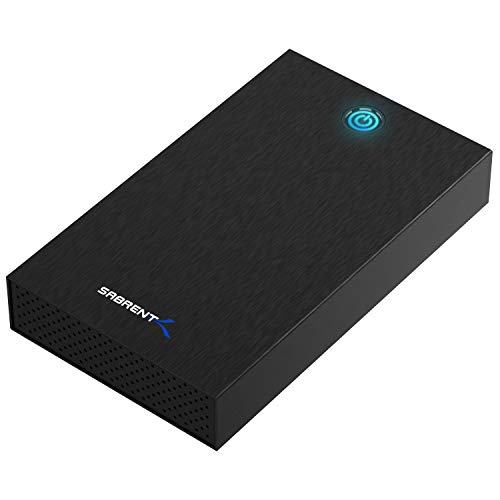
- Fits compatible 2.5-inch and 3.5-inch SATA drives
- Tool-free installation with USB 3.0 UASP
- Includes external 12V/2A power adapter
Best For: Windows users with multiple compatible SATA drive sizes
Best High-Speed 3.5-Inch Option
Avolusion PRO-G2 USB-C Enclosure

- USB 3.2 Gen 2 interface rated up to 10Gbps
- Quiet, fanless aluminum design
- Includes USB-C/USB-A cable and power adapter
Best For: Quiet desktop backups and large transfers from a 3.5-inch SATA drive
Best Compact 2.5-Inch Pick
SABRENT Tool-Free SATA Enclosure

- Compact design for standard 2.5-inch SATA drives
- USB 3.0 with UASP support up to 5Gbps
- Tool-free, plug-and-play installation
Best For: Portable use with a 2.5-inch SATA HDD or SSD
Best Protected Portable Option
UGREEN 2.5-Inch SATA Enclosure

- USB 3.0 UASP support up to 5Gbps
- Protective circuitry and EVA foam padding
- Fits 7mm/9.5mm SATA drives up to 6TB
Best For: Portable transfers and recovery of compatible 2.5-inch SATA drives
Best Stable-Power Enclosure

- USB 3.0 up to 5Gbps with UASP
- 12V/2A power and multiple safeguards
- Aluminum body with vertical stand
Best For: Powered Windows desktop drive access and reuse
Best Fan-Cooled Dock
SABRENT USB 3.0 SATA Hard Drive Dock
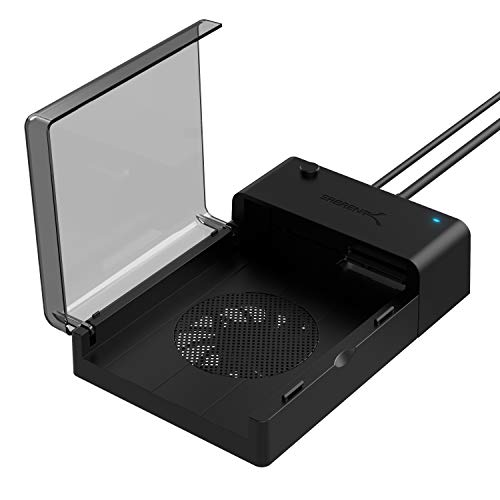
- Works with 2.5-inch and 3.5-inch SATA drives
- Built-in fan for active cooling
- Hot-swappable with cloning software access
Best For: Frequent drive swaps, backups, and cloning
Best Tool-Free Value
ORICO 3.5" USB 3.0 HDD Enclosure

- Tool-free plug-and-play installation
- USB 3.0 up to 5Gbps with UASP
- 12V/2A power and up to 20TB support
Best For: Simple single-drive Windows storage access
Best High-Speed Single-Bay Pick
ORICO Aluminum 3.5-Inch Enclosure

- USB 3.2 Gen 2 with up to 10Gbps support
- Fits 3.5-inch and 2.5-inch SATA drives
- Aluminum body with ventilation and protections
Best For: Fast access to one SATA drive on Windows
Best Multi-Drive Expansion Pick
CENMATE Aluminum 2-Bay Enclosure

- Holds two 2.5-inch or 3.5-inch SATA drives
- Tool-free trays with hot-swapping support
- Cooling fan and daisy-chain expansion
Best For: Desktop users needing flexible two-drive storage
Best Portable 2.5-Inch Pick

- Compact, lightweight design for 2.5-inch drives
- Tool-free, hot-swappable, and bus powered
- UASP support with USB 3.0 up to 5Gbps
Best For: Portable Windows storage and drive reuse
Best Versatility – SABRENT 2.5/3.5-Inch SATA Enclosure
For shoppers comparing hard drive enclosures for windows, the SABRENT EC-KSL3 is a flexible choice for both 2.5-inch and 3.5-inch SATA HDDs and SSDs. Its tool-free design, USB 3.0 UASP support, and included power adapter make it practical for desktop drives, though it requires a wall outlet and uses USB-A.
Best For: Windows users who need one enclosure for compatible 2.5-inch and 3.5-inch SATA drives.
Pros:
- Supports both 2.5-inch and 3.5-inch SATA HDDs and SSDs.
- Tool-free installation allows quick drive swaps.
- Includes a 12V/2A power adapter and supports plug-and-play use on Windows 10/11.
- Aluminum shell and internal shock-absorbing tray aid durability and heat dissipation.
Cons:
- Not compatible with SAS, M.2, NVMe, or IDE/PATA drives.
- Requires external AC power and connects through USB-A.
- Some larger 3.5-inch drives with non-standard PCB height may not seat correctly.
The EC-KSL3 stands out when drive-size flexibility matters. Verify your drive dimensions and available ports before buying, especially if your Windows computer has only USB-C connections.
Best High-Speed 3.5-Inch Option – Avolusion PRO-G2 USB-C Enclosure
The Avolusion PRO-G2 is a strong candidate among hard drive enclosures for windows if you want a USB-C connection for a 3.5-inch SATA hard drive. Its USB 3.2 Gen 2 interface is rated up to 10Gbps, while the fanless aluminum design keeps operation quiet. The internal drive is sold separately.
Best For: Windows desktops and laptops with USB-C or compatible USB-A connectivity that need a quiet 3.5-inch SATA drive enclosure.
Pros:
- USB 3.2 Gen 2 supports transfer speeds up to 10Gbps.
- Converts a 3.5-inch SATA hard drive into external USB-C storage.
- Fanless cooling provides quiet operation.
- Includes a power adapter, USB 3.2 cable with Type-C and Type-A adapter, and a two-year reseller warranty.
Cons:
- Supports one 3.5-inch drive rather than multiple drive sizes.
- Internal HDD is not included.
- Its 3-pound weight and larger design are less portable than compact 2.5-inch enclosures.
Choose the PRO-G2 when fast USB-C connectivity and quiet desktop use are priorities. Its rated 10Gbps interface is especially useful for large transfers, backups, and gaming storage when the computer and drive can take advantage of it.
Best Compact 2.5-Inch Pick – SABRENT Tool-Free SATA Enclosure
The SABRENT EC-UASP is a compact option for hard drive enclosures for windows, designed specifically for standard 2.5-inch SATA notebook drives and SSDs. It offers tool-free installation, USB 3.0 speeds up to 5Gbps, UASP support, and plug-and-play operation without requiring an external power adapter.
Best For: Windows users converting a 2.5-inch SATA HDD or SSD into portable external storage.
Pros:
- Small, lightweight enclosure for 2.5-inch drives.
- Tool-free setup and hot-swappable plug-and-play operation.
- Supports USB 3.0 transfer rates up to 5Gbps and UASP with SATA III SSDs.
- Compatible with Windows and backward-compatible USB 2.0 and USB 1.1 ports.
Cons:
- Limited to 2.5-inch SATA drives.
- Plastic construction may be less robust than an aluminum enclosure.
- Older operating-system compatibility is listed, but newer Windows versions are not specifically identified in the supplied details.
For a simple, portable enclosure for a notebook drive or SATA SSD, the EC-UASP keeps the setup straightforward. Confirm that your drive is a standard 2.5-inch SATA model before ordering.
Best Protected Portable Option – UGREEN 2.5-Inch SATA Enclosure
The UGREEN 2.5-inch enclosure is a practical pick among hard drive enclosures for windows when you want portable storage, drive recovery, or an easy way to connect an older SATA drive. It supports USB 3.0 UASP up to 5Gbps and includes protective features, but compatibility is limited to 2.5-inch 7mm or 9.5mm SATA drives up to 6TB.
Best For: Windows users connecting 2.5-inch SATA drives for file transfers, storage expansion, or data recovery.
Pros:
- Supports USB 3.0 and UASP transfer speeds up to 5Gbps.
- Compatible with Windows, Linux, and macOS, plus devices such as PS4 and Xbox.
- Includes short-circuit, over-current, and other protection features.
- EVA foam helps protect the drive from shakes and scratches.
Cons:
- Supports only 2.5-inch 7mm or 9.5mm SATA drives up to 6TB.
- Plastic enclosure rather than aluminum.
- Drive screws may need to be removed for the drive to fit.
The UGREEN enclosure offers a useful balance of speed, portability, and basic protection for compatible drives. Check the drive thickness, capacity, and screw placement before purchasing to avoid fit issues.
Best Stable-Power Enclosure – GODO 3.5" SATA HDD Enclosure
For shoppers comparing hard drive enclosures for windows, the GODO 3.5-inch SATA enclosure is a practical choice when stable external power and straightforward desktop use matter. It connects over USB 3.0 at up to 5Gbps, includes UASP support, and works with Windows systems without requiring drivers.
Best For: Windows users who need a powered enclosure for one 3.5-inch SATA HDD or SSD and value aluminum construction, heat dissipation, and a vertical stand.
Pros:
- Independent 12V/2A power supply with safeguards for overvoltage, short circuits, and related electrical issues.
- USB 3.0 transfer rates up to 5Gbps with UASP and TRIM support.
- Aluminum housing, LED activity indicator, plug-and-play setup, and removable vertical stand.
- Includes a USB cable, power adapter, screws, screwdriver, and stand.
Cons:
- Designed for one 3.5-inch drive rather than multiple drives.
- Requires a separate power adapter for operation with 3.5-inch drives.
- The supplied details list capacity support inconsistently; verify the intended drive size before purchase.
Choose the GODO when a secure, powered enclosure with desktop-friendly cooling and positioning is more important than compact portability. Its Windows compatibility and included installation accessories make it suitable for routine file access and drive reuse.
Best Fan-Cooled Dock – SABRENT USB 3.0 SATA Hard Drive Dock
Among hard drive enclosures for windows, the SABRENT EC-DFFN stands out as a dock-style option for users who want quick, tool-free access to either a 2.5-inch or 3.5-inch SATA drive. Its USB 3.0 connection supports up to 5Gbps, while the built-in fan adds active cooling during use.
Best For: Windows users who frequently swap standard 2.5-inch and 3.5-inch SATA HDDs or SSDs for backups, transfers, or drive cloning.
Pros:
- Supports both standard 2.5-inch and 3.5-inch SATA drives.
- Built-in cooling fan helps keep drives running cooler.
- Hot-swappable, plug-and-play design requires no drivers.
- Includes access to Acronis True Image for Sabrent cloning and migration software.
Cons:
- Its open dock format provides less enclosure-style protection than a fully closed case.
- Supports one drive at a time.
- USB 3.0 transfer rates top out at 5Gbps despite SATA signaling bandwidth up to 6Gbps.
The SABRENT is a strong fit for a Windows workstation where convenience and repeated drive changes matter. The fan and broad 2.5-/3.5-inch compatibility make it more flexible than a fixed-form-factor enclosure, while the included cloning software adds useful migration capability.
Best Tool-Free Value – ORICO 3.5" USB 3.0 HDD Enclosure
The ORICO 3588US3 is a sensible pick for hard drive enclosures for windows when you want a simple, tool-free way to connect one 3.5-inch SATA drive. It supports USB 3.0 speeds up to 5Gbps, uses a 12V/2A adapter, and is compatible with Windows 10, 8, 7, Vista, and XP.
Best For: Windows desktop and laptop users seeking an affordable, plug-and-play enclosure for a single 3.5-inch SATA HDD or SSD.
Pros:
- Tool-free installation with no reboot or driver required.
- Supports 3.5-inch SATA I, II, and III drives up to 20TB according to the supplied notes.
- USB 3.0 transfer rates up to 5Gbps with UASP support.
- Includes a 12V/2A adapter, USB data cable, thermal pads, and LED status indicator.
Cons:
- Supports one 3.5-inch drive rather than multiple drives.
- USB 3.0 performance depends on the host port, cable, and installed drive.
- ABS housing is less substantial than an aluminum enclosure.
For basic Windows storage expansion or accessing an older internal drive, the ORICO offers useful essentials without a complicated installation process. Its tool-free design and automatic sleep mode make it particularly convenient for occasional desktop use.
Best High-Speed Single-Bay Pick – ORICO Aluminum 3.5-Inch Enclosure
For shoppers comparing hard drive enclosures for Windows, the ORICO DD35-C3 is a strong single-drive option for 3.5-inch SATA hard drives and 2.5-inch SATA SSDs or HDDs. Its USB 3.2 Gen 2 connection, included USB-C to USB-C/A cable, and supplied power adapter make it suitable for backups, data transfers, and expanded desktop storage.
Best For: Windows users who want fast external access to one SATA drive, including high-capacity 3.5-inch HDDs.
Pros:
- Supports 3.5-inch and 2.5-inch SATA drives, with capacities up to 20TB.
- USB 3.2 Gen 2 supports up to 10Gbps and UASP, while the SATA interface supports 6Gbps.
- Aluminum construction, ventilation, and built-in protection help support stable operation.
- Tool-free, plug-and-play installation with USB-C and USB-A connectivity.
Cons:
- It holds only one drive.
- The 3.5-inch setup requires the included 12V/2A power adapter.
- Safe removal is recommended before disconnecting to help avoid data loss.
Choose this model when transfer speed and broad drive compatibility matter more than multi-drive expansion. Its aluminum enclosure and protection features add reassurance for regular backup and recovery tasks.
Best Multi-Drive Expansion Pick – CENMATE Aluminum 2-Bay Enclosure
The CENMATE 2-bay enclosure is a practical choice among hard drive enclosures for Windows when you need to use two SATA drives externally. It accepts 2.5-inch and 3.5-inch HDDs or SSDs, includes a cooling fan, and provides tool-free access for storage expansion or frequent drive changes.
Best For: Windows users who need two-drive capacity, hot swapping, or daisy-chain expansion without RAID or NAS functionality.
Pros:
- Supports two 2.5-inch or 3.5-inch SATA drives, up to 20TB per drive.
- Tool-free trays and hot-swapping simplify drive installation and replacement.
- Aluminum construction and a built-in fan help manage heat.
- USB 3.0 connectivity supports up to 5Gbps and allows daisy chaining for expansion.
Cons:
- It is a DAS enclosure with no RAID or NAS support.
- The cooling fan produces approximately 40–50 dB of noise.
- USB 3.0 is slower than the USB 3.2 Gen 2 connection on some newer enclosures.
This is the better fit for a desktop setup that benefits from multiple removable drives and additional capacity. Consider another model if low noise, RAID, or network storage is a priority.
Best Portable 2.5-Inch Pick – ORICO USB 3.0 SATA Enclosure
For a lightweight option among hard drive enclosures for Windows, the ORICO 25PW1-U3 converts a single 2.5-inch SATA HDD or SSD into portable USB storage. Its tool-free design, UASP support, and bus-powered operation make it useful for laptop upgrades, backups, drive recovery, and extra storage.
Best For: Windows laptop users who want a compact enclosure for a 7mm or 9.5mm 2.5-inch SATA drive.
Pros:
- Supports 7mm and 9.5mm 2.5-inch SATA I, II, and III drives.
- USB 3.0 provides up to 5Gbps, with UASP support for faster compatible systems.
- Tool-free installation, hot swapping, and plug-and-play operation require no extra power supply.
- Lightweight ABS construction weighs approximately 85g.
Cons:
- It supports only one 2.5-inch drive.
- The plastic enclosure is less focused on heat dissipation than aluminum designs.
- It uses USB 3.0 rather than a newer USB 3.2 Gen 2 interface.
This enclosure is a sensible budget-friendly portable choice for repurposing a laptop drive or carrying extra storage. Its small size and bus-powered design are especially convenient for mobile Windows use.
How We Picked These Hard Drive Enclosures for Windows
We focused on enclosures that support common SATA HDDs and SSDs and offer straightforward Windows compatibility. The selection includes 2.5-inch models for laptop drives, 3.5-inch enclosures for desktop hard drives, and flexible options that accept both sizes. We also considered USB 3.0 and USB 3.2 connectivity, UASP support, tool-free installation, cooling, power requirements, drive capacity limits, and whether the enclosure includes USB-A, USB-C, or both connection options.
Because an enclosure’s real-world usefulness depends on the drive inside it, we treated advertised transfer rates as interface limits rather than guaranteed file-copy speeds. Your drive, computer port, cable, and filesystem can all affect performance.
Quick Comparison
| Best For | What to Look For |
|---|---|
| 2.5-inch SATA SSD or HDD | Bus-powered design, tool-free mounting, and UASP |
| 3.5-inch desktop HDD | External power adapter, stable enclosure, and adequate ventilation |
| Fast transfers | USB 3.2 Gen 2 or another 10Gbps-rated connection |
| Mixed drive sizes | 2.5/3.5-inch compatibility and included mounting support |
| Frequent drive swaps | Tool-free access, hot-swappable support, or a docking-style design |
| Heat-sensitive or always-on use | Aluminum construction, ventilation, or an integrated cooling fan |
Key Buying Factors for Hard Drive Enclosures for Windows
Drive Size and Interface
Confirm that your drive is a SATA model and check whether it is 2.5 or 3.5 inches. Most 2.5-inch SSDs and laptop HDDs can draw power over USB, while 3.5-inch desktop drives generally require a dedicated power adapter. An enclosure designed for both sizes offers more flexibility but may be larger.
USB Speed and Connector
USB 3.0, commonly rated at 5Gbps, is sufficient for many SATA SSDs and hard drives. USB 3.2 Gen 2, rated at up to 10Gbps, is better for faster SSDs and large transfers when your Windows computer also has a compatible port. USB-C describes the connector shape, not necessarily the speed, so check both specifications.
Installation and Cooling
Tool-free designs are convenient for occasional upgrades and drive recovery. For frequent swapping, a dock or hot-swappable enclosure can be easier to use. Aluminum bodies can help dissipate heat, while a fan is useful for sustained activity or high-capacity 3.5-inch disks, though it may add noise.
Capacity, Protection, and Portability
Check the stated maximum capacity if you plan to install a large disk. Look for a secure enclosure, reliable cable, ventilation, and an enclosure that stays stable on your desk. Safely eject the drive in Windows before disconnecting it, particularly during file transfers.
Who Should Buy Which Hard Drive Enclosures for Windows?
Choose a compact 2.5-inch enclosure if you are reusing a laptop HDD or SATA SSD and want a portable, bus-powered solution. Pick a powered 3.5-inch enclosure or dock for desktop hard drives and large-capacity storage. A USB-C or 10Gbps model makes the most sense for newer Windows PCs and frequent large transfers. If you alternate between several drives, prioritize tool-free access, a docking format, or a multi-bay enclosure. For long sessions, select an aluminum or fan-cooled design and keep ventilation unobstructed.