Choosing a touchscreen video switcher for a production studio comes down to speed, signal compatibility, and how easily your team can manage live sources under pressure.
Below, we focus on models that make switching, monitoring, and streaming simpler for multi-camera work, hybrid events, and compact studio builds.
Best 10 Touchscreen Video Switcher for Production Studio Picks for 2026
Hybrid Touch Studio Switcher
Touch-S 10.1” HDMI/SDI Switcher
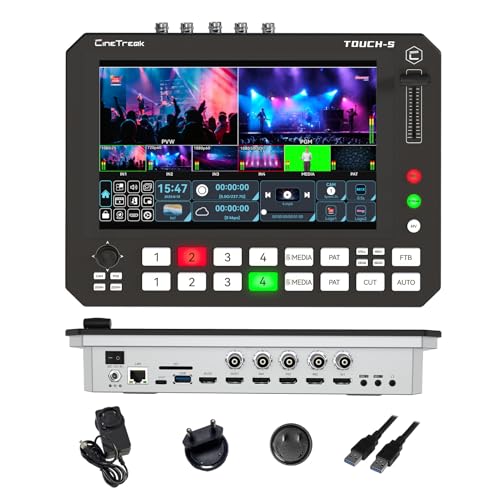
- 10-inch touchscreen plus shortcut keys
- 4 HDMI and 4 SDI inputs
- Super Source with up to four on-screen sources
Best For: Studios and live productions that want touch control with physical backup
Standalone Streaming Production System

- All-in-one switcher, encoder, streamer, and recorder
- 7-inch AMOLED touchscreen with preview control
- Dual hot-swappable batteries for mobile use
Best For: Teams that want a self-contained live production and streaming unit
Compact 4K HDMI Switcher
FEELWORLD L1 Plus HDMI Switcher

- 4 HDMI 2.0 inputs with 4K@60Hz support
- 2-inch touchscreen with joystick control
- USB 3.0 streaming and VISCA PTZ control
Best For: Small studios that need compact 4K HDMI switching with PTZ control
Large Multicam Touch Mixer
FEELWORLD L4 10.1" Touch Switcher

- 10.1-inch touchscreen with touch and button control
- 5-source support with HDMI and SDI inputs
- HDMI, SDI, and USB 3.0 outputs
Best For: Multi-camera studios needing a large touch interface and mixed I/O
Portable All-in-One Kit

- Includes switcher, 14-inch display, fan, and mounting plates
- 4 HDMI/SDI inputs with dual HDMI outputs and 2 USB ports
- AC, DC, or USB power bank support for flexible setups
Best For: Mobile producers and compact studios
Studio Switcher and Audio Hub

- Up to six sources with seven customizable scenes
- Built-in audio interface with two Neutrik combo jacks
- Streams, records, and supports ISO recording
Best For: Creators who want video switching and pro audio in one unit
Touchscreen PTZ Director

- 10.1-inch touchscreen with multiview and PTZ control
- 4 HDMI and 4 SDI inputs with USB/network streaming
- Up to 8-layer PGM output with overlays and dual PIP
Best For: Touchscreen-led productions that need PTZ control and advanced effects
Studio-Ready Touch Control
FEELWORLD L4 10.1-Inch Multi-Camera Mixer

- 10.1-inch touchscreen for preview and setup
- 4 HDMI + 1 SDI inputs for multi-camera work
- USB 3.0 output for PC streaming
Best For: Medium to large live productions that want touchscreen monitoring and easy camera switching
Broadcast Control Deck

- 4 HDMI inputs plus 2 HDMI outputs
- Ethernet, USB, and Type-C streaming options
- Audio control, overlays, and local recording
Best For: Small studios and live event teams that want a control-rich streaming mixer
Pro I/O Live Switcher
Tenveo PC500 4K60 HDMI/SDI Mixer

- 4 HDMI and 4 SDI inputs with 4K60 on select channels
- USB and Ethernet streaming with NDI|HX3 support
- PTZ control, recording, and dual-platform streaming
Best For: Professional studios and multi-camera productions that need flexible I/O and advanced streaming
Hybrid Touch Studio Switcher – Touch-S 10.1” HDMI/SDI Switcher
If you want a touchscreen video switcher for production studio workflows that still gives you tactile control, Touch-S is built for that middle ground. It combines a 10-inch full touchscreen with dual rows of physical shortcut keys, plus flexible HDMI/SDI inputs and customizable aux outputs for more complex live productions.
Best For: Studios, education, webinars, and mobile productions that need fast switching with both touch and hardware controls.
Pros:
- 10-inch full touchscreen with a redesigned UI for intuitive monitoring and switching
- Combines touchscreen control with physical shortcut keys for speed and reliability
- 4 HDMI and 4 SDI inputs, with user-defined input selection on the 4 channels
- Super Source mode supports up to four simultaneous on-screen sources plus PIP layouts
Cons:
- More advanced feature set may be more than basic single-camera setups need
- Flexible routing and media options may take time to learn fully
Touch-S stands out if you need a studio switcher that can scale from straightforward switching to multi-layer productions. Its portrait and landscape support, media channel, and customizable aux outputs make it especially adaptable for mixed-format live content.
Standalone Streaming Production System – Magewell Director One 55260
Magewell Director One is a touchscreen video switcher for production studio teams that want an all-in-one box instead of a PC-based workflow. It combines switching, encoding, streaming, recording, and monitoring in one standalone unit, with a 7-inch AMOLED touchscreen and multiple network and camera input options.
Best For: Mobile and fixed studios that need a standalone production system with built-in streaming, recording, and battery operation.
Pros:
- All-in-one system for switching, encoding, recording, monitoring, and streaming
- 7-inch capacitive AMOLED touchscreen for on-device scene control and previewing
- Supports HDMI, USB-A, and multiple IP source types including SRT, RTMP, RTSP, and NDI HX
- Dual hot-swappable battery slots plus DC input for mobile continuity
Cons:
- Only up to 2 HDMI and 2 USB-A inputs, so very large wired setups may need a different model
- Built for standalone operation, which may be less flexible than a PC-tethered workflow for some users
This is a strong choice when simplicity and portability matter as much as production features. The dedicated HDMI program output, media and overlay tools, and multi-destination streaming support make it a practical fit for polished live broadcasts without extra hardware.
Compact 4K HDMI Switcher – FEELWORLD L1 Plus HDMI Switcher
FEELWORLD L1 Plus is a compact touchscreen video switcher for production studio users who want 4K HDMI switching with simple controls and PTZ support. Its 2-inch touchscreen, joystick, and USB 3.0 output make it a straightforward option for live streaming setups that need quick operation and real-time switching.
Best For: Small studios and streamers looking for a compact HDMI switcher with PTZ control and fast USB streaming.
Pros:
- 4 HDMI 2.0 inputs with support for 4K@60Hz sources
- 2-inch full-color touchscreen plus a 5-direction joystick for easy control
- USB 3.0 plug-and-play output works with streaming software
- VISCA-compatible PTZ control with up to 8 presets and 14 onboard effects
Cons:
- Smaller touchscreen than larger studio-oriented switchers
- Focused on HDMI workflows, so it may not fit SDI-based productions
L1 Plus is best viewed as a practical compact mixer rather than a full-scale production console. If you need a small unit that can handle 4K HDMI sources, PTZ cameras, overlays, and fast USB streaming, it covers the core essentials well.
Large Multicam Touch Mixer – FEELWORLD L4 10.1" Touch Switcher
FEELWORLD L4 is a touchscreen video switcher for production studio setups that want a larger control surface and support for both HDMI and SDI sources. The 10.1-inch touchscreen, real-time preview, and T-bar switching make it easier to manage five-camera live productions with less menu diving.
Best For: Multi-camera studios that want a large touchscreen interface with HDMI, SDI, and USB streaming output.
Pros:
- 10.1-inch touchscreen with both full touch control and physical buttons
- Supports 5 input sources with 4 HDMI and 1 SDI input
- Includes chroma key and logo overlay tools for more polished broadcasts
- Offers HDMI, SDI, and USB 3.0 outputs for flexible streaming workflows
Cons:
- Large feature set may be more than simple one-camera streams require
- Input and output format support is detailed but may require careful setup planning
For productions that benefit from a full-sized interface and mixed-format connectivity, L4 is a strong fit. Its real-time preview, scene control, and broad format support make it suitable for studio-style switching where reliability and visibility matter.
Portable All-in-One Kit – Osee GoStream Duet Kit
If you want a touchscreen video switcher for production studio work that still travels easily, the Osee GoStream Duet Kit is built around portability and a full multi-camera workflow. It combines a switcher, 14-inch 1080×1920 display, silent fan, and mounting plates in one package, while offering 4 HDMI/SDI inputs, dual HDMI outputs, USB connectivity, and flexible power options for field or studio use.
Best For: Mobile producers and small studios that need an all-in-one touchscreen video switcher with strong input flexibility.
Pros:
- All-in-one kit includes the switcher, 14-inch screen, silent fan, and cheese plates
- 4 HDMI/SDI inputs plus 2 HDMI outputs and 2 USB ports for flexible routing
- Can run from AC, DC, or a USB power bank for easier mobile setups
- Built-in USB DC 5V out can help power additional devices like cameras
Cons:
- Weighs about 5 kg, so it is portable but not ultra-light
- Best suited to users who can take advantage of the included mounting hardware and monitor
The Duet Kit is a practical choice when you want one compact package rather than assembling separate studio pieces. Its biggest advantage is how much connectivity and monitoring it packages together for live production.
Studio Switcher and Audio Hub – RØDECaster Video Switcher
The RØDECaster Video is a strong touchscreen video switcher for production studio workflows that need both switching and serious audio handling. It supports up to six sources, seven customizable scenes, front-panel control for overlays and transitions, Wi-Fi or Ethernet streaming, USB output to software, and direct recording to external USB storage with ISO recording support.
Best For: Content creators and studios that want an integrated video switcher and audio interface in one device.
Pros:
- Switches up to six sources, including 4 HDMI and 2 USB inputs
- Seven customizable multi-source scenes with dedicated front-panel controls
- Two Neutrik combo jacks with Revolution Preamps for XLR mics and other audio sources
- Supports direct streaming, USB output to software, and ISO recording to external USB storage
Cons:
- Only 1080p60 is specified, so it is not aimed at higher-resolution production
- Fewer video inputs than larger studio switchers built for more complex rigs
This model stands out if audio is just as important as video in your studio setup. It packs switching, scene creation, recording, and interface features into one platform, which can simplify a small production workflow.
Touchscreen PTZ Director – FoMaKo M6 Live Switcher
For a touchscreen video switcher for production studio use, the FoMaKo M6 is built for operators who want more control in one portable console. It pairs a 10.1-inch HD touchscreen and multiview display with 4 HDMI inputs, 4 SDI inputs, USB/network streaming, PTZ control, chroma keying, and layered PGM effects for more advanced live productions.
Best For: Studios, churches, education setups, and live event teams that need touchscreen control plus PTZ management.
Pros:
- 10.1-inch touchscreen with multiview and integrated PTZ camera control
- 4 HDMI inputs, 4 SDI inputs, USB, and network streaming support
- Up to 8 layers of PGM output with dual PIP, logo overlays, and DSK
- Dual network streaming plus recording to SD card and USB 3.0 storage
Cons:
- NDI support is optional and not included by default
- Feature set is broad, so it may be more than basic users need
The M6 is the most feature-dense option here, especially for productions that need touchscreen operation and PTZ camera control in the same unit. It is a good fit when you want a compact switcher that can handle more advanced live show demands.
Studio-Ready Touch Control – FEELWORLD L4 10.1-Inch Multi-Camera Mixer
If you want a touchscreen video switcher for production studio use with straightforward multi-camera control, the FEELWORLD L4 is built around a 10.1-inch touchscreen, fast switching, and flexible HDMI/SDI connectivity. It’s a practical fit for live streaming setups that need quick monitoring, easy source selection, and simple integration with a PC for slides or streaming output.
Best For: Medium to large studio-style live streams, churches, weddings, events, and productions that want touchscreen monitoring plus simple camera switching.
Pros:
- 10.1-inch touchscreen makes previewing inputs and setting up the switcher easier on screen.
- 4 HDMI inputs plus 1 SDI input support multiple camera and source combinations.
- USB 3.0 output lets you connect to a computer for live streaming on major platforms.
- T-bar and button switching provide quick hands-on control during live production.
Cons:
- No built-in Ethernet streaming or NDI support is mentioned in the supplied notes.
- Best suited to HDMI/SDI-based workflows rather than highly networked studios.
For studios that value a large touchscreen and simple multi-view operation, the L4 focuses on fast, practical control rather than a long list of advanced network features. Its balance of inputs, preview workflow, and USB streaming makes it a solid option for mid-sized productions.
Broadcast Control Deck – Osee GoStream Deck HDMI Pro
The Osee GoStream Deck is a touchscreen video switcher for production studio workflows that need broad connectivity, direct control, and built-in streaming tools. With HDMI inputs and outputs, Type-C ports, Ethernet streaming, and a hard control panel with PVW/PGM buses, it suits operators who want a compact mixer that can handle switching, monitoring, graphics, and recording without relying on a PC.
Best For: Church broadcasts, podcasts, conferences, weddings, and studio teams that want a control-heavy switcher with recording and streaming flexibility.
Pros:
- 4 HDMI inputs and 2 HDMI outputs support MultiView and external monitoring.
- Built-in audio controls, headphone monitoring, and recording/playback features add production flexibility.
- Supports simultaneous streaming to up to 3 platforms via Ethernet, plus USB streaming through OBS or vMix.
- Includes PVW/PGM buses, T-Bar, macros, and on-device menu control for hands-on operation.
Cons:
- Only one SD card slot is mentioned for local media workflows.
- Its many features may be more than a simple entry-level setup needs.
If you want a switcher that feels closer to a compact broadcast panel, the GoStream Deck stands out for control depth and connectivity. The combination of streaming, monitoring, overlays, and audio tools makes it a strong all-in-one option for small production studios.
Pro I/O Live Switcher – Tenveo PC500 4K60 HDMI/SDI Mixer
For buyers seeking a touchscreen video switcher for production studio work with higher-end input flexibility, the Tenveo PC500 combines HDMI, SDI, USB, and IP streaming in one unit. It is designed for professional live production, with support for multi-camera switching, PTZ control, real-time monitoring, and recording, making it a strong fit for demanding studio and event environments.
Best For: Professional live studios, worship, conferences, stage productions, and multi-camera setups that need 4K-capable inputs and flexible streaming paths.
Pros:
- Offers 4 HDMI inputs and 4 SDI inputs, with 4K60 support on selected HDMI channels.
- Includes USB and Ethernet streaming with support for UVC, SRT, RTMP, RTSP, and NDI|HX3.
- Supports PTZ camera control, preset positions, AI tracking, and cruise tracks.
- Can record and stream simultaneously, with dual recording options for backup and playback use.
Cons:
- The feature set is advanced, so it may be more than casual users need.
- Its broad workflow may require more setup than simpler HDMI-only switchers.
The PC500 is the most production-oriented option in this group, with broad I/O and multi-platform delivery built for serious live work. If your studio needs stronger control over cameras, formats, and distribution, it offers a very capable all-in-one backbone.
How We Picked the Best Touchscreen Video Switcher for Production Studio
We looked for a Touchscreen Video Switcher for Production Studio workflows that balances responsive controls, reliable input options, and practical live-production tools. Priority went to switchers with clear touch interfaces, strong monitoring layouts, PTZ support, recording or streaming features, and connectivity that fits common studio setups.
Quick Comparison
Use the touchscreen for fast operation, but compare the underlying I/O first. Some models are better for HDMI-only studios, while others add SDI, USB-C, NDI, or onboard recording for more flexible pipelines. Screen size, preview confidence, and output formats can matter as much as raw channel count.
Key Buying Factors for a Touchscreen Video Switcher for Production Studio
Inputs and Outputs
Match the switcher to your cameras, computers, and displays. HDMI is common for smaller studios, while SDI is often preferred for longer cable runs and more robust pro installations.
Touchscreen Layout and Speed
A good touchscreen should make source selection, transitions, and clip control intuitive without diving through menus. If multiple operators will use the system, prioritize a layout that is readable at a glance.
Streaming and Recording Workflow
Many buyers want a Touchscreen Video Switcher for Production Studio use that can do more than switch. Look for built-in encoding, local recording, USB output, or platform-ready streaming features if you want fewer boxes in the chain.
PTZ, Audio, and Monitoring
PTZ camera control can be a major advantage in compact studios. Audio mixing, multiview monitoring, and chroma key support are also useful if you produce interviews, worship, corporate content, or education streams.
Resolution and Frame Rate Support
Confirm that the switcher supports the format you actually shoot in. A mismatch between 4K input, 1080p output, and camera refresh rates can create workflow headaches.
Who Should Buy Which Touchscreen Video Switcher for Production Studio?
If you want the simplest all-in-one setup, choose a model with an integrated screen, recording, and streaming tools. If you already have a more advanced studio chain, look for SDI, NDI, or USB-C flexibility. If you run a smaller production team, prioritize touch speed, PTZ control, and reliable multiview over extras you may not use. In short, the best Touchscreen Video Switcher for Production Studio work is the one that matches your cameras, output needs, and operator skill level without adding unnecessary complexity.