The best teleprompters help you maintain eye contact, deliver polished scripts, and record more efficiently without memorizing every line. This roundup compares 10 options for smartphones, tablets, DSLRs, camcorders, and dedicated displays.
Whether you need a compact setup for mobile video or a larger beam-splitter system for studio production, the right choice depends on screen size, camera compatibility, portability, and control options.
Best 10 Teleprompters Picks for 2026
Best Built-In Display

- Built-in 9-inch FHD display
- No separate tablet or phone required
- Works with cameras, webcams, and Stream Deck
Best For: Streamers and video-call users wanting desktop-controlled prompting
Best Large-Format Mirror

- Large 15-inch beamsplitter mirror
- Supports tablets up to 15 inches
- Includes remote, app support, and carry case
Best For: Presenters needing a spacious reading area
Best Hybrid Monitor

- Built-in LCD monitor for prompts
- Supports phone mirroring and computer display use
- Works with lenses from 35 to 200 mm
Best For: Creators wanting flexible phone, computer, or monitor workflows
Best for Presentations

- 14-inch beamsplitter with 45-degree tilt
- Assembly-free design with carry case
- Includes Bluetooth remote and app control
Best For: Presenters, educators, and larger production setups
Best Portable Pick
Desview P13 13-Inch Teleprompter

- 13-inch tablet-compatible display
- Remote and free app control
- Carry bag included
Best For: Mobile creators and tablet-based recording
Best Large-Format Option
NEEWER X17 II 17-Inch Teleprompter

- Large 17-inch beamsplitter
- Readable from up to 13 feet
- Quick-release camera mount
Best For: Studio presentations and long-distance reading
Best Value Pick
NEEWER BASICS X12B 12-Inch Teleprompter

- No-assembly aluminum-alloy design
- Remote and app script control
- Foldable with carry case
Best For: Budget-friendly tablet-based recording
Best with Extra Features
LENSGO TC7S Phone Teleprompter

- One-second fold design for travel
- Clear coated glass for phone recording
- Bluetooth remote with iOS and Android app
Best For: Traveling vloggers, livestreamers, and online teachers using a phone
Best Large-View Option
LENSGO TC12P Wide-Angle Teleprompter
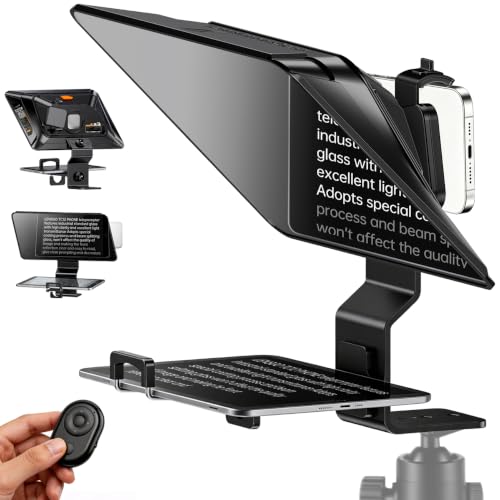
- 14.5-inch HD beam-splitter glass
- Fits phones and tablets up to 7.3 inches
- Quick setup with anti-glare light-seal padding
Best For: Creators making longer videos with a phone or tablet
Best Camera-Compatible Kit
GVM 12-Inch Collapsible Teleprompter
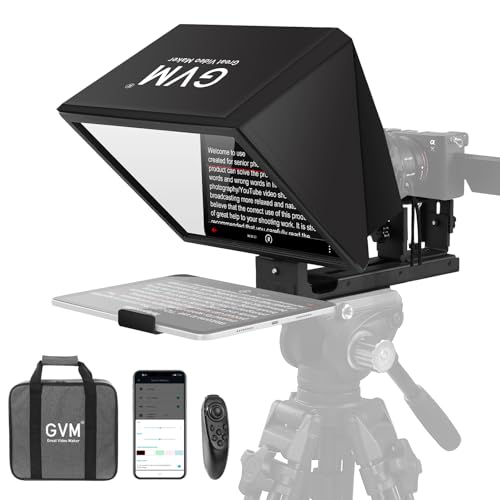
- Installation-free collapsible aluminum-alloy design
- Supports phones, tablets, and compatible cameras
- Includes remote control, app support, and carry bag
Best For: Creators using phones, tablets, DSLR, mirrorless, or video cameras
Best Built-In Display – Elgato Prompter
The Elgato Prompter is a streamlined choice for creators who want teleprompters functionality without relying on a separate phone or tablet screen. Its built-in 9-inch FHD display works like an additional monitor, letting you place scripts, chat, or other windows directly in front of the camera.
Best For: Streamers, video-call users, and creators who want desktop-controlled prompting with professional eye contact.
Pros:
- Built-in display eliminates the need for an extra tablet or smartphone.
- Supports DSLR cameras, webcams, smartphones, and wide lenses.
- Works with PC or Mac and integrates with the Camera Hub app and Stream Deck.
Cons:
- DisplayLink software is required for Mac and Android use.
- Text and display customization depends on the companion Camera Hub app.
Choose this model if convenience and computer-based control matter more than a traditional tablet-only setup. The monitor-style design is particularly useful for switching between scripts, chat, and conferencing content.
Best Large-Format Mirror – Desview TP150 Teleprompter
The Desview TP150 is a traditional tablet-based teleprompter with a large 15-inch beamsplitter mirror. It accommodates tablets up to 15 inches, includes Bluetooth remote control and app support, and uses an aluminum-alloy frame with a carry case for transport.
Best For: Presenters and video teams that need a large reading area for cameras, conferences, or outdoor recordings.
Pros:
- 15-inch mirror provides a generous text-reading area.
- Supports DSLR and mirrorless cameras, camcorders, and tablets up to 15 inches.
- Includes a Bluetooth remote, free app support, and a protective carry case.
- Anti-reflective, color-neutral glass is designed to reduce ghosting and reflections.
Cons:
- At 4.45 kg, it is heavier than the more compact options.
- The remote requires a battery, which is not included.
- Requires a separate tablet or compatible device for displaying scripts.
The TP150 makes sense when readability and a spacious mirror are priorities. Its aluminum construction and included case also make it a practical option for users who regularly move a full-size teleprompter between locations.
Best Hybrid Monitor – NEEWER X11 Teleprompter
The NEEWER X11 combines a camera teleprompter with a built-in LCD monitor for screen mirroring and computer use. It can display prompts without a tablet, connect to Windows or macOS as a second display, and support camera lenses with threads up to 72 mm and focal lengths from 35 to 200 mm.
Best For: Beginners and livestreamers who want a flexible teleprompter that can use a phone, computer, or built-in monitor.
Pros:
- Built-in 9-inch HD LCD monitor can display prompts without a tablet.
- Supports screen mirroring from compatible iPhone and Android devices.
- Can function as a second monitor for Windows and macOS computers.
- Includes adjustable Arca-type mounting hardware and phone clamp.
Cons:
- Some connection methods require drivers and compatible USB or DP hardware.
- Voice sync is not supported.
- Its 1024 x 768 display is lower resolution than a Full HD screen.
The X11 is a versatile middle ground for creators who do not want to commit to either a tablet-only or monitor-only workflow. Check your computer and phone connection requirements before buying, especially if you plan to use screen mirroring.
Best for Presentations – NEEWER X14 III Teleprompter
The NEEWER X14 III is a large, assembly-free teleprompter designed for recording, online courses, speeches, and presentations. Its 14-inch beamsplitter has a 45-degree tilt, while the included Bluetooth remote and app provide control over scrolling, page turns, and font size.
Best For: Presenters, educators, and production setups that value a large reading range and quick tripod changes.
Pros:
- 14-inch HD beamsplitter offers a reading range of up to 3 meters.
- No assembly is required, and the unit folds into its carry case.
- Includes RT113 remote with app controls for speed, pages, and font size.
- Upgraded QR plate is compatible with Manfrotto 501PL plates.
Cons:
- At 5.2 pounds, it is less portable than compact teleprompters.
- Requires a phone or tablet up to 8.7 inches wide to display scripts.
- Remote control requires a compatible iOS or Android device and app.
The X14 III is a strong fit for users who want a larger, more comfortable reading area without a complicated build process. Its adjustable mounting system and tripod threads also make it adaptable to more permanent production setups.
Best Portable Pick – Desview P13 13-Inch Teleprompter
The Desview P13 is a practical choice among teleprompters for creators who need a larger tablet-compatible display without a complicated setup. Its 13-inch high-definition beamsplitter, included Bluetooth remote, and carry bag suit studio, conference, and mobile video work.
Best For: Tablet-based recording, online conferences, DSLR or mirrorless camera setups, and creators who travel with their teleprompter.
Pros:
- Supports iPads and tablets up to 13 inches.
- Includes Bluetooth remote control and access to the Desview app.
- 7H-hardness glass with 70/30 visible-light transmission is designed for clear reading, including outdoors.
- Detachable sun hood, wide-angle shooting support, and an Oxford cloth carry bag add flexibility.
Cons:
- At 1.7 kg, it is not the lightest option for frequent travel.
- It is not water resistant.
The P13 balances a roomy reading area with portability and straightforward operation. It is especially appealing if you already use a tablet for scripts and want to maintain eye contact without looking off-camera.
Best Large-Format Option – NEEWER X17 II 17-Inch Teleprompter
The NEEWER X17 II is one of the larger teleprompters in this roundup, with a 17-inch beamsplitter designed for scripts readable from up to 13 feet. Its all-metal frame, quick camera-mount system, and included remote make it suited to demanding recording, streaming, and presentation setups.
Best For: Speeches, online courses, tutorials, studio video, and users who need a large viewing area or longer reading distance.
Pros:
- 17-inch beamsplitter offers clear script reflection with 71% light transmittance.
- Reads scripts from up to 13 feet and tilts 45 degrees for viewing comfort.
- Integrated no-assembly design includes sun hoods and an upgraded Manfrotto 501PL-compatible QR camera mount.
- RT113 remote and NEEWER app support pausing, speed adjustment, and page changes.
Cons:
- At 6.6 pounds, it is considerably heavier than smaller teleprompters.
- Its larger size is less convenient for compact travel setups.
- The tablet holder supports devices up to 9.3 inches wide, rather than every large tablet.
The X17 II prioritizes viewing distance, mounting flexibility, and a sturdy all-metal build over portability. Choose it when a large, readable script display matters more than keeping the rig compact.
Best Value Pick – NEEWER BASICS X12B 12-Inch Teleprompter
The NEEWER BASICS X12B keeps teleprompter functionality focused on the essentials. Its no-assembly aluminum-alloy design, 12-inch beamsplitter, app and remote control, and fold-flat construction make it a sensible option for tablet-based streaming, courses, and tutorials.
Best For: Budget-conscious creators using an iPad or tablet with a DSLR or camera for streaming, presentations, and instructional videos.
Pros:
- Installation-free aluminum-alloy design is lightweight and durable.
- 75% light-transmission glass reflects text clearly from up to 10 feet.
- Included RT113 remote and NEEWER app control playback, speed, pages, and font size.
- Foldable structure fits into the included carry case for storage and transport.
Cons:
- It is not intended for phone shooting, despite phone support in the listed device compatibility.
- AAA battery for the remote is not included.
- It does not function as a monitor or provide direct on-screen self-viewing during recording.
The X12B is a streamlined choice for creators who want core prompting features without extra hardware. Its 12-inch display and foldable design work well for home studios and portable tablet-based setups.
Best with Extra Features – LENSGO TC7S Phone Teleprompter
The LENSGO TC7S is a compact choice for shoppers comparing teleprompters for phone-based recording. Its 9.7-inch foldable design packs down quickly, while the coated beam-splitter glass is designed to keep scrolling text clear during vlogs, livestreams, interviews, and online classes.
Best For: Phone users who want a lightweight, travel-friendly teleprompter for vertical or horizontal shooting.
Pros:
- Folds in about one second for convenient transport and storage.
- Works with smartphones and tablets under 8 inches, including iOS and Android devices.
- Bluetooth remote and TCQI app support speed, pause, font, and background adjustments.
- Supports vertical or horizontal device placement and left- or right-side shooting.
Cons:
- The compact display may be less comfortable for longer reading distances than larger models.
- Tablet compatibility is limited to flexible tablets under 8 inches.
Choose the TC7S when portability and fast setup matter more than having the largest reading window. It is particularly practical for creators who primarily record with a phone.
Best Large-View Option – LENSGO TC12P Wide-Angle Teleprompter
The LENSGO TC12P stands out among teleprompters for its 14.5-inch HD beam-splitter glass and support for phones or tablets. Its quick assembly, adjustable front panel, and anti-glare padding make it suited to walk-and-talk videos, Zoom calls, TikTok content, and longer recordings.
Best For: Creators who want a larger reading area and flexible phone or tablet compatibility for mobile shooting.
Pros:
- Large 14.5-inch HD glass can make text easier to read during longer recordings.
- Supports phones and tablets up to 7.3 inches in landscape orientation.
- Switches between horizontal and vertical shooting with quick assembly and disassembly.
- Includes a Bluetooth remote and TCQI app for scrolling, speed control, and mirror mode.
Cons:
- The larger design is less compact than a mini phone teleprompter.
- Tablet support is limited by the 7.3-inch horizontal-device measurement.
The TC12P is a strong fit when a generous text area is more important than the smallest possible footprint. Its adjustable construction also helps accommodate different shooting angles.
Best Camera-Compatible Kit – GVM 12-Inch Collapsible Teleprompter
The GVM 12-inch teleprompter is a versatile choice for shoppers comparing teleprompters that work with more than smartphones. Its installation-free collapsible design supports tablets, phones, DSLR cameras, mirrorless cameras, and video recorders, while the included carry bag helps with transport.
Best For: Video makers who need one teleprompter for mobile devices and compatible camera rigs.
Pros:
- Installation-free design mounts to a tripod without assembly.
- 12-inch coated optical glass provides clear reflected text with a stated reading range up to 15 feet.
- Supports smartphones and tablets up to 8.6 inches.
- Compatible with camera equipment using 1/4-inch or 3/8-inch mounting screws.
Cons:
- At 5.68 pounds, it is heavier than the compact phone-focused models.
- The listed package dimensions suggest it may require more storage space.
- It is not described as water resistant.
The GVM is the better choice for a more adaptable setup, especially if you alternate between a tablet, phone, and camera. Its added compatibility comes with a heavier, less minimal design.
How We Picked the Best Teleprompters
We focused on compatibility, optical design, screen visibility, construction, portability, and ease of setup. The selection includes phone-friendly models, tablet Teleprompters, aluminum-alloy rigs, and options with built-in monitors or app-based controls. We also considered how well each design fits common use cases, including livestreaming, online courses, interviews, presentations, and professional video production.
Quick Comparison
| Best For | What to Look For |
|---|---|
| Travel and mobile filming | Foldable construction, low weight, and smartphone compatibility |
| Tablet-based scripts | A wide, stable platform with sufficient clearance for your device |
| Studio production | Larger glass, a dedicated monitor, and reliable remote control |
| DSLR or camcorder users | Adjustable camera mounting and broad lens compatibility |
| Fast setup | Tool-free or minimal-assembly designs |
Key Buying Factors for Teleprompters
Screen and Glass Size
Larger displays are easier to read from a greater distance, while compact models are simpler to transport. A 9.7-inch or smartphone teleprompter can suit close-range recording, but studio cameras and wider framing generally benefit from 13-, 14-, 15-, or 17-inch designs.
Device and Camera Compatibility
Check whether the teleprompter supports your phone, iPad, tablet, DSLR, mirrorless camera, or camcorder. Pay attention to lens clearance, mounting hardware, and whether your camera can remain centered behind the beamsplitter. A built-in screen can simplify compatibility, while tablet models may offer more flexibility.
Portability and Setup
For creators who film in multiple locations, collapsible or foldable designs save time and storage space. If you record in a fixed studio, heavier aluminum construction may be preferable because it can provide a more stable platform.
Controls and Reading Experience
Remote controls and companion apps make it easier to adjust scrolling speed, pause text, and control playback without touching the camera. Also consider viewing angle, text brightness, reflective glass quality, and whether the display remains readable under your lighting setup.
Who Should Buy Which Teleprompters?
Choose a compact phone teleprompter if you create short-form videos, livestreams, or travel content and need a lightweight setup. Choose a tablet-compatible model if you want flexible script apps, a larger reading area, and compatibility with multiple cameras. Choose a monitor-equipped teleprompter if you record frequently and prefer an integrated display with fewer accessories. Choose a large professional model if your camera sits several feet from the presenter, your scripts are lengthy, or you need comfortable reading during studio shoots.
Before buying, confirm the maximum device size, camera mount requirements, available working distance, and whether the package includes the remote, mounting adapters, and any required display cables.