Choosing a pcie capture card for multi camera studio setups comes down to input count, signal format, and how reliably the card handles long recording sessions.
This roundup focuses on internal cards that are practical for live production, streaming, conferencing, and hybrid studio workflows in 2026.
Best 10 Pcie Capture Card for Multi Camera Studio Picks for 2026
Quad SDI Genlock Capture
Blackmagic DeckLink Duo 2 for Multi-Cam SDI

- Four independent 3G-SDI channels
- Up to 1080p60 capture/playback
- Reference input for genlock sync
Best For: SDI studios needing synchronized four-channel capture
HDMI 2.1 Streaming Capture
Elgato 4K Pro for High-Frame-Rate Setups

- 4K60 HDR10 capture with 8K60 passthrough
- HDMI 2.1 with VRR and ultra-low latency
- Supports OBS, Zoom, Teams, and more
Best For: HDMI studios and dual-PC streaming rigs
Budget HDMI PCIe Capture

- Single HDMI input up to 4K30
- Zero-delay HDMI loop-out
- Works on Windows, Linux, and Mac OS
Best For: Budget studios needing one HDMI capture source
Quad HDMI Pro Capture

- Four independent HDMI inputs
- FPGA processing reduces host CPU load
- Works on Windows, macOS, and Linux
Best For: Professional studios needing four HDMI camera inputs
Premium 4K60 HDR Game Capture

- 4K60 HDR10 capture with zero-lag pass-through
- Supports up to 240 fps capture
- Works with OBS, Streamlabs, and XSplit
Best For: Windows creators who want high-end 4K HDR capture and low latency
Driver-Free Legacy Input Capture
DigitPro PCIe Video Capture Card

- Captures CVBS and S-video sources
- Plug-and-play with no driver install
- Works on Windows and Linux
Best For: Legacy AV capture from cameras, VCRs, and older video sources
Multi-Input 1080p60 Studio Capture

- Supports 4 HDMI input sources
- Up to 1080p60 recording with YUV2 compression
- Multiple PCIe cards can run in one PC
Best For: Multi-camera livestreaming and virtual studio production
4-Way Multicam Budget PCIe Pick
ACASIS 4K HDMI PCIe x4 Capture Card

- Supports 4-way 1080p60 HDMI capture
- Ultra-low latency, no-compression workflow
- Built-in fan for heat dissipation
Best For: Multi-camera studios that need several HDMI inputs in one internal card
HDMI 2.1 High-Refresh Internal Card

- HDMI 2.1 with 4K144 HDR pass-through
- Ultra-low latency and plug-and-play setup
- Supports up to 240Hz refresh combinations
Best For: High-refresh gaming and console capture in a modern studio PC
4K60 Pass-Through Studio Capture Card
AVerMedia Live Streamer Ultra HD
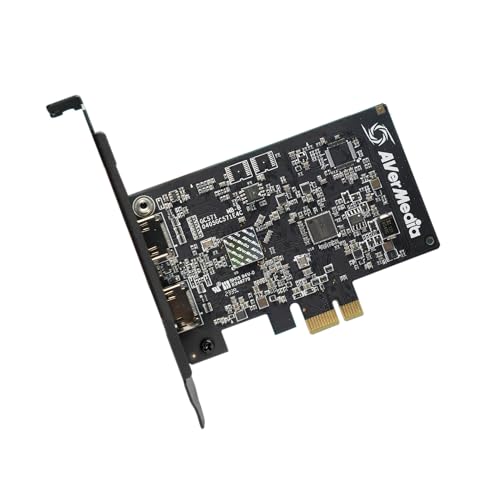
- 4K60 pass-through with 4K30 capture
- VRR support and 1080p120 recording
- Drive-free PCIe installation
Best For: Single-source studio capture with simple setup and modern HDMI features
Quad SDI Genlock Capture – Blackmagic DeckLink Duo 2 for Multi-Cam SDI
If you need a pcie capture card for multi camera studio workflows built around SDI, the Blackmagic Design DeckLink Duo 2 is a strong fit. It offers four independent 3G-SDI connections, so you can capture or play back multiple 1080p60 streams at once, and the reference input helps keep everything synchronized in live multi-camera setups.
Best For: Studio teams that need four SDI channels with genlock support for synchronized production.
Pros:
- Four independent 3G-SDI connections for simultaneous capture and playback.
- Supports up to 1080p60 across SD, HD, and 3G-SDI formats.
- Reference input supports external genlock timing for multi-camera sync.
- Works with a range of editing, VFX, and streaming software.
Cons:
- SDI-only design may not suit HDMI-based cameras.
- Requires a PCIe 4-lane Gen 2 capable slot or compatible higher-lane slot.
- Limited to 1080p capture rather than 4K workflows.
For SDI-based studios, this card is focused on reliability, synchronization, and multi-channel flexibility. It makes more sense for production environments than for casual streaming rigs.
HDMI 2.1 Streaming Capture – Elgato 4K Pro for High-Frame-Rate Setups
The Elgato 4K Pro is a practical pcie capture card for multi camera studio use when your sources are HDMI-based and you want modern passthrough features. It supports 4K60 HDR10 capture, 8K60 passthrough, VRR support, and ultra-low latency, making it well suited to live production or dual-PC streaming rigs.
Best For: HDMI studio and streaming setups that need high-end passthrough and low-latency capture.
Pros:
- HDMI 2.1 input and output with 8K60 passthrough.
- Captures up to 4K60 HDR10, with up to 1080p240 recording.
- VRR passthrough and ultra-low latency help keep monitoring smooth.
- Compatible with popular apps like OBS, Streamlabs, Zoom, Teams, and more.
Cons:
- Designed for Windows 10, so OS support is narrower than some pro cards.
- Best suited to HDMI sources rather than SDI studio gear.
- May be more capture card than you need for simple 1080p workflows.
If your studio is built around HDMI cameras, consoles, or a dual-PC broadcast chain, this card brings a lot of headroom. It leans toward modern high-frame-rate setups rather than traditional SDI production.
Budget HDMI PCIe Capture – MYPIN 4K30 Card with Loop-Out
If you want a straightforward pcie capture card for multi camera studio work on a budget, this MYPIN HDMI card is a simple place to start. It captures a single HDMI source at up to 4K30, includes zero-delay HDMI loop-out, and works with common streaming tools like OBS Studio and VLC.
Best For: Budget-conscious creators who need one HDMI input with local loop-out monitoring.
Pros:
- Captures a single HDMI source at up to 4K30.
- Zero-delay HDMI loop-out is useful for live monitoring.
- PCI-E high-speed transmission with broad slot compatibility.
- Supports Windows, Linux, and Mac OS, plus common streaming software.
Cons:
- Single-input design is not ideal for multiple cameras on its own.
- Limited to 4K30 rather than higher-frame-rate capture.
- More basic than pro-grade multi-channel studio cards.
This is best viewed as an affordable HDMI capture solution rather than a full multi-camera backbone. It can still fit into a studio workflow, but only one source at a time.
Quad HDMI Pro Capture – Magewell 4-Channel PCIe Card
The Magewell Pro Capture Quad HDMI is built for serious pcie capture card for multi camera studio workflows where four HDMI sources need to be ingested at once. With four independent HDMI inputs, FPGA video processing, and low-latency operation, it is aimed at production systems that need dependable multi-channel capture and onboard processing.
Best For: Professional multi-camera studios that need four HDMI inputs and hardware processing.
Pros:
- Four independent HDMI inputs with embedded audio.
- Supports input resolutions up to 2048×2160 and high frame rates.
- FPGA processing handles scaling, de-interlacing, cropping, and more.
- Works with Windows, macOS, and Linux for pro environments.
Cons:
- Requires PCIe Gen2 x4 and a capable host system.
- HDMI-only design may not suit SDI camera rigs.
- Higher-end hardware may be more than casual users need.
For studios that want four HDMI feeds in one card, this is the most production-oriented option in the group. The onboard processing and multi-card support make it especially useful in broadcast-style builds.
Premium 4K60 HDR Game Capture – AVerMedia GC573 Live Gamer 4K
If you need a pcie capture card for multi camera studio work that also handles high-end game capture, the AVerMedia GC573 is built for serious 4K workflows. It records and streams 4K60 HDR10 with zero-lag pass-through, and it also supports high-frame-rate capture up to 240 fps for situations where smooth motion matters.
Best For: Windows-based studios and creators who want top-tier 4K HDR capture with ultra-low latency.
Pros:
- Captures 4K60 HDR10 with zero-lag pass-through
- Supports high-frame-rate capture up to 240 fps
- Works with OBS, Streamlabs, and XSplit
- Includes RGB lighting and AVerMedia utility customization
Cons:
- Designed for Windows 10/11 systems
- Needs a stronger PC for 4K60 HDR or 1080p240 workflows
This is the strongest choice here if your studio needs premium capture quality and low latency in a PCIe x4 card. It is less about multi-input switching and more about delivering clean, reliable source capture at the highest quality in the group.
Driver-Free Legacy Input Capture – DigitPro PCIe Video Capture Card
If your pcie capture card for multi camera studio needs also include older analog sources, this DigitPro model is aimed at straightforward capture rather than modern HDMI production. It captures video and audio through PCIe, supports CVBS and S-video inputs, and is designed to plug in without driver installation.
Best For: Capturing legacy cameras, VCRs, and older AV sources on Windows or Linux systems.
Pros:
- Supports CVBS and S-video input formats
- Driver-free plug-and-play setup
- Compatible with OBS, VLC, Amcap, and similar software
- Works on Windows 8/10/11 and Linux
Cons:
- Maximum capture resolution is 1080p@30Hz
- Focused on analog sources rather than modern HDMI studio gear
For studios that need to bring older video devices into a PC workflow, this card is practical and simple. It is not the best fit for high-resolution multi-camera production, but it fills a useful niche for legacy ingest.
Multi-Input 1080p60 Studio Capture – AVMATRIX VC42 PCIe Card
For a pcie capture card for multi camera studio setups, the AVMATRIX VC42 stands out because it supports 4 HDMI signal sources and can run multiple PCIe capture cards in one PC. It records up to 1080p60 with YUV2 lossless compression, making it a strong fit when you need several live sources running at once.
Best For: Multi-camera livestreaming, virtual studios, churches, and other multi-source productions.
Pros:
- Supports 4 HDMI input sources on one card
- Allows multiple PCIe cards in a single PC for expanded setups
- Captures up to 1080p60 with low-latency transfer
- Works with OBS, Teams, Twitch, and other streaming apps
Cons:
- Limited to 1080p resolution
- Best suited to Windows 7+ and Linux 18.04+ workflows
This is the most studio-oriented option in the group if your priority is multiple simultaneous inputs instead of 4K capture. Its 4-channel design and support for scaled-out PC builds make it a better fit for production environments than single-source gaming capture cards.
4-Way Multicam Budget PCIe Pick – ACASIS 4K HDMI PCIe x4 Capture Card
If you need a pcie capture card for multi camera studio work and want a straightforward way to bring several HDMI sources into one PC, the ACASIS 4K HDMI PCIe x4 is built around that use case. It supports up to four-way 1080p60 HDMI capture simultaneously with ultra-low latency, making it a practical option for live switching, conferencing, teaching, and multicam streaming.
Best For: Creators who want multiple HDMI inputs in one internal card for live streaming, recording, or studio conferencing.
Pros:
- Captures up to 4 HDMI sources at 1080p60 simultaneously
- Ultra-low latency with no compression for smoother live workflows
- Built-in turbo fan helps with heat dissipation during long sessions
- Works with PCIe x4, x8, or x16 slots and multiple apps like OBS, vMix, and Wirecast
Cons:
- Capture resolution tops out at 1080p for recording and live capture
- Designed for Windows/Linux systems rather than broader platform support
- Requires an internal PCIe slot, so it is not a portable setup
For studios that care more about multiple inputs and stable real-time capture than top-end 4K output, this card covers the essentials well. Its four-input design and broad software compatibility make it a solid fit for compact multicam rigs.
HDMI 2.1 High-Refresh Internal Card – AVerMedia Live Gamer 4K 2.1
If your pcie capture card for multi camera studio needs also include modern console or high-refresh gaming sources, the AVerMedia Live Gamer 4K 2.1 is the most feature-packed option here. It supports HDMI 2.1, 4K144 HDR pass-through, and ultra-low latency capture, while also handling very high refresh-rate combinations and ultra-wide resolutions.
Best For: Studios and streamers who want an internal card for high-refresh gaming capture alongside live production.
Pros:
- HDMI 2.1 support with 4K144 HDR pass-through
- Ultra-low latency capture for responsive live workflows
- Supports up to 240Hz refresh-rate combinations and ultra-wide resolutions
- PCIe Gen 3 x4 internal design with plug-and-play installation
Cons:
- Capture resolution is listed at 1080p240 and 1440p120, not 4K capture
- Windows 10/11 x64 system requirement narrows compatibility
- More gaming-focused than a dedicated multi-input studio switcher
This card is strongest when your studio mixes console capture with high-frame-rate gaming content. If your priority is advanced HDMI 2.1 support and low-latency playback, it stands out clearly.
4K60 Pass-Through Studio Capture Card – AVerMedia Live Streamer Ultra HD
For a pcie capture card for multi camera studio use that leans toward clean HDMI ingest and dependable live production, the AVerMedia Live Streamer Ultra HD is a strong internal option. It offers 4K60 pass-through, 4K30 capture, VRR support, and 1080p120 recording support, all in a drive-free PCIe design that keeps setup simple.
Best For: Streamers and studio users who want a simple internal PCIe card with 4K pass-through and flexible capture modes.
Pros:
- 4K60 pass-through with 4K30 capture capabilities
- VRR support for a tear-free, responsive signal path
- 1080p120 high-frame-rate capture for smoother footage
- Drive-free plug-and-play installation with broad PCIe slot compatibility
Cons:
- Windows 11 support is listed in the specs, which limits platform flexibility
- Not a multi-input card; it focuses on a single HDMI source
- Capture tops out at 4K30 rather than 4K60
This is a good pick if you want a straightforward internal capture card that handles modern HDMI sources without extra setup friction. It is especially appealing for users who value 4K pass-through and high-frame-rate capture in a compact workflow.
How We Picked the Best Pcie Capture Card for Multi Camera Studio
We prioritized cards that fit real studio workflows: multi-input support, stable drivers, low-latency operation, and compatibility with common production software. We also weighed whether a card is better suited to HDMI sources, SDI workflows, or mixed recording and passthrough use.
Quick Comparison
For a Pcie Capture Card for Multi Camera Studio, the fastest way to narrow the list is by source type and channel count. HDMI-focused cards are usually easier for cameras, consoles, and content creation rigs, while SDI models are better for longer cable runs and more professional studio environments. Single-input cards suit simple camera or game capture, while multi-channel cards are the right choice when you need several sources in one system.
Key Buying Factors for Pcie Capture Card for Multi Camera Studio
Input Type and Channel Count
Match the card to your camera outputs. If you run multiple cameras, look for 2-, 4-, or higher-channel capture hardware. If your cameras output SDI, choose an SDI card; if they output HDMI, make sure the card supports the correct HDMI version and resolution.
Resolution, Frame Rate, and Latency
For studio work, 1080p60 is often the minimum comfortable target, while 4K60 is ideal if you need higher-detail recording or future-proofing. Low latency matters for live switching, monitoring, and synchronized production, especially when audio and video need to stay aligned.
Passthrough and Monitoring
Passthrough can help you monitor a source on an external display while the card records or streams it. This is useful in hybrid setups, but it should not be the only factor if your real need is dependable multi-camera ingest.
Software and System Compatibility
Check support for OBS, streaming apps, NLEs, and your operating system before buying. Driver quality, PCIe lane requirements, and motherboard compatibility can matter as much as raw specs, especially in a Pcie Capture Card for Multi Camera Studio build.
Who Should Buy Which Pcie Capture Card for Multi Camera Studio?
If you need professional multi-camera ingest and want strong reliability, choose a multi-channel card with the right input standard. If you mainly stream one or two HDMI cameras, a modern single-input or dual-input card may be enough. If your workflow includes long cable runs, more demanding broadcast-style routing, or a studio control room, SDI-based options are often the better long-term investment.
For mixed creator studios, the best choice is usually the card that matches your cameras today and leaves room for your next production upgrade.