A good patch bay makes a podcast studio easier to connect, troubleshoot, and expand. Instead of reaching behind preamps, interfaces, and processors, you can route signals from one accessible rack position.
These 10 patch bays cover common podcasting setups, from balanced TRS connections to XLR microphone and line-level routing. The right choice depends on your equipment, workflow, and how much flexibility you need.
Best 10 Patch Bays for Podcasting Picks for 2026
Flexible Rack Routing

- 48-point balanced 1/4-inch TRS patch bay
- Normalled, half-normalled, and thru modes
- 1U rack-mountable design
Best For: Balanced rack-based podcast studios needing flexible routing
Direct XLR Connections

- 16-point XLR patchbay
- 32 gold-plated XLR connectors
- Built for recording or live sound routing
Best For: XLR-based podcast studios and recording setups
Multi-Mode Studio Control
Behringer ULTRAPATCH PRO PX3000

- 48-point balanced TRS patchbay
- Parallel, half-normalled, normalled, and open modes
- Rugged construction for studio use
Best For: Expandable podcast studios needing varied signal-routing options
High-Density TRS Routing

- 48-point patchbay with 96 TRS connectors
- Gold-plated connectors
- Three-way mode switch
Best For: Larger TRS-based podcast and project studios
Reliable XLR Routing

- 16 balanced XLR channels
- Shielded steel 1U rack enclosure
- Reversible rack ears and 3-year warranty
Best For: Rack-based podcast studios using multiple XLR connections
High-Capacity Studio Hub
Art Pro Audio P48 Balanced Patch Bay

- 48-point balanced patchbay
- Fully shielded rack-mount steel design
- Organizes cables and protects connectors
Best For: Expanded podcast and recording studios with many audio connections
Best for Comfort
16-Port Reversible XLR Patchbay

- Reversible male/female XLR ports
- Rugged powder-coated steel chassis
- Mounting screws included
Best For: Podcast and broadcast setups needing adaptable XLR routing
Compact Balanced Routing
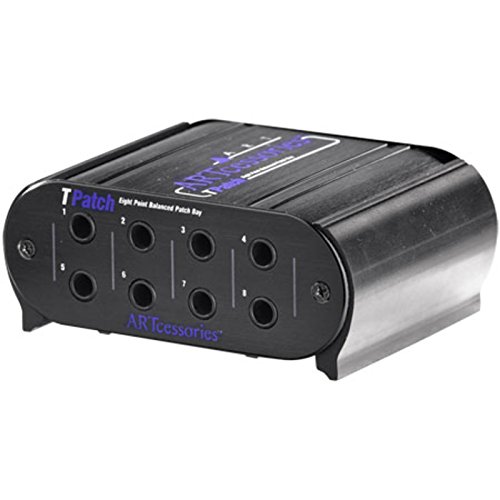
- Eight balanced signal points
- Switchable normal and half-normal modes
- Rugged aluminum case with TRS jacks
Best For: Small podcast and home-studio TRS routing
Modular XLR Expansion

- Configurable up to 16 XLR channels
- Four replaceable modular blocks
- Steel chassis with reversible rack ears
Best For: Expandable professional XLR rack systems
Front-Access XLR Convenience

- Twelve XLR patch points
- Reversible patchbay design
- Brings rear mixer inputs to the rack front
Best For: XLR podcast racks needing easier mixer access
Flexible Rack Routing – Samson S-Patch Plus
Samson S-Patch Plus Balanced 48-Point 1/4" Patch Bay | 1/4 Inch Phone Connections
Check Price On AmazonThe Samson S-Patch Plus is a practical choice among patch bays for podcasting when you want a central, rack-mounted connection point for microphones, mixers, interfaces, and other balanced audio gear. Its 48-point, 1/4-inch TRS layout keeps connections accessible while supporting multiple routing configurations.
Best For: Podcast studios using balanced 1/4-inch rack equipment and needing flexible signal routing.
Pros:
- Provides 48 front and 48 rear 1/4-inch phone connections.
- Supports normalled, half-normalled, and thru operation via front-panel switches.
- Its 1U rack-mount design helps keep wiring organized and accessible.
Cons:
- Uses 1/4-inch TRS connections rather than XLR connectors.
- The large connection count may be more than a small podcast setup requires.
With selectable routing modes and a fully balanced signal path, the S-Patch Plus is well suited to podcast rooms that are growing beyond a simple interface-and-microphone arrangement.
Direct XLR Connections – Black Lion Audio PBR XLR
The Black Lion Audio PBR XLR is one of the more straightforward patch bays for podcasting if your setup is built around XLR microphones and other XLR-equipped audio hardware. It provides 16 patch points through 32 gold-plated XLR connectors for routing in recording or live sound environments.
Best For: XLR-centered podcast and recording studios that want quick, accessible signal connections.
Pros:
- Offers 16 patch points with 32 gold-plated XLR connectors.
- Uses familiar XLR connectivity for compatible microphones and studio equipment.
- Designed for audio signal routing in recording or live sound studios.
Cons:
- Provides fewer patch points than the 48-point TRS models in this roundup.
- Its XLR-only design is less suitable for setups centered on 1/4-inch TRS connections.
The PBR XLR keeps the routing format simple and direct, making it a focused option when XLR connectivity is the priority rather than maximum channel density or multiple switching modes.
Multi-Mode Studio Control – Behringer ULTRAPATCH PRO PX3000
Behringer ULTRAPATCH PRO PX3000 Multi-Functional 48-Point 3-Mode Balanced Patchbay
Check Price On AmazonThe Behringer ULTRAPATCH PRO PX3000 is a versatile option among patch bays for podcasting, offering 48 points and selectable routing functions for a more adaptable studio signal path. It is designed to reduce cable clutter while supporting a range of audio connection needs.
Best For: Podcast studios that need a high-capacity patchbay with several selectable routing modes.
Pros:
- Provides 48 balanced TRS patch points.
- Supports parallel, half-normalled, normalled, and open functions.
- Rugged construction and high-quality jack connectors are designed for long-term use.
Cons:
- Its many routing options may require more setup knowledge than a basic patchbay.
- The supplied specifications list a 5-volt maximum voltage, so system compatibility should be checked carefully.
The PX3000 stands out for routing flexibility. It makes the most sense when your podcast studio includes several pieces of gear and you expect to change signal paths regularly.
High-Density TRS Routing – Black Lion Audio PBR TRS3
The Black Lion Audio PBR TRS3 is a high-density choice among patch bays for podcasting, with 48 points and 96 gold-plated TRS connectors. Its three-way mode switch provides routing flexibility for podcast studios that use microphones, interfaces, speakers, guitars, or other compatible equipment.
Best For: Larger podcast and project studios needing many TRS connections in one patchbay.
Pros:
- Offers 48 patch points through 96 gold-plated TRS connectors.
- Includes a three-way mode switch for flexible routing.
- Supports a broad range of listed devices, including guitars, microphones, computers, speakers, and XLR equipment.
Cons:
- The supplied notes do not specify the exact functions of each of the three modes.
- Its high connection count may be unnecessary for a compact podcast setup.
With dense TRS connectivity and three-way switching, the PBR TRS3 is aimed at studios that value expandability and centralized routing over a minimal connection layout.
Reliable XLR Routing – ART P16 XLR Balanced Patchbay
For studios seeking patch bays for podcasting, the ART P16 provides a straightforward way to organize 16 balanced XLR channels in a standard rack space. Its shielded steel enclosure and PCB wiring support a tidy, durable installation for microphone and other XLR connections.
Best For: Podcast studios that need a rack-mounted, 16-channel XLR patch point.
Pros:
- Provides 32 XLR connectors: 16 female on the front and 16 male on the rear.
- Uses reliable PCB wiring for consistent internal connections.
- Fits a standard 19-inch rack and includes reversible rack ears.
- Includes a 3-year warranty.
Cons:
- Uses XLR connectivity rather than a more compact TRS patchbay format.
- Its 1U rack footprint may be more than a small podcast setup requires.
The P16 is a focused choice when your podcast signal chain is built around XLR microphones, interfaces, preamps, or other balanced gear. Its channel count and rugged enclosure make it particularly practical for a permanent rack installation.
High-Capacity Studio Hub – Art Pro Audio P48 Balanced Patch Bay
The Art Pro Audio P48 is a 48-point balanced patch bay for podcasting setups that need extensive cable organization and routing. It is designed for rack installation and can help reduce connector wear across microphones, mixers, amplifiers, and other studio equipment.
Best For: Larger podcast studios, live sound systems, and recording rigs with many balanced connections.
Pros:
- Offers 48 balanced patch points for complex signal-routing needs.
- Fits a 19-inch rack and has a fully shielded steel construction.
- Supports use with mixers, microphones, amplifiers, instruments, and other audio equipment.
- Helps organize cables and reduce wear on equipment connectors.
Cons:
- Its high point count can be excessive for a simple one- or two-microphone podcast setup.
- The supplied notes identify the connector type as XLR, which may not suit rigs built around TRS patch cables.
Choose the P48 when expansion and centralized routing matter more than a compact setup. Its 48-point capacity makes it the most suitable option here for a busy studio or a podcast facility that also handles broader recording and live-sound duties.
Best for Comfort – 16-Port Reversible XLR Patchbay
This 16-port reversible XLR patchbay is a practical option for patch bays for podcasting when you want flexible connector orientation and a durable rack installation. Its balanced three-pin wiring is intended to help minimize interference, while the included mounting screws simplify setup.
Best For: Podcast studios, broadcast carts, and live-sound rigs that need customizable XLR I/O.
Pros:
- Uses reversible male/female XLR ports for adaptable configurations.
- Has a heavy-duty steel chassis with a black powder-coat finish.
- Includes mounting screws for standard 19-inch rack installation.
- Works with XLR cables, microphones, mixers, preamps, consoles, and recorders.
Cons:
- Provides 16 ports, so larger studios may need additional patchbay capacity.
- Its listed recommended usage is indoor, limiting suitability for exposed outdoor setups.
The reversible connectors are the defining advantage of this model, especially if your rack layout may change over time. It offers a flexible, rugged solution for balanced XLR routing without requiring rewiring when the panel configuration changes.
Compact Balanced Routing – Art Pro Audio TPatch
The Art Pro Audio TPatch is a practical choice when you need compact, balanced patch bays for podcasting or a small recording setup. Its eight 1/4-inch TRS points and switchable normal or half-normal modes support flexible signal routing without taking up much rack space.
Best For: Podcasters and home studios routing balanced line-level connections through an eight-channel patch bay.
Pros:
- Provides eight points of balanced direct signals.
- Offers switchable half-normal and normal operating modes.
- Uses 1/4-inch TRS phone jack connectors in a rugged extruded aluminum case.
Cons:
- Has eight channels, fewer than the larger XLR options in this roundup.
- Uses 1/4-inch TRS connections rather than XLR connectors.
Choose the TPatch if your podcasting chain uses balanced TRS connections and you want straightforward routing flexibility. Its compact eight-channel layout is best suited to smaller systems rather than extensive XLR-heavy installations.
Modular XLR Expansion – AP16 XLR Patchbay
The AP16 XLR Patchbay is built for podcasting setups that rely on multiple XLR connections and benefit from organized rack routing. Its four independent modular blocks can be configured for 4, 8, 12, or 16 channels, while reversible rack ears add installation flexibility.
Best For: Professional podcast studios, rack systems, and live setups needing modular 16-channel XLR routing.
Pros:
- Supports configurable 4-, 8-, 12-, or 16-channel layouts through four modular blocks.
- Uses 24K gold-plated XLR pins and a dual-layer PCB designed to reduce interference.
- Full-steel chassis and reversible rack ears support durable, flexible installation.
- Individual modules can be removed or replaced without reworking the entire PCB.
Cons:
- Heavier and larger than compact eight-channel patch bays.
- Its XLR-focused design may be excessive for a small podcast rig with few connections.
The AP16 stands out when expandability and serviceability matter as much as connection density. It is a strong fit for a permanent or growing studio, especially where modular zone management can keep complicated cabling organized.
Front-Access XLR Convenience – Hosa PDR-369 12-Point XLR
The Hosa PDR-369 brings hard-to-reach XLR mixer inputs to the front of a rack, making it a useful option for podcasting systems built around XLR mixers, interfaces, or microphone preamps. Its reversible 12-point design provides a straightforward way to centralize those connections.
Best For: XLR-based podcast racks that need convenient front-panel access to mixer and preamp connections.
Pros:
- Provides 12 XLR patch points in a single rack chassis.
- Reversible design supports flexible installation.
- Compatible with audio mixers, interfaces, and microphone preamps.
- Steel outer material and a limited lifetime warranty support long-term use.
Cons:
- Offers fewer channels than the 16-channel AP16.
- Uses XLR connections rather than 1/4-inch TRS patch points.
The PDR-369 is a sensible middle ground for users who need more than a compact patch bay but do not require a 16-channel modular system. Its main advantage is convenient front access to XLR connections that would otherwise be difficult to reach.
How We Picked the Best Patch Bays for Podcasting
We focused on practical studio factors rather than choosing solely by port count. The products in this roundup represent several useful formats, including balanced 1/4-inch TRS bays, XLR patch panels, multi-mode designs, and compact units for smaller racks.
Our comparison emphasizes connector compatibility, normalled or reversible routing options, build quality, rack installation, signal transparency, and ease of access. A patch bay should simplify your setup without introducing confusing routing or limiting future upgrades.
Quick Comparison
| Type | Best suited for | What to prioritize |
|---|---|---|
| Balanced TRS | Interfaces, preamps, compressors, and line-level gear | Correct wiring, routing modes, and channel count |
| XLR | Microphone inputs, outputs, and permanent studio connections | Connector direction, phantom-power safety, and shielding |
| Multi-mode | Studios that need flexible signal routing | Normal, half-normal, and thru configurations |
| Compact patch bay | Small podcast rooms and limited racks | Size, accessibility, and straightforward labeling |
Key Buying Factors for Patch Bays for Podcasting
Connector Type and Signal Level
Match the patch bay to your equipment. TRS models are typically convenient for balanced line-level connections between an audio interface, preamps, mixers, and outboard processors. XLR models can make microphone and hardware connections more accessible, but they require closer attention to pin wiring and phantom power.
Normalled, Half-Normalled, or Thru Routing
Normalled connections pass a signal through automatically until a cable is inserted. Half-normalled designs can split or monitor a feed, while thru configurations keep the front and rear connections directly linked. Choose the simplest mode that matches your workflow, and label every channel before connecting equipment.
Channel Count and Rack Space
More points provide room for expansion, but unused connections can make a small setup harder to understand. Count the inputs and outputs you use now, then leave enough capacity for likely additions such as a second interface, headphone amplifier, compressor, or remote guest system.
Build Quality and Installation
Look for secure jacks, a sturdy front panel, clear labeling, and dependable rear connections. Confirm the unit’s rack width and depth before buying, and use balanced cables throughout the signal path when your equipment supports them.
Phantom Power and Microphone Routing
Use caution when patching condenser microphones or active devices through an XLR bay. Turn phantom power off before changing connections, avoid mixing incompatible wiring schemes, and verify the manufacturer’s guidance for microphone-level routing.
Who Should Buy Which Patch Bays for Podcasting?
Choose a balanced TRS patch bay if your podcast studio mainly routes line-level signals among an interface, mixer, preamps, and processors. These models are often the most practical choice for repeatable studio workflows.
Choose an XLR patch bay if your priority is convenient access to microphone inputs, hardware outputs, or permanently installed rack connections. It is especially useful when rear-panel XLR ports are difficult to reach.
Choose a flexible multi-mode model if your routing needs may change as the studio grows. Multiple operating modes can support different connection patterns, but they require careful setup and labeling.
Choose a compact unit for a simple one- or two-host room where rack space and budget matter more than extensive expansion. Before purchasing, map every source, destination, and cable so the patch bay improves your workflow rather than adding another layer of confusion.