Recording a lecture is easy; capturing clear, usable audio is harder. The best multitrack recorders for lectures give you more control over microphones, speakers, room noise, and later playback.
This roundup compares versatile multitrack recorders with compact voice recorders and AI-enabled options, so you can match recording quality, storage, transcription features, and portability to your classes or research.
Best 10 Multitrack Recorders for Lectures Picks for 2026
Best Multitrack Workhorse

- Four XLR/TRS inputs with individual controls
- Up to 24-bit/96kHz WAV recording
- USB interface plus SD-card recording
Best For: Multichannel lecture and field recording setups
Best for Offline Transcription

- Offline transcription in five languages
- Six-microphone noise reduction system
- Up to 190 hours of stated recording time
Best For: Lecture recording, playback, and searchable study notes
Best Standalone Multitrack Option

- Eight simultaneous playback tracks
- 64 V-Tracks for project organization
- Built-in stereo mic and battery operation
Best For: Self-contained track-based recording and audio projects
Best AI Lecture Note-Taker
Innioasis PR1 AI Voice Recorder
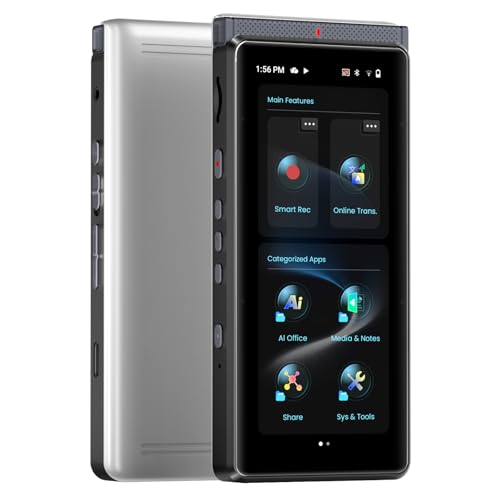
- Offline transcription in 70+ languages
- AI summaries, mind maps, and translation
- Beamforming array for lecture-hall capture
Best For: Students and researchers wanting organized lecture notes
High-Capacity Pick

- 128GB storage and up to 9296 hours of capacity
- Voice activation with noise-canceling microphone
- MP3/WAV recording, password protection, and USB transfer
Best For: Students and professionals needing extensive lecture-recording storage
Simple Name-Brand Option

- Straightforward MP3 recording
- Built-in USB for direct computer transfer
- Up to 57 hours of listed battery life
Best For: Users wanting simple, dependable lecture recording
AI Noise-Reduction Pick

- 136GB storage and up to 18,800 hours of capacity
- DSP 5.0 AI noise reduction and voice activation
- One-ounce design with USB-C OTG transfer
Best For: Portable lecture recording in noisy classrooms and offices
Best Overall Value
EVISTR L357 64GB Voice Recorder

- 1536kbps stereo audio with PCM noise reduction
- Up to 32 hours of recording and 64GB storage
- Voice activation and adjustable recording gain
Best For: Students and teachers seeking simple, long-duration lecture recording
Best Heavy-Duty Pick
arungo ZD70 128GB Voice Recorder

- 128GB TF card included
- 1536kbps PCM audio with stereo microphone
- Voice activation and one-button recording
Best For: Frequent users who need extensive storage for lectures and meetings
Best Lightweight Option

- 64GB memory with up to 750 hours of storage
- Low-battery auto-save helps protect files
- Very compact 14.7g design
Best For: Portable lecture recording with simple storage and file protection
Best Multitrack Workhorse – Zoom H6
For shoppers comparing multitrack recorders for lectures, the Zoom H6 is a strong fit when you need separate input control, expandable microphone options, and high-quality local recording. It records to SD cards in WAV or MP3 format, supports up to 24-bit/96kHz audio, and includes four XLR/TRS inputs with individual gain controls, pads, and phantom power.
Best For: Lecturers, production teams, and students who need multichannel recording or want to connect external microphones.
Pros:
- Four XLR/TRS inputs with individual gain controls, pads, and phantom power
- Records directly to SD cards up to 128GB in WAV or MP3
- Works as a multichannel or stereo USB audio interface
- Includes stereo and mid-side microphone capsules, batteries, case, and windscreen
Cons:
- More equipment-oriented than a simple one-button lecture recorder
- Requires four AA batteries for portable operation
- External mounting adapter for a DSLR or camcorder is optional
The H6 is the most capable choice here for controlled, multichannel setups. Its interchangeable capsules and four external inputs provide flexibility, while the SD recording and USB interface support both field use and later editing.
Best for Offline Transcription – iFLYTEK 302Pro
If your priority is turning lectures into searchable notes, the iFLYTEK 302Pro offers more study-focused features than a conventional multitrack recorder. It can transcribe speech offline in five languages, includes conference and speech recording modes, and supports long recording sessions with up to 190 hours of stated battery life and recording time.
Best For: Students and learners who want lecture playback, offline transcription, bookmarks, and exportable text files.
Pros:
- Offline voice-to-text support for English, Chinese, Japanese, Korean, and Russian
- Six-microphone noise-canceling system with multiple recording modes
- Imports MP3 and WAV files for transcription
- Exports recordings or transcriptions in several audio and document formats
Cons:
- No headphone jack is listed in the specifications
- Recognition can be affected by background noise or accents
- Its built-in microphone design is less suited to multi-input recording
The 302Pro is better understood as an offline transcription and study recorder than a traditional multitrack device. Choose it when converting lectures into text and reviewing key moments matters more than connecting multiple microphones.
Best Standalone Multitrack Option – BOSS BR-600
The BOSS BR-600 is an older-style standalone multitrack recorder for buyers who want track-based recording without relying on a computer. It offers eight simultaneous playback tracks, 64 V-Tracks, a built-in stereo microphone, battery operation, and a CompactFlash slot with a 128MB card included.
Best For: Users who want a self-contained recorder for basic lecture capture, demonstrations, or audio projects with track organization.
Pros:
- Eight simultaneous playback tracks and 64 V-Tracks
- Built-in stereo microphone for portable recording
- Battery-powered design with a 3.5mm headphone jack
- Includes effects, a drum machine, and a 128MB CompactFlash card
Cons:
- Included storage provides only a stated 2 hours and 16 minutes of recording time
- Uses CompactFlash media rather than SD cards
- Requires four 9V batteries for portable operation
The BR-600 provides genuine track-based workflow, but its limited included storage and older CompactFlash format make it less convenient for long lectures. It is most appealing when standalone multitrack control and built-in effects are more important than modern storage capacity.
Best AI Lecture Note-Taker – Innioasis PR1 AI Voice Recorder
For shoppers seeking multitrack recorders for lectures but primarily wanting automatic notes, the Innioasis PR1 combines recording with offline transcription and summarization. Its four-microphone array plus high-SNR microphone is designed for lecture halls and meetings, while the device can create transcripts, summaries, mind maps, and translations without a subscription.
Best For: Students, researchers, and professionals who want lecture audio converted into organized notes on the device.
Pros:
- Offline transcription in more than 70 languages, according to the supplied notes
- AI summaries, mind maps, translation, and transcript-based questions
- 64GB storage with backup recording mode for selected files
- Beamforming microphone array with smart, ANC Max, and Hi-Fi recording modes
Cons:
- AI recording battery life is stated at up to 17 hours, shorter than its audio-only figure
- Some translation features support more languages online than offline
- More complex than a basic dedicated voice recorder
The PR1 is a note-taking device first and a conventional multitrack recorder second. Its strongest advantage for lectures is the combination of focused microphone capture, on-device transcription, and automatic organization, especially for users who want useful notes rather than only an audio file.
High-Capacity Pick – EVIDA 128GB Voice Recorder
For shoppers comparing multitrack recorders for lectures, the EVIDA 9296 offers substantial storage, voice activation, and multiple recording formats in a compact device. Its noise-canceling microphone and playback features make it practical for capturing and reviewing classes, meetings, and interviews.
Best For: Students, teachers, and professionals who want extensive storage, voice activation, and flexible file formats.
Pros:
- 128GB storage with up to 9296 hours of recording capacity.
- Supports MP3 and WAV recording, including 1536kbps WAV.
- Voice activation, password protection, A-B repeat, bookmarks, and four-folder file organization.
- Up to 54 hours of continuous recording and USB computer transfer.
Cons:
- Built-in mono microphone rather than a multichannel recording setup.
- No headphone jack is listed in the specifications.
- Its many settings may take more time to learn than a basic recorder.
The EVIDA is a feature-rich choice when storage and organization matter most. It is better suited to single-source lecture recording than true multitrack production, but its voice activation and format options add useful flexibility.
Simple Name-Brand Option – Sony ICD-PX370 Recorder
Sony ICD-PX370 Mono Digital Voice Recorder with Built-In USB Voice Recorder,black
Check Price On AmazonFor buyers seeking multitrack recorders for lectures without a complicated feature set, the Sony ICD-PX370 focuses on straightforward MP3 recording and easy file transfer. Its built-in USB connection and long stated battery life make it convenient for routine classes and meetings.
Best For: Users who prefer a familiar brand and simple MP3 recording with direct computer connectivity.
Pros:
- Records MP3 audio quickly and easily.
- Up to 57 hours of battery life is listed.
- Built-in USB connection supports direct transfer to a computer.
- Includes a 2.5mm headphone jack.
Cons:
- 4GB storage is considerably less than the other listed options.
- It is a mono digital voice recorder, not a true multitrack recorder.
- Uses two AA batteries rather than a listed rechargeable battery.
The Sony is a sensible pick for uncomplicated lecture recording and quick file management. Its smaller storage capacity makes it best for users who regularly move recordings to a computer rather than archive them on the device.
AI Noise-Reduction Pick – Pexqil 136GB Voice Recorder
Among multitrack recorders for lectures, the Pexqil stands out for its large storage, AI noise reduction, and compact design. Voice activation can pause during silence, while OTG transfer allows recordings to move directly to compatible phones and computers without extra software.
Best For: Students and professionals recording in busy classrooms, offices, or other environments where storage and noise reduction are priorities.
Pros:
- 136GB storage with a stated capacity of up to 18,800 hours.
- DSP 5.0 AI noise reduction is designed to filter ambient noise.
- Voice activation conserves storage by pausing during silence.
- One-button recording, USB-C OTG transfer, and a 1-ounce design.
Cons:
- It is a built-in-microphone voice recorder, not a true multitrack system.
- Voice activation may not capture very quiet speech as consistently as continuous recording.
- OTG compatibility may vary by phone or computer.
The Pexqil is appealing when portability, long recording capacity, and background-noise processing are more important than advanced track control. Its one-button operation also makes it convenient for quickly starting a lecture recording.
Best Overall Value – EVISTR L357 64GB Voice Recorder
For shoppers comparing multitrack recorders for lectures, the EVISTR L357 is a compact voice recorder focused on clear speech capture, straightforward controls, and long recording endurance. Its adjustable gain, PCM noise reduction, and voice activation make it practical for classroom use.
Best For: Students, teachers, and anyone who wants simple lecture recording with substantial storage.
Pros:
- 1536kbps stereo recording with PCM noise reduction and seven gain levels.
- 64GB storage can hold up to 4,660 hours at 32Kbps.
- Up to 32 hours of continuous recording and 35 hours of playback.
- Voice activation, time scheduling, A-B repeat, and variable-speed playback.
Cons:
- It is a single built-in-microphone recorder rather than a true multitrack production device.
- The extensive features may require consulting the manual for setup.
The L357 is a well-rounded choice when portability, storage, and speech-focused features matter more than multitrack editing. Its USB-C transfer and time-stamped filenames also simplify organizing recordings after class.
Best Heavy-Duty Pick – arungo ZD70 128GB Voice Recorder
Among multitrack recorders for lectures, the arungo ZD70 stands out for its included 128GB TF card and automatic voice activation. It combines 1536kbps PCM recording with one-button operation, making it convenient for frequent lectures, meetings, and study sessions.
Best For: Heavy users who want maximum included storage and quick voice-activated recording.
Pros:
- 128GB pre-installed TF card provides ample room for recordings and music files.
- 1536kbps recording with an omnidirectional stereo microphone and noise cancellation.
- Voice activation can reduce storage use during silent portions.
- Includes A-B repeat, speed control, password lock, playback, and USB-C transfer.
Cons:
- Listed continuous recording time is 50 hours, so it may need recharging for extended use.
- Like the other products here, it is designed for voice recording rather than separate multitrack recording.
The ZD70 is appealing if storage capacity is your main priority. Its time-stamped files and one-click controls reduce the friction of recording and locating individual lecture sessions.
Best Lightweight Option – EVIDA 64GB Portable Recorder
For buyers researching multitrack recorders for lectures on a tight portability budget, the EVIDA recorder offers built-in 64GB storage in a very small, lightweight design. Its voice-activation function and low-battery auto-save are useful for unattended classroom recording.
Best For: Users who prioritize a compact recorder with generous storage and file protection.
Pros:
- 64GB built-in memory is advertised to store up to 750 hours of recordings.
- Voice activation helps focus saved audio on spoken content.
- Low-battery smart auto-save helps protect recordings before shutdown.
- Compact dimensions and approximately 14.7g weight support discreet portability.
Cons:
- The supplied specifications list 15 hours of digital recording time, less than some alternatives.
- Product notes provide fewer details about recording formats and playback features.
- It is a voice recorder, not a dedicated multitrack recorder with separate channels.
The EVIDA makes sense for lecture recording when size and storage protection are more important than advanced controls. Consider its listed 15-hour recording time when planning longer sessions between charges.
How We Picked the Best Multitrack Recorders for Lectures
We focused on the features that matter during real lectures: intelligible speech, reliable recording, simple controls, useful storage, battery practicality, and easy file transfer. The selection includes true multitrack units such as the Zoom H6 and Boss BR-600, as well as streamlined voice recorders designed for students, journalists, and meeting notes.
AI-enabled models were considered for transcription, translation, summarization, and noise reduction. These features can save time, but they should not replace checking the original audio or confirming whether recordings and cloud-connected services comply with campus privacy rules.
Quick Comparison
| Recorder type | Best for | Main advantage | Potential limitation |
|---|---|---|---|
| Multitrack field recorder | Multiple microphones or sources | Flexible inputs and stronger control | More setup and editing required |
| AI voice recorder | Transcripts and summaries | Fast conversion from audio to notes | Accuracy varies by speaker and room |
| Basic digital recorder | Simple lecture capture | Easy operation and long storage | Usually mono and less adjustable |
Key Buying Factors for Multitrack Recorders for Lectures
Audio Inputs and Track Control
Choose a multitrack recorder if you need separate microphones, a panel discussion, or a direct feed from another audio source. XLR/TRS inputs support more serious microphones and allow you to adjust channels independently. For a single lecturer, a mono or stereo voice recorder may be simpler and more convenient.
Microphone Quality and Placement
Built-in microphones can work well when placed near the speaker, but distance and room acoustics matter more than headline storage capacity. Look for adjustable recording levels, a low-cut filter, or noise reduction when available. Always test placement before an important class.
Storage, Battery Life, and File Transfer
Large internal memory is useful for frequent recordings, while SD-card support makes archiving and expansion easier. Confirm the actual recording time at your chosen quality setting rather than relying on maximum capacity claims. USB transfer, a built-in USB plug, or OTG support can simplify moving files to a computer or phone.
Transcription and Privacy
AI transcription is helpful for searchable notes, multilingual lectures, and quick summaries. Check supported languages, offline functionality, subscription requirements, and export options. If lectures contain personal information, prefer local processing or verify how uploaded audio is handled.
Who Should Buy Which Multitrack Recorders for Lectures?
Choose the Zoom H6 or Boss BR-600 if you need genuine multitrack recording, external microphones, or hands-on control for panels, seminars, and field research.
Choose an iFLYTEK or Innioasis AI recorder if transcription, translation, and summaries are more important than advanced channel mixing. These are particularly useful for reviewing long classes quickly.
Choose a Sony, EVISTR, or EVIDA recorder if you want straightforward lecture capture, generous storage, and minimal setup. The Pexqil and similar high-capacity voice-activated models may suit users who record frequently, provided their noise reduction and transfer workflow meet your needs.