Building a reliable multi camera kit for production studio work is about more than adding extra cameras. The right setup improves coverage, speeds up production, and makes switching between angles feel seamless.
Below, we focus on kits that suit everything from podcasts and livestreams to in-studio interviews and hybrid events, with an eye on ease of setup, image quality, and expansion potential.
Best 10 Multi Camera Kit for Production Studio Picks for 2026
Pro PTZ Studio Bundle

- 3-camera 4K NDI PTZ bundle
- 7-inch quad-screen joystick controller
- AI face and humanoid auto-tracking
Best For: Churches, events, and studios needing PTZ control
Podcast Video Starter
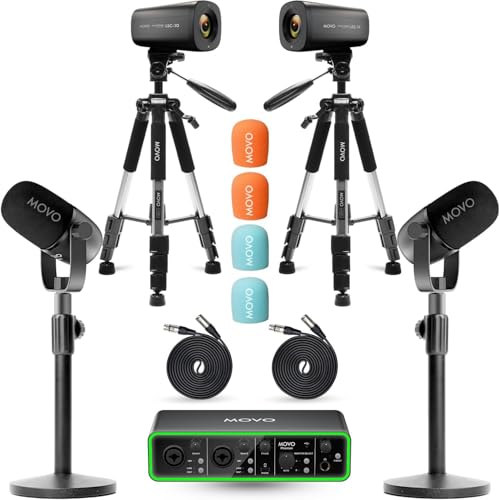
- Two 4K UHD cameras included
- 2 XLR dynamic microphones with interface
- Complete setup for two-host shows
Best For: Two-person podcasts and interview studios
Wireless 3-Cam Starter Kit

- Syncs up to three cameras
- Streams and records in 1080p
- App-controlled with Auto-Director
Best For: Small studios and livestream teams needing fast wireless multi-angle production
Broadcast Studio Camera
Blackmagic Studio Camera 4K Pro G2
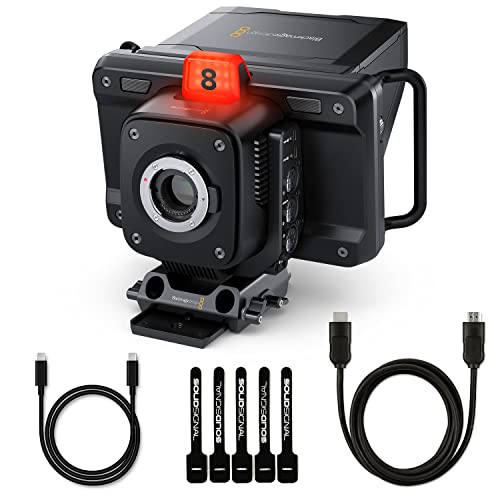
- Designed for ATEM and live studio workflows
- 4K sensor with 13 stops dynamic range
- HDMI, 12G-SDI, Ethernet, and XLR
Best For: Broadcast studios and live event rigs centered on a switcher
Studio Light Pair
NiceVeedi 2-Pack Bi-Color LED Panels

- 36W bi-color output
- 2700K-6500K color range
- Includes 2 tripods and remote
Best For: Adjustable studio lighting for video, streaming, and photography
Creator Starter Set

- Phone-focused kit with tripods
- Wireless mic and RGB fill light
- Supports vertical and horizontal shots
Best For: Beginner phone vloggers and compact content setups
Pro PTZ Studio Bundle – Tenveo 4K 20X NDI PTZ Kit
If you need a multi camera kit for production studio work with centralized control, this Tenveo bundle is built for live switching, streaming, and event coverage. It combines three 4K NDI PTZ cameras, a 7-inch quad-screen joystick controller, and an 8-port PoE switch, so you can build a more organized studio workflow around one package.
Best For: Church services, live streaming, conferences, weddings, schools, and broadcast-style productions that want PTZ control and network video in one kit.
Pros:
- Includes 3 Tenveo 4K NDI PTZ cameras for multi-angle production
- 7-inch LCD quad-screen controller supports real-time preview and PTZ adjustments
- AI humanoid and face auto-tracking help keep presenters centered
- HDMI, USB3.0, LAN/PoE, and NDI support offer flexible integration
Cons:
- No built-in microphone
- PoE operation requires the included switch or compatible PoE setup
- Advanced features may be more than casual users need
This is a strong pick when your production needs camera control, tracking, and networked connectivity rather than just basic webcams. It is especially appealing for teams that want a more professional PTZ-based studio layout.
Podcast Video Starter – Movo 2-Camera Podcast Bundle
This multi camera kit for production studio podcasting is a practical all-in-one option for two-person shows. It pairs two 4K UHD cameras, two XLR dynamic microphones, stands, and a USB audio interface, giving you a cleaner path to a complete video podcast setup without piecing everything together separately.
Best For: Co-hosted podcasts, interviews, and small studio setups that need both video and audio gear in one bundle.
Pros:
- Includes 2 4K UHD cameras for multi-angle podcast video
- Two XLR dynamic mics are designed to reject background noise
- USB audio interface includes 48V phantom power and high dynamic range preamps
- Bundle also includes desk stands and full-size tripods for setup flexibility
Cons:
- Built around a 2-person format, so it is not ideal for larger panels
- Details emphasize podcasting more than broader studio production
- Designed for laptops and PCs rather than standalone use
For a compact podcast studio, this bundle is straightforward and well matched to the task. It focuses on the essentials needed to get a polished two-camera show running with coordinated audio and video components.
AI Compact Creator Kit – EMEET PIXY Dual-Camera PTZ 4K
If you want a compact multi camera kit for production studio streaming, the EMEET PIXY Kit is designed around AI-assisted framing rather than a large hardware setup. It combines a dual-camera 4K PTZ webcam, an included tripod, tracking features, and a 3-mic array, making it a versatile choice for solo creators and small studio spaces.
Best For: Streamers, educators, presenters, and creators who want AI tracking, autofocus, and built-in audio in a compact camera kit.
Pros:
- Dual-camera design pairs a 4K main camera with an auxiliary AI camera
- PDAF and AI autofocus are tuned for fast 0.2s focusing
- Includes a tripod with 360° swivel for flexible framing
- 3-mic array offers multiple sound modes for live, noise-canceling, or ambient capture
Cons:
- It is a single-camera kit, not a full multi-camera studio package
- FOV is locked in 4K 30FPS and 1080P 60FPS modes for stability
- Compact design may not suit larger production environments
This kit makes sense when you want smarter framing and fewer extra accessories. It is best viewed as a polished creator-focused camera solution that can support a streamlined studio workflow.
4-Person Business Studio – NearStream Quad Podcast Bundle
For a larger multi camera kit for production studio use, this NearStream bundle is built to cover four-person podcasts, interviews, and business video work. It combines 4K cameras, lighting, green screen support, multiple microphones, mixers, and tripods, so you can assemble a full studio-style setup from a single package.
Best For: Four-person podcasts, panel discussions, training videos, livestreaming, and business studio production.
Pros:
- Includes 4 VM20 4K wired cameras for multi-angle coverage
- Comes with 4 tripods, 4 microphones, 2 mixers, and 2 wireless lavalier systems
- Green screen and 100W softbox light help create a cleaner studio look
- Designed specifically for 4-person content creation and business use
Cons:
- Large bundle may be more than smaller studios need
- Wired camera and USB-based workflow may require more planning
- Best suited to teams that want an all-in-one studio kit rather than minimal gear
This is the most complete studio bundle in the group if your priority is covering multiple hosts with coordinated audio, video, and lighting. It is a strong fit when you want one purchase to handle a full production environment.
Wireless 3-Cam Starter Kit – Logitech Mevo Start 3-Pack
If you want a flexible multi camera kit for production studio work without running a wall of cables, this Mevo Start 3-pack is built for quick multi-angle streaming. It supports syncing up to three cameras, records and streams in 1080p, and lets you control the setup wirelessly from the Mevo Multicam app.
Best For: Small studios, livestream creators, and teams that want a simple three-camera wireless workflow.
Pros:
- Syncs up to three Mevo Start cameras for multi-camera streaming
- Streams and records in 1080p HD
- Wi-Fi streaming means no cables required
- App control includes Auto-Director for easier production
Cons:
- Limited to 1080p rather than 4K
- Uses a fixed-focus design
- Best suited to wireless studio workflows instead of fully wired broadcast rigs
This kit makes sense if speed and simplicity matter more than cinematic flexibility. It is a practical option for creators who want to get multiple angles on air fast and manage everything from a smartphone or Wi-Fi-connected device.
Broadcast 4K Camcorder Bundle – Panasonic AG-CX350 Bundle
For a multi camera kit for production studio environments that also needs to travel, the Panasonic AG-CX350 brings a broadcast-style feature set in a compact camcorder body. It offers UHD 4K, a 1-inch MOS sensor, 20x optical zoom, LANC support, dual media card slots, and professional audio and video connections.
Best For: Productions that need a serious handheld 4K camcorder for studio, event, and field work.
Pros:
- UHD 4K recording with a 1-inch MOS sensor
- 20x optical zoom with 24.5mm wide-angle coverage
- Professional connectivity including 3G-SDI, HDMI, LAN, and XLR audio
- Includes a broad accessory bundle with cards, battery, tripod, and mic
Cons:
- More camera than a casual creator likely needs
- Accessory bundle adds complexity if you only want the base camera
- Handheld camcorder format is less studio-fixed than a dedicated studio camera
This bundle is a strong pick when you need one camera that can cover studio shooting, interviews, and live event production. It is especially appealing if you value zoom range and broadcast-style connectivity over a simplified tabletop setup.
Broadcast Studio Camera – Blackmagic Studio Camera 4K Pro G2
If you are building a multi camera kit for production studio use, this Blackmagic studio camera is designed for exactly that kind of live workflow. It pairs a 4K sensor with HDMI, 12G-SDI, Ethernet, tally, talkback, remote control, and built-in live streaming support, making it a strong fit for switcher-based setups.
Best For: Broadcast-style studios, live shows, conferences, and events using an ATEM or similar switching setup.
Pros:
- Built for studio and live production workflows
- 4K sensor with 13 stops of dynamic range and dual native ISO
- HDMI, 12G-SDI, Ethernet, and XLR connections for pro integration
- Includes 7-inch HDR LCD, built-in microphones, and recording to USB disks
Cons:
- Manual focus design may not suit everyone
- Best value is tied to a connected studio workflow
- Less portable than a handheld camcorder
This is the most studio-centric option in the group, especially if you want cameras that behave like part of a larger live production system. It is a smart choice when image control, connectivity, and switching integration matter more than mobility.
Studio Light Pair – NiceVeedi 2-Pack Bi-Color LED Panels
If you’re building a multi camera kit for production studio work, reliable lighting matters as much as the cameras themselves. This NiceVeedi 2-pack gives you bi-color LED panels with adjustable output, making it easier to keep faces and backgrounds consistent across multiple angles.
Best For: Creators who need flexible, adjustable studio lighting for video recording, streaming, podcasting, and photography.
Pros:
- 36W bi-color lights adjust from 2700K to 6500K for varied shooting conditions.
- Precise brightness control with 1% adjustment plus 25% gear steps.
- Built-in barndoors help shape the light without extra setup.
- Includes two tripods, remote control, adapters, and storage bag.
Cons:
- Only covers lighting, so it does not add cameras or audio gear to a studio build.
- Infrared remote control may be less convenient than app-based control.
Overall, this kit is a practical lighting add-on for a production studio that needs quick setup and controllable light. It is especially useful when you want a polished look across video, portrait, and live content.
Quad Production Bundle – NearStream PodKit Quad
For a multi camera kit for production studio setups, the NearStream PodKit Quad is built around scale. It combines four 4K cameras, four microphones, four boom arms, four tripods, and two audio mixers, so a group production space can be equipped in one purchase.
Best For: Podcast studios, livestream teams, and creators setting up a fully bundled multi-camera recording space.
Pros:
- Includes 4 VM20 cameras with 4K video, 40X hybrid zoom, and multiple connectivity options.
- Bundled with 4 microphones, 4 boom arms, 4 tripods, and 4 XLR cables for a full studio layout.
- Two AMIX40U mixers add XLR inputs, 48V phantom power, and real-time LCD monitoring.
- Heavy-duty tripods support cameras, lights, and mics with adjustable height.
Cons:
- This is a large bundle that may be more than a simple solo creator needs.
- Audio and camera features are spread across multiple components, so setup will take planning.
This is the most complete production-focused package in the group, especially if you want matched gear for a team or podcast room. It prioritizes quantity and integration over portability, which is ideal for a dedicated studio.
Creator Starter Set – Yeaki Vlogging Kit for Phones
If you want a lightweight way to support a multi camera kit for production studio content, this Yeaki vlogging kit focuses on phone-based shooting. It combines two tripod styles, a wireless microphone system, RGB lighting, and a phone clamp to help creators record from different angles with minimal gear.
Best For: Phone vloggers and beginner creators who want a compact starter kit for video recording and social content.
Pros:
- Includes both a sturdy camera tripod and a flexible tripod for different shooting angles.
- Wireless microphone system is designed for clear, crisp sound with room to move.
- RGB fill light offers 10 brightness levels and multiple lighting modes, including cold, warm, natural, and RGB effects.
- Phone clamp supports 4.7 to 7-inch devices and rotates for vertical or horizontal framing.
Cons:
- Designed primarily for smartphones, not a full camera-heavy studio setup.
- Includes one main microphone transmitter, so it may be best suited to solo creators.
For creators starting with phones, this kit covers the essentials in one box and helps improve both audio and lighting. It is a practical choice when you want flexibility more than a large studio footprint.
How We Picked the Best Multi Camera Kit for Production Studio
We prioritized kits that can support real studio workflows: dependable video quality, straightforward camera switching or syncing, useful audio and lighting add-ons, and enough flexibility to grow with your production needs. We also favored options that reduce setup friction, since a Multi Camera Kit for Production Studio use should save time as well as improve output.
Quick Comparison
Some kits are all-in-one podcast bundles built for fast deployment, while others center on PTZ or live production cameras for more controlled studio environments. Lighting-focused kits are best viewed as support pieces that complete a larger system rather than full camera solutions.
Key Buying Factors for a Multi Camera Kit for Production Studio
Camera Type and Control
PTZ cameras are ideal when you want remote framing, presets, and minimal operator movement. Camcorders and studio cameras can offer more traditional production flexibility, while creator bundles often trade pro controls for convenience and faster setup.
Resolution, Sensor Quality, and Low-Light Performance
4K is increasingly the baseline for studio work, but sensor size and processing matter just as much. If your studio lighting is inconsistent, look closely at low-light behavior and autofocus reliability.
Audio and Sync
Many buyers underestimate audio. For podcasting or interview production, a kit with microphones or a clear path to clean external audio can be more valuable than extra camera features alone.
Lighting and Background Support
Good lighting can make an average camera look better than a great camera in poor conditions. If your studio setup is still evolving, choose a kit that either includes lighting or works cleanly with standard softbox and LED systems.
Connectivity and Workflow
Check for HDMI, USB, LAN, PoE, app control, and streaming compatibility if you need fast switching or live output. For a Multi Camera Kit for Production Studio environments, workflow efficiency often matters as much as image specs.
Who Should Buy Which Multi Camera Kit for Production Studio?
Choose a podcast bundle if you want a ready-to-record solution for interviews, panels, or remote guests. Pick a PTZ-based kit if you need remote operation, repeatable framing, and a cleaner studio footprint. Go with a pro camcorder or studio camera bundle if your priority is broadcast-style control, better optics, and a more scalable production setup. If lighting is your biggest weakness, start with a dedicated studio lighting kit and add cameras after you define your space.
The best choice depends on whether you value speed, control, or future expansion most. In most studios, the strongest setup is the one that matches your workflow without adding unnecessary complexity.