A good microphone boom arm clears desk space, keeps your mic positioned consistently, and makes streaming or recording more comfortable. The best option depends on your microphone’s weight, mounting system, available desk space, and preferred range of motion.
We compared 10 popular microphone boom arms, including low-profile, heavy-duty, and budget-friendly designs, to help you find a stable setup for gaming, podcasts, calls, and music production.
Best 10 Microphone Boom Arms Picks for 2026
Best Adjustable Value
InnoGear Boom Arm Microphone Stand
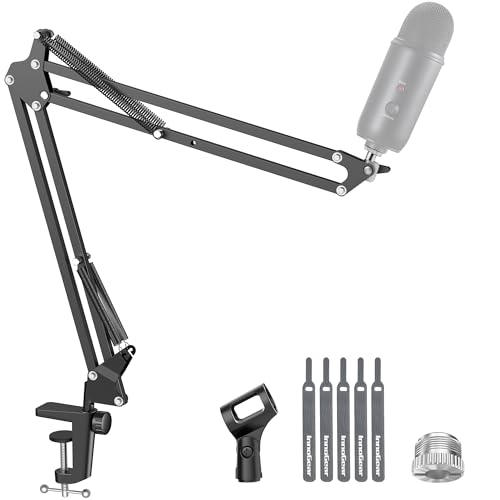
- Supports microphones up to 3.3 pounds
- Folds away and offers extensive positioning
- Fits flat desk edges up to 2 inches thick
Best For: Flexible gaming, streaming, and recording setups
Best for Quiet Studio Use
RØDE PSA1+ Professional Boom Arm
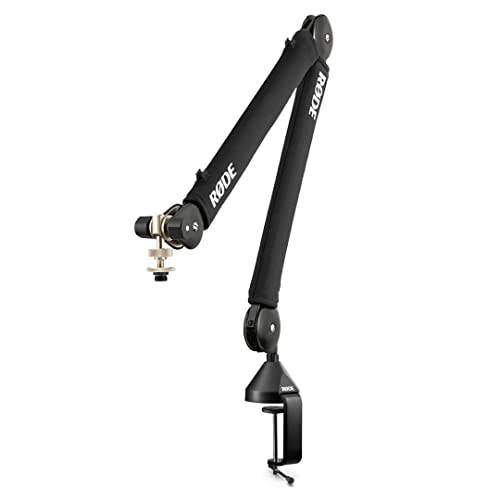
- Internal damping helps reduce movement noise
- Supports microphones and shock mounts up to 1.2 kg
- Includes integrated cable management
Best For: Podcasts, broadcasts, and quiet recording sessions
Best Low-Profile Design

- Stays below the shoulder line
- Provides 29.1 inches of horizontal reach
- Uses magnetic cable-channel covers
Best For: Unobstructed streaming and creator desks
Best Heavy-Duty Reach

- Supports microphones up to 4.4 pounds
- Reaches about 34 inches with broad rotation
- Includes built-in cable channels and multiple adapters
Best For: Heavy microphones, podcasts, streams, and vocal recording
Best Heavy-Duty Pick

- Supports microphones up to 3.5 pounds
- Reaches up to 32.3 inches horizontally
- Built-in channels organize microphone cables
Best For: Heavy microphones and extended-reach setups
Best for Everyday Use

- Extends beneath the monitor
- All-metal construction with cable management
- Includes three common thread sizes
Best For: Gaming and streaming desks with limited visual space
Best Starter Bundle

- Includes pop filter and windscreen
- Adjustable tension supports positioning
- Designed for standard microphone setups
Best For: Entry-level recording with included audio accessories
Best Compact Pick
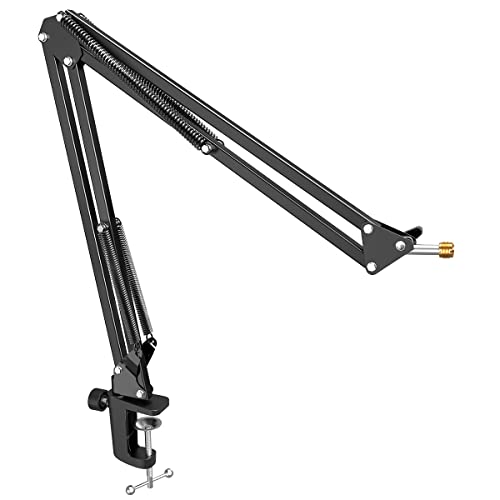
- Anti-scratch clamp fits desks up to 2 inches thick
- 180-degree adjustment with folding design
- Metal arm includes 3/8-inch to 5/8-inch adapter
Best For: Beginners and compact recording setups
Best All-in-One Kit

- Includes shock mount and double-screen pop filter
- Heavy-duty design supports up to 1.5 kg
- Clamp fits desks up to 2 inches thick
Best For: Streaming and recording setups needing accessories
Best for Popular USB Mics

- Compatible with HyperX, Blue, Fifine, and other listed mics
- Dual springs and reinforced knobs support positioning
- Clamp fits desks up to 1.89 inches thick
Best For: HyperX QuadCast and similar USB microphone users
Best Adjustable Value – InnoGear Boom Arm Microphone Stand
For shoppers comparing microphone boom arms, the InnoGear MU01 offers broad positioning control, a compact folding design, and support for microphones weighing up to 3.3 pounds. Its clamp is designed for flat desk edges up to 2 inches thick, making desk compatibility an important consideration.
Best For: Gamers, streamers, and home recordists who want a flexible, space-saving boom arm for compatible microphones.
Pros:
- Multiple adjustment points, including 360-degree base rotation and a 270-degree metal adapter.
- Supports up to 3.3 pounds, exceeding the 2.2-pound capacity noted for some competing stands.
- Folds away for compact storage and includes 3/8-inch and 5/8-inch compatibility.
- Designed for quieter positioning with strong springs and a reinforced construction.
Cons:
- The clamp is intended for flat, squared desk edges up to 2 inches thick.
- A shock mount is not included.
The InnoGear is a practical choice when adjustability and microphone compatibility matter more than premium cable concealment. Check your desk edge and microphone mounting requirements before buying.
Best for Quiet Studio Use – RØDE PSA1+ Professional Boom Arm
The RØDE PSA1+ is one of the more studio-focused microphone boom arms in this roundup, combining internal spring damping with full extension and integrated cable management. It clamps to desks up to 70 mm thick and supports microphones or shock-mounted setups from 0.25 to 1.2 kg.
Best For: Podcasters, broadcasters, and streamers who prioritize quiet repositioning and a clean desk setup.
Pros:
- Internal spring damping is designed to minimize creaks and handling noise during adjustments.
- 360-degree rotation and full extension provide broad positioning flexibility.
- Integrated cable management helps keep XLR runs hidden.
- Includes 3/8-inch and 5/8-inch thread adaptors and a two-year warranty.
Cons:
- Its 1.2 kg weight rating is lower than some heavy-duty arms in this roundup.
- Desk thickness is limited to 70 mm.
The PSA1+ makes the most sense for recording environments where quiet movement and tidy cable routing are priorities. Confirm that your microphone and any shock mount fall within its supported weight range.
Best Low-Profile Design – Elgato Wave Mic Arm LP
The Elgato Wave Mic Arm LP stands out among microphone boom arms with a low-profile layout that sits below the shoulder line. Its all-metal construction, 29.1-inch horizontal reach, and magnetic cable-channel covers suit desks where an unobstructed view is important.
Best For: Streamers and creators who want a long-reaching arm that stays visually unobtrusive.
Pros:
- Low-profile design helps keep the microphone arm below the shoulder line.
- All-metal, anti-torsion construction supports microphones up to 2 kg.
- Magnetic covers make cable routing accessible while hiding the cable.
- Offers 360-degree horizontal and 90-degree upper vertical adjustment.
Cons:
- The low-profile geometry may not suit users who want a tall overhead arm position.
- Its listed maximum height is 6.3 inches.
Choose the Wave Mic Arm LP when clear sightlines and a polished, cable-managed desk are more important than maximum vertical lift. Its 2 kg capacity also provides useful flexibility for heavier microphones.
Best Heavy-Duty Reach – FIFINE BM66 Metal Boom Arm
For microphone boom arms built around heavier equipment, the FIFINE BM66 combines an all-metal frame with a 4.4-pound load rating and up to 34 inches of height. Its built-in cable channels, rubber covers, and smooth one-hand operation are designed for podcasting, streaming, and vocal recording.
Best For: Users with heavier microphones who need long reach, sturdy desk mounting, and broad thread compatibility.
Pros:
- Heavy-duty metal construction supports up to 4.4 pounds.
- Reaches approximately 34 inches, with 180-degree arm extension and 360-degree base rotation.
- Built-in channels and rubber covers help organize and protect microphone cables.
- Includes 1/4-inch, 3/8-inch, and 5/8-inch thread support.
Cons:
- This listed BM66 version does not include an extension tube.
- Its warranty is one year, shorter than the two-year warranties listed for some alternatives.
The BM66 is a strong fit for setups using microphones such as the Shure SM7B or other heavier models. Its substantial capacity and reach are appealing, but check the included configuration if you specifically need an extension tube.
Best Heavy-Duty Pick – InnoGear Mic Arm
For microphone boom arms that can accommodate heavier microphones, the InnoGear MU-PSA28 combines a steel build, internal springs, and a 3.5-pound load capacity. Its extended reach and built-in cable channels make it a practical choice for recording, podcasting, and streaming setups.
Best For: Heavy microphones and users who want extended reach with integrated cable organization.
Pros:
- Supports up to 3.5 pounds, including heavier microphones such as the Yeti and SM7B.
- Offers up to 32.3 inches of horizontal reach and 37.4 inches of vertical reach with the included riser.
- Built-in cable channels help keep the desk setup neat.
- Adjustable arm and 360-degree rotating base provide flexible positioning.
Cons:
- The desk clamp fits desks up to 2 inches thick.
- A shock mount is not included.
Choose this microphone boom arm if stability, reach, and heavy-microphone support matter more than having the smallest possible footprint.
Best for Everyday Use – FIFINE BM88 Boom Arm
The FIFINE BM88 is one of the more space-conscious microphone boom arms for gaming and streaming. Its low-profile design can extend beneath a monitor, while the all-metal construction, hidden cable management, and broad adjustment range support a tidy and flexible workspace.
Best For: Gaming and streaming desks where preserving monitor visibility and desktop space is important.
Pros:
- Low-profile arm can extend below the bottom of a computer screen.
- All-metal construction and a stable C-clamp help reduce wobbling.
- Includes 1/4-inch, 3/8-inch, and 5/8-inch thread adapters.
- Provides up to 29 inches of extension with 220-degree vertical and 360-degree horizontal adjustment.
Cons:
- The microphone is not included.
- The section near the C-clamp cannot be adjusted vertically.
- The clamp is designed for desktops between 0.8 and 2.4 inches thick.
The BM88 stands out when a conventional arm would block the monitor or consume too much visual space, though its mounting and adjustment limitations are worth checking before purchase.
Best Starter Bundle – Amazon Basics Boom Arm
The Amazon Basics adjustable microphone boom arm is a straightforward option for standard microphone setups. It includes adjustable tension, a desk clamp, a pop filter, and a windscreen, making it useful for buyers who want essential recording accessories included with their microphone boom arm.
Best For: Standard microphones and entry-level recording setups that need basic wind and plosive protection.
Pros:
- Includes a dual-layer pop filter and foam windscreen.
- Adjustable tension helps position the arm for the microphone’s weight.
- Supports standard microphones with 3/8-inch and 5/8-inch compatibility.
- Desk clamp fits tables up to 2 inches thick.
Cons:
- Heavier microphones, shock mounts, or accessories may affect performance.
- Fully extended positions or uneven weight distribution may require additional tension adjustment.
- Stability depends on securely tightening the desk clamp.
This is a sensible bundled choice for basic voice recording, but users with heavy microphones should consider a model with a clearly higher stated load capacity.
Best Compact Pick – FIFINE CS1 Scissor Boom Arm
The FIFINE CS1 is a practical choice for shoppers comparing microphone boom arms for gaming, streaming, podcasting, or voice-over work. Its metal clamp fits desks up to 2 inches thick, while the arm rotates 180 degrees and folds away for easier storage.
Best For: Recording beginners and users with limited desk space who want a portable, adjustable arm.
Pros:
- Wide, anti-scratch clamp fits desktops up to 2 inches thick.
- 180-degree vertical adjustment provides flexible microphone positioning.
- Metal construction and strong springs help reduce shaking during adjustments.
- Includes a 3/8-inch to 5/8-inch adapter and folds for storage or transport.
Cons:
- Microphone is not included.
- Compatibility depends on the included thread adapter and microphone setup.
The CS1 keeps the feature set focused on stability, adjustability, and portability. It is a sensible microphone boom arm for smaller workspaces, especially if you already own a compatible microphone.
Best All-in-One Kit – InnoGear Mic Boom Arm Set
The InnoGear set stands out among microphone boom arms because it includes more than the arm itself: a shock mount, double-screen pop filter, mounting clamp, adapter, and cable ties. Its heavy-duty spring design supports microphones up to 1.5 kg and is built for desktop recording and live sound.
Best For: Buyers who want a ready-to-assemble microphone mounting kit with accessories for vocal recording and streaming.
Pros:
- Includes a shock mount, double-screen pop filter, adapter, and five cable ties.
- Compatible with standard 3/8-inch and 5/8-inch microphone connections.
- Strong spring and reinforced clamp help limit dropping, shaking, and unwanted noise.
- Clamp fits desks up to 2 inches thick and includes protective sponge layers.
Cons:
- The included shock mount is not designed to fit the Blue Yeti.
- At 1.01 kg, the complete set is heavier than the other listed arms.
For shoppers who do not want to purchase accessories separately, this InnoGear package offers the most complete setup of the three. Check the shock-mount fit before buying, particularly if you use a Blue Yeti.
Best for Popular USB Mics – SUNMON QuadCast Boom Arm
The SUNMON QuadCast boom arm is designed for popular microphones such as the HyperX QuadCast, Blue Yeti, SoloCast, and Fifine models. Its dual suspension springs, reinforced knobs, and desk clamp help keep the microphone positioned while allowing angle and height adjustments.
Best For: Users with a HyperX QuadCast or another listed USB microphone who want a straightforward desk-mounted arm.
Pros:
- Works with a broad range of listed microphones, including HyperX, Blue, Fifine, Shure, Rode, and Razer models.
- Dual suspension springs and reinforced knobs help reduce shaking and sinking.
- Includes a pre-installed 3/8-inch to 5/8-inch adapter.
- Desk clamp fits surfaces up to 1.89 inches thick and uses sponge protection.
Cons:
- Microphone is not included.
- The clamp accommodates desks up to 1.89 inches thick, less than the 2-inch limit of some alternatives.
- The package includes fewer accessories than the InnoGear set.
The SUNMON is a focused option for popular USB microphones, particularly the HyperX QuadCast family. Its included adapter and spring-supported arm simplify installation, though accessory needs may require separate purchases.
How We Picked These Microphone Boom Arms
We focused on the factors that affect everyday use: construction quality, load capacity, arm reach, movement, desk-clamp stability, cable management, and microphone compatibility. The selection includes options for popular microphones such as the Blue Yeti, HyperX QuadCast, FIFINE models, and RØDE microphones, while also accounting for standard 3/8-inch and 5/8-inch mounting threads.
Because desk setups vary, we included traditional scissor arms, low-profile arms that stay below monitors, and sturdier metal models for heavier microphones and shock mounts.
Quick Comparison
| Best For | What to Look For |
|---|---|
| Streaming and gaming | Quiet movement, compact reach, and easy positioning |
| Podcasting and recording | Strong tension control, stability, and cable routing |
| Heavy microphones | Metal construction and a high stated weight capacity |
| Small desks | Low-profile geometry and a compact clamp |
| Budget setups | Standard threading, included adapters, and a reliable clamp |
Key Buying Factors for Microphone Boom Arms
Weight Capacity and Balance
Check the arm’s supported weight with your microphone, shock mount, pop filter, and any added accessories included. A boom arm that is technically compatible may still sag if it is operated near its limit.
Desk Clamp and Mounting Space
Measure your desktop thickness and confirm that the clamp opens wide enough. Look for a broad, padded clamp if you frequently reposition the arm or use a heavy microphone. A reinforced mount can reduce vibration transferred from the desk.
Reach, Movement, and Profile
Traditional scissor arms offer broad adjustment, while low-profile models are useful when you want the microphone below a monitor or out of the camera frame. Make sure the arm can reach your normal speaking position without crossing the keyboard or blocking your display.
Threading and Cable Management
Most microphone arms use 3/8-inch or 5/8-inch connections, but adapters may be required. Built-in channels, clips, or sleeves keep cables from dangling and make the setup easier to move. Verify connector compatibility before buying, especially with USB microphones and shock mounts.
Who Should Buy Which Microphone Boom Arms?
Choose the RØDE PSA1+ or another sturdier, smoothly damped model if you record frequently and want refined movement with a heavier microphone. A low-profile Elgato or FIFINE arm suits streamers who need a clean camera view and easy access to a monitor or keyboard. Heavy-metal FIFINE models are better for users prioritizing rigidity and support.
For a first setup or a tighter budget, an InnoGear, Amazon Basics, or compatible FIFINE scissor arm can provide useful positioning without a large investment. If you own a Blue Yeti, HyperX QuadCast, SoloCast, or FIFINE microphone, confirm the included shock mount and thread adapter before ordering. The best Microphone Boom Arms are not simply the longest or strongest; they are the ones that fit your desk, support your complete microphone setup, and stay where you place them.