Choosing a large screen monitor for creative studio work is about more than size. Color accuracy, resolution, connectivity, and ergonomics all affect how comfortably you can edit, design, and review projects.
Below, we’ve grouped the best large-format options for creative professionals who want more workspace without sacrificing image quality or day-to-day usability.
Best 10 Large Screen Monitor for Creative Studio Picks for 2026
Premium 5K2K Workhorse
Dell UltraSharp U4025QW 40" Curved Monitor

- 39.7-inch curved 5K2K panel
- 600-nit brightness with matte finish
- USB-C, Ethernet, HDMI, and USB hub
Best For: creative pros who want a wide, high-resolution desktop
Mac Studio Favorite
Apple Studio Display 27-inch 5K

- 27-inch 5K Retina display
- 12MP camera and six-speaker audio
- 600 nits brightness with P3 wide color
Best For: Mac creators who want a premium all-in-one display
Superwide Productivity Pick
Dell UltraSharp 49" Curved Ultrawide
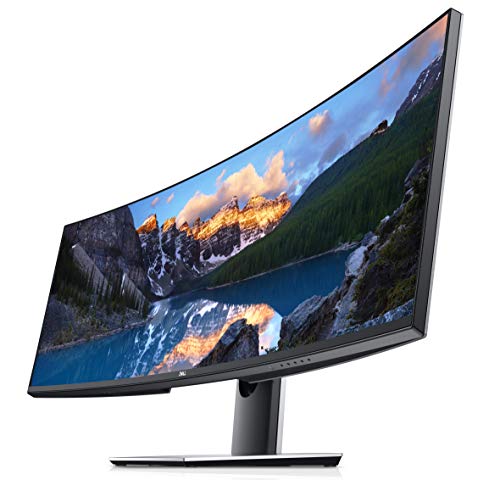
- 49-inch 32:9 super-ultrawide screen
- 5120 x 1440 resolution
- USB-C, DisplayPort, HDMI, and USB
Best For: multitasking creatives who want one ultra-wide workspace
Modern Hub Display
Samsung 49" Business Curved Ultrawide

- 49-inch 1000R curved 32:9 display
- USB-C dock-style connectivity with 90W charging
- 120Hz refresh rate and DisplayHDR 400
Best For: wide, cable-light studio setups with frequent multitasking
Executive Wide-Canvas Pick
Dell UltraSharp 49 Curved USB-C Monitor

- 49-inch curved 32:9 display
- 5120x1440 native resolution
- USB and HDMI connectivity
Best For: Large-scale creative multitasking and timeline-heavy work
Color-Friendly Budget Ultrawide
CRUA 34 Inch Curved IPS Monitor

- 3440x1440 ultrawide workspace
- 120% sRGB and 92% DCI-P3
- 100Hz with FreeSync support
Best For: Editing, design, and multitasking on a smaller ultrawide
Premium Productivity Hub
Dell UltraSharp U4924DW 49 DQHD

- 49-inch 5120x1440 DQHD panel
- USB-C hub with Ethernet and USB
- Height, tilt, and swivel adjustments
Best For: Laptop-based studio work that needs a dockable ultrawide display
Creator-Friendly 4K Value

- 32-inch 4K panel with a matte finish
- 99% sRGB and 95% DCI-P3 coverage
- ComfortView Plus and 120Hz for smoother viewing
Best For: creators who want a roomy 4K desktop display for editing and design
Ultrawide Studio Command Center

- 49-inch 32:9 ultrawide with 5120x1440 resolution
- DisplayHDR 600 and FreeSync Premium Pro
- Ideal for side-by-side workflows and large timelines
Best For: creators who want a massive ultrawide workspace for editing and multitasking
Budget Ultrawide Workspace

- 49-inch 32:9 curved ultrawide layout
- USB-C 65W plus HDMI, DP, and USB ports
- PIP/PBP support for two-source workflows
Best For: creators who want a wide, flexible desktop for multitasking and laptop docking
Premium 5K2K Workhorse – Dell UltraSharp U4025QW 40" Curved Monitor
If you want a large screen monitor for creative studio work, the Dell UltraSharp U4025QW stands out with its 39.7-inch curved 5K2K panel, 21:9 aspect ratio, and 5120 x 2160 resolution. It gives you a wide canvas for timelines, tool palettes, and side-by-side layouts, while the matte finish and 600-nit brightness help it stay usable in brighter rooms.
Best For: Designers, editors, and studio users who want a wide, high-resolution desktop with strong connectivity.
Pros:
- 39.7-inch curved 5K2K display with a productive 21:9 layout
- 600-nit brightness and matte finish for use in well-lit spaces
- USB-C plus DisplayPort, HDMI, Ethernet, and USB hub support
- 120Hz refresh rate and 5ms response time for smoother motion
Cons:
- Very large and heavy at 41.9 pounds
- Resolution is excellent for workspace density, but not as tall as a 32:9 panel
- Built for desktop use, so it is not a compact setup choice
This is a strong fit for creative studios that need an expansive, color-friendly work area and don’t want to rely on multiple smaller monitors. Its mix of size, clarity, and hub-style connectivity makes it especially practical for a clean workstation.
Mac Studio Favorite – Apple Studio Display 27-inch 5K
The Apple Studio Display is a polished option if your creative studio runs on Mac and you want a large screen monitor for detailed visual work. Its 27-inch 5K Retina panel delivers 14.7 million pixels, 600 nits of brightness, and support for 1 billion colors with P3 wide color, which makes it well suited to image-heavy workflows.
Best For: Mac-based creators who want a premium display with built-in camera and audio.
Pros:
- 27-inch 5K Retina display with 14.7 million pixels
- 600 nits brightness and P3 wide color support
- 12MP Center Stage camera with Desk View
- Six-speaker sound system with Spatial Audio
Cons:
- Smaller than the ultrawide and super-ultrawide options in this roundup
- Tilt-adjustable stand is included, but height adjustment requires a separate version
- Best suited to Mac-focused setups rather than mixed-device studios
For creators who value image fidelity, solid built-in conferencing tools, and a clean Apple-centered desk setup, this display is easy to justify. It is less about sheer screen width and more about a premium, tightly integrated studio experience.
Superwide Productivity Pick – Dell UltraSharp 49" Curved Ultrawide
If your creative studio workflow benefits more from horizontal space than pixel density, this Dell 49-inch ultrawide is a practical large screen monitor for creative studio setups. The 32:9 aspect ratio and 5120 x 1440 resolution give you one long, continuous workspace for editing, arranging windows, and keeping reference materials visible at the same time.
Best For: Studio users who want an extra-wide screen for multitasking and timeline-heavy work.
Pros:
- 49-inch curved panel with a 32:9 aspect ratio
- 5120 x 1440 resolution for broad workspace width
- USB-C, DisplayPort, HDMI, and USB 3.0 connectivity
- FreeSync support and 5ms response time
Cons:
- 60Hz refresh rate is more basic than newer alternatives
- Glossy screen finish may be less ideal in bright studios
- Designed more for workspace span than high-refresh motion use
This model is a good fit if you want to replace a dual-monitor arrangement with one very wide screen. It is not the sharpest or fastest option here, but for layout-heavy creative work, the screen real estate is the main advantage.
Modern Hub Display – Samsung 49" Business Curved Ultrawide
The Samsung S95UA is a strong large screen monitor for creative studio desks that need both room and cleaner cable management. Its 49-inch 1000R curved panel uses a 32:9 aspect ratio and Dual QHD resolution, while USB-C with 90W charging and multiple video inputs make it function like a built-in docking hub.
Best For: Creators who want a wide, connected workstation with HDR support and built-in speakers.
Pros:
- 49-inch 1000R curved display with a 32:9 layout
- USB-C with 90W charging plus DisplayPort and HDMI inputs
- 120Hz refresh rate for smoother scrolling and motion
- VESA DisplayHDR 400 and built-in speakers
Cons:
- Large footprint may dominate smaller desks
- Dual QHD resolution spreads across a very wide panel, so it is not a high-pixel-density choice
- Built-in speakers are convenient, but not a substitute for dedicated audio gear
For studios that want a single-screen command center, this Samsung combines wide-screen productivity with practical docking features. It is especially appealing if you want fewer cables, smoother interaction, and enough width to keep multiple work areas visible.
Executive Wide-Canvas Pick – Dell UltraSharp 49 Curved USB-C Monitor
If you want a large screen monitor for creative studio work that can replace a dual-monitor setup, the Dell UltraSharp 49 gives you a massive 49-inch 32:9 canvas with 5120×1440 resolution. Its IPS technology, 350 cd/m2 brightness, and 178-degree viewing angle make it practical for timelines, palettes, and side-by-side reference windows.
Best For: Creatives and multitaskers who want a single ultra-wide display for editing, project management, and window-heavy workflows.
Pros:
- 49-inch curved screen with 5120×1440 resolution for expansive workspace
- IPS picture quality with 178-degree viewing angles for consistent visibility
- USB connectivity plus HDMI support for flexible studio setups
- FreeSync support may help keep motion smoother in compatible workflows
Cons:
- 8 ms response time is not the fastest for motion-sensitive use
- Glossy screen finish may reflect more light in bright rooms
- Wall-mount oriented design may require careful desk planning
This is a strong fit if your studio values horizontal workspace over pixel density alone. It is built for broad, efficient multitasking rather than specialized color-spec claims, so it makes the most sense for editing, layout, and production work that benefits from one huge panel.
Color-Friendly Budget Ultrawide – CRUA 34 Inch Curved IPS Monitor
The CRUA 34-inch ultrawide is a practical large screen monitor for creative studio users who want more room without jumping to a 49-inch panel. Its 3440×1440 resolution, IPS panel, 120% sRGB, and 92% DCI-P3 coverage make it a sensible choice for photo video editing, design, and everyday multitasking.
Best For: Designers, editors, and home-office users who want a wide IPS display with strong color coverage and a cleaner desk footprint.
Pros:
- 3440×1440 ultrawide resolution gives plenty of horizontal workspace
- IPS panel with 120% sRGB and 92% DCI-P3 for vibrant color reproduction
- 100Hz refresh rate and FreeSync support for smoother scrolling and playback
- Built-in speakers and multiple HDMI/DP inputs simplify a compact setup
Cons:
- 34-inch size is less expansive than 49-inch studio ultrawides
- 3 ms response time is fine, but not a premium-spec standout
- Curvature and glossy rivals aside, the screen finish is matte, which may not suit everyone’s preference
For creative work, this model balances usable color specs with an accessible ultrawide format. It is especially appealing if you want a wide editing workspace and solid everyday visuals without the size and price burden of a super-ultrawide.
Premium Productivity Hub – Dell UltraSharp U4924DW 49 DQHD
Dell UltraSharp U4924DW 49" Dual Quad HD (DQHD) Curved Screen Edge WLED LCD Monitor - 32:9,Black
Check Price On AmazonThe Dell UltraSharp U4924DW is a large screen monitor for creative studio setups that need serious workspace and dock-style convenience. It pairs a 49-inch curved 32:9 DQHD panel with 5120×1440 resolution, USB-C hub functionality, Ethernet, and multiple USB ports, making it useful when your monitor also needs to act as a connection center.
Best For: Studio professionals who want a wide productivity display with extensive USB-C hub connectivity and ergonomic adjustment.
Pros:
- 49-inch DQHD display with 5120×1440 resolution for a broad desktop view
- USB Type-C, Ethernet, HDMI, DisplayPort, and USB hub support for docking-style use
- Height, swivel, and tilt adjustments help fine-tune a working setup
- IPS Black panel technology and 2000:1 contrast ratio improve image clarity
Cons:
- 60 Hz refresh rate is basic for fast motion or gaming-focused use
- Very large and heavy at 60.2 pounds, so placement matters
- Glossy screen finish may be less ideal in bright studio lighting
This model stands out when connectivity and workflow efficiency matter as much as screen size. For creative studios that want a central hub for a laptop-driven desk, it offers a compelling mix of ultrawide real estate and practical port expansion.
Creator-Friendly 4K Value – Dell 32 Monitor S3225QS
If you want a large screen monitor for creative studio work without jumping into ultrawide territory, this 32-inch Dell gives you 4K clarity, strong color coverage, and a matte finish that suits long editing sessions. Its 99% sRGB and 95% DCI-P3 coverage make it a practical fit for photo and video workflows, while the 120Hz refresh rate adds extra smoothness for everyday use.
Best For: Creators who want a roomy 4K desktop display for editing, design, and general studio work.
Pros:
- 4K resolution on a 31.5-inch panel gives you plenty of workspace and sharp detail.
- 99% sRGB and 95% DCI-P3 coverage support color-aware creative work.
- ComfortView Plus reduces blue light without sacrificing color accuracy.
- 120Hz refresh rate and FreeSync Premium help keep motion smooth.
Cons:
- VA panel and 300 cd/m2 brightness may not match higher-end pro reference displays.
- It is a standard 16:9 screen, so it offers less horizontal room than ultrawide models.
- No USB-C connectivity listed for single-cable laptop setups.
This Dell is a sensible pick if your studio needs a balanced mix of size, 4K sharpness, and comfortable all-day viewing. It is less specialized than ultrawide creative monitors, but it covers the essentials well for a broad range of desktop tasks.
Ultrawide Studio Command Center – Samsung Odyssey G9 G91F
For a large screen monitor for creative studio setups that also demands serious multitasking space, the 49-inch Samsung Odyssey G9 stands out with its 32:9 5120×1440 canvas. It gives you the equivalent of two 16:9 displays in one curved panel, which is useful when you want timelines, toolbars, reference material, and preview windows all visible at once.
Best For: Creators who want a massive ultrawide workspace for editing, multitasking, and side-by-side content management.
Pros:
- 49-inch 32:9 screen offers enormous horizontal workspace for studio multitasking.
- 5120×1440 resolution keeps text and interface elements sharp across the wide panel.
- DisplayHDR 600 adds stronger contrast and deeper blacks for supported content.
- 144Hz refresh rate and FreeSync Premium Pro keep motion smooth and responsive.
Cons:
- Its 32:9 format can be more monitor than some creative desks need.
- At 280 cd brightness, it is not the brightest option in this group.
- Best value is tied to users who can actually use the huge screen width.
This Samsung is the most expansive option here and works well when your studio workflow benefits from maximum on-screen organization. It is less about color-spec bragging and more about giving you a highly efficient, immersive workspace.
Budget Ultrawide Workspace – INNOCN 49C1G
If your creative studio wants lots of screen real estate without moving to a 4K ultrawide, the INNOCN 49C1G delivers a 49-inch 32:9 curved layout at 3840×1080. It is designed for broad multitasking, with PIP/PBP support, multiple inputs, and USB-C 65W power delivery that can simplify a laptop-based setup.
Best For: Creators who want a wide, flexible desktop for multitasking, content review, and laptop docking.
Pros:
- 49-inch 32:9 ultrawide format gives you a broad workspace for multiple windows.
- USB-C 65W, HDMI 2.1, DisplayPort 1.4, and extra USB ports make it versatile.
- PIP/PBP support helps you view two sources at once.
- 99% sRGB and HDR400 are useful for general creative and media work.
Cons:
- 3840×1080 resolution is much less detailed than 4K or dual-QHD options.
- Glossy screen finish may be less ideal in bright studio lighting.
- It is listed as a gaming monitor, so color-critical pros may want to compare alternatives carefully.
This INNOCN is appealing when workspace size and connectivity matter more than pixel density. It is a practical ultrawide for productivity-heavy creative setups, especially if you want USB-C convenience and split-screen flexibility.
How We Picked the Best Large Screen Monitor for Creative Studio
For this roundup, we prioritized large-format displays that make sense for design, photo, video, and multitasking workflows. That means strong resolution, reliable color support, practical stand or mounting options, and the ports needed for modern laptops and desktops.
We also considered whether each display fits a creative studio’s real-world needs: wide timelines, multiple windows, crisp text, and a comfortable viewing experience over long sessions.
Quick Comparison
In a Large Screen Monitor for Creative Studio setup, ultrawide and 32:9 models are best for timeline-heavy work and split-screen productivity, while 4K 32-inch displays are often better for sharper pixel density and focused editing. Curved screens can reduce head movement on very wide panels, and USB-C models simplify single-cable workflows.
Key Buying Factors for a Large Screen Monitor for Creative Studio
Resolution and Pixel Density
Higher resolution matters more as screen size increases. A 4K 32-inch display offers sharper text and finer detail, while 49-inch dual-QHD or 5K2K ultrawides provide huge workspace for tool palettes, timelines, and side-by-side apps.
Color Accuracy and Panel Type
If your work involves photography, branding, print, or client delivery, look for wide color gamut coverage and factory calibration when available. IPS and other color-focused panels are usually better suited to creative work than basic VA panels, though VA can still be useful for general studio use.
Connectivity and Workflow
USB-C with power delivery, DisplayPort, and HDMI can make switching between devices much easier. For studios with Mac laptops or hybrid workstations, Mac compatibility and simple docking-style setups are especially valuable.
Ergonomics and Screen Format
Curved ultrawides are helpful for immersive editing and reduced eye travel across very wide panels. Adjustable stands and VESA support also matter, especially if your studio uses monitor arms or multi-display layouts.
Who Should Buy Which Large Screen Monitor for Creative Studio?
Choose a 49-inch ultrawide if you want maximum screen real estate for video editing, motion graphics, or multitasking. Pick a 32-inch 4K monitor if you want a sharper all-around creative display for design and photo work. A 40-inch 5K2K model is a strong middle ground for professionals who want more room than 4K without going all the way to 32:9. If your studio also handles gaming or fast-motion preview work, higher refresh-rate models can add flexibility beyond typical creative tasks.
For most buyers, the best Large Screen Monitor for Creative Studio work balances detail, color confidence, and a layout that matches the way you actually create.