A reliable boom arm can make a bigger difference to your recording setup than another accessory. The best heavy-duty microphone boom arms keep your microphone stable, position it smoothly, and help clear valuable desk space.
We’ve gathered 10 options for podcasters, streamers, gamers, broadcasters, and home-studio users, including low-profile designs, long-reach arms, and models with useful cable-management features.
Best 10 Heavy Duty Microphone Boom Arms Picks for 2026
Professional Quiet Choice
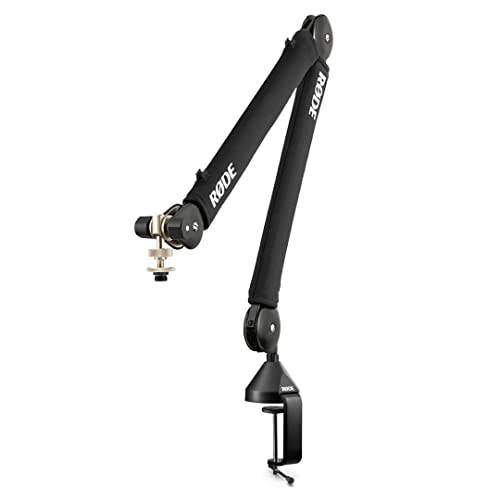
- Silent internal spring damping
- Supports microphones up to 1.2kg
- 360° rotation with hidden cable management
Best For: Quiet podcasting and streaming setups
Heavy-Metal Stability Pick

- All-metal design supports up to 2kg
- Reaches 34.25 inches
- Supports 1/4-inch, 3/8-inch, and 5/8-inch threads
Best For: Heavy microphones and stable streaming desks
Low-Profile Heavy-Duty Option

- Pneumatic damping supports up to 2.5kg
- Low-profile height from 3.7 to 15.6 inches
- 30.2-inch horizontal reach with cable channels
Best For: Compact desks using heavier microphones
Long-Reach Steel Classic

- 48-inch maximum reach
- Steel construction supports up to 5 pounds
- Includes C-clamp and flange mounts
Best For: Wide-range studio and broadcast positioning
Premium Broadcast Pick
Shure by Gator Deluxe Boom Arm

- Supports up to 2 kg
- Quiet 360-degree rotation
- 32.25-inch extension with cable channel
Best For: Podcasters and streamers using Shure MV7 or SM7B microphones
Low-Profile Stability Pick

- Low-profile design under monitors
- All-metal construction
- Includes 1/4-, 3/8-, and 5/8-inch adapters
Best For: Gaming and streaming desks where monitor clearance matters
Extended Reach Pick

- Supports up to 3.5 pounds
- Reaches 32.3 inches horizontally
- Includes a 6.3-inch extension riser
Best For: Creators positioning heavier microphones over monitors
Broadcast-Ready Support
Gator Frameworks Deluxe Boom Arm

- Supports microphones up to 2.4 pounds
- 38.6-inch reach with 360-degree rotation
- Clamps to surfaces up to 2.17 inches thick
Best For: Podcasters and broadcasters using heavier microphones
Best Heavy-Duty Pick
Aokeo AK-58i Low-Profile Microphone Arm

- Supports loads up to 2 kg
- 360-degree arm rotation and 180-degree vertical adjustment
- Includes 1/4-inch and 5/8-inch adapters
Best For: Compact gaming, streaming, and podcasting desks
Versatile Cable-Controlled Setup
Blue Yeti-Compatible Heavy Duty Boom Arm

- Supports up to 1.4 kg
- Hidden cable management and three pivoting joints
- Padded clamp fits desks up to 2.6 inches thick
Best For: Yeti, QuadCast, and SM7B desktop recording setups
Professional Quiet Choice – RØDE PSA1+ Boom Arm
For creators seeking heavy duty microphone boom arms with quiet operation, the RØDE PSA1+ combines internal spring damping, 360-degree rotation, and integrated cable management. It clamps to desks up to 70mm thick and supports microphones weighing 0.25kg to 1.2kg.
Best For: Podcasting, streaming, and broadcast-style desk setups using microphones within its 1.2kg capacity.
Pros:
- Internal spring damping helps reduce creaks and handling noise during repositioning.
- 360-degree rotation and full extension support flexible microphone placement.
- Integrated cable management keeps XLR cables concealed.
- Includes 3/8-inch and 5/8-inch thread adaptors.
Cons:
- Its 1.2kg maximum capacity is lower than some heavy-metal alternatives.
- Desk clamp compatibility is limited to surfaces up to 70mm thick.
The PSA1+ is a polished option when silent movement and a clean appearance matter more than maximum load capacity. Its support range suits many common studio microphones and shock-mount setups.
Heavy-Metal Stability Pick – FIFINE BM66 Boom Arm
The FIFINE BM66 is among the heavy duty microphone boom arms built for larger microphones and demanding desk setups. Its all-metal construction supports up to 2kg, while cable channels, smooth movement, and a high-grip clamp help keep recordings stable and organized.
Best For: Streamers, podcasters, and vocal-recording users who need substantial load capacity and broad thread compatibility.
Pros:
- All-metal construction supports up to 2kg.
- Extends up to 34.25 inches and offers 180-degree arm adjustment.
- Built-in cable channels and rubber covers help protect and organize cables.
- Includes 1/4-inch, 3/8-inch, and 5/8-inch thread support.
Cons:
- The listed version does not include an extension tube.
- Its one-year warranty is shorter than some competing options.
Choose the BM66 when stability and microphone compatibility are priorities. It is a particularly practical match for heavier models such as the Shure SM7B, provided your desk can accommodate its clamp.
Low-Profile Heavy-Duty Option – NEEWER MS002 Mic Arm
The NEEWER MS002 takes a low-profile approach to heavy duty microphone boom arms, using pneumatic damping and an all-metal aluminum-and-stainless-steel build. It supports microphones up to 2.5kg while keeping the arm close to the desk and providing adjustable positioning.
Best For: Compact workstations, broadcast desks, and users who need high load capacity without a tall conventional boom arm.
Pros:
- Adjustable pneumatic damping supports microphones up to 2.5kg.
- Low-profile design adjusts from 3.7 to 15.6 inches above the desk.
- Extends horizontally to 30.2 inches with 360-degree base pan.
- Hidden cable channels and a clamp for desks 10-80mm thick help maintain a tidy setup.
Cons:
- The joints can be tension-adjusted but cannot be fully locked.
- Its maximum vertical height is lower than traditional long-reach arms.
- The listed blue finish may not suit every desk aesthetic.
The MS002 is a strong fit when desk clearance and load capacity matter equally. Its pneumatic adjustment is useful for heavier microphones, but users wanting a rigidly lockable arm should note the joint limitation.
Long-Reach Steel Classic – Samson MBA48 Boom Arm
The Samson MBA48 is one of the straightforward heavy duty microphone boom arms for users who need extended reach. Its durable steel construction, internal springs, and 48-inch maximum reach provide broad positioning flexibility, with a 5-pound load rating.
Best For: Long-reach podcast, broadcast, and recording setups that use standard 5/8-inch microphone mounting.
Pros:
- 48-inch maximum arm reach covers large positioning areas.
- Steel construction supports microphones up to 5 pounds.
- Internal springs enable silent, easier positioning.
- Includes both a C-clamp mount and a flange mount.
Cons:
- The included C-clamp grips desks up to 2 inches thick.
- It uses a 5/8-inch thread rather than multiple included thread standards.
- The long arm may require more desk clearance than low-profile designs.
The MBA48 is a practical choice when reach is the deciding factor. Its steel build and dual mounting options suit users who want a conventional studio arm with more placement range than compact models.
Premium Broadcast Pick – Shure by Gator Deluxe Boom Arm
For shoppers comparing heavy duty microphone boom arms, the Shure by Gator Deluxe Broadcast arm stands out with its metal construction, 2 kg weight recommendation, and quiet 360-degree rotation. Its 32.25-inch arm extension and cable channel suit podcasting and streaming setups, while the 2.17-inch clamp range supports many desktop configurations.
Best For: Podcasters and streamers using microphones such as the Shure MV7 or SM7B.
Pros:
- Supports microphones up to 2 kg.
- Quiet, fully adjustable 360-degree arm rotation.
- Includes a cable channel and threaded 3/8- and 5/8-inch adapter compatibility.
- Backed by a limited lifetime manufacturer warranty.
Cons:
- Its 5.8-pound weight may be more than some compact desktop users need.
- The clamp range is limited to desktops up to 2.17 inches thick.
This is a strong choice when microphone support and broadcast-style positioning matter more than minimizing the arm’s size or weight.
Low-Profile Stability Pick – FIFINE BM88 Boom Arm
The FIFINE BM88 is one of the more practical heavy duty microphone boom arms for gaming and streaming desks where monitor clearance matters. Its all-metal construction, low-profile design, and stable C-clamp keep the arm below the screen, while 220-degree vertical and 360-degree horizontal adjustment provide flexible positioning.
Best For: Gamers and streamers who want a low-profile arm with broad thread compatibility.
Pros:
- Low-profile design helps preserve monitor visibility and desktop space.
- All-metal arm and clamp are designed for stable positioning.
- Includes 1/4-, 3/8-, and 5/8-inch thread adapters.
- Hidden cable management keeps the setup neater.
Cons:
- The microphone is not included.
- The clamp fits desktops from 0.8 to 2.4 inches thick.
- The section nearest the C-clamp cannot adjust vertically.
Choose the BM88 when a clean, unobstructed screen view is a priority and you want included adapters for a wider range of microphones and accessories.
Extended Reach Pick – InnoGear Heavy-Duty Mic Arm
The InnoGear Mic Arm is a useful option among heavy duty microphone boom arms for users who need extra reach over a monitor. Its steel construction and internal springs support up to 3.5 pounds, while the included 6.3-inch riser extends the setup to 37.4 inches vertically and 32.3 inches horizontally.
Best For: Creators using heavier microphones such as the Blue Yeti or Shure SM7B who need extended positioning.
Pros:
- Supports up to 3.5 pounds.
- Includes an extension riser for greater height.
- Built-in cable channels and removable rubber covers help organize cables.
- Offers 135-degree back-and-forth and 180-degree up-and-down adjustment, plus a 360-degree rotating base.
Cons:
- The desk clamp fits desks up to 2 inches thick.
- The 5/8-inch connector may require an adapter for some microphone setups.
- A shock mount is not included.
This arm makes the most sense for recording or streaming stations that need substantial reach and support without giving up integrated cable management.
Broadcast-Ready Support – Gator Frameworks Deluxe Boom Arm
For creators comparing heavy duty microphone boom arms, the Gator Frameworks Deluxe offers a spring-loaded articulating design, smooth positioning, and support for microphones or accessories weighing up to 2.4 pounds. Its 38.6-inch reach and desk clamp make it a practical choice for podcasting, broadcasting, recording, and streaming setups.
Best For: Podcasters, broadcasters, and streamers who need a long-reach arm for heavier microphones.
Pros:
- Supports up to 2.4 pounds (1.1 kg).
- Provides a 38.6-inch reach with 360-degree rotation.
- Clamps to surfaces up to 2.17 inches thick.
- Includes a locking knob for secure microphone placement.
Cons:
- At 4.5 pounds, the arm is relatively substantial for a desk accessory.
- The supplied model details identify the stand as using a 5/8-inch thread, so adapter needs may vary by microphone.
Choose this arm when reach, load capacity, and a sturdy alloy-steel build matter more than having the smallest possible desk footprint. The three-year warranty is an additional advantage for a long-term recording setup.
Best Heavy-Duty Pick – Aokeo AK-58i Low-Profile Microphone Arm
The Aokeo AK-58i is one of the more space-conscious heavy duty microphone boom arms, using a low-profile design to keep the center of gravity low. It supports up to 2 kg and offers broad adjustment for gaming, podcasting, recording, and streaming desks.
Best For: Users who want strong load capacity with a discreet arm that stays below the monitor area.
Pros:
- Supports microphones or shock mounts up to 2 kg.
- Low-profile design helps reduce shaking and visual distraction.
- Arms rotate 360 degrees, while the microphone arm swings 180 degrees vertically.
- Includes 3/8-to-1/4-inch and 3/8-to-5/8-inch adapters.
Cons:
- Its maximum listed height is 30 cm, limiting elevated positioning.
- The clamp fits tables less than 7 cm thick, so unusually thick desktops may not work.
- Microphone is not included.
This model is a strong fit when stability and a clean sightline are priorities. Its adapter set broadens compatibility, while the lower profile keeps the arm less prominent than traditional overhead designs.
Versatile Cable-Controlled Setup – Blue Yeti-Compatible Heavy Duty Boom Arm
This upgraded Blue Yeti-compatible arm is a practical option among heavy duty microphone boom arms for users who want a stable clamp, hidden cable routing, and broad microphone compatibility. Its all-tube metal construction supports up to 1.4 kg and uses three pivoting joints for flexible positioning.
Best For: Blue Yeti, HyperX QuadCast, and Shure SM7B users who want tidy cable management and a padded desk clamp.
Pros:
- Supports microphones weighing up to 1.4 kg.
- Hidden cable management keeps the USB cable routed along the arm.
- Three pivoting joints and 360-degree base rotation provide flexible positioning.
- Metal clamp fits desks up to 2.6 inches thick and includes protective padding.
Cons:
- The listed 15-inch arm size may provide less reach than longer boom arms.
- Only a 90-day warranty is specified.
- Microphone is not included in the package.
Consider this arm if a tidy desk appearance is as important as support. The reinforced clamp and hidden cable path suit desktop recording stations, while the included 3/8-to-5/8-inch adapter helps accommodate several common microphones.
How We Picked the Best Heavy Duty Microphone Boom Arms
We focused on the features that matter during everyday recording: load capacity, arm reach, joint stability, desk-clamp security, adjustment range, cable management, and compatibility with common microphones and shock mounts. We also included different designs because a compact gaming setup has different needs from a broadcast desk or full-size studio workspace.
Spring-assisted and pneumatic arms can make repositioning easier, while low-profile models are useful when you want the microphone to sit below or beside your monitor. A strong clamp and a suitable desk thickness are just as important as the arm’s headline weight rating.
Quick Comparison
| Best For | What to Look For |
|---|---|
| Podcasting and broadcasting | Long reach, smooth movement, strong joints, and quiet operation |
| Gaming and streaming | Low-profile positioning, compact footprint, and hidden cable routing |
| Heavy microphones | High load capacity, reinforced springs or pneumatic support, and a firm clamp |
| Small desks | Shorter reach, low-profile construction, and minimal base clearance |
| Flexible multi-user setups | 360-degree rotation and easy height and angle adjustment |
Key Buying Factors for Heavy-Duty Microphone Boom Arms
Weight Capacity and Balance
Check the arm’s supported weight against your complete microphone setup, including a shock mount, pop filter, and any adapters. A boom arm that technically supports the microphone may still sag when accessories are added.
Reach and Adjustment Range
Measure the distance from the clamp to your preferred speaking position. Long arms provide more placement freedom, but compact arms may be easier to keep stable on shallow desks. Look for multiple joints and sufficient vertical adjustment.
Clamp Security and Desk Compatibility
Confirm the clamp fits your desk thickness and has enough contact area to resist twisting. Thick, reinforced clamps generally inspire more confidence, while thin or fragile desktops may need a protective pad or mounting solution.
Cable Management and Noise
Built-in channels or clips keep USB and XLR cables away from moving joints. Spring-damped and pneumatic designs can also reduce sudden movement, but every arm benefits from careful cable slack and controlled adjustments.
Who Should Buy Which Heavy Duty Microphone Boom Arms?
Choose a long, well-supported arm if you record podcasts, interviews, or broadcasts and need the microphone to move between speakers or positions. A low-profile arm is usually the better choice for gaming and streaming desks where the screen should remain unobstructed. Users with heavier broadcast microphones should prioritize capacity, clamp strength, and smooth tension adjustment over the lowest price.
If you use a Blue Yeti, Snowball, HyperX QuadCast, Elgato Wave, or a similar USB microphone, verify the included thread adapter and mount compatibility before buying. For a clean professional setup, prioritize cable routing and quiet repositioning; for occasional use, a simpler spring-loaded arm may offer the best value.