Choosing the right display can make or break your edit. For a color accurate video monitor for editing studio workflows, you want reliable gamut coverage, low Delta E, and a panel that stays consistent under real production conditions.
This roundup focuses on monitors that help editors, colorists, and content teams judge footage with confidence, whether you work in Rec.709, DCI-P3, or wider-gamut HDR pipelines.
Best 10 Color Accurate Video Monitor for Editing Studio Picks for 2026
Color-Accurate Editing All-Rounder
BenQ PV3200U 32” 4K UHD Video Monitor

- 100% Rec.709, sRGB, and 95% P3 coverage
- Factory-calibrated with Delta E ≤ 2
- 65W USB-C plus ergonomic stand
Best For: Editors who want dependable color and easy studio connectivity
Print-Grade Color Workhorse
BenQ SW321C 32” 4K Editing Monitor

- 99% AdobeRGB, 100% sRGB, 95% P3
- Hardware calibration with 16-bit 3D LUT
- Paper Color Sync for screen-to-print consistency
Best For: Color-critical creators who need print-aware calibration and wide gamut support
Precision HDR Studio Choice
ASUS ProArt PA32UCE 32” 4K Monitor
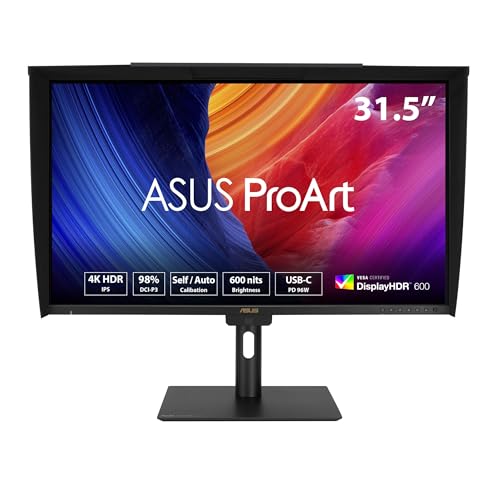
- Delta E < 1 with 98% DCI-P3 coverage
- Built-in colorimeter for self/auto calibration
- 600-nit HDR with USB-C 96W and daisy-chain
Best For: Professional editors who want built-in calibration and stronger HDR support
Flagship 6K Color Workhorse
LG 32U990A-S 32-inch 6K Thunderbolt 5 Pro

- 6K 32-inch panel with 224 PPI
- Up to 99.5% Adobe RGB and 98% DCI-P3
- Thunderbolt 5, DP 2.1, HDMI 2.1, USB-C
Best For: High-end editing studios needing a 6K reference-style display
Calibrated Studio Precision Pick
ASUS ProArt PA27UCGE 27-inch 4K HDR
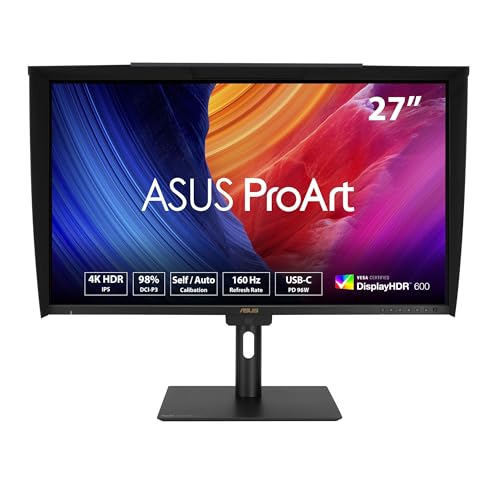
- Delta E < 1 with 98% DCI-P3 and 100% sRGB
- Built-in motorized colorimeter with Auto calibration
- USB-C 96W, HDMI, DP, USB hub, Auto KVM
Best For: Color-critical editors who want built-in calibration tools
Budget-Friendly 4K Editing Option
INNOCN 27C1U-D 27-inch 4K USB-C

- 4K IPS panel with 1.07B colors
- DeltaE<2 with HDR400 support
- USB-C, DisplayPort, HDMI, adjustable stand
Best For: Budget-minded editors needing a solid 4K workspace
Studio-Calibrated Value
ASUS ProArt PA279CV 27 Inch 4K USB-C Monitor

- Calman Verified with Delta E < 2 factory calibration
- 100% sRGB and Rec. 709 for accurate video work
- USB-C 65W, HDMI, DisplayPort, and USB hub
Best For: Color-accurate editing on a compact 27-inch 4K display
Large-Gamut Reference Pick
ASUS ProArt PA329CRV 32 Inch 4K DCI-P3 Monitor

- 31.5-inch 4K IPS panel with more room for editing
- 98% DCI-P3 and Delta E < 2 factory calibration
- USB-C 96W, DisplayPort, HDMI, and USB hub
Best For: Editors who want a larger wide-gamut 4K studio display
Sharp QHD Workhorse
ASUS ProArt 27 WQHD Color Accurate Monitor

- Calman Verified with Delta E < 2 factory calibration
- 100% sRGB and Rec. 709 for color-managed work
- 27-inch WQHD IPS panel with ergonomic adjustments
Best For: Editors who want accurate color with a spacious QHD workspace
Color-Accurate Editing All-Rounder – BenQ PV3200U 32” 4K UHD Video Monitor
If you want a color accurate video monitor for editing studio work, the BenQ PV3200U is built around reliable Rec.709, sRGB, and P3 coverage. It’s aimed at creators who need trustworthy color from edit to upload, plus practical extras like USB-C, calibrated presets, and easy adjustments.
Best For: Video editors who want a studio-friendly 32-inch 4K display with strong color management and simple single-cable setup.
Pros:
- 100% Rec.709, 100% sRGB, and 95% P3 for broad video workflow coverage
- Factory-calibrated with Delta E ≤ 2 for dependable out-of-box accuracy
- ICCsync and mobile preview support help match color across devices
- 65W USB-C, ergonomic stand, and wireless Hotkey Puck improve daily use
Cons:
- 60Hz refresh rate is standard, not ideal for fast-motion or gaming-focused use
- Built-in speakers are useful, but not a replacement for dedicated studio monitors
The PV3200U is a practical choice if your priority is accurate video editing rather than flashy specs. Its color tools, factory calibration, and workflow-friendly connectivity make it a strong fit for a serious editing setup.
Mac-Friendly High-Resolution Pick – ASUS ProArt PA27JCV 27” 5K Monitor
The ASUS ProArt PA27JCV stands out as a color accurate video monitor for editing studio setups that benefit from sharp 5K detail and reliable factory tuning. With 99% DCI-P3, 100% sRGB, and Calman Verified calibration, it’s aimed at creators who want precision on a Mac-friendly USB-C display.
Best For: Mac users and video editors who want a compact 5K professional monitor with strong calibration and modern connectivity.
Pros:
- 5K resolution delivers very sharp timelines, UI text, and fine detail
- 99% DCI-P3 and 100% sRGB support accurate wide-gamut work
- Factory pre-calibrated and Calman Verified with Delta E < 2
- 96W USB-C, Auto KVM, and height adjustment suit streamlined workstations
Cons:
- 27-inch size may feel smaller than a 32-inch editing display
- 60Hz refresh rate is fine for editing, but not built for high-refresh use
If you want maximum desktop clarity in a smaller footprint, this ProArt model makes a lot of sense. It combines high resolution, accurate color, and flexible connectivity in a package designed for professional creative workflows.
Print-Grade Color Workhorse – BenQ SW321C 32” 4K Editing Monitor
For a color accurate video monitor for editing studio work that also handles photo-oriented color management, the BenQ SW321C is a serious option. It combines 99% AdobeRGB, 100% sRGB, 95% P3, hardware calibration, and a 16-bit 3D LUT for precise control over your image pipeline.
Best For: Creators who need a 32-inch 4K monitor with print-aware color features and hardware calibration.
Pros:
- 99% AdobeRGB plus 100% sRGB and 95% P3 cover demanding color workflows
- Hardware calibration and 16-bit 3D LUT support precise reproduction
- Paper Color Sync helps preview screen-to-print consistency
- USB-C, USB hub, and multiple video inputs make it studio-friendly
Cons:
- 250-nit brightness is modest compared with brighter HDR-focused displays
- Glossy screen finish may not suit every lighting setup
The SW321C is best if your editing work overlaps with print-critical color management or highly controlled grading. It’s not the flashiest monitor here, but it offers deep calibration tools and wide gamut support that professionals value.
Precision HDR Studio Choice – ASUS ProArt PA32UCE 32” 4K Monitor
The ASUS ProArt PA32UCE is a color accurate video monitor for editing studio users who want top-tier precision and brighter HDR support. With Delta E < 1, 98% DCI-P3, a built-in colorimeter, and 600-nit HDR capability, it’s designed for creators who need both color confidence and advanced calibration tools.
Best For: Professional editors and color-conscious creatives who want a 32-inch 4K monitor with built-in calibration and strong HDR performance.
Pros:
- Delta E < 1 and 98% DCI-P3 deliver very tight color accuracy
- Built-in colorimeter supports self and auto calibration workflows
- 600 nits brightness with HDR-10 and HLG support improves HDR work
- USB-C 96W, daisy-chain support, and USB hub simplify studio wiring
Cons:
- Premium feature set will likely put it above basic editing monitors in price
- 60Hz refresh rate is standard rather than fast
If your studio demands dependable color, HDR support, and a cleaner calibration process, the PA32UCE is the most advanced option in this group. It’s especially compelling for professionals who want fewer external tools and more built-in control.
Flagship 6K Color Workhorse – LG 32U990A-S 32-inch 6K Thunderbolt 5 Pro
If you need a color accurate video monitor for editing studio work, this LG UltraFine evo is built for high-end creative pipelines. Its 6K 32-inch panel delivers dense, sharp imagery with wide creative color support, while Thunderbolt 5, DisplayPort 2.1, HDMI 2.1, and USB-C make it easy to slot into a modern Mac or Windows setup.
Best For: Editors and color-focused creatives who want a 6K master display for demanding studio workflows.
Pros:
- 6K resolution on a 32-inch panel with 224 PPI for very sharp timelines and UI detail
- Up to 99.5% Adobe RGB, 98% DCI-P3, and real 10-bit color depth for precise creative work
- DisplayHDR 600 plus Nano IPS Black for brighter highlights, deeper shadows, and strong contrast
- Thunderbolt 5 with 96W power delivery and daisy chaining for streamlined studio setups
Cons:
- 60Hz refresh rate is more studio-oriented than motion-heavy
- Premium connectivity and 6K specs may exceed what casual users need
This model stands out when your priority is maximum workspace, rich color, and future-ready connectivity in one professional display. For editing suites that value pixel density and wide-gamut accuracy, it reads like a serious centerpiece monitor.
Calibrated Studio Precision Pick – ASUS ProArt PA27UCGE 27-inch 4K HDR
For buyers searching for a color accurate video monitor for editing studio use, this ASUS ProArt model is all about calibration and consistency. It combines 4K resolution, Delta E < 1 accuracy, a built-in motorized colorimeter, and Light Sync sensors to help keep color performance reliable across changing room conditions.
Best For: Editors, photographers, and motion creators who want a highly calibrated 4K studio monitor.
Pros:
- Delta E < 1 color accuracy with 98% DCI-P3 and 100% sRGB coverage
- Built-in motorized colorimeter plus support for Auto calibration, Calman, and ColourSpace CMS
- ASUS Light Sync with ambient light and backlight sensors for consistent color performance
- USB-C with 96W power delivery, HDMI, DisplayPort, USB hub, and Auto KVM
Cons:
- 27-inch 4K panel is less expansive than larger-format studio displays
- Designed for precision first, so its 160Hz spec is secondary to color work
This ProArt display is a strong fit if you want dependable calibration tools instead of chasing extra screen size. Its combination of accuracy, sensor-based stability, and pro connectivity makes it a practical editing-studio choice.
Budget-Friendly 4K Editing Option – INNOCN 27C1U-D 27-inch 4K USB-C
If you want a color accurate video monitor for editing studio work without moving into premium territory, the INNOCN 27C1U-D covers the essentials. It offers 4K resolution, DeltaE<2, HDR400 support, and an IPS panel with wide viewing angles, making it a sensible choice for general photo and video editing.
Best For: Creators who want an affordable 4K USB-C monitor for everyday editing and content work.
Pros:
- 4K UHD IPS panel with 178° viewing angles and 1.07B colors
- DeltaE<2 and HDR400 support for solid color and contrast performance
- USB-C, DisplayPort, and HDMI connectivity for flexible laptop and desktop use
- Adjustable stand with swivel, height, and pivot movement for ergonomic setups
Cons:
- 60Hz refresh rate is basic compared with more premium studio monitors
- Brightness and contrast are more modest than higher-end professional displays
This monitor makes sense when you want 4K clarity and respectable color accuracy at a more approachable price. It is not the most advanced grading display here, but it is practical for editing workflows where value matters.
Studio-Calibrated Value – ASUS ProArt PA279CV 27 Inch 4K USB-C Monitor
If you need a color accurate video monitor for editing studio work without stepping into a premium price tier, the ASUS ProArt PA279CV is built around the essentials creators care about: factory calibration, Delta E < 2 accuracy, and 100% sRGB/Rec. 709 coverage. Its 27-inch 4K IPS panel gives you plenty of sharpness for timelines and fine detail, while USB-C with 65W power delivery makes it practical for modern laptop-based editing setups.
Best For: Editors and creators who want reliable color accuracy, 4K clarity, and simple USB-C connectivity in a compact studio display.
Pros:
- Calman Verified with factory calibration and Delta E < 2 accuracy
- 100% sRGB and Rec. 709 support for color-managed video work
- USB-C with 65W PD, plus HDMI, DisplayPort, and a USB hub
- Height, tilt, swivel, and pivot adjustments for studio ergonomics
Cons:
- 27-inch size may feel small for users who want a larger reference display
- 60Hz refresh rate is standard rather than high-performance focused
- More geared toward SDR editing than wide-gamut HDR workflows
Overall, the PA279CV is a sensible fit for editing studios that prioritize dependable Rec. 709/sRGB accuracy and easy day-to-day connectivity. It’s not the most expansive or HDR-forward option here, but it covers the core needs of color-sensitive post-production very well.
Large-Gamut Reference Pick – ASUS ProArt PA329CRV 32 Inch 4K DCI-P3 Monitor
For a color accurate video monitor for editing studio workflows that benefit from more screen space and a wider gamut, the ASUS ProArt PA329CRV stands out with its 31.5-inch 4K IPS panel and 98% DCI-P3 coverage. It is factory calibrated, Calman Verified, and rated for Delta E < 2 accuracy, so it’s aimed squarely at professionals who need dependable color performance for content creation and HDR-capable work.
Best For: Video editors and creators who want a larger 4K display with wide DCI-P3 coverage and professional color accuracy.
Pros:
- 31.5-inch 4K IPS panel provides generous workspace for timelines and panels
- 98% DCI-P3 and Delta E < 2 factory-calibrated accuracy
- VESA DisplayHDR 400 support for HDR-capable workflows
- USB-C with 96W power delivery, plus DisplayPort, HDMI, and USB hub
Cons:
- Glossy screen finish may be less ideal in bright studio environments
- 60Hz refresh rate is aimed at productivity, not motion-heavy use
- Physically larger and heavier than a 27-inch editing monitor
This is the strongest choice here if your editing studio values a bigger canvas and wider color coverage for modern video work. The PA329CRV combines studio-grade calibration with practical connectivity, making it a strong centerpiece monitor for serious creators.
Sharp QHD Workhorse – ASUS ProArt 27 WQHD Color Accurate Monitor
If your editing studio would rather trade 4K for a sharper balance of workspace and performance, this ASUS ProArt 27-inch WQHD monitor is a practical color accurate video monitor for editing studio use. It offers a 2560 x 1440 IPS panel, 100% sRGB and Rec. 709 coverage, and Calman Verified factory calibration with Delta E < 2 accuracy, making it well suited to photo/video editing and general creative production.
Best For: Creators who want accurate Rec. 709/sRGB color and a spacious QHD workspace for editing.
Pros:
- Calman Verified factory calibration with Delta E < 2 accuracy
- 100% sRGB and Rec. 709 coverage for reliable creative work
- 27-inch WQHD IPS panel gives more workspace than Full HD
- Ergonomic stand with tilt, swivel, pivot, and height adjustment
Cons:
- QHD resolution is lower than the 4K options in this roundup
- No USB-C connectivity listed, so cable simplicity is more limited
- Designed as a multimedia/professional monitor rather than HDR-focused reference display
In an editing studio, this model makes sense when you want accurate color and a comfortable amount of screen space without committing to 4K. It’s a solid, balanced choice for creators who value dependable calibration and practical connectivity over maximum resolution.
How We Picked the Best Color Accurate Video Monitor for Editing Studio
We prioritized color accuracy first: factory calibration claims, Delta E performance, and support for key standards like sRGB, Rec.709, DCI-P3, and AdobeRGB. We also weighed resolution, panel size, USB-C connectivity, power delivery, and practical studio features such as hardware calibration, KVM, and height adjustment.
Quick Comparison
If you want the most straightforward studio display, a 27-inch 4K model is often the easiest fit for most desks. If you need more workspace for timelines and reference panels, 32-inch 4K options are the sweet spot. For high-end finishing or Mac-heavy pipelines, 5K and 6K models offer extra detail and a more refined image.
Key Buying Factors for a Color Accurate Video Monitor for Editing Studio
Color Standards and Gamut Coverage
Match the monitor to your delivery format. Rec.709 remains essential for broadcast and online video, while DCI-P3 matters more for modern cinematic work. AdobeRGB is useful if you also handle photo work or mixed-media projects.
Calibration and Color Consistency
Look for low Delta E numbers, Calman verification, or hardware calibration support. These features help keep the display accurate over time, which is critical when you revisit projects or collaborate with others.
Size, Resolution, and Workspace
For editing, 27-inch 4K offers sharp text and a manageable footprint. 32-inch 4K gives you more room for your timeline and scopes. If your work is detail-heavy, 5K or 6K can improve pixel density and make UI scaling feel cleaner.
Connectivity and Studio Workflow
USB-C with power delivery can simplify laptop setups, especially for MacBook users. If you switch between devices, features like auto KVM, USB hubs, and daisy chaining can save time and reduce cable clutter.
Who Should Buy Which Color Accurate Video Monitor for Editing Studio?
Choose a 27-inch 4K monitor if you need a balanced, desk-friendly editing display. Go with a 32-inch 4K model if you prefer a larger canvas for multitasking and grading. Pick a 5K or 6K option if you want the sharpest image for Mac workflows and premium finishing work. If your budget is tighter, a well-calibrated 4K IPS model can still deliver excellent results for most studio editing tasks.
In short, the best monitor for your setup depends on your color pipeline, desk space, and how much detail you need to see at a glance.