A great master clock can help a recording studio tighten digital timing, simplify sync, and keep connected gear working together more reliably.
Below, we’ve rounded up 10 strong options for different studio sizes, budgets, and clocking needs, from compact solutions to high-end atomic-reference models.
Best 10 Master Clock for Recording Studio Picks for 2026
Antelope Audio 10MX

- Rubidium atomic clock with jitter management
- Ten BNC outputs for multi-device sync
- USB software control plus front-panel operation
Best For: High-end studios needing atomic-grade synchronization
NanoClocks GL Digital Audio Genlock Masterclock

- Discrete crystal oscillators for standard audio clocks
- Supports video sync, word clock, and AES-11 DARS
- Automatic switchover between two reference inputs
Best For: Post-production and studios that need video genlock support
Black Lion Audio Micro Clock MKIII

- Eight selectable sample rates
- S/PDIF optical, coaxial, and AES outputs
- Galvanic transformer isolation with dedicated drivers
Best For: Studios wanting flexible digital outputs in a compact clock
Antelope Audio Isochrone Trinity
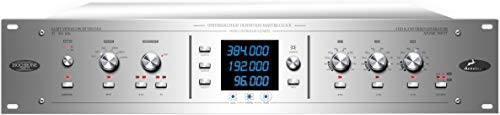
- 4th gen AFC with 64-bit DSP
- Supports up to 384 kHz and varispeed
- Atomic input with USB remote control
Best For: Professional studios needing advanced synchronization and control
Black Lion Audio Revolution Clock

- 44.1kHz to 384kHz support
- 4 BNC outputs plus AES/EBU, S/PDIF, ADAT
- Standalone word clock generator
Best For: Studios needing a focused, standalone sync source
Antelope Audio OCXHD Master Clock
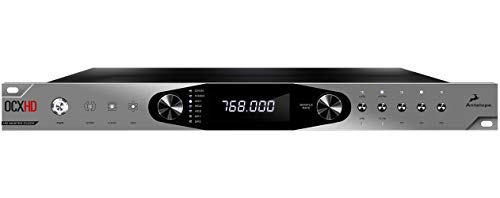
- Up to 768 kHz sample-rate support
- 10 word clock outputs and 2 inputs
- AFC clocking with AES/EBU, S/PDIF, video sync
Best For: Pro studios and post-production setups
Black Lion Audio Revolution Clock XC

- 44.1kHz to 384kHz support
- 8 BNC outputs plus AES/EBU, S/PDIF, ADAT
- 1 BNC input for sync-chain integration
Best For: Studios that need more clock distribution outputs
Black Lion Audio Micro Clock MKII
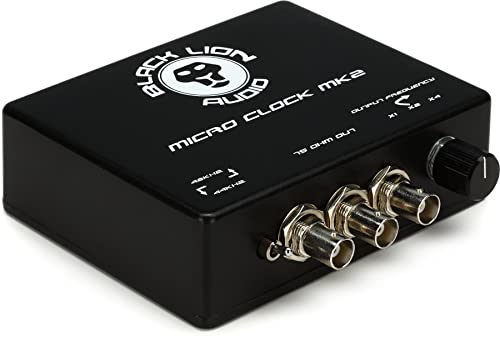
- 3rd-order crystal oscillators
- Ultra-low jitter clocking
- High-current parallel drive circuit
Best For: Engineers wanting a simple low-jitter master clock for a recording studio
Black Lion Audio Revolution Clock Mini
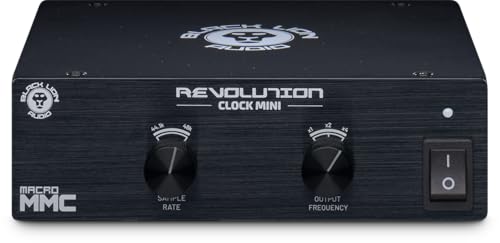
- 44.1kHz to 384kHz support
- Standalone word clock generator
- Three BNC outputs
Best For: Compact studios that need wide sample-rate support and multiple BNC feeds
Black Lion Audio Micro Clock MKIII XB

- 8 selectable sample rates
- AES, optical, and coaxial outputs
- Galvanic transformer isolation
Best For: Studios needing multiple digital output options from a master clock
Atomic reference clock – Antelope Audio 10MX
If you need a master clock for recording studio use, the Antelope Audio 10MX is built for high-end synchronization with rubidium atomic stability, 10 MHz distribution, and support for multiple professional outputs. Its 1U design and software control make it a strong fit for modern studios that want precise clocking across several devices.
Best For: Studios needing atomic-grade clocking, multiple outputs, and flexible control.
Pros:
- Rubidium atomic clock with jitter-management and AFC technology
- Ten BNC atomic clock outputs can clock up to 10 devices
- Four BNC word clock outputs plus AES/EBU and S/PDIF support
- Front-panel and Mac/Windows software control for easier setup
Cons:
- More advanced than a basic studio clock needs
- Built for professional systems rather than casual setups
The 10MX is a strong choice when clock stability and routing flexibility matter most. It suits studios that want a compact rack unit with serious reference-grade performance.
Video-sync masterclock – NanoClocks GL Digital Audio Genlock Masterclock
The NanoClocks GL is a practical master clock for recording studio environments that also need video sync flexibility. It generates standard audio clocks from discrete crystal oscillators, and it can reference internal timebase, external video sync, external word clock, or AES-11 DARS.
Best For: Studios and post setups that need clean audio clocking with video genlock support.
Pros:
- Discrete crystal oscillators generate standard audio sample rates directly
- Supports internal, video, audio, and distribution-amplifier reference modes
- Automatically detects SD/HD video frame rates and standards
- Two reference inputs offer automatic switchover if one source fails
Cons:
- Limited to one sample rate per oscillator in standard mode
- Maximum sample rate is 96 kHz
This model is especially useful if your studio workflow crosses into post-production or sync-heavy work. It prioritizes clean reference handling and reliable switching over broad high-rate audio features.
Versatile budget clock – Black Lion Audio Micro Clock MKIII
The Black Lion Audio Micro Clock MKIII is a straightforward master clock for recording studio setups that need selectable sample rates and multiple output formats. With S/PDIF optical and coaxial outputs, AES output, and galvanic transformer isolation, it focuses on practical connectivity in a compact unit.
Best For: Small to mid-size studios wanting a versatile clock with multiple digital outputs.
Pros:
- Eight selectable sample rates for flexible studio use
- Offers S/PDIF optical and coaxial outputs
- Includes AES output for broader compatibility
- Galvanic transformer isolation and dedicated output drivers
Cons:
- No atomic or high-end reference features listed
- Fewer advanced control details than premium studio clocks
If you want a no-frills clocking solution with useful output options, this model covers the essentials well. It is a sensible pick for studios that value connectivity and simple sample-rate selection.
High-definition sync hub – Antelope Audio Isochrone Trinity
The Antelope Audio Isochrone Trinity is a feature-rich master clock for recording studio work where high-resolution synchronization and flexible routing matter. It supports up to 384 kHz audio, uses 4th generation AFC with 64-bit DSP, and adds atomic input plus USB control for remote management.
Best For: Professional studios and live rigs that want a high-definition clock with advanced control.
Pros:
- 4th generation AFC and 64-bit DSP for detailed clocking performance
- Supports audio up to 384 kHz with varispeed functionality
- Nine independent generators for flexible system integration
- Atomic input, USB remote control, preset management, and firmware upgrades
Cons:
- Larger rack footprint than compact master clocks
- Feature set may be more than basic studios require
The Trinity is aimed at users who want a serious synchronization hub with deep feature support. It is especially compelling for studios that need precision, flexibility, and remote management in one unit.
Standalone Clock Option – Black Lion Audio Revolution Clock
If you need a master clock for recording studio use with straightforward routing, the Black Lion Audio Revolution Clock is built as a standalone word clock generator with broad sample-rate support. It covers 44.1kHz to 384kHz and adds AES/EBU, S/PDIF, ADAT, and four BNC outputs for flexible system syncing.
Best For: Studios that want a dedicated word clock source with multiple digital outputs and a simple standalone setup.
Pros:
- Supports sample rates from 44.1kHz to 384kHz.
- Includes 4 BNC outputs plus AES/EBU, S/PDIF, and ADAT connections.
- Standalone word clock generator format keeps it focused on sync duties.
- Backed by a 2-year warranty.
Cons:
- Does not list advanced control features or app-based remote operation.
- Fewer output connections than the larger XC model.
For a recording studio that mainly needs a dedicated clocking box with practical digital I/O, this model is a clean, no-frills option. Its appeal is the balance of wide sample-rate support and essential outputs in a compact standalone design.
Pro Sync Hub – Antelope Audio OCXHD Master Clock
The Antelope Audio OCXHD is a master clock for recording studio environments where high-resolution sync and broad connectivity matter. It supports up to 768 kHz and uses 4th generation AFC clocking with 64-bit DSP, plus multiple word clock, AES/EBU, S/PDIF, and video sync inputs for complex digital setups.
Best For: Professional studios, post-production rooms, and film scoring setups that need extensive clocking and sync options.
Pros:
- Supports sample rates up to 768 kHz.
- Uses 4th generation AFC clocking with 64-bit DSP and an oven-controlled crystal oscillator.
- Offers 10 word clock outputs and 2 word clock inputs.
- Includes AES/EBU, S/PDIF, video sync, and 10 MHz input support.
Cons:
- Likely more clocking hardware than a simple small-studio setup needs.
- 1U rack design and broad feature set may be overkill for basic sync jobs.
If your studio setup depends on detailed synchronization across multiple digital devices, the OCXHD stands out for its depth of routing and resolution support. The desktop app control and video sync features make it especially relevant when recording workflows overlap with post-production.
Expanded Output Pick – Black Lion Audio Revolution Clock XC
For a master clock for recording studio setups that need more distribution, the Black Lion Audio Revolution Clock XC is a standalone word clock generator with expanded connectivity. It supports 44.1kHz to 384kHz and adds 2 AES/EBU outputs, 1 BNC input, 8 BNC outputs, plus 2 S/PDIF and 2 ADAT connections.
Best For: Studios with multiple digital devices that need a clock source offering more output options than a basic unit.
Pros:
- Supports sample rates from 44.1kHz to 384kHz.
- Provides 8 BNC outputs for wider clock distribution.
- Adds 2 AES/EBU outputs, 2 S/PDIF, and 2 ADAT connections.
- Includes a 1 BNC input for integration into existing sync chains.
Cons:
- Larger and heavier than the standard Revolution Clock.
- No app control or advanced display features are listed.
This XC version is the better fit when your studio has more gear to sync and you want additional routing flexibility in one dedicated clock box. It keeps the same standalone approach while giving you substantially more output capacity.
Studio-Grade Stability – Black Lion Audio Micro Clock MKII
If you’re shopping for a master clock for recording studio use, the Black Lion Audio Micro Clock MKII is built around ultra-low jitter timing and 3rd-order crystal oscillators. Its high-current parallel drive circuit is aimed at helping distribute clock signal cleanly in a compact standalone unit.
Best For: Engineers who want a straightforward master clock with low-jitter clocking and a simple, studio-friendly footprint.
Pros:
- 3rd-order crystal oscillators for dedicated clock generation
- Ultra-low jitter design for tighter timing reference
- High-current parallel drive circuit for signal distribution
- Compact standalone form factor for studio racks and desks
Cons:
- No sample-rate range is listed in the supplied details
- Fewer connectivity specifics are provided than on some alternatives
The Micro Clock MKII is a focused option if your priority is stable master clocking rather than extra routing features. It keeps the feature set centered on low-jitter timing and practical distribution.
Wide-Range Word Clock – Black Lion Audio Revolution Clock Mini
For a master clock for recording studio setups that need broader sample-rate support, the Black Lion Audio Revolution Clock Mini is a standalone word clock generator rated from 44.1kHz to 384kHz. It also includes three BNC outputs, which makes it easier to feed multiple devices from one compact source.
Best For: Studios that need a compact word clock generator with wide sample-rate support and multiple BNC outputs.
Pros:
- Standalone word clock generator
- Supports sample rates from 44.1kHz to 384kHz
- Three BNC outputs for multiple connections
- 2-year warranty included
Cons:
- Only BNC outputs are listed in the supplied details
- No other clock formats are specified here
The Revolution Clock Mini stands out for flexibility in sample-rate support while keeping the setup compact. If your studio needs a clean master reference across a wide range of rates, this model is easy to evaluate.
Flexible Digital Routing – Black Lion Audio Micro Clock MKIII XB
If you want a master clock for recording studio workflows with more output options, the Black Lion Audio Micro Clock MKIII XB adds AES, S/PDIF optical, and coaxial outputs. It also offers 8 selectable sample rates plus galvanic transformer isolation and dedicated output drivers.
Best For: Engineers who need a master clock with multiple digital outputs and selectable sample-rate options.
Pros:
- 8 selectable sample rates
- AES output plus S/PDIF optical and coaxial outputs
- Galvanic transformer isolation
- Dedicated output drivers for clock distribution
Cons:
- Heavier than the other listed models at 3.9 pounds
- Feature set may be more than needed for simple clocking tasks
The Micro Clock MKIII XB is the most feature-rich option in this group, especially if you need multiple digital output paths from one clock source. It is a strong fit when routing flexibility matters as much as timing accuracy.
How We Picked the Best Master Clock for Recording Studio
To build this list, we focused on the factors that matter most in a Master Clock for Recording Studio setups: clock stability, format support, expansion flexibility, reputation for low-jitter performance, and value for different room sizes. We also looked at whether each unit fits a practical studio role, such as a small project rig, a hybrid room, or a more demanding multi-device system.
Quick Comparison: Which Type Fits Your Studio?
If you want a straightforward upgrade for a modest setup, a compact clock can be the easiest win. If you run multiple digital devices, an expanded clock distribution or more advanced master unit may make more sense. Atomic-reference models are best suited to users who want a top-tier timing source and have the rest of the studio chain built to take advantage of it.
Key Buying Factors for a Master Clock for Recording Studio
Clock Stability and Jitter Performance
The main job of a master clock is timing consistency. Look for designs that emphasize low jitter and stable distribution, especially if you rely on several digital devices, converters, or outboard processors.
Connections and Compatibility
Check the formats you need, such as word clock I/O, multiple outputs, or synchronization features for larger setups. The best choice is the one that cleanly integrates with your current interface, converters, and digital hardware.
Studio Size and Expansion
A small room usually needs a simpler clocking solution, while larger studios benefit from more outputs and better routing flexibility. If you expect to expand, choose a model that leaves room for future devices.
Reference Quality and Long-Term Value
Higher-end clocks can be worth it in rooms where timing precision is critical, but many studios get more practical value from a solid midrange unit paired with properly configured gear. Match the investment to the quality of your converters, interface, and workflow.
Who Should Buy Which Master Clock for Recording Studio?
Home studios and project rooms should look first at compact, affordable options that improve synchronization without adding unnecessary complexity. Growing studios with several digital components may want a more feature-rich clock with stronger distribution options. High-end rooms, mastering spaces, and facilities with strict sync demands are the best candidates for premium or atomic-reference models.
In short, the right Master Clock for Recording Studio use depends less on hype and more on how much gear you need to synchronize, how flexible your wiring must be, and how far you want to push timing performance.