A good control surface can make studio mixing faster, more tactile, and less fatiguing than working with a mouse alone. For engineers who need precision, hands-on workflow, and reliable DAW control, the right unit can streamline every session.
This roundup focuses on the best options for a mixing control surface for professional studio use, from compact desktop controllers to larger motor-fader systems.
Best 10 Mixing Control Surface for Professional Studio Picks for 2026
EUCON-Ready Modular Surface
Avid S1 Compact EUCON Controller

- EUCON-enabled desktop control surface
- Connect up to four S1 units
- USB connection, ergonomic design
Best For: Pro studios that want a scalable EUCON surface
Motor-Fader DAW Workhorse

- Eight motorized, touch-sensitive faders
- Scribble Strip displays for track info
- Studio One, HUI, and Mackie Control support
Best For: Studio users who want tactile faders and fast DAW navigation
Universal Multi-Protocol Surface
Behringer X-TOUCH Control Surface

- Nine motorized touch-sensitive faders
- Eight LCD Scribble Strips
- USB, Ethernet, and MIDI connectivity
Best For: Users who need a flexible universal DAW controller
Fader-Forward Studio Controller
Softube Console 1 Fader Mk III

- 10-channel fader control surface
- USB connection for desktop use
- Works with Windows and Mac hardware
Best For: Compact studio mixing with hands-on fader control
Portable Fader Control
Akai MIDImix USB MIDI Mixer Controller

- 8 channel faders and master fader
- 24 knobs for assignable mix control
- Compact metal build with USB connection
Best For: Portable DAW mixing and Ableton Live control
Display-Driven Control
Softube Flow Studio Control Surface
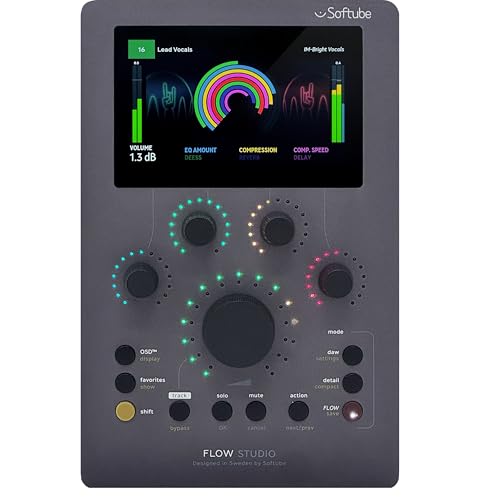
- 4.3-inch high-resolution screen
- 5 knobs and 9 buttons for core control
- USB-C desktop-friendly design
Best For: Compact studio control with visual feedback
Multi-Layer Mobility
Studiologic SL Mixface 4-Layer Control Surface

- 4-layer control for switching tasks
- Bluetooth and USB connectivity
- 8 knobs, 9 sliders, and 8 buttons
Best For: Mobile studio users who switch between DAW and instruments
Studio Control Center
Behringer CONTROL2USB Studio Monitor Controller

- All-in-one master volume, source, and monitor switching
- Built-in talkback mic with level control
- USB audio interface with VCA control
Best For: studio control rooms needing monitoring and communication in one box
Compact DAW Surface
Korg nanoKONTROL2 Slim USB Controller

- Slim USB control surface for desk-friendly setups
- New track select and marker advance controls
- Supports major DAW software
Best For: portable DAW users who need basic hands-on mixing control
Motorized Fader Surface
EM-12F 12-Channel Motorized MIDI Controller

- 12 motorized 100mm faders with position feedback
- Fully programmable MIDI mapping for DAWs
- Plug-and-play USB MIDI with no driver needed
Best For: engineers wanting tactile, motorized DAW mixing control
EUCON-Ready Modular Surface – Avid S1 Compact EUCON Controller
If you want a mixing control surface for professional studio work that stays compact but can scale with your setup, the Avid S1 is built around EUCON integration and USB connectivity. It gives you hands-on control in a small footprint, and you can connect up to four units to build a larger surface as your workflow grows.
Best For: Engineers and producers who want a compact EUCON surface that can expand into a multi-unit control rig.
Pros:
- EUCON-enabled for integrated control workflows
- Supports connecting up to four S1 units for expansion
- USB connectivity keeps setup straightforward
- Ergonomic desktop design
Cons:
- Windows-compatible according to the supplied notes
- Single-unit setup may feel limited for large sessions
The S1 is a practical choice if you want a modular control surface that can start small and grow with your studio. Its value is in the EUCON workflow and expansion path rather than a feature-heavy layout.
Motor-Fader DAW Workhorse – PreSonus FaderPort 8
The PreSonus FaderPort 8 is a strong mixing control surface for professional studio use if you want physical faders, transport controls, and fast session navigation. With eight touch-sensitive motorized faders, Scribble Strip displays, and support for Mackie Control, HUI, and Studio One control, it covers a lot of day-to-day DAW mixing tasks.
Best For: Mix engineers and producers who want an 8-fader controller with deep DAW transport and navigation control.
Pros:
- Eight 100 mm touch-sensitive motorized faders
- Eight high-definition Scribble Strip displays
- Session Navigator adds fast scrolling and zoom functions
- Supports Studio One, HUI, and Mackie Control
Cons:
- Requires USB 2.0 connectivity
- Best-supported native workflow is centered on Studio One
This is a practical option if your studio needs tactile mixing control without moving into a much larger surface. Its balance of faders, displays, and transport tools makes it especially useful for editing and mixing sessions.
Universal Multi-Protocol Surface – Behringer X-TOUCH Control Surface
The Behringer X-TOUCH is aimed at users who need a flexible mixing control surface for professional studio and live work. It combines nine touch-sensitive motorized faders, Scribble Strips, and support for HUI and Mackie Control, plus Ethernet, USB, and MIDI connectivity for wider integration.
Best For: Producers and engineers who need a universal DAW controller with multiple connection options.
Pros:
- Nine 100 mm touch-sensitive motorized faders
- Eight LCD Scribble Strips for track and parameter visibility
- Supports HUI and Mackie Control protocols
- Ethernet, USB, and MIDI interface support
Cons:
- Larger and heavier than compact desktop controllers
- Feature set may be more than casual users need
If you want a versatile control surface that can slot into different DAW setups, the X-TOUCH stands out for its universal protocol support and multiple connection paths. It is a strong fit when flexibility matters as much as hands-on mixing control.
Fader-Forward Studio Controller – Softube Console 1 Fader Mk III
The Softube Console 1 Fader Mk III is a streamlined mixing control surface for professional studio setups that need hands-on fader control in a modern desktop format. It offers 10-channel fader control, USB connectivity, push-button controls, and support for DAW software on Windows and Mac.
Best For: Studio users who want a compact 10-channel fader controller for mixing and recording workflows.
Pros:
- 10-channel fader control surface
- USB-connected for simple desktop use
- Compatible with Windows and Mac hardware platforms
- Includes USB cable and user manual
Cons:
- Supplied notes describe it as a demo control surface
- Specific supported-software details are limited in the notes
This model makes sense if you want a focused fader surface rather than a sprawling control center. It is best evaluated as a practical desktop mixing tool with a straightforward USB workflow.
Portable Fader Control – Akai MIDImix USB MIDI Mixer Controller
If you want a mixing control surface for professional studio work without adding bulk to your desk, the Akai Professional MIDImix is built around fast, hands-on DAW control. Its 8 channel faders, master fader, 24 assignable knobs, and 16 buttons make it a straightforward way to manage volume, sends, EQ, mute, solo, and record arm functions from one compact unit.
Best For: Producers who want an ultra-portable mixer-style controller with immediate Ableton Live integration.
Pros:
- 8 channel faders plus a master fader for mix balancing
- 24 knobs provide plenty of assignable control for EQ, sends, and effects
- 16 buttons support mute, solo, and record arm across two banks
- Compact, lightweight metal design is easy to move between sessions
Cons:
- Designed as a MIDI mixer controller rather than a full-featured standalone mixer
- Works best when you are comfortable mapping controls into your DAW
Overall, the MIDImix makes sense if your priority is tactile mix control in a small footprint. It is especially appealing for Ableton Live users, but it still fits well into any laptop-based production setup that values simple, physical access to core mix functions.
Display-Driven Control – Softube Flow Studio Control Surface
The Softube Flow Studio Control Surface is a compact mixing control surface for professional studio users who want a simple physical layout with a display-driven workflow. It pairs 5 knobs, 9 buttons, USB-C connectivity, and a 4.3-inch high-resolution screen, making it a focused option for controlling mix tasks while keeping key information visible at a glance.
Best For: Studio users who want a compact controller with an integrated screen and a small, streamlined control set.
Pros:
- 4.3-inch high-resolution screen adds immediate visual feedback
- 5 knobs and 9 buttons keep the control layout simple and direct
- USB-C connection is modern and convenient for desktop setups
- Includes a software bundle for added value out of the box
Cons:
- Control count is modest compared with larger mixer-style surfaces
- Best suited to streamlined workflows rather than dense hands-on channel control
In practice, the Flow Studio is a good fit when you want a clean, minimal surface with enough tactile control to speed up daily mixing tasks. The screen and software bundle help it feel more integrated than a basic knob controller, especially on a tidy PC or Mac workstation.
Multi-Layer Mobility – Studiologic SL Mixface 4-Layer Control Surface
The Studiologic SL Mixface is a flexible mixing control surface for professional studio users who want mobility and multi-layer control in one compact unit. It combines 8 knobs, 9 sliders, and 8 buttons with Bluetooth and USB connectivity, plus auto-mapping support for major DAW apps, so you can move between mixing and instrument control without rebuilding your workflow.
Best For: Producers who need a portable controller that can switch between DAW control and instrument performance modes.
Pros:
- 4-layer design expands what one controller can do
- 8 knobs, 9 sliders, and 8 buttons provide hands-on access
- Bluetooth and USB support make it flexible for mobile or desktop use
- Auto-mapping to major DAW apps helps speed up setup
Cons:
- Wireless use requires 3 AAA batteries, not included
- Its compact format favors flexibility over a large fader count
The SL Mixface stands out if you want one surface that can adapt across different studio tasks. It is especially useful for users who move between a DAW environment and virtual instruments, or who want a controller that travels easily while still offering real hands-on workflow control.
Studio Control Center – Behringer CONTROL2USB Studio Monitor Controller
If you want a mixing control surface for professional studio duties that also handles monitoring and talkback, the Behringer CONTROL2USB is built as an all-in-one desktop command center. It combines master volume control, source selection, monitor switching, and direct communication in one unit, which can simplify a busy studio setup.
Best For: Engineers and producers who want a monitor controller with integrated talkback and USB audio.
Pros:
- VCA control with ultra-low noise and high headroom design
- Includes monitor switching, source selection, and master volume control
- Built-in talkback microphone with level control for musician communication
- USB audio interface support for computer-based studio workflows
Cons:
- More focused on studio control and communication than on fader-based mixing
- Designed around USB and computer use, not a standalone console
- Three-channel specification may be limiting for some routing needs
For a studio that values monitoring control and talkback as much as mix management, this is a practical, centralized solution. It is especially appealing if you want one compact unit to handle core control-room tasks without adding separate boxes.
Compact DAW Surface – Korg nanoKONTROL2 Slim USB Controller
The Korg nanoKONTROL2 is a slim USB control surface aimed at hands-on DAW control without taking over your desk. For a mixing control surface for professional studio use, it gives you a compact way to manage track selection and common control tasks across supported software.
Best For: Producers who want a lightweight, portable controller for basic DAW mixing and transport-style control.
Pros:
- Low-profile design that fits easily on crowded studio desks
- Supports numerous software titles, including major DAW programs
- Includes new track select and marker advance functions
- USB connectivity and a compact 8-channel mixer layout
Cons:
- Button-based surface with no traditional faders or keyboard layout
- Smaller control format than a full mixer-style surface
- Best suited to limited hands-on control rather than deep mixing
This is a good choice if you want simple, portable control for software mixing and session navigation. It is less about large-format tactile mixing and more about giving you essential control in a minimal footprint.
Motorized Fader Surface – EM-12F 12-Channel Motorized MIDI Controller
If you need a mixing control surface for professional studio work with real fader movement, the EM-12F is built around 12 motorized 100mm sliders. Its position feedback, customizable MIDI mapping, and plug-and-play USB setup make it a strong fit for DAW mixing, automation, and scene recall workflows.
Best For: Audio engineers and producers who want motorized faders for tactile DAW mixing and automation control.
Pros:
- 12 motorized 100mm faders with position feedback
- Fully programmable MIDI CC, volume, pan, and send/return mapping
- Plug-and-play USB MIDI interface with no extra driver needed
- Compact desktop layout with a stable aluminum base
Cons:
- Focused on fader control rather than broader studio monitoring features
- Designed for computer-based MIDI workflows, not standalone mixing
- May be more controller than casual users need
For hands-on mixing, this is the most console-like option in the group. The motorized faders and recall behavior are especially useful when you want accurate, tactile control over DAW parameters and session automation.
How We Picked the Best Mixing Control Surface for Professional Studio
We focused on the features that matter most in a Mixing Control Surface for Professional Studio work: motorized faders, dependable DAW integration, clear labeling, assignable controls, build quality, and workflow speed. We also considered whether each unit fits a small edit suite, a hybrid project room, or a full-scale control desk.
Quick Comparison
Broadly, these products fall into three groups. Compact controllers are best for simple transport, plugin, and session navigation. Mid-size fader surfaces offer the best balance of hands-on mixing and footprint. Larger, more advanced systems are better for engineers who want deeper integration and faster automation control.
Key Buying Factors for Mixing Control Surface for Professional Studio
DAW Compatibility
Check whether the surface supports your main DAW natively or through a solid protocol such as EUCON, Mackie Control, or HUI. Better integration usually means more reliable track banking, automation, plug-in control, and metering.
Faders and Layout
Motorized faders are especially useful for recall and automation. More channels reduce banking during larger sessions, while smaller surfaces can still be efficient if you value portability and a minimal desk setup.
Workflow Features
Look for dedicated transport, jog navigation, scribble strips, assignable knobs, and layer switching. These details matter when you are managing edits, automation passes, and repeated mix moves throughout the day.
Connectivity and System Fit
USB is common and simple, while Ethernet or dedicated network control can be preferable in more permanent studio setups. Also confirm whether the controller works well with your operating system and interface environment.
Who Should Buy Which Mixing Control Surface for Professional Studio?
If you want deep DAW control and a more traditional studio feel, choose a larger motor-fader surface. If you need efficient mixing without giving up too much desk space, a mid-size controller is usually the sweet spot. If you mainly want transport, level moves, and lightweight hands-on control, a compact USB surface may be enough. The best choice is the one that matches your session size, workflow, and monitoring habits—not just the number of faders on the panel.