The right boom arm can make a desk microphone easier to position, clearer to access, and less disruptive to your workspace. These clamp-mounted options cover popular microphones from Blue, HyperX, FIFINE, RØDE, and Elgato.
We selected 10 microphone boom arms with clamp based on adjustability, mounting design, compatibility, cable management, and suitability for streaming, recording, calls, and gaming.
Best 10 Microphone Boom Arms with Clamp Picks for 2026
Best Adjustable Value
InnoGear Boom Arm Microphone Stand
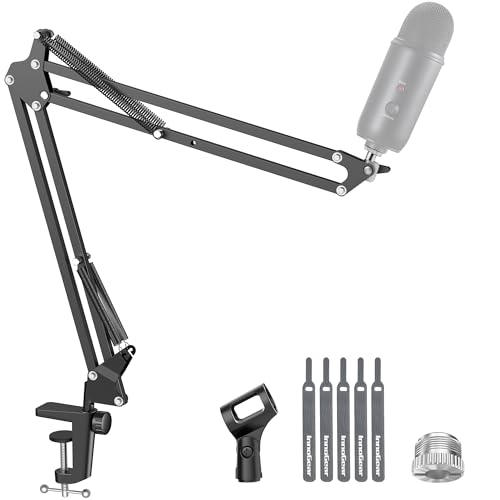
- 360-degree base rotation and multi-axis adjustment
- Supports microphones up to 3.3 pounds
- Folds away and includes 3/8-inch and 5/8-inch adapters
Best For: Flexible home streaming, gaming, and recording setups
Best for Quiet Studio Use
RØDE PSA1+ Professional Boom Arm
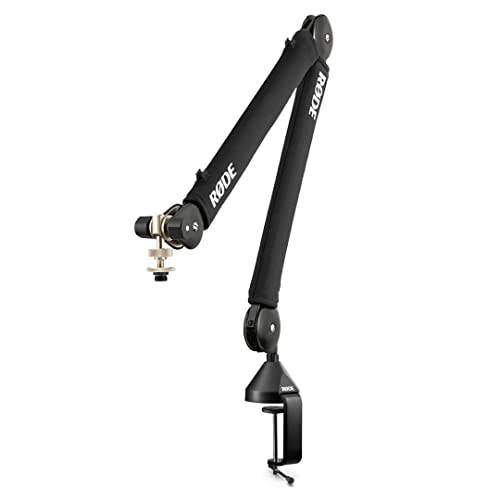
- Internal spring damping helps minimize creaks
- 360-degree rotation with full extension
- Integrated cable management and dual thread adapters
Best For: Quiet podcasting, streaming, and broadcast setups
Best for QuadCast Setups
SUNMON Mic Boom Arm for Popular USB Mics

- Dual suspension springs support stable positioning
- Clamp fits desks up to 1.89 inches thick
- Includes pre-installed 3/8-inch-to-5/8-inch adapter
Best For: Blue Yeti, HyperX QuadCast, and similar USB microphones
Best Premium Design

- Smooth, quiet adjustment in virtually any direction
- Slim all-metal design with monitor-clearing reach
- Padded clamp and included riser and thread adapters
Best For: Polished streaming and creator desks with limited space
Low-Profile Stability

- All-metal construction with a stable C-clamp
- Low-profile design stays below the monitor
- Cable management and multiple thread adapters included
Best For: Gaming and streaming desks that need unobstructed monitor visibility
Extended Heavy-Duty Reach

- 3.5-pound capacity for heavier microphones
- Up to 37.4 inches of vertical reach
- Covered cable channels and included extension riser
Best For: Podcasters and streamers using larger microphones or monitor-spanning placement
Portable Scissor-Arm Value
FIFINE CS1 Microphone Boom Arm
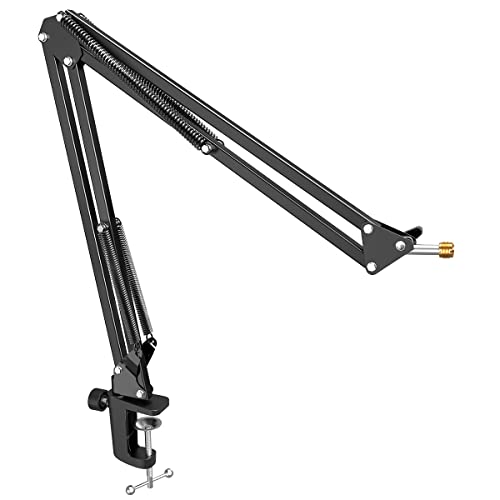
- Foldable metal arm saves desktop space
- Anti-scratch clamp fits desks up to 2 inches
- Includes 5/8-inch to 3/8-inch microphone adapter
Best For: Beginner recording setups and compact or portable workspaces
Premium Low-Profile Pick

- All-metal, anti-torsion construction
- 29.1-inch horizontal reach
- Magnetic cable channels
Best For: Creators wanting a durable, discreet arm for larger desks
Space-Saving Value Pick

- 3.35-inch low-profile position
- Magnetic cable management
- Supports up to 3.3 pounds
Best For: Compact desks and flexible streaming setups
Flexible Reach Pick

- Extends up to 25.6 inches
- 360-degree horizontal rotation
- Clamp doubles as headphone hook
Best For: Creators needing broad positioning flexibility
Best Adjustable Value – InnoGear Boom Arm Microphone Stand
If you need microphone boom arms with clamp mounting for a compact recording or streaming desk, the InnoGear MU01 offers broad positioning control and a sturdy steel build. Its clamp is designed for flat, squared desk edges up to 2 inches thick.
Best For: Streamers, gamers, and home-recording users who want flexible positioning for microphones weighing up to 3.3 pounds.
Pros:
- 360-degree base rotation, 135-degree forward-and-back extension, and 180-degree arm movement provide flexible placement.
- Supports up to 3.3 pounds, exceeding the listed 2.2-pound capacity of many comparable stands.
- Includes a standard microphone clip plus 3/8-inch and 5/8-inch compatibility for many popular microphones.
- Folds away when not in use and uses a design intended to reduce spring deformation.
Cons:
- The clamp requires a flat, squared desk edge and is limited to 2 inches of thickness.
- A shock mount is not included.
Choose this arm when adjustability and a relatively high stated load capacity matter most. Verify your desk edge and microphone mounting requirements before buying.
Best for Quiet Studio Use – RØDE PSA1+ Professional Boom Arm
Among microphone boom arms with clamp mounting, the RØDE PSA1+ stands out for quiet movement during recording. Its internal spring damping is designed to reduce creaks and handling noise, while the clamp fits desks up to 70mm thick.
Best For: Podcasters, streamers, and broadcast-style users who need a quiet, professional arm for microphones and shock mounts from 0.25kg to 1.2kg.
Pros:
- Internal spring damping supports quiet repositioning during recordings.
- 360-degree rotation and full extension provide broad reach.
- Integrated cable management helps keep XLR cables concealed.
- Includes 3/8-inch and 5/8-inch thread adapters and a two-year warranty.
Cons:
- Its 1.2kg maximum load is lower than some competing arms.
- The desk clamp is specified in metric sizing, so desk thickness should be checked carefully.
The PSA1+ is a strong fit for users prioritizing quiet operation and a clean studio appearance. Its weight range and desk compatibility are the key specifications to confirm before purchase.
Best for QuadCast Setups – SUNMON Mic Boom Arm for Popular USB Mics
The SUNMON is one of the more accessible microphone boom arms with clamp mounting for popular USB microphones. It includes a desk clamp for surfaces up to 1.89 inches thick and a pre-installed 3/8-inch-to-5/8-inch adapter for broad microphone compatibility.
Best For: Blue Yeti, HyperX QuadCast, SoloCast, Fifine, and similar microphone users seeking a compact suspension arm.
Pros:
- Dual suspension springs and reinforced knobs are designed to reduce shaking and sinking.
- Supports microphones up to 1.4kg.
- Includes a clamp with protective sponge padding to help prevent desk scratches.
- Works with numerous listed microphones and includes a pre-installed thread adapter.
Cons:
- The clamp is limited to desktops up to 1.89 inches thick.
- The streaming microphone is not included.
- Its listed maximum height specification is only 5 centimeters, so reach details should be confirmed before purchase.
This arm makes the most sense for users with a compatible USB microphone, especially a QuadCast or Blue Yeti. Check the clamp limit and available workspace before ordering.
Best Premium Design – Elgato Wave Mic Arm MK.2
For buyers comparing microphone boom arms with clamp mounting, the Elgato Wave Mic Arm MK.2 emphasizes smooth adjustment and a clean desktop profile. Its slim metal arms can rise above monitors or remain below shoulder level, while the padded clamp is designed for tight desk spaces.
Best For: Streamers, creators, and desk setups that need quiet positioning, monitor clearance, and a polished all-metal design.
Pros:
- Can rise above tall monitors or stay in a low-profile position.
- Supports precise angle and rotation adjustments with smooth, quiet movement.
- Slim all-metal arms have a subdued, logo-free appearance.
- Includes a padded clamp, riser extension, Allen key, and 3/8-inch and 5/8-inch adapters.
Cons:
- At 1.79kg, it is relatively substantial compared with lighter arms.
- The supplied notes do not state a maximum microphone load or desk-thickness limit.
The Wave Mic Arm MK.2 is a compelling choice when appearance, quiet movement, and monitor clearance are more important than minimizing weight. Confirm load and desk fit if your microphone setup is unusually heavy or specialized.
Low-Profile Stability – FIFINE BM88 Boom Arm
The FIFINE BM88 is a practical choice among microphone boom arms with clamp when you want a sturdy, low-profile setup that stays below your monitor. Its all-metal construction, cable management, broad adjustment range, and included thread adapters make it well suited to gaming, streaming, podcasting, and recording.
Best For: Desk setups where monitor visibility and a clean cable layout matter.
Pros:
- Low-profile design can extend beneath a computer screen without obstructing the monitor view.
- All-metal arm and C-clamp are designed for stable positioning with less wobble.
- Includes hidden cable management and 1/4-inch, 3/8-inch, and 5/8-inch thread compatibility.
- Offers up to 29 inches of extension, 220-degree vertical adjustment, and 360-degree horizontal adjustment.
Cons:
- The clamp fits desktops from 0.8 to 2.4 inches thick, so unusually thin or thick surfaces may not work.
- The section nearest the C-clamp cannot be adjusted vertically.
- The microphone is not included.
Choose the BM88 if you want a solid, space-conscious arm with extensive adjustment and built-in cable organization. Its low-profile layout is especially useful when a clear view of the monitor is a priority.
Extended Heavy-Duty Reach – InnoGear Mic Arm
The InnoGear mic arm is one of the more capable microphone boom arms with clamp for users who need extra reach and support for heavier microphones. Its steel construction, internal springs, extension riser, cable channels, and 3.5-pound capacity suit podcasting, streaming, and studio-style desk setups.
Best For: Larger microphones and setups that need extended reach over a monitor.
Pros:
- Supports up to 3.5 pounds, accommodating microphones such as the Blue Yeti and Shure SM7B.
- Reaches up to 32.3 inches horizontally and 37.4 inches vertically with the included riser.
- Built-in cable channels keep wires covered and organized.
- Provides 135-degree back-and-forth and 180-degree up-and-down adjustment, plus a 360-degree rotatable base.
Cons:
- The clamp is designed for desks up to 2 inches thick.
- The 5/8-inch connector is supplied, but a shock mount is not included.
- Its larger reach and 1.6-kilogram weight may be more than compact desks require.
The InnoGear stands out when reach and load capacity matter more than a minimal footprint. It is a strong fit for users positioning a heavier microphone above or around a monitor while keeping cables tucked away.
Portable Scissor-Arm Value – FIFINE CS1 Microphone Boom Arm
The FIFINE CS1 is a straightforward option among microphone boom arms with clamp for gaming, voice-over work, and beginner recording setups. Its metal scissor-arm design folds for storage, while the upgraded clamp adds an anti-scratch pad and a fixed knob for more secure positioning.
Best For: Beginners and smaller workspaces that need a foldable microphone arm.
Pros:
- Metal clamp includes an anti-scratch pad and fits desks up to 2 inches thick.
- Strong springs and a locking knob help keep the arm stable during adjustment.
- Folds to save desk space and can be carried for mobile recording.
- Includes a 5/8-inch to 3/8-inch adapter for compatibility with several microphones.
Cons:
- Its maximum listed height is 13 inches, offering less reach than the other arms here.
- The arm provides 180-degree up-and-down adjustment but no stated horizontal rotation range.
- The microphone is not included.
The CS1 makes sense when affordability, portability, and basic stability are the priorities. Its compact foldable design is convenient for limited desk space, though users needing extensive reach may prefer a larger arm.
Premium Low-Profile Pick – Elgato Wave Mic Arm LP
The Elgato Wave Mic Arm LP is a premium choice among microphone boom arms with clamp mounting. Its all-metal construction, low-profile positioning, and 29.1-inch horizontal reach make it well suited to larger desks and uncluttered recording setups.
Best For: Streamers, podcasters, and creators who want a durable low-profile arm with concealed cable routing and broad desk coverage.
Pros:
- All-metal, anti-torsion construction supports microphones up to 2 kg.
- Sits below the shoulder line to preserve an unobstructed view.
- Magnetic cable channels keep wiring hidden while remaining easy to access.
- Offers 360-degree horizontal and 90-degree upper vertical rotation.
Cons:
- Its premium construction may be more than needed for lightweight microphones.
- The low-profile design has a listed maximum height of 6.3 inches.
Choose this arm when build quality, cable management, and a long horizontal reach matter more than minimizing cost. The included thread adapters also broaden compatibility with microphones using 1/4-inch, 3/8-inch, or 5/8-inch threads.
Space-Saving Value Pick – InnoGear LP98 Mic Arm
The InnoGear LP98 is a practical option for shoppers comparing microphone boom arms with clamp mounts for compact or cluttered desks. Its arm sits just 3.35 inches above the desktop, while the magnetic cable channel keeps the setup tidy.
Best For: Small workstations, minimalist streaming desks, and users who need wide adjustment range with a compact footprint.
Pros:
- Low-profile design helps free desk space and maintain a clear view.
- Provides 360-degree base rotation, 180-degree swivel, 170-degree tilt, and 360-degree shaft rotation.
- Alloy-steel construction supports up to 3.3 pounds.
- Rubber-padded clamp fits flat-edged desks up to 2.36 inches thick.
Cons:
- The clamp is limited to flat desk edges.
- Its 3.3-pound capacity may not suit heavier microphone setups.
- A shock mount is not included.
With two included thread adapters, the LP98 supports a broad selection of microphones and some compatible webcams. It is a strong fit when low-profile positioning and easy cable management are priorities.
Flexible Reach Pick – InnoGear MU-LP26 Mic Arm
The InnoGear MU-LP26 combines a discreet low-profile shape with a 25.6-inch extension, making it one of the more flexible microphone boom arms with clamp mounting in this lineup. Its alloy-steel build and padded C-style clamp are designed for stable desk use.
Best For: Streamers and podcasters who need extended reach, broad positioning options, and a clamp that also functions as a headphone hook.
Pros:
- Extends up to 25.6 inches for flexible microphone placement.
- Offers 360-degree horizontal rotation and 250 degrees of vertical adjustment.
- Supports up to 3.3 pounds and fits desks up to 2.75 inches thick.
- Includes 3/8-to-5/8-inch and 3/8-to-1/4-inch adapters plus a universal mic clip.
Cons:
- Its 3.3-pound capacity limits use with heavier equipment.
- The clamp is intended for desks within the listed 2.75-inch thickness limit.
The MU-LP26 is a versatile middle ground for users who want a tidy low-profile arm without giving up reach. Its adapters also allow use with compatible webcams and ring lights, while the clamp’s headphone-hook function adds practicality.
How We Picked the Best Microphone Boom Arms with Clamp
We focused on practical features that affect everyday use rather than appearance alone. The selection includes traditional scissor arms, low-profile models, and premium studio-style designs. We considered the type of desk clamp, adjustment range, stated microphone compatibility, mounting hardware, cable-management features, and how well each arm fits common desk setups.
Because microphone weights and mounting systems vary, confirm your microphone, shock mount, and adapter requirements before buying. A boom arm that supports a bare USB microphone may perform differently once a heavy shock mount or pop filter is added.
Quick Comparison
| Best For | What to Look For |
|---|---|
| Budget upgrades | Stable clamp, broad compatibility, and included adapters |
| Streaming and gaming | Quiet repositioning, useful reach, and cable management |
| Small desks | Low-profile construction and compact clamp footprint |
| Studio recording | Smooth movement, stronger construction, and spring damping |
| Clean desk setups | Integrated cable routing and minimal arm bulk |
Key Buying Factors for Microphone Boom Arms with Clamp
Desk Compatibility and Clamp Strength
Measure your desk thickness and check whether the clamp can attach securely without blocking drawers, shelves, or cable trays. A padded, wide clamp generally distributes pressure better and helps protect the desktop.
Weight Capacity and Mounting Hardware
Check the arm’s capacity against the complete microphone setup, including a shock mount, pop filter, and any adapter. Standard 3/8-inch and 5/8-inch threads are common, but included adapters differ between models.
Reach, Rotation, and Low-Profile Design
Choose an arm with enough horizontal and vertical reach to place the microphone near your mouth without covering your monitor. Low-profile arms can preserve sightlines and leave more space above the desk, while conventional scissor arms may offer greater height flexibility.
Movement Noise and Cable Management
For live content and recordings, look for smooth joints or spring damping that reduce handling noise. Built-in channels, clips, or sleeves keep the USB or XLR cable away from moving joints and make the setup easier to manage.
Who Should Buy Which Microphone Boom Arms with Clamp?
Choose a conventional scissor arm if you want broad adjustability at a reasonable price or frequently switch between speaking, gaming, and recording positions. A low-profile model is a better fit for compact desks, ultrawide monitors, and setups where the microphone should stay below the screen when not in use.
Premium studio arms such as the RØDE or Elgato options are worth considering when smooth operation, refined construction, and a clean appearance matter more than the lowest price. Models from InnoGear and FIFINE are practical choices for budget-conscious users, while compatibility-focused arms can suit owners of popular Blue Yeti, HyperX, and FIFINE microphones. Before ordering, prioritize a secure clamp and adequate weight support over extra reach you may never use.