MOVE SPEED 256GB USB-C USB Drive review: this dual-connector flash drive is built for speed, portability, and modern device compatibility.
It’s especially appealing if you move large files, shoot on iPhone, or want one drive that works across USB-A and USB-C hardware.
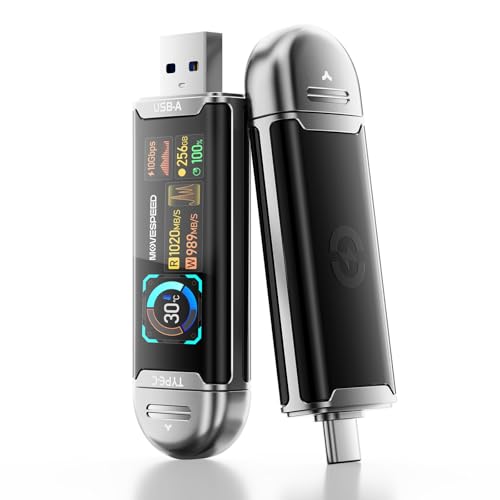
MOVE SPEED 256GB Drive Review Summary
The MOVE SPEED 256GB USB-C USB Drive is best viewed as a high-performance portable storage tool for people who care about more than basic file copying.
If you regularly transfer videos, photo libraries, design files, or game data, this drive’s dual-interface design and smart display make it a practical buy rather than a generic thumb drive.
It fits best for creators, mobile professionals, and cross-device users who want fast transfer speeds without carrying a separate cable or external SSD enclosure.
The combination of USB-A and USB-C support, live transfer data on the LCD, and iPhone ProRes HDR recording support makes it stand out in the crowded portable storage category.
Scorecard
| Category | Score | Why it matters |
|---|---|---|
| Transfer speed | 9.0/10 | Built for very fast USB 3.2 Gen 2 performance on large files and media workflows. |
| Device compatibility | 9.0/10 | Dual USB-A and USB-C connectivity broadens support across modern and legacy devices. |
| Mobile video recording support | 8.0/10 | Useful for iPhone ProRes HDR and direct external recording workflows. |
| Thermal management | 8.0/10 | AI temperature control and live temperature monitoring help during long transfers. |
| Data safety | 8.0/10 | TLC flash and LDPC correction are better signs than the bare minimum budget-drive setup. |
| Portability | 9.0/10 | Small, light, and easy to carry in a pocket or gear bag. |
| Usability features | 9.0/10 | The LCD display shows storage, speed, progress, interface rate, and temperature. |
Overall, this is a strong choice if you want a fast USB-C flash drive with real workflow features instead of a simple storage stick.
The main tradeoff is that its advanced feature set only becomes valuable when paired with compatible ports and real high-speed use cases.
Key Features and Specifications of MOVE SPEED 256GB Drive
Here’s a clear look at the core specifications and the practical value behind them.
| Brand | MOVE SPEED |
|---|---|
| Capacity | 256 GB |
| Interface | USB 3.2 Gen 2 |
| Connectivity | USB-A and USB-C |
| Claimed read speed | Up to 1090 MB/s |
| Claimed write speed | Up to 1090 MB/s |
| Flash memory | TLC |
| Display | Smart HD LCD with transfer and temperature readout |
| Dimensions | 3″ D x 0.9″ W x 0.4″ H |
| Weight | 0.1 lb |
| Color | Silver |
| Compatibility | Desktop, laptop, smartphone, tablet, gaming console, smart TV, car audio |
| Included | Quick Start Guide |
| Warranty | 5 |
The headline feature is obviously the claimed 1090 MB/s read and write speeds, which place this drive far above ordinary flash drives on paper.
In real life, performance will depend on your device, file type, port quality, and whether you are using a true high-speed USB 3.2 Gen 2 connection.
The dual-interface hardware is just as important as the speed claim.
A lot of portable drives are either USB-A or USB-C only, which creates friction when you move between a laptop, desktop, phone, tablet, or console.
This model is designed to reduce that hassle.
Pros and Cons of MOVE SPEED 256GB Drive
MOVE SPEED 256GB USB-C USB Drive pros and cons are important to weigh before buying, because this is a more specialized storage accessory than a basic thumb drive.
Pros
- Very fast claimed transfer performance for large files, especially video and source assets.
- Dual USB-A and USB-C makes it flexible across modern and older devices.
- LCD smart display gives live feedback on capacity, speed, progress, interface rate, and temperature.
- Temperature management features should help during longer file transfers.
- TLC memory and LDPC correction suggest better reliability than the cheapest generic drives.
- Portable and lightweight for travel, content creation, and everyday carry.
Cons
- Real-world speed may vary depending on the port, device, and file size.
- Windows and macOS capacity reporting can differ after formatting, which is normal but still worth knowing.
- Some buyers may not need the advanced display features if all they want is simple storage.
- Top performance depends on compatible hardware; older USB ports will limit results.
From a buyer’s point of view, the biggest advantage is that this drive tries to solve multiple problems at once: speed, monitoring, and compatibility.
The biggest drawback is that casual users may be paying for features they’ll rarely notice.
Who Should Buy MOVE SPEED 256GB Drive?
The MOVE SPEED 256GB USB-C USB Drive makes the most sense for people who will actually use its speed and display tools.
It is a smart fit for buyers who move large media files often and want a more professional storage experience than a standard flash drive can offer.
- Content creators who work with 4K video, camera clips, editing assets, and project backups.
- iPhone users who want direct external recording support for ProRes HDR workflows.
- Hybrid device owners who regularly switch between USB-A and USB-C machines.
- Traveling professionals who want compact storage with live transfer monitoring.
- Console and smart TV users who need portable media storage or file transport.
You should probably skip it if you only need a drive for light document storage, occasional school files, or basic photo backup.
In those cases, a simpler USB-C stick or lower-cost dual drive may be enough.
Design and Usability: Why the Smart Display Matters
One of the most interesting design choices here is the built-in LCD smart display.
That may sound like a small feature, but it meaningfully improves the user experience because it lets you see what the drive is doing without relying on software tools or guessing from transfer behavior.
The display shows remaining storage capacity, read and write speed, file transfer progress, current interface rate, and drive temperature.
That is especially useful when you are copying a huge video folder or backing up a phone and want immediate feedback.
For buyers who have ever unplugged a drive too early or wondered why a transfer slowed down, this is a real usability win.
The zinc alloy shell is another smart design choice.
It gives the drive a more durable feel than lightweight plastic models and pairs well with the shock-resistant positioning.
The compact body also helps portability, though buyers who use crowded laptop ports should still pay attention to clearance and nearby cable placement.
In day-to-day use, this drive feels aimed at people who like visible status and measurable performance.
That makes it more appealing than a plain flash drive, even if the average user will not need every data point it provides.
Smart Display and Real-Time Monitoring
The smart display is not just a novelty.
It is part of the product’s larger pitch: make storage easier to manage in real time.
If you are moving a large source file or editing asset package, speed fluctuations and temperature changes can matter.
Seeing those values live gives you a better sense of when the drive is working hard and whether transfer conditions are still healthy.
This is also helpful for troubleshooting.
If the transfer rate seems lower than expected, you can quickly tell whether the bottleneck is the drive, the port, or the scenario.
That sort of information is valuable for buyers who do their own file management and do not want to guess why performance changed mid-transfer.
iPhone ProRes and Creator Workflow Use
One of the stronger selling points is the support for 4K ProRes HDR video recording on iPhone 15, 16, and 17 Pro models.
That matters because high-bitrate video quickly eats internal storage.
External recording support can make a phone much more practical for long shooting sessions or on-location content capture.
For creators, this makes the drive more than a backup accessory.
It becomes part of the capture workflow.
If you are a mobile shooter, vlog creator, or social video producer, the move to direct external storage can help you keep internal phone space free while recording longer clips.
That said, this is a specialized benefit.
If you do not shoot ProRes or similar large video files, the creator-focused value drops.
For those users, the drive is still fast and portable, but the headline use case becomes less important.
USB-A vs USB-C Compatibility
Dual connectivity is one of the strongest practical reasons to consider this drive.
Many modern users still work across mixed ecosystems: a USB-C laptop, a USB-A desktop, a tablet with USB-C, maybe a car stereo or TV that still prefers USB-A.
Having both connectors makes the MOVE SPEED 256GB USB-C USB Drive much easier to share across devices.
This also helps households and offices where not every machine is standardized.
Instead of carrying multiple adapters or buying separate flash drives, one dual-interface model can cover a lot of ground.
Still, buyers should remember that compatibility is not the same as maximum speed.
A device may accept the drive but not deliver the claimed performance.
If you want the best results, use a fast USB 3.2 Gen 2 port and a device that can actually sustain high-speed transfers.
Heat Control and Long Transfer Behavior
Portable drives can slow down when they get warm, and that is where the product’s AI temperature control becomes relevant.
The idea is to adjust speed dynamically based on thermal conditions and transmission scenario.
That should help the drive stay more stable during lengthy copy jobs.
This matters most when you are moving big video folders or repeated source files.
Short document transfers usually will not stress a drive, but large media workflows can.
A better thermal strategy can reduce the chance of excessive slowdown and may improve consistency over time.
To be clear, no compact flash drive behaves exactly like a full-size external SSD with a bigger thermal envelope.
But for its form factor, this product is clearly designed with heat management in mind, which is a positive sign for heavy users.
Storage Accuracy and File Capacity Notes
Like most storage products, the labeled 256GB capacity will not appear identical across every operating system.
Formatting conventions and file system overhead mean that Windows and macOS may report slightly different usable space.
That is normal and not unique to this model.
What matters more is how the drive behaves with the files you actually use.
If your workload includes huge single files, compressed archives, 4K clips, or project folders, the performance and stability matter more than a small difference in displayed capacity.
Buyers should also remember that claimed speeds are not guaranteed in every setup.
If you connect the drive to an older port, a slower laptop, or a device with limited bandwidth, results will be lower.
That does not make the drive bad; it simply means the ecosystem around it matters.
Best Alternatives to Consider
If you are comparing the MOVE SPEED 256GB USB-C USB Drive against other well-known options, these broad product lines are worth checking on Amazon:
- Samsung Type-C USB flash drive — a popular choice if you want a sleek USB-C-first drive from a known storage brand.
- SanDisk dual connector USB drive — useful if you want a mainstream brand with broad compatibility.
- Crucial portable SSD — better if you want more sustained performance and SSD-style handling.
- Kingston USB-C flash drive — a solid alternative for simple USB-C storage needs.
- PNY dual interface flash drive — worth considering if you want a familiar dual-connector design.
Compared with these alternatives, the MOVE SPEED model stands out most for its display-led usability and creator-friendly positioning.
A portable SSD may be better for sustained heavy workloads, but this device offers more convenience in a thumb-drive format.
Is MOVE SPEED 256GB Drive Worth It?
Yes, for the right buyer, the MOVE SPEED 256GB USB-C USB Drive is worth it. It is particularly compelling if you need a compact storage device that can move easily between USB-A and USB-C systems while giving you real-time feedback on speed, progress, and temperature.
If you are asking is MOVE SPEED 256GB USB-C USB Drive worth it, the answer depends on how you store files.
For creators, frequent transfer users, and iPhone ProRes shooters, it offers a strong mix of performance and convenience.
For casual users, the smart display and advanced features may be more than necessary.
My buying advice is simple: choose this drive if you want fast, flexible, and visible storage control.
Skip it if you only need a basic document drive.
In the right workflow, this is a smart, modern accessory that feels designed for real use rather than just spec-sheet marketing.
Final verdict: the MOVE SPEED 256GB USB-C USB Drive is a strong buy for creators and power users who want fast dual-connector storage with useful monitoring features.