ZUMWALT 14-Inch Triple Screen Extender review readers usually want one thing: more workspace without hauling a full desk setup.
This portable triple-screen add-on promises exactly that.
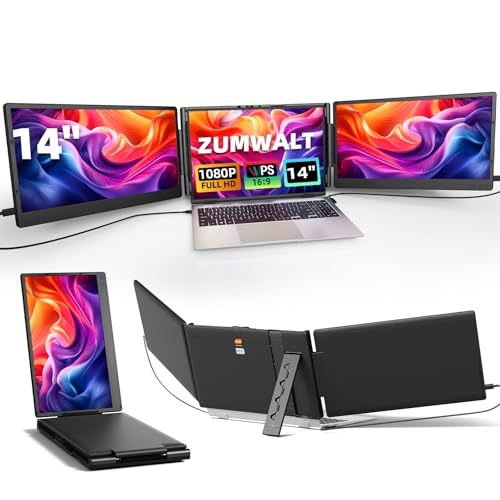
ZUMWALT Extender Review Summary
If you spend your day juggling spreadsheets, documents, chat windows, and browser tabs, the ZUMWALT 14-Inch Triple Screen Extender can be a genuine productivity upgrade.
It is especially appealing for remote workers, students, coders, analysts, and frequent travelers who want a portable triple-monitor setup without buying a separate dock, monitor arm, and external display.
The appeal is straightforward: attach it to a compatible laptop and instantly expand your screen real estate into a three-panel workspace.
That makes this a strong fit for people who value multitasking efficiency, presentation flexibility, and a cleaner mobile setup.
It is not perfect, though, and compatibility is the biggest factor buyers need to verify before ordering.
In other words, this is a high-potential productivity accessory for the right laptop user, but it is not a universal solution.
If your device matches the port requirements and you want a more efficient workflow on the move, the ZUMWALT 14-Inch Triple Screen Extender is very compelling.
Scorecard
| Category | Score | Why it matters |
|---|---|---|
| Multi-screen productivity | 9.0 | Expands a laptop into a triple-screen setup for spreadsheets, chat, design tools, coding, and multitasking without constant tab switching. |
| Display quality | 8.0 | Uses a 14-inch IPS panel with 1080p resolution, 300 nits brightness, 60Hz refresh rate, wide viewing angles, and 80% color gamut for clear everyday work visuals. |
| Compatibility | 7.0 | Supports Mac, Windows, Android, Chrome, and Switch through USB-C or HDMI, but has important chip and port limitations on some laptops. |
| Setup convenience | 8.0 | Plug-and-play design with no driver install, plus included USB-C, HDMI-to-Type-C, and USB-A-to-Type-C cables simplifies getting started. |
| Portability | 7.0 | Slim portable design and included travel pouch suit mobile work, though the triple-monitor form factor is still bulkier than a single external screen. |
| Adjustability and viewing comfort | 8.0 | The 180-degree rotating stand and eye-care-oriented display help with meetings, presentations, and longer work sessions. |
| Build and extras | 7.0 | Includes built-in speakers, a magnetic protector, and a stable base, making it more complete than a bare-bones extender. |
Bottom line: the ZUMWALT 14-Inch Triple Screen Extender is best for buyers who need real screen expansion on a laptop and are willing to check compatibility carefully first.
Key Features and Specifications of ZUMWALT Extender
The hardware package is what makes the ZUMWALT 14-Inch Triple Screen Extender interesting.
It is built as a portable triple monitor accessory, and the feature list is solid for office work, remote collaboration, and everyday media use.
| Spec | Details |
|---|---|
| Screen size | 14 inches |
| Resolution | 1920 x 1080 Full HD |
| Panel type | IPS LCD |
| Aspect ratio | 16:9 |
| Brightness | 300 nits |
| Refresh rate | 60Hz |
| Viewing angle | 178 degrees |
| Contrast ratio | 2000:1 |
| Response time | 2 ms |
| Color gamut | 80% |
| Connectivity | HDMI, USB-C |
| Compatible laptop size | 13 to 16.5 inches |
| Dimensions | 13.85 x 8.5 x 1.44 inches |
| Warranty | 12 months |
| Color | Black |
| Special features | Built-in speakers, eye care, rotatable stand |
- Triple portable monitor extender for a three-screen workflow
- Plug-and-play setup with no driver installation
- Includes 2 USB-C to USB-C cables, 1 HDMI to Type-C cable, and 2 USB-A to USB-C cables
- Includes a magnetic dual-screen extender protector and a travel pouch
- Supports extended and duplicate display modes
- 180-degree rotatable stand for flexible viewing and shared-screen use
Those numbers matter because they position the device as a practical, productivity-focused display rather than a premium creative monitor.
The 1080p IPS panel, 300-nit brightness, and 178-degree viewing angles are all respectable for office tasks, video calls, and media consumption.
The 60Hz refresh rate is also normal for this category, so you should not expect gaming-monitor smoothness.
How the Triple-Screen Setup Works
The core idea behind the ZUMWALT 14-Inch Triple Screen Extender is to transform one laptop into a multi-display workstation.
That means you can keep a main task on the laptop display while using the extra panels for reference docs, Slack or Teams, dashboards, timelines, email, or side-by-side editing.
For many buyers, this is where the value becomes obvious.
A single laptop screen forces constant window switching, especially in work like coding, accounting, trading, and research.
A triple-screen setup reduces friction and helps you build a more stable workflow.
That is why the phrase portable laptop screen extender matters here: it is about workflow speed, not just extra pixels.
The extender supports extended and duplicate modes, which broadens its use cases.
Extended mode is the real productivity play, while duplicate mode is useful for presenting to clients, teaching, or sharing content in a meeting.
The included connectivity options make the setup more forgiving than many cheaper alternatives.
Still, the actual experience depends on whether your laptop has the right type of USB-C support or needs an HDMI path for video transmission.
That is why compatibility should be checked before you buy, not after it arrives.
ZUMWALT Extender Pros and Cons
Below is the practical ZUMWALT 14-Inch Triple Screen Extender pros and cons breakdown from a buyer’s perspective.
Pros
- Adds a lot of usable screen space for multitasking.
- Portable for a triple-screen setup, especially with the included pouch.
- No driver installation keeps setup simple.
- Good display specs for office work and everyday media.
- Includes a generous accessory bundle.
- The rotatable stand improves flexibility for meetings and presentations.
Cons
- Not compatible with some MacBook models, including M1/M2/M3 chip devices.
- Requires the right laptop ports for proper operation.
- The triple-screen form factor can feel bulky for minimal travelers.
- The glossy screen can show reflections in bright rooms.
That combination creates a clear profile: the ZUMWALT is strong on productivity and convenience, but it rewards careful buyers and penalizes impulse shoppers who skip the compatibility check.
Display Quality for Work and Entertainment
For everyday work, the display specification set is good enough to be useful and comfortable.
The 14-inch IPS panel with 1920 x 1080 resolution gives you a sharp enough image for documents, browser work, video calls, and spreadsheets.
The 80% color gamut is decent for general use, though not aimed at serious color-critical editing.
The 300 nits brightness rating is an important middle-ground figure.
It should be adequate indoors in most settings, especially for office lighting and home workstations.
However, the glossy finish means you may still deal with reflections near windows or under strong overhead lights.
That is worth considering if you regularly work in bright cafés or sunlit conference rooms.
The 178-degree viewing angles and 2000:1 contrast ratio help maintain legibility when you tilt the panels or share them with another person.
The 2 ms response time is a nice bonus, but in practice this device is still more about productivity than competitive gaming.
The 60Hz refresh rate confirms that positioning.
Built-in speakers are a useful extra, even if most buyers will still prefer headphones, a laptop speaker, or earbuds for calls and media.
Think of them as a convenience feature rather than a headline reason to buy.
Portability, Stand, and Included Accessories
A lot of portable monitors look good on paper but become annoying the moment you try to travel with them.
The ZUMWALT 14-Inch Triple Screen Extender does a respectable job of staying mobile for what it is.
At 13.85 x 8.5 x 1.44 inches, it is compact enough to fit into a work bag more easily than a traditional multi-monitor setup.
The included travel pouch matters more than it sounds.
Because the extender is meant for mobility, you want some protection when carrying it between office, hotel, home, or classroom.
The magnetic protector also adds a layer of convenience and helps reduce the feeling that you are transporting a fragile, unfinished gadget.
The 180-degree rotatable stand is another practical design choice.
It lets you adjust the setup for shared viewing, better posture, or presentation mode.
If you often join meetings, review documents with a colleague, or switch between desk work and presentations, this flexibility is a real benefit.
From a buyer’s perspective, the best thing about the accessory bundle is that it reduces the need for add-on purchases.
The included USB-C, HDMI-to-Type-C, and USB-A-to-Type-C cables cover more laptop configurations than a bare-bones extender would.
Compatibility and Laptop Port Requirements
This is the section that can make or break your buying decision.
The ZUMWALT 14-Inch Triple Screen Extender is marketed as compatible with Mac, Windows, Android, Chrome, and Switch, but that does not mean every device will work the same way.
The important issue is not only operating system support; it is the combination of chip design and port capability.
The biggest caution is Mac compatibility.
Some Apple laptops, including MacBook Air M1, M2, and M3 models, are not supported.
Some older MacBook Pro configurations are also excluded.
If you are buying this for a Mac, you should verify the exact model before you assume it will work.
On the Windows side, compatibility is generally better, but the laptop still needs the right video output path.
In practical terms, that means buyers should check whether the USB-C port is full-featured and capable of carrying display output, or whether HDMI will be needed to handle video transmission.
If the external display does not show a signal, the cable path is usually the first thing to inspect.
Buyer tip: before ordering, confirm your laptop model, port type, and whether your USB-C supports video.
That one step can save you the most frustration.
Common Setup Issues and How to Avoid Them
Portable extenders like this are often judged unfairly because the setup process can be confusing when the buyer skips the compatibility details.
Most problems fall into a few predictable categories.
- No signal on the extra screen: this usually points to the wrong cable path, an unsupported port, or a Mac chip limitation.
- Loose or inconsistent display output: verify that the USB-C or HDMI connection is seated correctly and that the cable chosen matches the laptop’s output requirements.
- Reflections and glare: position the extender away from direct light or reduce overhead glare if the glossy finish becomes distracting.
- Too much bulk for travel: this is normal for triple-screen gear, so pack it only if the productivity gain justifies the size.
The good news is that the plug-and-play design and included cable kit lower the learning curve.
But because this is not a one-size-fits-all accessory, the setup experience is only as smooth as your laptop compatibility.
Comparable Alternatives to Consider
If you are still deciding whether the ZUMWALT 14-Inch Triple Screen Extender is the right fit, these alternatives make sense depending on your priorities:
- portable USB-C monitor – a better choice if you want one high-quality extra screen and maximum simplicity.
- dual-screen laptop extender – worth considering if triple-screen bulk feels excessive.
- 16-inch portable monitor – useful if you prefer a larger single panel for creative work or split-screen use.
- laptop docking station with external monitor – better for semi-permanent desk setups.
- ASUS portable monitor – a mainstream option from a well-known brand if brand familiarity matters more than triple-screen expansion.
Compared with these, the ZUMWALT stands out because it gives you three displays in one compact package.
That is its advantage and its tradeoff at the same time.
Who Should Buy ZUMWALT Extender?
The ZUMWALT 14-Inch Triple Screen Extender is a smart buy for people who work best with multiple windows open all day and want to keep that workflow on the road.
It is especially suitable for remote workers, students, coders, financial professionals, data analysts, and anyone who regularly handles meetings plus reference material at the same time.
It also makes sense for buyers who want a more organized portable workstation without carrying a separate monitor stand and docking setup.
If your work depends on efficient multitasking, this product can feel like a meaningful upgrade rather than a novelty.
Best fit: users with a compatible 13-inch to 16.5-inch laptop who want a truly portable three-screen workflow.
Who should skip it: buyers with unsupported MacBook chip models, people who travel ultra-light, or anyone who wants a simple single-screen upgrade instead of a triple-display accessory.
Is ZUMWALT Extender Worth It?
Yes, for the right buyer. The ZUMWALT 14-Inch Triple Screen Extender is worth it if your main goal is to increase productivity through more screen space and you have a compatible laptop.
The combination of triple-screen expansion, easy setup, solid IPS display specs, adjustable stand design, and included accessories makes it a strong value proposition in the portable monitor category.
That said, the product’s value is highly dependent on compatibility.
If you are using an unsupported MacBook model or a laptop without the right video output capabilities, the experience can turn frustrating quickly.
The glossy screen and bulkier form factor are also worth accepting only if the extra workspace will genuinely improve your workflow.
Final verdict: if you want a portable multi-monitor solution and your laptop matches the requirements, the ZUMWALT 14-Inch Triple Screen Extender is an easy recommendation.
If you want simpler compatibility or less bulk, a single portable monitor may be the better choice.