APILDELLA P7 Triple Laptop Screen Extender review: this is a serious workspace upgrade for anyone who feels boxed in by a single laptop screen.
It aims to turn a portable computer into a true multi-monitor setup without a desk-bound monitor arm.
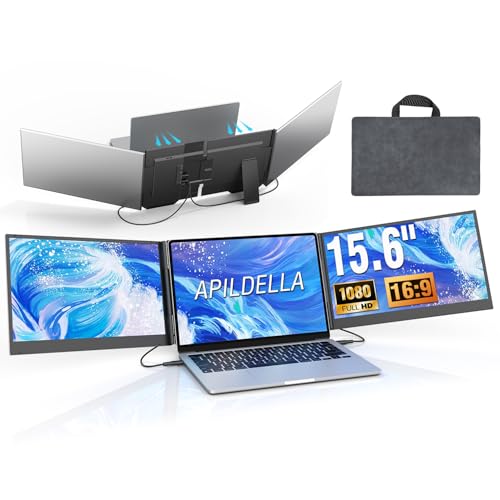
APILDELLA P7 Extender Review Summary
If you want more screen space for spreadsheets, browser tabs, documents, and side-by-side multitasking, the APILDELLA P7 Triple Laptop Screen Extender is a strong productivity buy. It is especially appealing for remote workers, students, analysts, consultants, and frequent travelers who want a portable triple-screen setup without a clamp-style attachment pressing on the lid.
The biggest reason to consider it is simple: it solves the modern laptop problem of limited workspace.
With two added 15.6-inch panels, the APILDELLA P7 gives you enough room to keep communication apps, reference material, and active work visible at the same time.
That makes it a legitimate workflow tool rather than a novelty accessory.
Scorecard
| Category | Score | Why It Matters |
|---|---|---|
| Screen Expansion | 9.0/10 | Turns a single laptop into a much larger multi-screen workstation. |
| Display Quality | 8.0/10 | IPS, HDR, 1080p-class visuals, and 60Hz are solid for productivity and casual media. |
| Setup Ease | 8.0/10 | Plug-and-play operation avoids driver installation and keeps the workflow simple. |
| Compatibility | 7.0/10 | Works with many laptops, but port requirements can rule out some systems. |
| Portability | 8.0/10 | Travel bag, slim aluminum build, and foldable design help keep it mobile. |
| Build and Stability | 7.0/10 | Clamp-free design is laptop-friendly, though the triple-screen format still adds bulk. |
Bottom line: the APILDELLA P7 is best for users who prioritize screen real estate over minimalism. If portability, faster multitasking, and a cleaner two-cable style setup matter more than absolute lightness, it makes a lot of sense.
Verdict: This is a practical, well-considered laptop accessory for mobile productivity, but it is not the right choice for every laptop owner.
Compatibility should be checked before buying.
Key Features and Specifications of APILDELLA P7 Extender
The APILDELLA P7 Triple Laptop Screen Extender is built around two attachable 15.6-inch displays that expand your laptop into a triple-screen workstation.
It is designed for users who want a broader view for work tasks, editing, and everyday multitasking without carrying a full desk setup.
| Specification | Details |
|---|---|
| Brand / Model | APILDELLA P7 |
| Screen Size | 15.6 inches each |
| Display Type | IPS |
| Resolution | 1080p-class / HD listing language |
| Maximum Display Resolution | 1920 x 1200 pixels |
| Aspect Ratio | 16:9 |
| Refresh Rate | 60Hz |
| Response Time | 2 milliseconds |
| Screen Finish | Glossy |
| Body Material | Aerospace-grade aluminum alloy |
| Viewing Adjustment | Foldable 0-180° |
| Connection | 2 USB-C ports with DisplayPort support, or 1 USB-C plus 1 HDMI |
| Modes | Extension, mirroring, second-screen use |
| Compatibility | 13-inch to 17.3-inch laptops; Mac, Windows, Chrome, Switch |
| Included Accessories | Travel bag, 2 USB-C to C cables, 1 USB-A to C cable, 1 HDMI to C cable, power adapter |
| Special Notes | Some MacBook M1-4 chip models require an H5-T accessory |
These specs tell you a lot about the target buyer.
The APILDELLA P7 is not trying to be a general-purpose monitor.
It is designed as a portable productivity extension with a focus on quick expansion, low friction setup, and enough display quality for office work and content review.
- Triple-screen capability: the main selling point for power users
- IPS panels: better than basic TN-style portable displays for everyday viewing
- HDR support: helps visuals look more dynamic, though this is not a professional HDR reference monitor
- Two-cable design: aims to reduce the mess often associated with multi-screen laptop add-ons
- Clamp-free build: avoids pressure on the lid, which is a thoughtful design choice
Pros and Cons of APILDELLA P7 Extender
Before buying any triple laptop monitor extender, it is worth weighing the real-world tradeoffs.
The APILDELLA P7 Triple Laptop Screen Extender pros and cons are fairly straightforward.
Pros
- Huge productivity boost: the extra screen area makes multitasking feel dramatically easier.
- Plug-and-play simplicity: no driver download is a real convenience.
- Clamp-free mounting: gentler on the laptop body than some older extender designs.
- Portable enough for travel: the included bag and slim aluminum shell help.
- Useful screen quality: IPS, HDR, and 60Hz are well matched to work and casual media.
- Multiple cables included: less chance you’ll need to source everything separately.
Cons
- Compatibility is not universal: the right USB-C or HDMI outputs are essential.
- MacBook limitations may apply: certain M1-4 models need an extra accessory.
- Bulk increases fast: triple-screen convenience comes with added weight and width.
- Glossy panels can reflect light: less ideal in bright rooms or near windows.
- Not aimed at color-critical creators: it is better for productivity than high-end visual grading.
Buying insight: the strengths are obvious if you need more space; the drawbacks matter most if you value ultralight travel or use a laptop in very bright environments.
Who Should Buy APILDELLA P7 Extender?
The APILDELLA P7 Extender is a good fit for people whose work benefits from seeing more at once.
If you often switch between email, chat, spreadsheets, reports, timelines, or research tabs, this kind of setup can save time and reduce mental clutter.
- Remote workers who want a flexible home-office and travel solution
- Students who keep lecture notes, sources, and writing assignments open together
- Analysts and finance users who live in spreadsheets and dashboards
- Consultants and sales professionals who need quick mobile presentations and reference panels
- Casual creatives who want side panels for editing workflows and asset management
On the other hand, you should probably skip it if you want the lightest possible carry setup, use a laptop with limited video-out support, or prefer a single external monitor at a fixed desk.
If that sounds like you, a compact portable monitor may be the better fit.
How the Triple-Screen Setup Works
The appeal of the APILDELLA P7 Triple Laptop Screen Extender is not just that it adds displays.
It is that the setup is meant to behave like a practical workstation, with extension, mirroring, and second-screen modes that let you match the display configuration to the task.
In extension mode, the extra panels are most valuable for day-to-day productivity.
You can keep your main laptop screen on your active task while using the side displays for chat, reference docs, web research, or inbox management.
That split is exactly what many buyers want from a laptop screen extender review: real workflow gain, not just more pixels.
The foldable 0-180° viewing adjustment also matters.
It helps you angle the panels in a way that suits a table, café desk, hotel desk, or office bench.
That flexibility is useful because a triple-screen setup needs more placement control than a standard external monitor.
Design choice that stands out: the clamp-free approach.
Instead of relying on a top clamp to hold the panels, APILDELLA has opted for a setup that should be kinder to the laptop body.
For buyers with a premium laptop shell, that is a meaningful consideration.
Compatibility and Connection Requirements
This is the section most buyers should read twice.
A screen extender can look universal on paper while still being picky in practice.
The APILDELLA P7 requires either two USB-C ports with DisplayPort support or one USB-C and one HDMI port.
That means your laptop must have the right output mix to feed both screens properly.
If you are using a newer business laptop, a creator laptop, or a gaming notebook with the right ports, you are in better shape.
Mac users should be especially careful.
The brief notes that some M1-4 chip MacBook configurations need an H5-T accessory, so this is not the sort of accessory you want to buy casually without checking your exact model.
Windows and Chrome users may find compatibility easier, but port shape and video output support still matter.
Practical advice: check your laptop’s video output capabilities before you buy.
That one step can save you from a frustrating return.
If you want to explore comparable options, consider these Amazon search alternatives:
- triple laptop screen extender
- portable dual laptop monitor extender
- single portable USB-C monitor
- lapdock
Those alternatives are worth comparing if you want a lighter setup, a simpler single-screen add-on, or a more self-contained portable workstation style product.
Portable Workstation Use Cases
The APILDELLA P7 is at its best when the laptop is acting as your base computer and the extender is your instant productivity multiplier.
It is not just about having more windows open; it is about reducing context switching.
Best use cases include:
- Spreadsheet work: data entry on one panel, formulas or notes on another, email or chat on the third
- Writing and research: draft in the center, sources to the side, communication tools on the other display
- Project management: timelines, task boards, and reference files visible at once
- Travel productivity: a hotel desk becomes a temporary multi-monitor office
- Presentations and reviews: one screen for the main content, one for notes, one for supporting assets
For casual media, the extender is also fine.
The IPS panels and 60Hz refresh rate should deliver a smooth enough experience for video playback, web browsing, and everyday entertainment.
Just keep in mind that its purpose is productivity first, entertainment second.
Display Quality for Work and Media
The display side of the APILDELLA P7 Triple Laptop Screen Extender is solid for the category.
The 15.6-inch IPS panels, 1080p-class output, and HDR enhancement give it a stronger spec sheet than many basic portable add-ons.
For office use, the important thing is clarity.
Text should be readable, windows should feel spacious, and the panels should make it easier to keep documents organized.
The 16:9 aspect ratio is familiar and efficient for most laptop workflows, especially if your software is already designed around standard widescreen layouts.
The glossy finish is the one display trait that may divide buyers.
Glossy panels often look a bit punchier indoors, but they can also reflect light.
If you frequently work under bright office lighting or near windows, that is a drawback worth considering.
In a dimmer room or controlled environment, it is less of a problem.
For buyers focused on color accuracy: this is not the right class of product for professional grading or color-critical production.
It is more than good enough for productivity, but it is not pretending to replace a high-end creator monitor.
What’s Included in the Box
The package list is strong, and that matters because some laptop accessories become expensive or annoying once you discover what is missing.
Here, APILDELLA includes the extender itself, a travel bag, and a useful cable assortment.
- APILDELLA P7 screen extender
- Travel bag
- 2 USB-C to C cables
- 1 USB-A to C cable
- 1 HDMI to C cable
- Power adapter
This is a better-than-minimal box.
Having multiple cable types included increases the chance that you can get up and running with less extra shopping, which is important for a product category where compatibility is already the main concern.
APILDELLA P7 Extender Review: Design, Build, and Usability
From a design standpoint, the APILDELLA P7 feels intentionally built for mobile productivity rather than desk permanence.
The aerospace-grade aluminum shell gives it a more serious look and should offer decent structural confidence compared with cheaper plastic-heavy accessories.
The ultra-thin profile is also a plus, but the review reality is that triple-screen portability is still relative.
Yes, it is portable for a three-panel accessory.
No, it is not something you will casually forget in a small day bag.
It makes the most sense for users who already travel with a laptop bag and are willing to trade a little bulk for a big workflow gain.
Usability improves because the extender is clamp-free and plug-and-play.
Those two design choices make the product friendlier for real-world use than many competitors that require more fiddly setup or create worry about laptop lid pressure.
The reduced cable clutter is another practical win.
With two independent video signals and shared power, the whole idea is to make the setup feel less cobbled together.
Small but important takeaway: APILDELLA appears to have optimized for everyday use, not just impressive marketing photos.
APILDELLA P7 Extender Review Summary: Alternatives to Consider
If you are undecided, the main alternatives fall into three categories.
First, a portable dual laptop monitor extender gives you extra space with less bulk.
Second, a single portable USB-C monitor is the simplest and often the lightest setup.
Third, a lapdock-style portable workstation display can make more sense if you want a more integrated mobile desk solution.
Compared with those options, the APILDELLA P7 stands out because it gives you two added screens at once.
That is the selling point.
If your work genuinely benefits from a full tri-pane setup, it can be more efficient than buying one monitor now and another later.
Still, the alternatives are better if your priority is low weight, fewer cables, or easier compatibility.
In other words, choose the APILDELLA P7 for workflow density.
Choose a simpler portable monitor for convenience.
Is APILDELLA P7 Extender Worth It?
So, is APILDELLA P7 Triple Laptop Screen Extender worth it?
Yes, if your daily work improves when you can see more information at once and your laptop meets the connection requirements. It is a smart buy for productivity-focused users who want a travel-friendly triple-screen setup without committing to a fixed desktop monitor arrangement.
The reasons to buy are compelling: big screen expansion, solid IPS display quality, easy plug-and-play operation, and a thoughtful clamp-free design.
The reasons to hesitate are also clear: compatibility checks matter, the unit adds bulk, and glossy panels are not ideal in every lighting environment.
For the right buyer, those tradeoffs are acceptable because the workflow gain is substantial.
For the wrong buyer, it could feel like overkill.
Final advice: buy the APILDELLA P7 Triple Laptop Screen Extender if you want a portable productivity upgrade and your laptop ports are compatible.
Skip it if you want the lightest possible carry setup or if you are unsure about your MacBook or USB-C/HDMI support.