Modern NAS storage is no longer limited to basic file sharing. With dual 2.5GbE connectivity, the right enclosure can improve transfers, support multiple users, and handle demanding backup or media workflows without requiring enterprise-grade hardware.
We compared 10 NAS options across drive capacity, networking, processing hardware, memory, expansion, and ease of use to help you choose the best fit for your home, creative workspace, or small business.
Best 10 Nas Enclosures with 2 5gbe Picks for 2026
Best All-Rounder

- Four bays and up to 144TB capacity
- 10GbE plus 2.5GbE networking
- Docker, VMs, RAID, and AI photo tools
Best For: Families, creators, and small teams
Best Rackmount Value

- Compact 1U short-depth chassis
- Dual 2.5GbE network ports
- Google Workspace and Microsoft 365 backup
Best For: Space-limited small-business racks
Best Advanced Home NAS

- Two bays plus dual M.2 NVMe slots
- Intel N100 and 8GB DDR5 RAM
- 2.5GbE, Docker, VMs, and media-server support
Best For: Advanced home users and creators
Best Dual-5GbE Performance

- Dual 5GbE LAN ports
- Three M.2 slots and up to 84TB
- Intel N95, 8GB RAM, and app support
Best For: Editors, creative teams, and fast media workflows
Balanced Home Office Pick
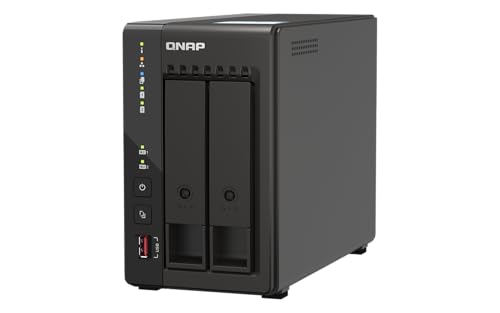
- Dual 2.5GbE ports for faster file sharing
- 8GB RAM with Intel quad-core processing
- Two M.2 slots plus USB 3.2 Gen 2
Best For: Compact home offices and small teams needing fast network storage
Feature-Rich Media Pick

- Two 2.5GbE ports and dual NVMe slots
- HDMI with 4K@60Hz media playback
- Supports Docker, VMs, and remote access
Best For: Media libraries and technical users wanting flexible expansion
High-Capacity Business Pick
TerraMaster F6-424 Six-Bay NAS

- Six bays with extensive RAID support
- Dual 2.5GbE ports with up to 5Gb aggregation
- 8GB DDR5 and business backup tools
Best For: Small businesses and high-capacity multi-user storage
Best Beginner Pick

- Four-bay storage with up to 128TB capacity
- 2.5GbE networking and 8GB RAM
- AI photo organization and automatic mobile backup
Best For: Families and first-time NAS buyers
Best Rackmount Option

- Four-bay rackmount enclosure
- Dual 2.5GbE ports for team file sharing
- 8GB RAM, PCIe expansion, and USB 3.2 Gen 2
Best For: Small offices and rack-based storage
Best Quiet Media NAS

- Quiet two-bay design with 2.5GbE
- 4K H.265 decoding for Plex, Emby, and Jellyfin
- Up to 60TB with TRAID support
Best For: Home media streaming and quiet environments
Best All-Rounder – UGREEN DXP4800 Plus
The UGREEN DXP4800 Plus is a versatile choice among NAS enclosures with 2 5gbe, although its networking setup combines one 10GbE port with one 2.5GbE port. With four drive bays, an Intel five-core CPU, 8GB of DDR5 RAM, Docker and virtual-machine support, it suits users who need centralized storage, backups, and flexible applications.
Best For: Families, creators, and small teams needing high capacity and broad device compatibility.
Pros:
- Four bays support up to 144TB with compatible drives.
- Includes 10GbE and 2.5GbE networking plus 10Gbps USB ports.
- Supports RAID, Docker, virtual machines, encrypted private-cloud storage, and AI photo organization.
- Offers 4K HDMI, an SD 3.0 slot, and apps for major desktop and mobile platforms.
Cons:
- Hard drives and SSDs are not included.
- Actual transfer speeds depend on the network, drives, processor, and file sizes.
- Wired Ethernet is required; Wi-Fi is not supported.
Choose the DXP4800 Plus if you want more bays and expansion headroom than a typical home NAS. Its mixed 10GbE/2.5GbE connectivity is especially useful when your network includes both high-speed and mainstream equipment.
Best Rackmount Value – QNAP TS-433eU-US
The QNAP TS-433eU-US is a compact 1U rackmount option for buyers comparing NAS enclosures with 2 5gbe. Its dual 2.5GbE ports support faster file sharing, while the short 11.51-inch chassis makes it practical for shallow racks and space-limited installations.
Best For: Small teams and edge deployments that need rackmount storage in a compact enclosure.
Pros:
- Dual 2.5GbE ports support 2.5G, 1G, and 100M connections.
- Short-depth 1U design fits more constrained rack environments.
- 4GB of onboard DDR4 RAM and a quad-core ARM Cortex-A55 processor are included.
- Boxafe supports backups for Google Workspace and Microsoft 365 accounts and files.
Cons:
- The product is diskless, so storage drives must be purchased separately.
- Its ARM processor and 4GB RAM are more focused on storage and backup than demanding virtualization workloads.
- It provides 2.5GbE rather than 5GbE connectivity.
The TS-433eU-US stands out when rack compatibility and physical fit matter more than maximum processing power. Its dual 2.5GbE ports and cloud-account backup support make it a sensible small-business or edge-storage platform.
Best Advanced Home NAS – UGREEN DXP2800
The UGREEN DXP2800 is a capable two-bay choice for shoppers considering NAS enclosures with 2 5gbe, with a 2.5GbE connection aimed at faster home and creator workflows. Its Intel N100 processor, 8GB of DDR5 RAM, and dual M.2 NVMe slots support storage, backups, media serving, Docker, and virtual machines.
Best For: Advanced home users, remote workers, creators, and media-server enthusiasts.
Pros:
- Supports up to 80TB across two HDD bays and two M.2 NVMe slots.
- Intel N100 CPU and 8GB DDR5 RAM suit larger files and multiple applications.
- Includes AI photo organization and duplicate-photo detection.
- Can support local surveillance features including face, people, and pet detection with compatible cameras.
Cons:
- HDDs and SSDs are not included.
- It has one 2.5GbE network connection rather than dual 5GbE ports.
- Two main drive bays provide less HDD expansion than four-bay models.
The DXP2800 is a strong fit for a growing digital library when you want compact hardware without giving up application flexibility. The M.2 slots add useful performance or storage options, while the two-bay layout keeps the enclosure relatively straightforward.
Best Dual-5GbE Performance – TerraMaster F2-425 Plus
The TerraMaster F2-425 Plus is the clearest match for shoppers seeking NAS enclosures with 2 5gbe. It has dual 5GbE LAN ports with link aggregation and SMB Multichannel, along with an Intel N95 processor, 8GB of RAM, and three M.2 slots for demanding storage and media workloads.
Best For: Video editors, creative teams, small offices, and advanced home media users with a 5GbE network.
Pros:
- Dual 5GbE ports can deliver up to 1020MB/s sequential read/write speeds under suitable conditions.
- Three M.2 slots support SSD caching or independent storage pools.
- Supports up to 84TB across two HDDs and three M.2 SSDs.
- Includes Docker, virtual-machine, Portainer, backup, and Plex/Emby/Jellyfin support.
Cons:
- The enclosure is diskless, so HDDs and SSDs are extra.
- Reaching the quoted speeds requires compatible networking, drives, and workload conditions.
- Its two-bay design offers less primary HDD expansion than four-bay alternatives.
For a roundup focused specifically on NAS enclosures with 2 5gbe, the F2-425 Plus is the most direct fit. Its dual 5GbE connectivity and three M.2 slots make it particularly appealing for fast collaborative storage, editing workflows, and high-bandwidth home media use.
Balanced Home Office Pick – QNAP TS-253E-8G-US
The QNAP TS-253E-8G-US is a practical choice among NAS enclosures with 2 5GbE connections, pairing dual 2.5GbE ports with 8GB RAM and an Intel quad-core processor. Its two bays, NVMe slots, and USB 3.2 Gen 2 ports make it suitable for shared files, backups, and personal media without taking up much space.
Best For: Home users, small teams, and buyers who want a compact two-bay NAS with fast networking and SSD expansion.
Pros:
- Dual 2.5GbE ports support faster file sharing and large transfers.
- Includes 8GB RAM and an Intel quad-core CPU with burst speeds up to 2.9 GHz.
- Two M.2 PCIe Gen3x2 slots can provide cache acceleration or SSD storage pools.
- Multiple USB 3.2 Gen 2 ports support fast external-drive transfers.
Cons:
- It is diskless, so drives must be purchased separately.
- The two-bay design offers less drive capacity than larger enclosures.
Choose this QNAP when you value a ready-to-expand desktop platform and straightforward 2.5GbE connectivity. It is especially well suited to organized home media, family files, and small-office sharing.
Feature-Rich Media Pick – ORICO HS200 2-Bay NAS
The ORICO HS200 is a flexible option among NAS enclosures with 2 5GbE connections, combining two 2.5GbE ports with two HDD bays and two M.2 NVMe slots. It also adds HDMI output, remote access, virtual-machine support, Docker tools, and media-library features for buyers who want more than basic file storage.
Best For: Media-focused households and technical users who want expandable storage, remote sharing, and multiple software environments.
Pros:
- Supports two HDDs and two M.2 NVMe SSDs, with up to 64TB listed capacity.
- Dual 2.5GbE ports, USB-A, USB-C, and HDMI provide versatile connectivity.
- Supports Time Machine, remote access, Docker, and virtual-machine setup options.
- Offers 4K@60Hz playback and automated movie organization features.
Cons:
- It is diskless and requires separate HDDs or SSDs.
- The listed warranty is 18 months, shorter than some competing options.
- WAN performance is listed at 10MB/s, so remote transfers may be slower than local ones.
The HS200 stands out for its broad feature set and hybrid HDD/NVMe layout. Consider it if media playback, experimentation with operating systems, and remote family access matter as much as storage.
High-Capacity Business Pick – TerraMaster F6-424 Six-Bay NAS
The TerraMaster F6-424 is a six-bay choice among NAS enclosures with 2 5GbE connections, designed for higher-capacity storage and multi-user workloads. Its dual 2.5GbE interfaces support link aggregation up to 5Gb of network bandwidth, while RAID options, NVMe caching, and business backup tools add room for growth.
Best For: Small and medium-sized businesses, busy households, and users who need six bays, flexible RAID, and centralized backup features.
Pros:
- Six drive bays support more storage and a broad range of RAID configurations.
- Dual 2.5GbE ports can provide link aggregation up to 5Gb of network bandwidth.
- Includes 8GB DDR5 memory, dual M.2 NVMe slots, and dual USB 3.2 Gen 2 ports.
- Business Backup Suite includes centralized backup, synchronization, cloud recovery, and snapshots.
Cons:
- It is diskless, so the six bays require separately purchased drives.
- The larger six-bay enclosure is less compact than two-bay alternatives.
- Its listed warranty is two years.
For buyers prioritizing capacity and resilience, the F6-424 is the strongest fit in this group. Its six bays and backup-focused software make it better suited to growing data collections and business workflows than entry-level two-bay models.
Best Beginner Pick – UGREEN NAS DH4300 Plus
If you want one of the more approachable NAS enclosures with 2.5GbE for home storage, the UGREEN NAS DH4300 Plus combines four drive bays with beginner-friendly setup tools. It supports private cloud access, Docker, automatic backups, AI photo organization, and 4K HDMI output, though it does not support virtual machines.
Best For: Families, home users, and remote workers moving away from cloud storage or external drives.
Pros:
- Four-bay design supports up to 128TB of storage with compatible drives.
- 8GB LPDDR4X RAM and a 2.5GbE port support multitasking and faster file transfers.
- Automatic mobile photo backup with AI albums, semantic search, and duplicate removal.
- Supports access across Windows, macOS, Android, iOS, web browsers, and smart TVs.
Cons:
- Storage disks are not included.
- Does not support virtual machines.
- Its feature set may be more than needed for simple file storage.
The DH4300 Plus is a practical choice when ease of use and family-focused photo management matter as much as capacity. Its four bays and 2.5GbE connectivity give it room to grow, while the guided setup and mobile tools reduce the learning curve.
Best Rackmount Option – QNAP TS-464U-8G-US
For teams needing rack-ready hardware, the QNAP TS-464U-8G-US is a strong contender among NAS enclosures with 2.5GbE. This diskless four-bay unit pairs dual 2.5GbE ports with an Intel Celeron processor, expandable memory, PCIe expansion, and fast USB connectivity for demanding file-sharing and backup workloads.
Best For: Small offices, rackmount installations, and teams moving large files across multiple devices.
Pros:
- Dual 2.5GbE ports support faster file sharing and large transfers.
- Quad-core Intel Celeron N5105/N5095 processor bursts up to 2.9GHz.
- Includes 8GB DDR4 RAM, expandable to 16GB.
- PCIe Gen 3×2 expansion and USB 3.2 Gen 2 ports add upgrade and transfer flexibility.
Cons:
- Diskless configuration requires separate storage drives.
- Rackmount format is less suitable for users seeking a compact desktop NAS.
- Its business-oriented features may be excessive for basic home backups.
The TS-464U-8G-US stands out when network throughput and rack integration are priorities. Dual 2.5GbE ports and expansion options make it better suited to shared office workloads than a basic single-port NAS, while Boxafe adds backup support for Google Workspace and Microsoft 365.
Best Quiet Media NAS – TERRAMASTER F2-425
The TERRAMASTER F2-425 is a compact two-bay choice among NAS enclosures with 2.5GbE, aimed at home users who want media streaming and straightforward backups. Its Intel x86 quad-core processor, 4GB RAM, hardware 4K H.265 decoding, and quiet 19dB(A) operation make it well suited to living spaces and bedrooms.
Best For: Home media libraries, quiet rooms, and users who want mobile photo backup in a compact enclosure.
Pros:
- 2.5GbE networking supports fast transfers and concurrent users.
- Hardware-level 4K H.265 decoding works with Plex, Emby, and Jellyfin.
- Quiet 19dB(A) operation and tool-free push-lock drive trays suit home use.
- Supports up to 60TB, TRAID arrays, cloud synchronization, and two-way PC/Mac sync.
Cons:
- Only two drive bays provide less expansion than four-bay models.
- Storage drives are not included.
- Plastic enclosure material may feel less substantial than metal alternatives.
The F2-425 is a sensible fit if quiet operation and media playback matter more than maximum bay count. Its 2.5GbE port and 4K decoding support a capable home media setup, while mobile initialization and automatic photo backups keep routine management simple.
How We Picked the Best Nas Enclosures with 2 5gbe
We evaluated these NAS systems for the features that matter most in real-world storage setups: the number of drive bays, available 2.5GbE ports, processor performance, included memory, upgrade potential, operating-system support, and overall suitability for backups, media, surveillance, and shared work files.
We also considered form factor. Desktop models are generally easier to install and maintain, while short-depth and full rackmount systems make more sense for network closets, offices, and structured storage environments. Because the products span entry-level two-bay units through six-bay systems, the final choice depends as much on future capacity as current needs.
Quick Comparison
- Best for larger home libraries and growing teams: Choose a four- or six-bay enclosure for more capacity, RAID flexibility, and easier expansion.
- Best for compact setups: Two-bay desktop models provide a smaller footprint and a straightforward starting point.
- Best for rack installations: Short-depth 1U and four-bay rackmount options suit offices with existing rack infrastructure.
- Best for SSD-assisted workflows: Models with M.2 NVMe slots can add caching or separate fast storage, depending on software support.
Key Buying Factors for NAS Enclosures with 2.5GbE
Drive Bays and RAID Planning
Two bays are enough for mirrored storage, but four or six bays offer more usable capacity and better flexibility for expansion. Remember that RAID improves availability; it is not a substitute for an independent backup.
Networking Hardware
Dual 2.5GbE ports can support link aggregation, separate network paths, or multiple connected users, but the benefit depends on your switch, cabling, client devices, and NAS configuration. A single 2.5GbE connection is still useful for faster transfers than standard gigabit Ethernet.
CPU, Memory, and Applications
Modern Intel and comparable multi-core processors are better suited to simultaneous file transfers, indexing, media services, and backup jobs. More RAM helps when running several applications or working with larger libraries, while upgradeable memory can extend the enclosure’s useful life.
Expansion and Software
Check for M.2 slots, USB expansion, supported drive types, snapshots, remote access, synchronization, and virtualization or container features if you need them. Also verify compatibility with your preferred backup and media applications before buying.
Who Should Buy Which Nas Enclosures with 2 5gbe?
Choose a two-bay NAS if you want a compact personal cloud, automated backups, or mirrored protection for important files. A four-bay model is the better all-purpose choice for families, creators, and small teams that need more capacity or a more flexible RAID layout. Six-bay storage is worth considering when you maintain a large media collection, expect significant growth, or want to balance capacity and redundancy.
For offices with rack equipment, select a rackmount enclosure that matches your available depth and cooling setup. For beginners, prioritize a simple desktop model with clear software and room to expand. Whichever model you choose, use compatible NAS-rated drives, protect the system with a UPS, and maintain a separate backup of irreplaceable data.