The best drawing tablet for artists should feel natural to use, match your workspace, and provide the pressure control and shortcut access your workflow demands. This roundup covers pen displays, screenless tablets, and standalone Android options.
Whether you are illustrating, editing photos, animating, or learning digital art, the right combination of screen size, portability, compatibility, and pen performance can make the process faster and more comfortable.
Best 10 Drawing Tablet for Artists Picks for 2026
Best Overall

- 13.3-inch laminated display with Canvas Glass 2.0
- 16384 pressure levels and 99% sRGB coverage
- Dual dials, shortcut keys, and adjustable stand
Best For: Artists wanting an accurate, compact pen display
Best Compact Pick

- 11.6-inch Full HD IPS display
- Battery-free pen with digital eraser
- Six shortcut keys and programmable touch bar
Best For: Students and beginners needing a compact pen display
Best for Detailed Work

- 15.4-inch laminated anti-glare display
- 16384 pressure levels with X3 Pro stylus
- Red dial and eight customizable keys
Best For: Artists needing a larger screen for detailed projects
Best Screenless Value
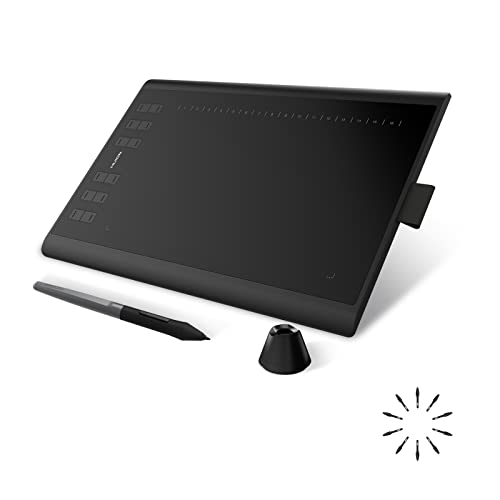
- 10 x 6.25-inch active drawing area
- Battery-free pen with tilt support
- 12 press keys plus 16 soft keys
Best For: Artists wanting a spacious screenless tablet with many shortcuts
Best Color-Accurate Pen Display

- 16K pressure-sensitive battery-free stylus
- Fully laminated FHD display with wide color coverage
- Dial, shortcut keys, stand, and accessories included
Best For: Detailed digital art, animation, and graphic design
Best Standalone Starter Tablet

- Works independently without a computer
- Laminated 10-inch display with 4096-level pen
- Preloaded apps, tutorials, case, and accessories
Best For: Beginners, students, and portable sketching
Best Ergonomic Pro Pen Display

- 14-inch laminated anti-glare display
- 16K stylus with highly precise pressure response
- Stand, wireless remote, and wrist rest included
Best For: Professional illustration, animation, and 3D work
Best Standalone Pick

- Standalone Android 14 design
- 8,192-level battery-free pen
- Matte, paper-like display
Best For: Portable, computer-free sketching
Best Budget Pen Tablet

- Compact 6-by-4-inch active area
- Battery-free 8,192-level stylus
- Six customizable shortcut keys
Best For: Beginners and portable computer-based drawing
Best Screen Tablet for Desktop Work

- Fully laminated 11.6-inch display
- 8,192 pressure levels with tilt
- Red dial plus eight shortcut keys
Best For: Computer-connected, on-screen drawing
Best Overall – HUION Kamvas 13 (Gen 3)
The HUION Kamvas 13 (Gen 3) is a strong drawing tablet for artists who want a compact pen display with accurate color, a laminated screen, and flexible shortcut controls. Its 13.3-inch display must be connected to a compatible computer or laptop to work.
Best For: Artists, illustrators, and designers seeking a portable pen display with advanced pressure sensitivity and color accuracy.
Pros:
- Fully laminated Canvas Glass 2.0 screen helps reduce glare and parallax.
- 16384 pressure levels and PenTech 4.0 support detailed, natural strokes.
- 99% sRGB coverage, factory calibration, five shortcut keys, and dual dials.
- Includes an adjustable stand and supports Windows, macOS, Android, and Linux.
Cons:
- Not a standalone tablet; it requires connection to a computer or compatible device.
- A full-featured USB-C cable is sold separately if you do not use the included 3-in-1 cable.
With its accurate display, high pressure sensitivity, and useful control layout, the Kamvas 13 (Gen 3) is a well-rounded drawing tablet for artists who prioritize a responsive on-screen workflow.
Best Compact Pick – XP-PEN Artist12
The XP-PEN Artist12 is a compact drawing tablet for artists who need an on-screen workspace for drawing, animation, photo editing, or online instruction. Its 11.6-inch Full HD display must be connected to a computer and uses HDMI and USB connectivity.
Best For: Students, teachers, beginners, and creators who prefer a smaller pen display with customizable controls.
Pros:
- 1920×1080 IPS display offers vivid images and 100% sRGB coverage as listed.
- Six customizable shortcut keys and a programmable touch bar support faster navigation.
- Battery-free stylus includes a digital eraser and supports 8192 pressure levels.
- Compatible with major creative software and includes a pen holder, glove, and replacement nibs.
Cons:
- Requires a computer with available HDMI and USB-A ports, or an appropriate adapter.
- The smaller 11.6-inch active display provides less workspace than larger pen displays.
The Artist12 offers a practical entry point for anyone who wants direct screen drawing without taking up much desk space, though connection requirements should be checked before buying.
Best for Detailed Work – XPPen Artist 15.6 Pro V2
The XPPen Artist 15.6 Pro V2 is a drawing tablet for artists who want a larger laminated display, highly sensitive pen input, and a dedicated dial for controlling common creative tools. The pen display requires a computer or laptop and includes a 3-in-1 cable.
Best For: Illustrators, designers, and hobbyists who need a larger workspace for detailed drawing and extended sessions.
Pros:
- X3 Pro stylus provides 16384 pressure levels for nuanced line control.
- Full-laminated anti-glare glass helps reduce parallax and reflections.
- Red dial and eight customizable shortcut keys can streamline repetitive commands.
- Wide color coverage includes 99% sRGB, 96% Adobe RGB, and 96% Display P3.
Cons:
- It must be connected to a computer or laptop to operate.
- The larger 15.4-inch format may require more desk space than compact models.
This model is geared toward users who value a spacious, color-capable display and extensive hardware controls, making it a compelling choice for detail-focused creative work.
Best Screenless Value – HUION Inspiroy H1060P
The HUION Inspiroy H1060P is a screenless drawing tablet for artists who want a generous working area, extensive shortcut controls, and a battery-free stylus. It connects by USB to a computer or compatible Android device, so drawing is performed while viewing the computer or mobile screen.
Best For: Artists, beginners, and hobbyists who prefer a spacious, affordable-style pen tablet with many programmable controls.
Pros:
- 10 x 6.25-inch working area provides comfortable room for drawing.
- Battery-free stylus supports 8192 pressure levels and ±60° tilt recognition.
- Includes 12 programmable press keys and 16 programmable soft keys.
- Symmetrical design can accommodate right- or left-handed use.
Cons:
- It has no built-in drawing display, so users must look at a connected screen.
- Mac connection requires a USB adapter, and Ubuntu requires the Xorg display server.
- iPhone and iPad are not supported according to the supplied notes.
The H1060P is a practical choice for users comfortable with screenless drawing who value a large active area and more shortcut buttons than many compact tablets provide.
Best Color-Accurate Pen Display – XP-PEN Artist 13.3 Pro V2
The XP-PEN Artist 13.3 Pro V2 is a strong drawing tablet for artists who want to work directly on a responsive screen. Its fully laminated 13.3-inch display, 16K pressure-sensitive stylus, shortcut controls, and broad device compatibility suit detailed illustration, manga, animation, and graphic design.
Best For: Artists who want a portable pen display with accurate color, customizable controls, and the option to use it as a traditional pen tablet.
Pros:
- 16,384 pressure levels, low initial activation force, tilt support, and a built-in digital eraser.
- Fully laminated 1920×1080 display with 99% sRGB, 89% Adobe RGB, and 95% P3 coverage.
- Red dial, eight shortcut keys, foldable stand, replacement nibs, glove, and pen holder included.
- Supports direct USB-C connections with compatible devices and can switch to pen tablet mode.
Cons:
- It is not standalone and must be used with a compatible computer, laptop, Chromebook, or Android device.
- Traditional HDMI setups require a separately sold 3-in-1 cable.
For artists prioritizing screen feel and color flexibility, this model offers a well-equipped workspace in a relatively portable format. Confirm that your device supports the required USB-C video connection before buying.
Best Standalone Starter Tablet – PicassoTab A10
The PicassoTab A10 is a drawing tablet for artists and students who want to create without connecting to a computer. Running Android 14 with preloaded creative apps, guided tutorials, expandable storage, and a laminated 10-inch display, it is designed for portable, beginner-friendly drawing and everyday tablet use.
Best For: Beginners, students, and travelers who want an all-in-one drawing device with built-in lessons and no separate computer.
Pros:
- Standalone design works without a computer and includes five creative apps.
- Laminated 10-inch 2000×1200 display and 4096-level pressure-sensitive active pen.
- Octa-core processor, 6GB RAM, 64GB storage, and expansion up to 1TB.
- Includes a case, glove, universal power adapter, screen protector, and lifetime tutorial upgrades.
Cons:
- Its 4096 pressure levels are lower than the pressure sensitivity offered by the two XP-Pen models.
- The 10-inch screen may feel limiting for artists who prefer a larger workspace.
The A10 stands out when independence and ease of use matter more than professional pen-display specifications. Its tutorials and included accessories make it particularly approachable for new digital artists.
Best Ergonomic Pro Pen Display – XP-Pen Artist Pro 14 Gen2
The XP-Pen Artist Pro 14 Gen2 is a drawing tablet for artists who need a larger, feature-rich screen for illustration, animation, 3D modeling, or design. Its 14-inch laminated anti-glare display, 16K stylus, wireless shortcut remote, foldable stand, and wrist rest are built around extended creative sessions.
Best For: Experienced digital artists, animators, and 3D creators who want detailed pen input and ergonomic workflow controls.
Pros:
- 16,384 pressure levels with the X3 Pro battery-free stylus for nuanced lines.
- Full lamination, etched anti-glare glass, 16:10 aspect ratio, and 178-degree viewing angle.
- 99% sRGB coverage, 123% sRGB color gamut area ratio, and stated ΔE <2.2 accuracy.
- Includes a foldable stand, wireless shortcut remote, and X-Edge wrist rest.
Cons:
- It is not standalone and requires a compatible computer or laptop.
- The feature-rich setup may be more than beginners need.
This is the more workspace-focused choice of the two XP-Pen displays, combining a larger screen with useful ergonomic accessories. Check your operating system and USB video compatibility, particularly for Android connections.
Best Standalone Pick – Wacom MovinkPad 11
For artists who want a drawing tablet for artists that works without a computer, the Wacom MovinkPad 11 combines Android 14, 8GB of memory, 128GB of storage, and a pressure-sensitive Pro Pen 3 in one portable device. Its matte etched-glass display is designed for a paper-like feel, while the Quick Draw feature opens Wacom Canvas quickly for spontaneous sketching.
Best For: Artists who want an all-in-one, portable sketching and drawing setup.
Pros:
- Standalone Android tablet requires no computer.
- 8,192 pressure levels and a battery-free Pro Pen 3 support precise strokes.
- Matte etched glass reduces glare and adds subtle paper-like texture.
- Lightweight 1.3-pound design fits easily in a bag.
Cons:
- Its 11.45-inch display may feel compact for large illustrations.
- Android app compatibility may differ from a desktop workflow.
The MovinkPad 11 is the most self-contained option here, making it especially convenient for travel, classes, and quick ideas. Choose it if portability and computer-free drawing matter more than a larger desktop workspace.
Best Budget Pen Tablet – HUION Inspiroy H640P
The HUION Inspiroy H640P is a compact, practical drawing tablet for artists who already have a compatible computer or Android device. Its 6-by-4-inch active area, battery-free stylus, and six customizable keys provide precise control for drawing, editing, notes, and everyday cursor work without taking up much desk or bag space.
Best For: Beginners, students, and artists seeking an affordable, portable pen tablet.
Pros:
- Battery-free pen offers 8,192 pressure levels and 5080 LPI resolution.
- Six customizable keys can be assigned to shortcuts and saved by application.
- Thin, lightweight design is convenient for travel and crowded workspaces.
- Supports Windows, Mac, Linux, and Android devices, with left-handed use supported.
Cons:
- It has no built-in screen, so artists draw while viewing a separate device.
- It does not support iPhone or iPad.
The H640P focuses on essential pen-tablet functionality rather than premium extras. It is a strong fit for artists comfortable with a screenless workflow and for anyone wanting programmable controls in a small, accessible package.
Best Screen Tablet for Desktop Work – XP-Pen Artist 12 Pro
The XP-Pen Artist 12 Pro is a screen-based drawing tablet for artists who prefer to draw directly on the image. Its fully laminated 11.6-inch display is designed to minimize parallax, while the battery-free stylus provides pressure and tilt control. A red dial and eight customizable keys help streamline painting, editing, and navigation.
Best For: Desktop artists who want an affordable pen display with direct-on-screen drawing.
Pros:
- Fully laminated anti-glare display helps reduce visual gap and reflections.
- Battery-free stylus supports 8,192 pressure levels and up to 60 degrees of tilt.
- Red dial and eight customizable keys provide efficient workflow control.
- Works with Windows, macOS, ChromeOS, and Linux.
Cons:
- It must connect to a computer and cannot be used as a standalone tablet.
- The 11.6-inch screen may provide less room than larger pen displays.
- Its 3-in-1 cable setup adds connectivity requirements to a desk workflow.
The Artist 12 Pro is a good middle ground for artists who want direct screen drawing without moving to a larger display. Its laminated screen, tilt support, and physical controls make it particularly useful for desktop painting and editing.
How We Picked the Best Drawing Tablet for Artists
We compared these 10 models by looking at the features that most affect everyday creative work: drawing surface size, display quality, pressure sensitivity, pen technology, shortcut controls, connectivity, operating-system support, portability, and overall value. The selection includes screen-based pen displays, traditional graphics tablets that require a computer, and standalone tablets that can run without one.
Because artists have different priorities, we did not treat the most expensive or highest-resolution model as automatically best. Instead, each category favors practical strengths such as comfortable long-session use, responsive pen tracking, useful controls, or convenient mobile operation.
Quick Comparison
| Type | Best For | Key Advantage |
|---|---|---|
| Screen pen display | Illustrators and designers | Draw directly on the image |
| Screenless graphics tablet | Desktop artists and beginners | Lower cost and compact setup |
| Standalone tablet | Mobile and travel workflows | No computer required |
Key Buying Factors for a Drawing Tablet for Artists
Display Size and Surface
Smaller 11- to 13-inch displays are easier to transport, while 14- to 16-inch screens provide more room for detailed illustrations and timeline-based work. Screenless tablets are often more affordable and can feel efficient once hand-eye coordination becomes familiar.
Pen Performance
Pressure sensitivity helps control line weight, opacity, and brush size. Battery-free styluses reduce maintenance, while tilt support benefits shading and brush effects. High pressure-level ratings are useful, but driver quality and real-world tracking matter just as much.
Controls and Ergonomics
Express keys, dials, and programmable buttons can reduce reliance on keyboard shortcuts. Also check the stand, viewing angle, textured surface, anti-glare treatment, and whether the tablet remains comfortable during long sessions.
Compatibility and Connections
Confirm support for your operating system and preferred software before buying. Check whether the model connects by USB-C, requires multiple cables, or supports Android or Chromebook devices. Standalone options should also be judged by storage, battery life, and app support.
Who Should Buy Which Drawing Tablet for Artists?
Choose a screen pen display if you want the most direct, paper-like workflow for illustration, concept art, or design. Larger Artist Pro and 15.6-inch models suit artists who value workspace, while compact 11- to 13-inch displays are better for smaller desks and travel.
A screenless HUION Inspiroy or similar graphics tablet is a smart choice for beginners, photo editors, and budget-conscious desktop users. It offers a capable input surface without paying for a built-in display.
For drawing away from a computer, consider the PicassoTab or Wacom MovinkPad 11. These standalone options are more convenient for mobile sketching, though their app ecosystem and hardware limits should be checked against your specific workflow. Finally, prioritize the model that fits your software, desk, and preferred drawing style rather than choosing solely by pressure-sensitivity numbers.