The best portable drawing tablets let you sketch, illustrate, annotate, and develop ideas without being tied to a desk. This roundup compares standalone Android models with screen-based tablets that connect to a computer.
We focus on drawing feel, portability, display quality, software flexibility, and value so you can choose the right tablet for travel, classes, client work, or everyday creativity.
Best 10 Portable Drawing Tablets Picks for 2026
Best Mobile Studio

- Standalone Android 14 tablet with 8GB RAM and 256GB storage
- 12.2-inch 2160×1440 paper-like display
- 16,384-pressure-level stylus and up to 13-hour battery
Best For: Artists wanting a spacious, highly portable standalone drawing tablet
Best Premium Display

- 14-inch 3K OLED display with 100% sRGB and DCI-P3
- Snapdragon 8s Gen 3, 12GB RAM, and 256GB storage
- Battery-free Pro Pen 3 with 8,192 pressure levels
Best For: Professionals seeking high-end color and performance on the go
Best Value Slate

- 10.95-inch FHD+ display with 99% sRGB and 90Hz refresh
- Android 14 tablet with 8GB RAM and expandable storage
- H-Pencil includes 4,096 pressure levels and tilt recognition
Best For: Students and creators wanting an accessible all-in-one drawing tablet
Best Compact Sketchbook

- 11.45-inch matte display with a paper-like surface
- Quick-launch Wacom Canvas app for instant sketching
- Battery-free Pro Pen 3 with 8,192 pressure levels
Best For: Mobile sketchers and note-takers who prioritize convenience
Best Standalone Pick

- Standalone 11-inch tablet with no computer required
- Laminated 2K display and 4096-level pressure pen
- Includes apps, tutorials, case, glove, and screen protector
Best For: Students and beginners seeking a larger all-in-one drawing tablet
Best Connected Display

- 13.3-inch laminated pen display for PC, Mac, Linux, or Android
- 16,384 pressure levels with PenTech 4.0
- Includes shortcut controls, dual dial, and adjustable stand
Best For: Creators who want a portable screen tablet connected to a compatible device
Best Budget-Friendly Standalone

- Compact 10-inch standalone tablet with Android 14
- Laminated screen and 4096-level active pen
- Includes tutorials, creative apps, case, glove, and adapter
Best For: Beginners and students wanting an all-in-one portable drawing setup
Best for Connected Creative Work
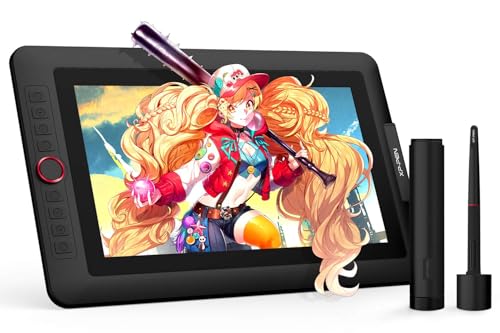
- 13.3-inch fully laminated FHD display
- 16,384-pressure-level tilt-sensitive stylus
- Requires a computer or laptop
Best For: Artists seeking a feature-rich pen display for computer-based work
Best Standalone Value

- Works without a computer
- 10.1-inch Full HD IPS display
- Up to five hours of battery use
Best For: Beginners, students, and mobile creators needing an independent tablet
Best for Notes and Sketching

- Paper-like anti-glare 10.95-inch display
- 16,384-pressure-level battery-free stylus
- Android 14 with three color modes
Best For: Students and creators combining handwritten notes with portable sketching
Best Mobile Studio – XPPen Magic Drawing Pad
For artists seeking portable drawing tablets that work without a computer, the XPPen Magic Drawing Pad combines a 12.2-inch paper-like display with Android 14, 8GB of RAM, and 256GB of storage. Its lightweight design, included battery-free stylus, and long battery life make it practical for drawing away from a desk.
Best For: Artists who want a standalone tablet with generous storage, a large display, and highly sensitive pen input.
Pros:
- Includes an X3 Pro stylus with 16,384 pressure levels and 60-degree tilt recognition.
- 12.2-inch 2160×1440 anti-glare display offers 97% sRGB coverage and a paper-like surface.
- 8,000mAh battery supports up to 13 hours of creation, with storage expandable to 1TB.
Cons:
- At about 599g, it is portable but heavier than a typical compact tablet.
- Its Android app experience may not replace a full desktop workflow for every artist.
The Magic Drawing Pad is a flexible all-in-one option for sketching, illustration, and light creative multitasking. Its high-resolution screen and unusually high pressure sensitivity are strong advantages for detail-oriented work.
Best Premium Display – Wacom MovinkPad Pro 14
The Wacom MovinkPad Pro 14 is one of the more powerful portable drawing tablets for artists who want a large, color-rich standalone display. Android 15, 12GB of RAM, a Snapdragon 8s Gen 3 processor, and a 3K OLED panel support demanding creative work without requiring a separate computer.
Best For: Professional artists, designers, and photographers who prioritize display quality and performance in a mobile format.
Pros:
- 14-inch 3K OLED display provides vivid color, true blacks, and 100% sRGB and DCI-P3 coverage.
- 12GB RAM, 256GB storage, and microSD expansion provide strong capacity for creative projects.
- Wacom Pro Pen 3 offers 8,192 pressure levels, needs no charging, and includes replacement nibs.
Cons:
- At approximately 0.73kg, it is less lightweight than smaller mobile drawing tablets.
- Instant pen-display compatibility excludes Windows ARM-based systems and Intel Macs.
With its premium textured glass and OLED panel, the MovinkPad Pro 14 is well suited to color-sensitive work and extended drawing sessions. It is a strong choice when performance and screen quality matter more than minimizing size and weight.
Best Value Slate – HUION Kamvas Slate 11
The HUION Kamvas Slate 11 offers a practical balance for shoppers comparing portable drawing tablets for sketching, notes, and everyday media use. It runs Android 14, includes 8GB of RAM and 128GB of storage, and uses a 10.95-inch full-laminated display with a smooth 90Hz refresh rate.
Best For: Students, emerging artists, and mobile creators who want an all-in-one drawing tablet with expandable storage and included accessories.
Pros:
- 10.95-inch FHD+ display delivers 207 PPI, 99% sRGB coverage, and a matte anti-glare surface.
- 90Hz refresh rate and full lamination support smooth, precise drawing with reduced parallax.
- Includes an H-Pencil with 4,096 pressure levels and 60-degree tilt recognition.
- 8,000mAh battery and microSD expansion up to 1TB support mobile use.
Cons:
- Its 128GB internal storage is less generous than some competing standalone tablets.
- The 4,096 pressure levels are lower than the sensitivity offered by the other listed models.
The Kamvas Slate 11 is a capable, well-equipped option for portable drawing and note-taking. Its high refresh rate, textured screen, and bundled case and glove make it especially convenient for students and creators building a mobile setup.
Best Compact Sketchbook – Wacom MovinkPad 11
The Wacom MovinkPad 11 is designed for artists who want portable drawing tablets that feel more like digital sketchbooks. Its 11.45-inch matte display, quick-launch Wacom Canvas app, battery-free Pro Pen 3, and 588g weight make it convenient for capturing ideas wherever they occur.
Best For: Sketchers, students, and note-takers who value quick access, pen precision, and a lightweight standalone design.
Pros:
- Tap-and-hold pen launching provides quick access to Wacom Canvas for sketching or notes.
- Pro Pen 3 delivers 8,192 pressure levels, three buttons, and no charging requirement.
- Matte etched glass reduces glare and fingerprints while providing a paper-like drawing feel.
- Includes 8GB RAM, 128GB storage, creative app benefits, and support for popular digital pens.
Cons:
- Its 128GB storage is more limited than the 256GB options in this roundup.
- The 11.45-inch display is smaller than the panels on both the XPPen and Wacom Pro models.
The MovinkPad 11 focuses on immediacy and portability rather than maximum specifications. It is a particularly appealing choice for spontaneous sketching, classroom notes, and artists who want a familiar Wacom pen experience in a compact Android tablet.
Best Standalone Pick – PicassoTab X11
The PicassoTab X11 is a strong choice for portable drawing tablets if you want to sketch, animate, and learn without carrying a computer. Its 11-inch laminated 2K display, bundled creative apps, and expandable storage make it suitable for both creative practice and everyday tablet use.
Best For: Students, beginners, and artists who want a standalone drawing tablet with guided lessons and a larger screen.
Pros:
- Runs independently without a computer and includes five creative apps.
- 11-inch laminated 2K display helps reduce glare and parallax for a paper-like feel.
- Includes a 4096-level pressure-sensitive stylus, case, glove, adapter, and screen protector.
- 6GB RAM, 128GB storage, and expansion support up to 1TB offer useful multitasking capacity.
Cons:
- The larger 11-inch format may be less compact than a smaller travel tablet.
- The listed operating system is a custom graphics tablet OS, so software compatibility should be checked.
Choose the X11 when independent operation, beginner-friendly tutorials, and a spacious drawing surface matter more than having the smallest possible device.
Best Connected Display – HUION Kamvas 13 Gen 3
The HUION Kamvas 13 (Gen 3) is a portable drawing tablet with a screen for creators who already work on a compatible computer or Android device. It combines a 13.3-inch laminated display with high pen sensitivity, color-focused specifications, shortcut controls, and an included adjustable stand.
Best For: Artists, illustrators, animators, and designers who want a feature-rich pen display for PC, Mac, Linux, or compatible Android devices.
Pros:
- Canvas Glass 2.0, full lamination, and anti-sparkle treatment support comfortable, accurate drawing.
- PenTech 4.0 provides 16,384 pressure levels and a 2g initial activation force.
- Offers 99% sRGB coverage, 16.7 million colors, and a listed average Delta E below 1.5.
- Includes five shortcut keys, dual dial controls, and an adjustable ST300 stand.
Cons:
- It is not standalone and must be connected to a computer or compatible Android device.
- The full-featured USB-C cable is sold separately; the included connection option is a 3-in-1 cable.
This is the better fit for a desktop-style creative workflow in a transportable format, provided you are comfortable supplying the host device and checking port compatibility.
Best Budget-Friendly Standalone – PicassoTab A10
The PicassoTab A10 is a compact standalone option among portable drawing tablets, letting beginners draw and study without a separate computer. Its 10-inch laminated screen, included active pen, preloaded apps, and travel accessories keep the setup simple for creative practice on the go.
Best For: Beginners and students who prioritize portability, guided tutorials, and an all-in-one drawing setup.
Pros:
- Works independently and comes with five apps for drawing, painting, animation, and lessons.
- 10-inch laminated display is designed to reduce glare and parallax.
- Includes a 4096-level pressure-sensitive pen plus case, glove, adapter, and screen protector.
- Android 14, 6GB RAM, and expandable storage support everyday tablet tasks alongside drawing.
Cons:
- The 10-inch display provides less drawing area than the PicassoTab X11.
- Its listed storage specifications are inconsistent: the bullet notes state 64GB, while the detail highlight lists 128GB.
- At 1.5 kg, it may feel less lightweight than some smaller tablets.
The A10 makes sense for learners who want a self-contained, travel-friendly tablet with structured tutorials and useful accessories, while buyers should confirm the storage capacity before purchase.
Best for Connected Creative Work – XPPen Artist 13.3 Pro V2
The XPPen Artist 13.3 Pro V2 is a strong choice among portable drawing tablets for artists who want a full-laminated, color-rich display while working with a computer or laptop. Its 13.3-inch screen, tilt support, dial, and customizable keys are suited to illustration, animation, photo editing, and 3D work.
Best For: Digital artists, animators, concept artists, students, and photo editors who already have a compatible computer.
Pros:
- 13.3-inch fully laminated FHD display with 88% NTSC color coverage and a 178-degree viewing angle.
- Battery-free stylus offers 16,384 pressure levels, 60-degree tilt support, and low initial activation force.
- Red dial and eight customizable shortcut keys can streamline common creative tasks.
- Works with Windows, macOS, Chrome OS, Linux, and major software such as Photoshop, Illustrator, SAI, and Blender 3D.
Cons:
- Requires connection to a computer or laptop; it is not a standalone tablet.
- Portable use may require carrying the included cables, power adapter, and compatible computer.
Choose this model if screen-based drawing quality and workflow controls matter more than computer-free portability. The included stand, pen holder, replacement nibs, and connection options add practical value for regular creative sessions.
Best Standalone Value – RubensTab T11 Pro
The RubensTab T11 Pro stands out among portable drawing tablets because it works without a computer. Its 10.1-inch Full HD display, built-in Android 12 system, pre-installed drawing apps, and battery make it a practical option for sketching, notes, and creative work on the go.
Best For: Beginners, students, teachers, and artists who want a self-contained tablet for drawing, note-taking, and everyday tasks.
Pros:
- Standalone design lets you draw, sketch, and take notes without an external computer.
- 10.1-inch 1920×1200 IPS display provides sharp images, vibrant colors, and wide viewing angles.
- Built-in 5800mAh battery supports up to five hours of continuous use and can be extended with a power bank.
- Includes pre-installed drawing apps, multi-touch support, an adjustable stand case, and a battery-free pressure-sensitive pen.
Cons:
- Listed pressure sensitivity is 1,024 levels, lower than some newer dedicated pen displays.
- Battery life is rated for up to five hours, so longer sessions may require charging.
This is the better fit for users who prioritize independence and convenience over a larger display or advanced desktop controls. Its Android software and included accessories also make it approachable for learning and casual creative use.
Best for Notes and Sketching – XPPen Magic Note Pad
The XPPen Magic Note Pad is a highly portable option among portable drawing tablets, combining digital note-taking with sketching and reading features. Its 10.95-inch anti-glare display, paper-like surface, Android 14, and lightweight 495-gram design suit creative work and productivity away from a desk.
Best For: Students, professionals, and artists who want one lightweight device for handwritten notes, PDF annotation, reading, and light drawing.
Pros:
- Paper-like X-Paper display uses AG nano-etching to add friction for more natural pencil strokes.
- 16,384-pressure-level battery-free stylus supports precise sketching and shading with tilt support.
- Three color modes accommodate colorful notes, light-color sketching, and monochrome reading.
- Android 14, Google Play access, a 90Hz refresh rate, anti-glare technology, and TÜV-certified low blue light support varied use.
Cons:
- Its 10.95-inch, 1920×1200 display is more suited to portable notes and sketching than large-format artwork.
- The listed product weight is inconsistent between the portable 495-gram claim and the specification listing of 1.61 kg.
Consider this model when portability, note-taking, and a paper-like writing feel are central priorities. It offers more flexibility than a basic drawing pad, though artists seeking a larger dedicated canvas may prefer a full-size pen display.
How We Picked the Best Portable Drawing Tablets
We selected these Portable Drawing Tablets across several common use cases, including fully standalone devices, computer-connected pen displays, digital note-taking pads, and compact options for beginners. Our comparison emphasizes the features that most affect the everyday drawing experience: pen responsiveness, pressure sensitivity, screen quality, operating system, storage, battery life, connectivity, and overall portability.
We also considered whether each tablet is better suited to professional illustration, casual sketching, handwritten notes, or learning digital art. A standalone tablet offers more freedom, while a pen display can provide stronger compatibility with desktop creative software.
Quick Comparison
Best for standalone flexibility: Android-based models such as the XPPen Magic Drawing Pad, Wacom MovinkPad Pro 14, HUION KAMVAS Slate 11, and Wacom MovinkPad 11 let you draw without a separate computer.
Best for computer-based workflows: The HUION Kamvas 13 Gen 3 and XPPen Artist 13.3 Pro V2 are designed to work as screen displays for compatible computers.
Best for beginners and casual use: The PicassoTab A10 and X11 offer a simpler entry into portable digital drawing, while the RubensTab T11 Pro targets users who want a standalone format at a potentially lower cost.
Best for notes and lightweight sketching: The XPPen Magic Note Pad is aimed at digital color note-taking as well as drawing.
Key Buying Factors for Portable Drawing Tablets
Standalone or Computer-Connected
A standalone tablet includes its own operating system, storage, and battery, making it convenient for travel and quick ideas. A computer-connected pen display usually needs a laptop or desktop, but it may offer broader access to professional applications and a more powerful workflow.
Pen Performance and Drawing Area
Look for low-latency tracking, useful pressure sensitivity, tilt support, and a comfortable stylus. A larger display provides more room for detailed work, while a smaller tablet is easier to carry. High pressure-sensitivity ratings are helpful, but real-world calibration and software compatibility matter just as much.
Display Quality and Surface Feel
Resolution, color coverage, brightness, lamination, and viewing angles affect how accurately you can see your work. A laminated screen can reduce the gap between the pen tip and cursor. A textured surface may feel more like paper, while a smoother surface can make broad strokes easier.
Battery, Storage, and Connectivity
For mobile use, check battery endurance, charging requirements, internal storage, and wireless connectivity. USB-C is particularly useful for charging and accessories. If you plan to install large creative apps, prioritize more storage or expandable storage where available.
Who Should Buy Which Portable Drawing Tablets?
Choose a premium standalone model if you want to draw anywhere, use Android apps, and avoid carrying a laptop. Choose a computer-connected display if your workflow depends on desktop software such as professional illustration, photo-editing, or animation programs.
Choose a compact beginner tablet for school, casual sketching, or learning digital art without spending heavily. Choose a note-focused model if handwritten annotations, diagrams, and color notes are as important as finished illustrations. Before buying, confirm operating-system support, included accessories, and whether the stylus is included.