Wireless drawing tablets make digital sketching, retouching, note-taking, and online instruction easier by reducing cable clutter without requiring a premium display tablet.
This roundup compares 10 options from Wacom, HUION, XPPen, and GAOMON, covering compact beginner models, larger active areas, shortcut controls, Bluetooth connectivity, and renewed-value choices.
Best 10 Wireless Drawing Tablets Picks for 2026
Best Compact Classic

- Battery-free pen with 4,096 pressure levels
- Bluetooth and USB-A connectivity
- Four ExpressKeys plus included software access
Best For: Students, teachers, and compact creative work
Best Large Wireless Surface

- Spacious 10 x 6.25-inch working area
- Up to 24 hours of Bluetooth use
- Battery-free 8,192-level stylus with tilt support
Best For: Artists wanting a larger canvas and mobile compatibility
Best Shortcut-Friendly Mini
- 16,384-level battery-free pen with tilt support
- Eight customizable shortcut keys
- Bluetooth, wireless USB, and USB-C options
Best For: Portable creative work, teaching, and shortcut-heavy workflows
Best Renewed Value

- Compact 6 x 3.7-inch active area
- Bluetooth and USB connectivity
- Four customizable ExpressKeys and original accessories
Best For: Budget-conscious buyers wanting a compact renewed Wacom
Beginner-Friendly Pick

- Large 10 x 6.25-inch drawing area
- 16,384-level battery-free stylus
- Eight customizable shortcut keys
Best For: Beginners and amateur digital artists
Reliable Wireless Choice

- Bluetooth and USB-A connectivity
- Battery-free 4,096-level pen
- Software and training included
Best For: Students, teachers, and everyday creators
Large-Surface Power User

- 13.6-inch active drawing area
- Bluetooth 5.0 and up to 18-hour battery
- 8,192-level stylus with tilt support
Best For: Artists and designers needing space and wireless flexibility
Best Overall Control

- Bluetooth 5.0 and USB-C connectivity
- 16,384-level battery-free pen with tilt support
- Dial plus eight customizable shortcut keys
Best For: Artists seeking extensive controls and long wireless sessions
Best for Broad Compatibility

- Bluetooth 5.0 wireless connection
- Battery-free X3 stylus with tilt support
- Works with Windows, Mac, Android, Chrome OS, and Linux
Best For: Mixed-device users, students, and teachers
Best Compact Wireless Pick
- Compact 7-by-4.37-inch drawing area
- Bluetooth 5.0 with up to 13 hours of use
- Mobile mapping for distortion-free Android drawing
Best For: Portable and Android-focused creative work
Best Compact Classic – Wacom Intuos Small Bluetooth
The Wacom Intuos Small is a dependable choice for shoppers seeking wireless drawing tablets with a compact footprint. Its battery-free pen, Bluetooth connectivity, and compatibility with Mac, Windows, and Chromebook make it suitable for everyday digital art, photo editing, and remote work.
Best For: Students, teachers, and creators who want a compact, established tablet for drawing, editing, and online education.
Pros:
- Battery-free pen with 4,096 pressure levels for controlled strokes.
- Bluetooth or USB-A connectivity supports flexible use at a desk or away from it.
- Four ExpressKeys provide convenient shortcuts.
- Includes access to creative software and Wacom online training after registration.
Cons:
- The 6 x 3.7-inch active area is relatively compact.
- Uses USB-A for wired connection rather than USB-C.
This Wacom is a practical, portable option when reliability and a simple setup matter more than a large drawing surface. Its smaller active area is best suited to users comfortable working within compact dimensions.
Best Large Wireless Surface – HUION Inspiroy Frego Medium
The HUION Inspiroy Frego Medium stands out among wireless drawing tablets with its spacious 10 x 6.25-inch working area and clean, key-free design. Bluetooth, USB-C, mobile support, and a rechargeable battery give it flexibility for home, classroom, or portable creative work.
Best For: Artists who prefer a larger canvas, extended drawing sessions, and compatibility across computers and mobile devices.
Pros:
- Large 10 x 6.25-inch working area provides room for detailed work.
- Bluetooth offers up to 24 hours of use after a full charge.
- Battery-free stylus provides 8,192 pressure levels and 60-degree tilt support.
- Works with Windows, macOS, Ubuntu, Android, iPhone, and iPad through supported apps.
Cons:
- The minimalist design omits physical shortcut keys on the tablet.
- Bluetooth compatibility has more specific operating-system requirements than wired use.
Choose the Frego Medium if surface area and device flexibility are priorities. Its wrist-rest design and sloped edges also make it a thoughtful choice for longer sessions, while the lack of tablet shortcut keys favors a clean workspace.
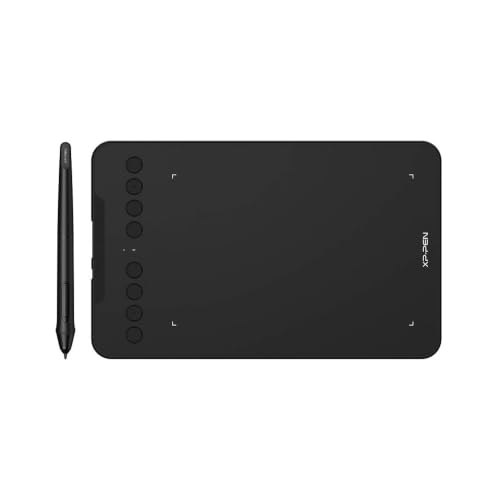
Best Shortcut-Friendly Mini – XP-Pen Deco mini7W
The XP-Pen Deco mini7W is a versatile pick among wireless drawing tablets for users who want a small, portable setup with plenty of shortcut control. It combines Bluetooth 5.0, a wireless USB option, eight customizable keys, and a high-pressure-sensitivity battery-free pen.
Best For: Mobile creators, online teachers, and users who value customizable shortcuts in a compact tablet.
Pros:
- Battery-free pen offers 16,384 pressure levels and 60-degree tilt support.
- Eight customizable press keys can streamline frequent commands.
- Supports Bluetooth 5.0, wireless USB, and USB-C-to-USB-C connections.
- Compatible with Windows, macOS, Android, ChromeOS, and Linux.
Cons:
- The 7 x 4-inch active area is smaller than medium-format alternatives.
- Its broad compatibility still depends on the operating-system version and connection method.
This model is a strong fit when portability and workflow customization are more important than a large canvas. The eight keys and multiple connection options make it adaptable for drawing, teaching, editing, and writing.
Best Renewed Value – Wacom Intuos Small Wireless
This renewed Wacom Intuos is a compact option for shoppers comparing wireless drawing tablets on a tighter budget. It retains Bluetooth connectivity, a battery-free pen, four customizable ExpressKeys, and a 6 x 3.7-inch active area for drawing, painting, and photo editing.
Best For: Buyers who want a small Wacom tablet with wireless operation and original accessories in a renewed package.
Pros:
- Includes the original pen, USB cable, and replacement nibs.
- Bluetooth supports wireless use with compatible Mac and Windows computers.
- Four customizable ExpressKeys put common shortcuts within reach.
- Compact design can fit limited desktop spaces and supports left- or right-handed setup.
Cons:
- The active area is limited to 6 x 3.7 inches.
- As a renewed product, condition may be a consideration for some buyers.
- Compatibility is focused on desktop and laptop computers in the supplied specifications.
This renewed Intuos makes sense for users who prefer Wacom’s familiar compact design and need wireless drawing without a large workspace. Verify the renewed-product condition and included accessories before purchase.
Beginner-Friendly Pick – XP-Pen Deco 01 V3
The XP-Pen Deco 01 V3 is a practical choice for beginners seeking wireless drawing tablets that offer a spacious work area, customizable controls, and a battery-free stylus. Its 10 x 6.25-inch surface, USB-C connectivity, and broad operating-system support make it easy to use with a compatible computer or Android device.
Best For: Beginners and amateur digital artists who want a large, portable tablet with plenty of shortcut keys.
Pros:
- 16,384 pressure levels and up to 60 degrees of tilt support for detailed strokes and shading.
- Battery-free stylus requires no charging and includes replacement nibs.
- Eight customizable shortcut keys support both right- and left-handed users.
- Works with Windows, macOS, ChromeOS, Linux, and compatible Android devices.
Cons:
- Requires a wired USB connection rather than built-in wireless operation.
- Android support requires Android 10.0 or later and the XPPen Tools app for aspect-ratio mapping.
The Deco 01 V3 emphasizes drawing space and beginner-friendly setup rather than wireless convenience. It is a strong fit if you are comfortable using a cable and want high reported pressure sensitivity with flexible compatibility.
Reliable Wireless Choice – Wacom Intuos Medium
The Wacom Intuos Medium is a versatile option among wireless drawing tablets, pairing Bluetooth connectivity with a battery-free pen and a medium-size active area. It supports creative software, document markup, and photo or video work on compatible Mac, Windows, and Chromebook setups.
Best For: Students, teachers, and creators who want dependable Bluetooth connectivity and included software resources.
Pros:
- Bluetooth enables wireless use, while USB-A provides a direct connection when preferred.
- Battery-free Wacom Pen 4K offers pressure-sensitive control with 4,096 levels.
- Four ExpressKeys provide convenient shortcut access.
- Registration includes access to creative software and Wacom online training.
Cons:
- The active surface measures 8.50 x 5.31 inches, smaller than some large-format alternatives.
- Compatibility is listed for Windows 7 or later and OS X 10.11 or later, with Chromebook support noted but not detailed in the supplied specifications.
The Intuos Medium is a balanced wireless pick for everyday creative and educational use. Its pressure sensitivity is lower on paper than some newer models, but Bluetooth, shortcut keys, and included learning resources make it convenient for varied tasks.
Large-Surface Power User – HUION Inspiroy Giano G930L
The HUION Inspiroy Giano G930L stands out among wireless drawing tablets with a 13.6-inch working area, Bluetooth 5.0, and a built-in mini LCD status screen. Its rechargeable battery supports up to 18 hours of use, while the battery-free stylus is designed for illustration, painting, 3D modeling, and photo editing.
Best For: Artists and designers who need a large active area, wireless flexibility, and extended battery life.
Pros:
- Large 13.6 x 8.5-inch working area suits large monitors and detailed work.
- Bluetooth 5.0 supports wireless connection to compatible Mac and Windows computers.
- Battery-free stylus provides 8,192 pressure levels, tilt support, and included felt nibs.
- 2500mAh battery offers up to 18 hours of working time after a stated three-hour charge.
Cons:
- At 1.15 kg, it is heavier than more compact drawing tablets.
- Wireless computer use depends on charging the tablet battery.
- iOS/iPadOS support is limited to ibisPaint at the specified app and operating-system versions.
The Giano G930L is the most spacious and feature-rich option in this selection. Choose it when a generous canvas, status display, configurable controls, and long wireless sessions matter more than portability.
Best Overall Control – GAOMON WH851
The GAOMON WH851 is a strong choice among wireless drawing tablets for artists who want a generous 8-by-5-inch active area, extensive pressure sensitivity, and hands-on shortcut controls. Bluetooth 5.0 supports cable-free work, while USB Type-C provides a wired alternative.
Best For: Digital artists and designers who want a dial, eight customizable keys, and long wireless battery life.
Pros:
- Offers Bluetooth 5.0 wireless use plus USB Type-C wired connectivity.
- Battery-free AP519 pen provides 16,384 pressure levels and 60-degree tilt support.
- Center dial and eight customizable keys can speed up zooming, scrolling, and brush adjustments.
- Supports Windows, macOS, and Android devices with adjustable drawing-area ratios.
Cons:
- Its larger 8-by-5-inch layout may be less portable than a compact tablet.
- The listed operating-system details distinguish wired support for Windows and macOS, so wireless compatibility should be verified for your setup.
With an advertised 18-hour battery and a smooth, lightly textured surface, the WH851 emphasizes comfortable extended sessions. Its dial and high-resolution pen make it especially appealing when workflow controls matter as much as drawing space.
Best for Broad Compatibility – XPPen Deco MW
The XPPen Deco MW is a versatile option among wireless drawing tablets, combining an 8-by-5-inch active area with Bluetooth 5.0 and a battery-free X3 stylus. Its broad operating-system and software support makes it practical for drawing, teaching, and general creative work.
Best For: Students, teachers, and creators who use multiple operating systems or a wide range of art applications.
Pros:
- Bluetooth 5.0 enables cable-free drawing and a tidier workspace.
- Battery-free X3 stylus includes 8,192 pressure levels and 60-degree tilt support.
- Eight customizable shortcut keys include tactile bumps for easier identification.
- Supports Windows, macOS, Android, Chrome OS, and Linux, along with major creative software.
Cons:
- Its 8,192 pressure levels are lower than some newer tablets listed here.
- The supplied details do not specify a wireless battery runtime.
The Deco MW focuses on dependable everyday versatility rather than specialized hardware controls. Its included dongle, adapters, replacement nibs, and extensive compatibility make it a flexible pick for mixed-device households and classrooms.
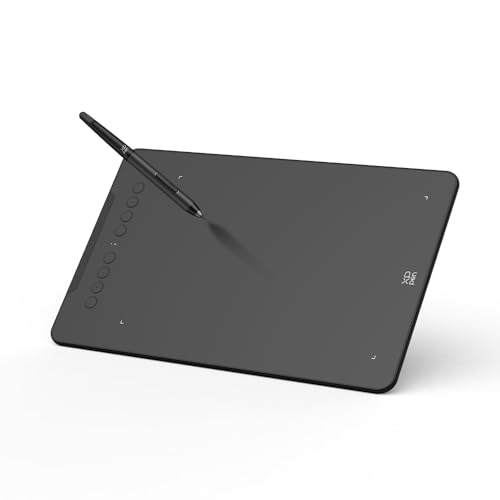
Best Compact Wireless Pick – XPPen Deco mini7W V2
The XPPen Deco mini7W V2 is a compact choice among wireless drawing tablets, with a 7-by-4.37-inch working area, Bluetooth 5.0, and eight shortcut keys. Its mobile mapping feature is designed to help match the active area to an Android screen ratio without stretching.
Best For: Mobile creators, students, and artists who prioritize portability and Android-friendly mapping.
Pros:
- Bluetooth 5.0 supports wireless work for up to 13 hours per charge.
- P05D battery-free stylus offers 16,384 pressure levels and 60-degree tilt support.
- Exclusive app helps adjust the active area for distortion-free Android use.
- Eight customizable keys and an L-shaped USB-C port support efficient wired or wireless workflows.
Cons:
- The smaller active area provides less workspace than an 8-by-5-inch tablet.
- Its specifications list 8,192 pressure sensitivity in one detail field despite the product bullets describing 16,384 levels.
- iOS support is limited to ibis Paint according to the supplied notes.
The Deco mini7W V2 balances portability with advanced pen control and broad compatibility across Windows, macOS, Android, ChromeOS, and Linux. Its compact format and mobile mapping make it particularly suited to travel and tablet-based creation.
How We Picked These Wireless Drawing Tablets
We selected tablets across several practical use cases rather than ranking models by specifications alone. The comparison considers active drawing area, wireless connection options, stylus design, pressure sensitivity, shortcut controls, software support, portability, and overall value. Battery-free pens receive particular attention because they reduce charging interruptions, while Bluetooth models are evaluated alongside their wired fallback options.
Compatibility also matters. Before buying, confirm that the tablet works with your operating system and preferred software, such as Photoshop, Illustrator, Clip Studio Paint, Krita, or common online whiteboard platforms. A high pressure-level count can be useful, but driver stability and comfortable pen tracking usually have a greater effect on day-to-day work.
Quick Comparison
| Best For | What to Look For | Models in This Roundup |
|---|---|---|
| Beginners and students | Simple setup, compact size, included software | Wacom Intuos Small, XPPen Deco mini7W |
| More drawing room | Medium or 10-by-6-inch active area | HUION Inspiroy Frego, Wacom Intuos Medium, XPPen Deco 01 V3 |
| Shortcut-heavy workflows | Express keys, dial, or programmable controls | GAOMON WH851, XPPen Deco MW |
| Portability | Small footprint and wireless operation | XPPen Deco mini7W V2, XPPen Deco mini7W |
| Value shopping | Lower cost or renewed hardware | Wacom Intuos CTL4100WLK0 Renewed |
Key Buying Factors for Wireless Drawing Tablets
Active Area and Size
The active area is the surface that responds to the pen. Smaller tablets save desk space and travel well, while medium and 10-by-6-inch models offer more room for broad strokes and detailed illustration. Match tablet size to your monitor setup and preferred hand movement.
Wireless Connection and Battery Life
Bluetooth is convenient, but check whether the tablet can also operate over USB if pairing becomes unreliable or the internal battery needs charging. For regular travel, consider weight, charging method, and whether the tablet can remain usable while connected.
Pen Feel and Controls
Battery-free styluses are convenient and typically feel ready immediately. Pressure sensitivity helps with line weight and opacity, but pen balance, nib friction, tilt support, and driver customization may matter more for experienced artists. Shortcut keys and dials can speed up zooming, undoing, brush-size changes, and canvas navigation.
Software and Compatibility
Check Windows and macOS support, driver availability, and compatibility with your creative applications. Included software can add value for beginners, while professionals may prioritize dependable drivers and broad application support over bundled extras.
Who Should Buy Which Wireless Drawing Tablets?
Choose a compact Wacom Intuos or XPPen Deco mini7W if you are learning digital art, working at a small desk, or need a portable tablet for classes and online teaching. A medium Wacom Intuos or HUION Inspiroy Frego is better for users who want a more comfortable drawing surface without moving to a display tablet.
For artists who prefer a larger workspace and many customizable controls, consider the XPPen Deco 01 V3, XPPen Deco MW, or HUION Inspiroy Giano. The GAOMON WH851 is appealing if a dial is central to your workflow. Buyers focused on reducing upfront cost can investigate the renewed Wacom model, provided the seller explains warranty coverage and return terms.