The best teleprompters for laptops make presentations, tutorials, livestreams, and video calls easier to deliver without constant glances away from the camera. The right model can improve eye contact while keeping your script visible and your setup manageable.
These 10 options cover laptop-compatible rigs, tablet and DSLR designs, built-in-screen models, and portable prompters. Use the guide below to match screen size, mounting style, portability, and control features to your workflow.
Best 10 Teleprompters for Laptops Picks for 2026
Professional Pick

- Supports displays up to 17 inches
- 60/40 beam-splitter glass
- Includes telescopic conference stand
Best For: Professional presentations and broadcast setups
Portable Camera Setup

- Compact, pre-assembled design
- Supports DSLR, mirrorless, and webcam setups
- Includes carry case and protective hood
Best For: Portable smartphone-prompted video recording
Built-In Display Choice

- Built-in 9-inch FHD display
- Controlled from PC or Mac
- Supports scripts, chat, and video calls
Best For: Streaming, webcam recording, and conferencing
Tablet-Based Value

- 12-inch HD reflected-text display
- Bluetooth remote and app control
- Foldable, no-assembly aluminum design
Best For: Tablet-based courses, tutorials, and presentations
Best All-in-One Laptop Setup
NEEWER X11 2-in-1 Teleprompter

- Built-in 9-inch LCD for prompts or second-screen use
- Works with Windows and macOS computers
- Supports cameras, webcams, and phones
Best For: Laptop livestreaming, video calls, and integrated script display
Best Large-Screen Option
Desview P17 Portable Teleprompter

- Large 17-inch prompting area
- Remote and app support with TXT/DOCX import
- Foldable design with sunshade and storage bag
Best For: Tablet-based recording and presentations needing a spacious script view
Best for Long-Range Reading

- 14-inch glass with up to a 10-foot reading range
- Includes Bluetooth remote and app control
- Folds flat and needs no assembly
Best For: Presentations, courses, and tripod-mounted phone or tablet rigs
Tablet-Ready Camera Rig

- Supports tablets up to 11 inches
- Works with 49mm–95mm lenses
- Requires separate 15mm rail support
Best For: Camera users with a compatible tablet and rail system
Adjustable 12-Inch Setup
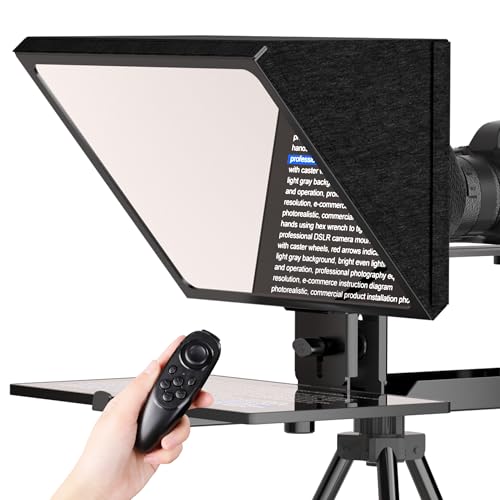
- Holds tablets up to 12.9 inches
- Includes remote and app controls
- Uses tempered optical glass and a metal frame
Best For: Camera-based recording with a large tablet script display
Large-Glass Prompting System

- 12-inch glass with up to 15-foot reading range
- Fits tablets up to 12.9 inches
- App and remote control text settings
Best For: Flexible studio or on-location tablet prompting
Professional Pick – Proaim Speech Teleprompter
For buyers seeking teleprompters for laptops in professional presentation settings, the Proaim Speech Teleprompter offers a large-device design, beam-splitter glass, and an adjustable conference stand. It supports laptops, tablets, and monitors up to 17 inches, making it suitable for more substantial presentation setups.
Best For: Conferences, corporate events, broadcasts, training sessions, and studio or on-location productions using displays up to 17 inches.
Pros:
- Supports laptops, tablets, and monitors up to 17 inches.
- 60/40 beam-splitter glass is designed for clear script visibility and natural eye contact.
- Included telescopic stand allows adjustable height positioning.
- Suitable for presentations, livestreaming, broadcasting, education, and houses of worship.
Cons:
- At 18.5 pounds, it is considerably less portable than compact teleprompters.
- The large 31.5-by-21.75-by-6.75-inch footprint may require substantial setup space.
This is the strongest choice for a fixed or semi-permanent professional setup where laptop compatibility, viewing comfort, and presentation-scale construction matter more than portability.
Portable Camera Setup – Glide Gear TMP 75
Glide Gear TMP 75 Teleprompter - Laptop, DSLR, Smartphone - Carry Case, No Assembly
Check Price On AmazonThe Glide Gear TMP 75 is a compact option for shoppers comparing teleprompters for laptops and webcam or camera recording. Its all-metal construction, pre-assembled design, and included carry case make it convenient for portable video work, although prompting is handled through a smartphone rather than an iPad or laptop screen.
Best For: DSLR, mirrorless-camera, webcam, and smartphone-based recording setups that need a lightweight, travel-friendly teleprompter.
Pros:
- Works with smartphones, DSLRs, mirrorless cameras, and webcams.
- Pre-assembled and ready to use without complicated setup.
- All-metal construction, protective hood, and included carry bag support portability.
- 70/30 beam-splitting glass provides clear text visibility.
Cons:
- Does not support iPad tablets.
- A teleprompter app is not included.
- It is designed around smartphone prompting rather than direct laptop-screen use.
The TMP 75 is a practical pick for creators who prioritize a small footprint and camera flexibility. Choose it when a smartphone-based workflow is acceptable and laptop compatibility is not essential.
Built-In Display Choice – Elgato Prompter
Among teleprompters for laptops, the Elgato Prompter stands out because it includes its own display. Instead of requiring a separate tablet or phone, you can move a script, chat window, or other app onto the prompter from a PC or Mac, while the camera remains positioned for more natural eye contact.
Best For: Streamers, video-call users, webcam creators, and camera operators who want laptop-controlled prompting with a built-in 9-inch FHD display.
Pros:
- Built-in display eliminates the need for a separate tablet or smartphone screen.
- Works with PCs and Macs and supports laptops as compatible devices.
- Can display scripts, Twitch chat, or other windows while maintaining camera eye contact.
- Supports DSLR cameras, webcams, smartphones, and a broad range of lenses.
Cons:
- Mac users need free DisplayLink software, and Android users need DisplayLink Presenter software.
- The 9-inch display may offer less reading area than larger tablet-based models.
- It requires a USB-connected computer-controlled workflow.
For laptop users who want an integrated and flexible setup, the Elgato is the most streamlined option here. Its built-in monitor and desktop control are particularly useful for streaming and video conferencing.
Tablet-Based Value – NEEWER Basics X12B
The NEEWER Basics X12B is a practical tablet-based alternative for buyers researching teleprompters for laptops. It uses a 12-inch display area and reflected text from an iPad or tablet, includes Bluetooth remote and app control, and folds for transport. It is a prompting accessory, not a monitor for direct on-screen self-view.
Best For: Online courses, tutorials, presentations, and streaming setups using an iPad or compatible tablet with app-controlled scripts.
Pros:
- No-assembly aluminum-alloy design is lightweight and easy to set up.
- 12-inch HD display area supports reading distances up to 10 feet.
- Included remote and NEEWER app control scrolling, playback, pages, and font size.
- Foldable structure and carry case make storage and transport easier.
Cons:
- It does not function as a monitor or provide direct on-screen self-view during recording.
- It is not intended for phone shooting, despite app and device compatibility details.
- The remote requires an AAA battery, which is not included.
The X12B makes sense for creators who already own an iPad or tablet and want an economical, portable prompting rig. It is less suitable if you specifically need the laptop itself to serve as the prompter display.
Best All-in-One Laptop Setup – NEEWER X11 2-in-1 Teleprompter
The NEEWER X11 is a practical choice among teleprompters for laptops if you want a built-in monitor that can serve as a script display or a second screen. Its 9-inch LCD connects with Windows and macOS computers, while the 11-inch beamsplitter supports camera, webcam, and phone setups.
Best For: Laptop-based livestreaming, video calls, and creators who want an integrated monitor without relying on a separate tablet or phone for prompts.
Pros:
- Built-in 1024 x 768 LCD can mirror a phone or work as a Windows/macOS external display.
- Multi-coated glass offers 75% light transmission and a stated reading distance of up to 2.5 m.
- Supports lenses with threads up to 72 mm and focal lengths from 35 to 200 mm.
- Adjustable Arca-type holder and tripod-compatible mounting holes add setup flexibility.
Cons:
- Computer connections may require a driver, depending on the cable and HDMI setup.
- Phone mirroring requires a compatible DP-protocol iPhone or Android device.
- Voice sync is not supported, and the required apps must be downloaded separately.
The X11 stands out for laptop users who want a self-contained display and flexible mounting options. Check your computer ports and phone compatibility before buying, especially if you plan to use screen mirroring.
Best Large-Screen Option – Desview P17 Portable Teleprompter
The Desview P17 is a large, foldable option for teleprompters for laptops and tablet-based recording. Its 17-inch format supports longer viewing distances, while the app, remote, and file-import features make it suited to creators who need flexible script control.
Best For: Video creators, presenters, and recording setups that use a 10- to 12-inch tablet or want a larger prompting area.
Pros:
- Supports mirror and rotate modes, adjustable playback speed, font size, and text color.
- Bluetooth remote controls playback, speed, page turns, and other script functions.
- Imports TXT and DOCX files through the Desview app and supports voice control through the app.
- Foldable sunshade, quick-release tripod mount, extendable arm, and included storage bag support portable use.
Cons:
- At 4.38 kg, it is considerably heavier than compact teleprompter designs.
- The setup is intended for tablets up to 10–12 inches rather than a laptop placed inside the prompter.
- It is not waterproof and should not be disassembled or exposed to liquids.
The P17 is a strong choice when readable, spacious prompting matters more than minimal weight. Its tablet-based design makes it useful alongside a laptop-controlled recording workflow, but confirm that your tripod and setup can handle its weight.
Best for Long-Range Reading – NEEWER X14 III Teleprompter
The NEEWER X14 III is designed for larger production setups where a laptop may manage the recording workflow while a phone or tablet supplies the script. Its 14-inch beamsplitter, 10-foot reading range, included remote, and fold-flat case make it a versatile choice for courses, presentations, and broadcasts.
Best For: Online instructors, presenters, broadcasters, and creators using phones or tablets on a tripod with a longer reading distance.
Pros:
- 14-inch beamsplitter provides a stated reading range of up to 3 m/10 ft.
- Included Bluetooth remote works with the NEEWER app for scrolling, speed, page turns, and font-size adjustments.
- No assembly is needed, and the unit folds flat into the included carry case.
- Manfrotto 501PL-compatible camera plate, adjustable mounting, and 1/4- and 3/8-inch threads support varied rigs.
Cons:
- It supports phones and tablets up to 8.7 inches wide, not a laptop as the script display.
- The 5.2-pound unit is less compact than smaller teleprompters.
- App control requires iOS 11.0 or Android 6.0 and newer.
The X14 III is a good fit when you need a stable, professional-style prompter that works beside a laptop-based production workflow. Its long reading range and quick-release mounting are especially useful for presentations and camera setups, provided your script device fits the width limit.
Tablet-Ready Camera Rig – SMALLRIG 3646
The SMALLRIG 3646 is a camera-mounted option for creators searching for teleprompters for laptops or larger screens. It supports tablets up to 11 inches, works with DSLR, mirrorless, and camcorder setups, and is designed to help you maintain camera eye contact during livestreams and video calls.
Best For: Tablet-based prompting with DSLR, mirrorless, or camcorder rigs.
Pros:
- Supports tablets up to 11 inches and lenses from 49mm to 95mm.
- SmallGoGo App can import and edit text from PDFs, images, Word documents, and TXT files.
- Includes a top flag to reduce glare and a 4 x 5.65-inch filter adapter.
Cons:
- Not compatible with smartphones.
- Requires a separately available 15mm LWS rail support system.
- For lenses under 22mm focal length, vignetting may occur.
This is a specialized choice for camera users who already have a tablet and a compatible 15mm support setup. Its broad lens coverage and app-based text importing make it practical for structured video production, but it is less convenient as an all-in-one laptop or smartphone teleprompter.
Adjustable 12-Inch Setup – Glazon Camera Teleprompter
The Glazon 12-inch teleprompter is a flexible choice for creators comparing teleprompters for laptops, tablets, and camera workflows. Its adjustable tablet holder accommodates displays up to 12.9 inches, while the included remote and app support simplify script control during recording.
Best For: Video creators using DSLR cameras, camcorders, and large tablets.
Pros:
- Supports DSLR cameras, mirrorless cameras, camcorders, and other camera setups.
- Holds tablets up to 12.9 inches as the script display.
- Includes wireless remote control and app support for scrolling, pausing, and speed adjustments.
- Tempered optical glass and a light-blocking hood improve script visibility.
Cons:
- Designed around camera-based recording rather than a standalone laptop setup.
- Protective films must be removed from both sides of the glass before use.
With its large tablet capacity, metal frame, and remote-controlled scrolling, this model suits home studios and portable production kits. It is especially useful when you want a larger script display without giving up camera eye contact.
Large-Glass Prompting System – Moman MT12 Teleprompter
The Moman MT12 is a substantial option for creators evaluating teleprompters for laptops or tablets. Its 12-inch tempered beamsplitter glass, adjustable viewing angle, and support for tablets up to 12.9 inches make it suitable for longer scripts and varied seated or standing recording positions.
Best For: DSLR, camcorder, or smartphone filming with a large tablet display.
Pros:
- Offers a stated reading range of up to 15 feet.
- Adjustable reflective angle helps accommodate different sight lines.
- Supports tablets up to 12.9 inches and includes a phone clamp.
- Moman Prompter App and remote control adjust text size, speed, colors, and background.
Cons:
- Its listed item weight is 6.05 pounds, making it relatively substantial to transport.
- It is a tablet- and phone-based system, not a dedicated laptop display.
The MT12 stands out when clear reflection and a broad viewing area matter more than minimal weight. Its adjustable angle and extensive app controls make it adaptable for interviews, livestreams, conferences, and other multi-position shoots.
How We Picked the Best Teleprompters for Laptops
We focused on compatibility, usability, construction, portability, and script-control options. The selected models support different laptop, tablet, monitor, camera, and smartphone setups, so the list includes both dedicated laptop solutions and flexible teleprompters that can work alongside a computer-based recording workflow.
We also considered beamsplitter size, mounting flexibility, assembly requirements, remote or app control, and whether each design is better suited to a desk, tripod, studio, or mobile setup. A teleprompter is only useful when it keeps text readable without making the camera or laptop difficult to position.
Quick Comparison
- Best for an integrated desktop setup: Elgato Prompter, with a built-in screen and creator-focused design.
- Best for broad device compatibility: Proaim Professional Speech Teleprompter, designed for tablets, laptops, and monitors.
- Best for simple portability: Glide Gear TMP 75, which includes a carry case and requires no assembly.
- Best for larger reading areas: NEEWER X14 III, with a 14-inch beamsplitter.
- Best for compact tablet rigs: SMALLRIG’s iPad-compatible model or the Moman MT12.
Key Buying Factors for Teleprompters for Laptops
Compatibility and Mounting
Check the supported laptop, tablet, monitor, and camera dimensions before buying. Some teleprompters sit directly in front of a laptop screen, while others require a tablet or separate monitor to display the script. Confirm that your camera, lens, webcam, and tripod can be mounted without blocking the text or creating an unstable setup.
Screen and Beamsplitter Size
A larger beamsplitter generally makes text easier to read from farther away, but it also adds weight and bulk. Smaller models suit desk recording and close framing; 12- to 14-inch designs are more useful for wider shots, studio work, or presenters who need to stand farther from the camera.
Script Control and Readability
App control, wireless remotes, and adjustable scrolling speeds help you maintain a natural pace. Look for glare reduction, a hood or sunshade, clear glass, and enough brightness from the display behind the beamsplitter. Test font size and line spacing with your preferred script app before recording.
Portability and Setup
Foldable designs and included cases are valuable for mobile creators. For a permanent desk or studio, prioritize rigidity, quick adjustments, and cable management over the lightest possible frame.
Who Should Buy Which Teleprompters for Laptops?
Choose an integrated-screen model if you want the fewest extra components and primarily record at a desk. Pick a laptop- or monitor-compatible prompter if your scripts already run from a computer and you need a flexible presentation setup. Tablet-based models are a practical middle ground for creators who want a lighter rig, while larger 12- or 14-inch units are better for longer viewing distances and more comfortable reading.
For frequent travel, prioritize foldability, low weight, a protective case, and remote control. For studio recording, favor a larger beamsplitter, sturdy mounting hardware, and broad camera compatibility. Before ordering, measure every device in your setup and verify the required app, connection method, and supported operating system.