The Zerfis 14-inch Laptop Screen Extender review starts with a simple question: do you need more screen space without turning your bag into a desktop setup?
For remote work, travel, and everyday multitasking, this is a practical answer.
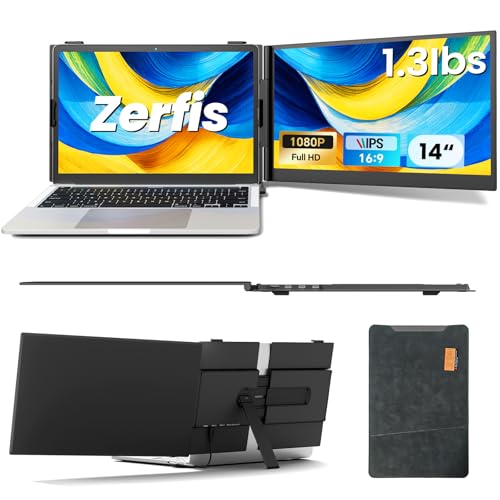
Zerfis 14-inch Extender Review Summary
If you want a portable second screen that feels purpose-built for productivity, the Zerfis 14-inch Laptop Screen Extender makes a strong case.
It is especially appealing for remote workers, frequent travelers, students, designers, and anyone who needs to keep email, documents, chat, and browser tabs visible at the same time.
What stands out most is the combination of slim portability, FHD IPS image quality, and flexible multi-screen modes.
The trade-off is that your experience depends heavily on laptop port support, so it is a better fit for buyers who know their device compatibility before ordering.
Quick Scorecard
| Category | Score | Buyer Takeaway |
|---|---|---|
| Portability | 9.0/10 | Very slim and lightweight for work on the move. |
| Display quality | 8.0/10 | Sharp 1080p IPS panel with good brightness and color coverage. |
| Productivity boost | 9.0/10 | Great for extended, mirrored, duplicate, portrait, and landscape workflows. |
| Compatibility | 7.0/10 | Flexible, but port requirements can narrow the easy-use audience. |
| Setup convenience | 7.0/10 | Mostly plug-and-play, though some setups need power or drivers. |
| Build and durability | 8.0/10 | Aerospace-grade aluminum and a reinforced stand add confidence. |
| Eye comfort | 8.0/10 | Anti-glare and low blue light support longer sessions. |
Bottom line: the Zerfis 14-inch Laptop Screen Extender is a smart buy if you want true mobile multitasking in a compact package.
It is not the simplest universal accessory for every laptop, but for compatible users it can dramatically improve workflow efficiency.
Key Features and Specifications of Zerfis 14-inch Extender
The feature set is designed around portability first, then productivity second.
That matters because a lot of portable displays look good on paper but are too bulky or awkward to carry every day.
| Spec | Details |
|---|---|
| Screen size | 14 inches |
| Resolution | 1920 x 1080 pixels, Full HD |
| Display type | IPS LCD |
| Aspect ratio | 16:9 |
| Brightness | 300 nits |
| Contrast ratio | 1000:1 |
| Refresh rate | 60 Hz |
| Response time | 2 ms |
| Viewing angle | Up to 180 degrees |
| Weight | 2.2 pounds |
| Thickness | 0.17 inches |
| Dimensions | 10.8 x 15.7 x 2.6 inches |
| Build | Aerospace-grade aluminum casing |
| Color | 100% sRGB coverage |
| Extras | Anti-glare, low blue light, HDR enhancement, adjustable stand, leather protective case |
| Connectivity | USB-C and HDMI options |
| Compatibility | 13-inch to 17-inch laptops, smartphones, gaming consoles, major systems |
| Warranty | 12-month quality warranty |
The headline specs are genuinely competitive for a portable extender.
Full HD resolution, IPS wide viewing angles, 300 nits brightness, and 100% sRGB are the kinds of numbers you want for work tasks where text clarity and color accuracy matter.
The included premium leather protective case is also worth noting.
It helps the product feel more travel-ready than cheaper portable displays that ship with little more than a basic sleeve or stand.
Pros and Cons of Zerfis 14-inch Extender
Every laptop screen extender involves compromises, and the Zerfis 14-inch Laptop Screen Extender review is no exception.
The best way to judge it is by balancing what it adds against what it asks from your laptop setup.
| Pros | Cons |
|---|---|
| Very portable and easy to pack | Some laptops need specific full-featured USB-C ports |
| Sharp 1080p IPS display with strong angles | Some connection methods require drivers |
| Multiple display modes for multitasking | External power may be required in certain setups |
| Sturdy aluminum build | Glossy screen can reflect light in bright spaces |
| Eye-comfort features for longer sessions | Compatibility varies more than a standard monitor |
| Flexible connection options | Best experience depends on laptop port support |
Big strengths: portability, display sharpness, and a design that supports real productivity instead of just looking convenient.
Big drawbacks: compatibility checks matter, and that makes this less plug-and-forget than a typical portable monitor.
How the Triple-Screen Setup Works
One of the most compelling parts of the Zerfis 14-inch Laptop Screen Extender is how quickly it can transform a normal laptop into a dual-screen or triple-screen workstation.
That matters if you regularly compare documents, monitor communication apps, edit content, manage spreadsheets, or keep reference material open while working.
The extender supports extended, mirrored, duplicate, portrait, and landscape modes.
In practical terms, that means you can use it as a true productivity tool rather than a fixed secondary display.
For example, a writer can keep research on one side and a draft on the other, while a spreadsheet user can pin dashboards or charts to the extra screen.
Portrait mode is a useful bonus for reading long documents, coding, social feeds, or reviewing vertical content.
Landscape mode is better for media, presentations, and general office work.
The flexibility makes the Zerfis 14-inch Laptop Screen Extender more adaptable than many basic portable monitors that only do one thing well.
Best use case: mobile professionals who need a fast way to expand screen real estate without carrying a separate full-size monitor.
Best Laptop Port Requirements and Connection Methods
This is where buyers need to slow down and check the fine print.
The Zerfis 14-inch Laptop Screen Extender offers several connection paths, but not every path is equally simple.
- Two USB-C cables for laptops with two fully functional USB-C ports
- USB-C + HDMI + external power adapter for another common setup
- H5 + HDMI + external power adapter for laptops without a fully functional USB-C port, which requires driver installation
In plain language, the extender is flexible, but full-featured USB-C support makes life much easier.
If your laptop has limited power delivery or video output over USB-C, you may still get it working, but you might need more cables, a power adapter, or drivers.
That is not unusual in this product category, but it is an important buyer decision factor.
Portable monitor alternatives like an ARZOPA portable monitor or a USB-C portable monitor with matte screen may be easier for users who want a more universal display rather than a laptop-attached extender.
If you are shopping for the Zerfis 14-inch Laptop Screen Extender pros and cons specifically, the main pro here is flexibility.
The con is that flexibility comes with a compatibility checklist.
Display Quality for Work and Travel
For a portable accessory, the display quality is a major reason this model stands out.
The 14-inch panel uses IPS technology, which gives it wide viewing angles and more consistent color than cheaper TN-based screens.
The stated 1920 x 1080 Full HD resolution is the right call for this size because it keeps text crisp without making scaling awkward.
At 300 nits brightness, it should be bright enough for most indoor workspaces and hotel rooms.
The 1000:1 contrast ratio is solid for office tasks, browsing, and media, though it is not designed to compete with premium high-end creative monitors.
For a portable travel display, that is still respectable.
The 100% sRGB coverage is a meaningful feature for buyers who care about color accuracy in light photo work, design review, or content editing.
It will not replace a professional studio display, but it is more than enough for many creators who need a dependable secondary panel while away from their main workstation.
Eye comfort also deserves attention.
The anti-glare treatment and low blue light mode are useful for long sessions, especially when the screen is used for emails, spreadsheets, or reading-heavy tasks.
The glossy finish can still pick up reflections, so bright windows and overhead lights may reduce comfort a bit, but the added eye-care features help offset that.
If you value clarity over size, this display is one of the stronger selling points in the Zerfis 14-inch Laptop Screen Extender review.
Stand Stability and Viewing Angle Adjustments
Portable displays often fail at the support hardware, not the screen itself.
The Zerfis tries to avoid that with a reinforced adjustable stand, two anti-slip hooks on the back panel, customizable height, and 180-degree rotating screen adjustment.
That matters because a screen extender should feel secure when attached to a laptop lid or used in a cramped workspace.
If the stand wobbles or shifts during typing, the productivity benefit disappears quickly.
Here, the design choice seems clearly focused on practical use rather than flashy styling.
The aerospace-grade aluminum casing is another positive sign.
Aluminum typically improves durability and helps with heat handling, which is helpful in a compact device that may run for hours in a bag, on a desk, or in transit.
For buyers comparing options, this is one area where the Zerfis 14-inch Laptop Screen Extender feels more refined than many generic portable extenders.
It is not just a screen panel; it is a travel-oriented workstation add-on.
Who Should Buy Zerfis 14-inch Extender?
The Zerfis 14-inch Extender is a strong fit for people who want more screen space without committing to a bulky external monitor.
It is especially practical if your work involves multiple windows, frequent app switching, or a need to review source material while typing.
- Remote workers who need an easy dual-screen setup at home, in coworking spaces, or on the road
- Frequent travelers who want productivity gear that does not take up much room
- Students who split time between notes, research, and assignments
- Designers and editors who benefit from a second screen for previews or palettes
- Professionals who need a portable conference or hotel-room display
Best buyer fit: someone with a compatible laptop who values compactness and faster multitasking more than absolute simplicity.
Who Should Skip a Laptop Screen Extender
Not every buyer should jump on a laptop screen extender, and this category has a few common deal-breakers.
- Skip it if you use an older laptop with limited USB-C video support.
- Skip it if you want a simple universal monitor with minimal setup.
- Skip it if you work mostly in bright environments and strongly prefer a matte panel.
- Skip it if you do not want to deal with external power or driver installation.
In other words, this is for informed buyers.
If you want plug-and-play simplicity above all else, a more traditional portable monitor may be the safer choice.
Comparable Alternatives to Consider
If the Zerfis setup does not match your laptop ports or workflow, it is worth comparing it with other widely available Amazon options.
- KEFEYA laptop screen extender – a popular alternative if you want a similar attachable multi-screen concept.
- ARZOPA portable monitor – a strong option for buyers who prefer a more conventional external screen.
- 15.6-inch portable monitor – a good choice if screen size matters more than attachment-style portability.
- USB-C portable monitor matte – better for glare control and broad laptop compatibility.
Compared with those alternatives, the Zerfis 14-inch Laptop Screen Extender leans harder into travel-friendly productivity and a more integrated dual-screen experience.
Is Zerfis 14-inch Extender Worth It?
Yes, for the right buyer, the Zerfis 14-inch Laptop Screen Extender is worth it. It delivers a lot of productivity value in a compact, lightweight package, and its screen quality is strong enough to support everyday office work, content creation, and multitasking on the move.
The key reason to buy is simple: it gives you more usable workspace without forcing you to carry a full-size monitor.
That is a meaningful advantage for remote workers and travelers who live out of a laptop bag.
The aluminum build, adjustable stand, 1080p IPS panel, and low blue light features all support that mission well.
The main reason to hesitate is compatibility.
If your laptop does not have the right USB-C support, you may need extra steps like external power or drivers, which reduces the “instant upgrade” appeal.
The glossy finish can also be less ideal in very bright spaces.
Final verdict: buy the Zerfis 14-inch Laptop Screen Extender if you want a portable, efficient, and genuinely useful second screen and you have checked your laptop ports first.
If you need the simplest possible setup or a matte panel for glare-heavy environments, compare it with a standard portable monitor before deciding.