The Phomemo M08F Portable Thermal Printer review starts with a simple truth: this is built for convenience, not color-rich office printing.
If you want an inkless, travel-friendly printer for documents and simple graphics, the Phomemo M08F Portable Thermal Printer makes a strong case.
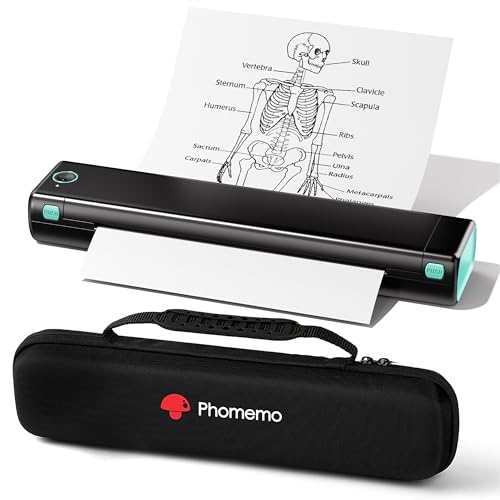
Phomemo M08F Review Summary
If you need a compact printer you can carry between home, school, the office, and the road, the Phomemo M08F Portable Thermal Printer is one of the more practical options in its class.
It is especially appealing for buyers who want low-maintenance, inkless printing for PDFs, Word files, web pages, and basic images without dealing with ink cartridges, toner, or ribbons.
That said, this is still a monochrome thermal printer, so it will not replace a color inkjet or a full desktop printer for everyday household printing.
The value here is in portability, quick setup, and simplified ownership.
For remote workers, students, and frequent travelers, the Phomemo M08F Portable Thermal Printer is easy to justify.
Scorecard
| Category | Score | What It Means |
|---|---|---|
| Portability | 9.0/10 | Compact, lightweight design with a carry case for easy transport. |
| Printing convenience | 8.0/10 | Bluetooth app printing and USB computer support make it flexible. |
| Print quality | 7.0/10 | Good for documents and simple images, but limited to monochrome output. |
| Setup and usability | 8.0/10 | Phone printing is straightforward, especially with the app workflow. |
| Compatibility | 8.0/10 | Works with iOS, Android, laptops, PCs, smartphones, and tablets. |
| Running cost | 9.0/10 | Inkless thermal printing keeps ongoing maintenance low. |
Bottom line: the Phomemo M08F Portable Thermal Printer is best for buyers who care more about portability and low hassle than color output or heavy-duty office performance.
Key Features and Specifications of Phomemo M08F
The best way to judge the Phomemo M08F Portable Thermal Printer is by matching its specs to how you actually plan to use it.
This is a print-only device designed around portability and simple mobile workflows, and the spec sheet reflects that focus.
| Specification | Details |
|---|---|
| Brand / Model | Phomemo M08F |
| Print Technology | Thermal printing using thermal paper only |
| Output | Monochrome |
| Resolution | 203 x 203 DPI |
| Print Speed | About 4.25 pages per minute |
| Connectivity | Bluetooth and USB |
| Compatible Devices | Laptops, PCs, smartphones, tablets |
| Control Method | App |
| Supported File Types | PDF, Word, images, web content |
| Weight | 715 g |
| Dimensions | 4 x 13.7 x 3 in |
| Functions | Print only |
| Included Value | Carry case |
In practical terms, those numbers tell a clear story.
The 203 DPI resolution is adequate for business documents, notes, forms, and basic graphics, while the 4.25 ppm print speed is fast enough for occasional use without pretending to be a high-volume office machine.
The 715 g weight is especially important because it makes the device feel genuinely portable rather than merely “small.” The included carry case also reinforces the product’s travel-first identity, which is a real advantage if you plan to move it between locations frequently.
Pros and Cons of Phomemo M08F
Here is the clearest way to think about the Phomemo M08F Portable Thermal Printer pros and cons: it wins on convenience and simplicity, but it gives up color and standard paper compatibility to get there.
| Pros | Cons |
|---|---|
| Very portable and travel-friendly | Only prints in monochrome |
| No ink, toner, or ribbon costs | Requires thermal paper instead of standard copy paper |
| Bluetooth phone printing is convenient | Phone printing depends on the Phomemo app |
| USB support broadens compatibility | PC printing requires USB and a driver |
| Works with common document types and simple images | Not meant for photo-quality or color output |
| Carry case adds value for mobile use | Not ideal for heavy-duty, high-volume jobs |
Best strengths: inkless ownership, portability, and flexible connectivity.
Main drawbacks: monochrome-only output and the need to buy thermal paper rather than use whatever printer paper you already have.
How the Phomemo App and Bluetooth Setup Work
For most buyers, the setup experience will be one of the biggest reasons to choose or skip this printer.
The Phomemo M08F Portable Thermal Printer is designed around app-driven Bluetooth printing on iOS and Android, which is exactly what mobile-first users want.
In practice, that means you can open the Phomemo app, pair the printer, and send documents from your phone with minimal friction.
That is a major plus for students printing lecture notes, travelers printing boarding-related documents, or remote workers who do not want to boot up a full desktop system just to print one file.
The app-based workflow is a smart design choice because it keeps the printer easy to use for casual owners.
The tradeoff is that phone printing depends on the app rather than being as direct as a standard office printer.
If you are comfortable with app-based controls, the experience is convenient; if you want ultra-minimal setup with native print menus only, this may feel slightly less seamless.
USB support is another useful decision.
It broadens the device’s reach to laptops and PCs, although the product notes that PC printing requires a USB driver.
That is not a dealbreaker, but it is worth knowing if your main plan is desktop use.
Thermal Paper Compatibility and Running Costs
The biggest long-term advantage of the Phomemo M08F Portable Thermal Printer is also the reason people buy thermal printers in the first place: it does not need ink, toner, or ribbons.
For many buyers, that alone makes it attractive, especially if they print irregularly and hate dried-out cartridges or surprise consumable costs.
Instead, this model uses thermal paper only.
That simplifies ownership, but it also changes how you think about supplies.
You are not buying generic copy paper and expecting normal output; you are committing to thermal media.
That is fine if your workflow is documents, travel forms, school worksheets, or temporary records.
It is less ideal if you want a printer that can use any paper lying around the office.
From a buyer’s perspective, this is a fair trade.
Thermal printing keeps maintenance low and reduces clutter, but the recurring thermal paper purchase is still part of the ownership picture.
If you print often enough to care about convenience but not enough to justify a traditional desk printer, the M08F’s running cost profile makes a lot of sense.
Buying tip: make sure you are comfortable with thermal paper before you buy.
That choice matters more than the printer itself.
Print Quality for Documents, Images, and DIY Use
When judging the Phomemo M08F Portable Thermal Printer, it is important to set expectations correctly.
With 203 x 203 DPI output and monochrome printing, this is not a photo printer and not trying to be one.
Its strength is clean, usable output for everyday information, not rich visual reproduction.
For documents, the print quality is practical.
Text should be readable for forms, notes, handouts, and general office use.
For images, quality depends heavily on what you are printing.
Simple graphics, icons, line art, and DIY drawings are where the printer makes the most sense.
Detailed photos will obviously look limited because thermal monochrome output cannot reproduce color or subtle gradients in the way an inkjet can.
This is why the M08F is a better fit for functional printing than creative display work.
If your use case includes labels, drafts, checklists, travel records, basic charts, or classroom materials, it does the job well enough.
If your expectation is a substitute for a color printer, you will be disappointed.
The speed, around 4.25 pages per minute, is reasonable for its category.
It is not built for an office that prints stacks of pages every morning, but it is fast enough for everyday portable use where convenience matters more than throughput.
Travel, School, and Office Use Cases
This is where the Phomemo M08F Portable Thermal Printer review gets more specific, because buyer fit matters more than raw specs.
The printer makes the most sense in scenarios where portability and low upkeep are more valuable than paper flexibility.
For travel: the compact form factor and carry case are genuine advantages.
If you move between hotels, shared spaces, or temporary work locations, the printer is easy to pack and unpack.
It is also useful for printing forms, itineraries, reference pages, and other travel paperwork.
For students: the M08F fits well for printing notes, assignments, practice sheets, and handouts, especially if the student uses a phone or tablet heavily.
The inkless design keeps the ownership experience simple, which is great when you do not want to manage cartridges.
For home office users: it works best as a secondary printer.
If you already have a main color printer, the M08F can be the portable backup for quick jobs.
If you do not have a printer at all, it can still work, but only if your print needs are mostly black-and-white documents.
For business trips: this is a smart carry-along device for invoices, references, and documents that need fast printing without relying on a hotel business center.
Less ideal for: families, photo printing, and any setup that needs regular paper compatibility or larger batch printing.
Alternatives to Consider Before Buying
If you are comparing options before buying the Phomemo M08F Portable Thermal Printer, it helps to understand the alternatives by use case rather than just by brand.
- Other portable thermal printers if you want a similar inkless, mobile-friendly experience.
Search Amazon for portable thermal printer to compare form factors and app ecosystems.
- Brother compact printers if you want a more traditional desktop option with broader paper compatibility.
Search Amazon for Brother compact printer.
- Portable inkjet printers if you need color output or photo-capable printing.
Search Amazon for portable inkjet printer.
- Canon portable printers if you want a recognizable printer brand with mobile and desktop options.
Search Amazon for Canon portable printer.
Compared with those alternatives, the Phomemo M08F Portable Thermal Printer stands out most on low-maintenance ownership and portability.
It does not try to be the most capable printer overall; it tries to be the easiest one to live with on the move.
What to Know Before Buying a Thermal Portable Printer
Before buying any thermal printer, there are a few decision factors you should not ignore.
These are especially important if you are deciding whether the Phomemo M08F Portable Thermal Printer is the right match for your workflow.
1.
Paper type matters. Thermal printers do not use standard paper in the same way regular printers do.
That is convenient for some users and frustrating for others.
2.
Color is not included. If you need color charts, photos, or branded materials, you should look at inkjet options instead.
3.
Mobile use is the sweet spot. The Bluetooth and app setup make the most sense for phone-first buyers.
4.
PC printing needs a little more setup. USB and driver installation are normal here, but they add a step that casual buyers should know about.
5.
Think about document volume. This is ideal for occasional to moderate portable printing, not heavy office output.
Those factors make the M08F easy to evaluate honestly.
If your answers line up with portable black-and-white printing, the product is a very good fit.
If not, a compact inkjet or a desktop printer will serve you better.
Who Should Buy Phomemo M08F?
The Phomemo M08F Portable Thermal Printer is a strong match for buyers who want a compact, inkless printer that works well with smartphones and occasional computer printing.
It is especially well suited to travelers, students, remote workers, and home office users who value convenience over advanced output.
You should buy it if you want:
- A printer that is easy to carry in a bag or case
- Ink-free operation with no toner or ribbon changes
- Bluetooth printing from iOS or Android
- Simple black-and-white documents and basic images
- A low-maintenance backup printer for mobile use
You should probably skip it if you need:
- Color printing
- Photo-quality output
- Standard copy paper compatibility
- High-volume office throughput
- A printer that behaves like a traditional all-purpose home unit
In short: this is a smart buy for convenience-driven users, but not for shoppers who want a true do-everything printer.
Is Phomemo M08F Worth It?
Yes, the Phomemo M08F Portable Thermal Printer is worth it if your priorities are portability, inkless printing, and simple mobile workflows.
It is a well-designed niche printer that makes life easier for people who print documents on the go and do not want the hassle of cartridges or ribbons.
The key reasons to buy are clear: strong portability, low running cost, easy app-based printing, and useful USB support.
The key reasons to pass are just as clear: it is monochrome only, it requires thermal paper, and it is not built for color or high-volume printing.
For the right buyer, those tradeoffs are completely reasonable.
If you want a travel-friendly printer that is easy to maintain and practical for everyday black-and-white jobs, the Phomemo M08F Portable Thermal Printer is a solid recommendation.
Final verdict: buy it for mobility and simplicity; skip it if you need a full-featured color printer.
Recommended next step: if the feature set fits your workflow, check current availability and compare bundled paper or carry-case offers before you buy.