Haiway 10.
1-Inch Security Monitor review seekers usually want one thing: a small display that just works.
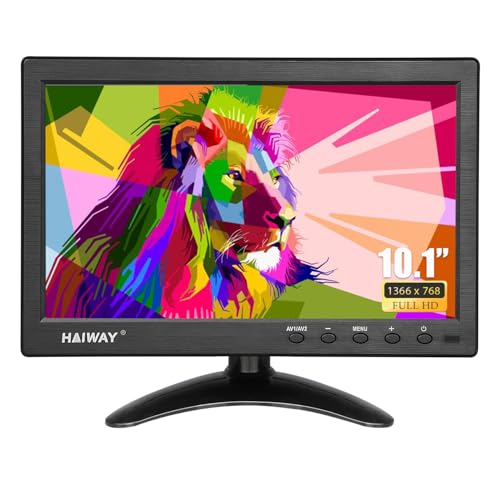
Haiway Monitor Review Summary
The Haiway 10.1-Inch Security Monitor is a practical buy if you need a compact, multi-input screen for CCTV, a desk corner, or a light-duty portable setup.
It stands out most for security camera compatibility, simple source switching, and flexible placement, making it especially appealing to buyers who value utility over premium panel specs.
If your priority is dependable monitoring in a small footprint, the Haiway 10.1-Inch Security Monitor makes a lot of sense. It is not trying to compete with a high-end full-HD desktop monitor; instead, it focuses on the basics that matter for surveillance and secondary use: BNC and AV inputs, HDMI and VGA support, built-in speakers, and a stand that can handle both landscape and portrait use.
That makes the Haiway 10.1-Inch Security Monitor a strong fit for homeowners watching camera feeds, small business owners monitoring a back office or warehouse corner, and drivers or travelers who want a compact screen that can run from different power sources.
If you want sharp media editing detail or a large productivity workspace, you should look elsewhere.
But if you want reliable, space-saving compatibility, this mini monitor earns attention.
Scorecard
| Category | Score | Why it matters |
|---|---|---|
| Security camera compatibility | 9.0/10 | Dedicated BNC and AV inputs make it especially useful for CCTV and surveillance systems. |
| Connectivity versatility | 8.0/10 | HDMI, VGA, BNC, AV, and USB inputs cover monitors, cameras, PCs, consoles, and TV boxes. |
| Display clarity | 7.0/10 | The 1366 x 768 panel is modest, but brightness and viewing angles help in normal monitoring use. |
| Ease of setup | 8.0/10 | Plug-and-play operation and the included remote make it easy to get going quickly. |
| Built-in audio | 7.0/10 | Dual speakers are convenient for basic sound, though not a replacement for quality external audio. |
| Mounting and placement flexibility | 8.0/10 | Compact size, adjustable stand, portrait mode, and VESA 75 x 75 support improve positioning options. |
| Power and portability | 8.0/10 | AC/DC and vehicle power options make it useful for desk, indoor, and vehicle-based setups. |
Overall, this is a smart utility monitor rather than a spec monster.
If you need a small display that can handle surveillance inputs and basic general-purpose use, the Haiway Monitor is a sensible and flexible option.
Key Features and Specifications of Haiway Monitor
The hardware package is where this monitor makes its case.
The Haiway 10.1-Inch Security Monitor is compact, lightweight, and designed to work with a broad mix of devices without making setup complicated.
| Spec | Detail |
|---|---|
| Brand | Haiway |
| Screen size | 10.1 inches |
| Native resolution | 1366 x 768 |
| Aspect ratio | 16:9 |
| Display type | LED / LCD |
| Brightness | 400 cd/m² |
| Contrast ratio | 400:1 |
| Viewing angle | 178° horizontal and vertical |
| Refresh rate | 60 Hz |
| Screen finish | Glossy |
| Inputs | HDMI, VGA, BNC, AV, USB |
| Speakers | Dual built-in speakers |
| Mount support | VESA 75 x 75 mm |
| Power | 12V, 12 watts |
| Dimensions | 6.5 x 9.92 x 1.3 inches |
| Special modes | Landscape and portrait orientation support |
The most important feature for many buyers is the dedicated BNC and AV connectivity.
That is the difference between a generic small monitor and one that actually fits a CCTV workflow.
If you are connecting DVRs, security cameras, or other surveillance equipment, those ports matter far more than fancy gaming features.
The 400 cd/m² brightness is another helpful detail.
For a compact monitor in this category, that level of brightness should stay readable in typical indoor spaces, especially when used for camera monitoring, kiosks, or a desk setup.
The 178-degree viewing angle also helps if the monitor is viewed from the side or mounted in an awkward spot.
At the same time, the panel stays modest with a 1366 x 768 resolution.
That is the biggest practical limitation to understand before buying.
For security feeds and simple media playback, it is workable.
For fine detail work, text-heavy productivity, or image editing, a full-HD or higher monitor is the better choice.
Pros and Cons of Haiway Monitor
Every buyer researching Haiway 10.1-Inch Security Monitor pros and cons should weigh convenience against display limitations.
Here is the short version.
Pros
- Excellent CCTV compatibility thanks to dedicated BNC and AV inputs.
- Very versatile connection support with HDMI, VGA, USB, BNC, and AV.
- Compact footprint fits desks, counters, shelves, and vehicle spaces.
- Built-in speakers add simple audio without extra gear.
- Remote control included for easier source switching and basic adjustments.
- Flexible mounting options with adjustable stand, portrait mode, and VESA 75 x 75 support.
- Dual power options improve portability and placement flexibility.
Cons
- Resolution is limited compared with full-HD mini monitors.
- Glossy screen finish can reflect light in bright rooms.
- Small display size may feel cramped for productivity or media-heavy viewing.
- VESA hardware is not included, so wall-mounting may require extra purchases.
For most buyers, the biggest drawback is not performance but expectations.
The Haiway Monitor is built for function and compatibility, not premium image quality.
Who Should Buy Haiway Monitor?
This monitor is a strong fit for buyers who need a compact screen that can handle a mix of sources without fuss.
If you are wondering is Haiway 10.1-Inch Security Monitor worth it, the answer depends on your use case, and the value is highest for practical monitoring rather than entertainment.
- CCTV and security users who want a small, dedicated display for camera feeds.
- Home office or workshop users who need a second screen for dashboards, device monitoring, or reference material.
- Warehouse, retail, or back-room setups where space is limited and reliability matters more than resolution.
- Vehicle-based users who can benefit from the included vehicle power cable and compact size.
- Buyers who want plug-and-play simplicity instead of a complicated monitor with extra software or adapter hassles.
You should probably skip it if you need crisp 1080p detail, color-critical work, or a larger monitor for daily computing.
In those cases, a better alternative is a 10.1-inch full HD mini monitor or a small IPS display with anti-glare treatment.
Best Use Cases for CCTV, Desk, and Car Setups
The strongest use case for the Haiway 10.1-Inch Security Monitor is CCTV monitoring.
The BNC connection makes it a practical companion for DVRs and camera systems, and the compact screen size is actually an advantage when you only need a dedicated feed viewer rather than a large desktop display.
For desk use, it works well as a secondary monitor.
You might use it for system status, chat, streaming controls, POS data, or light reference material.
It is not ideal as a main productivity screen, but as a small companion display it is easy to place and simple to live with.
For car or portable setups, the dual power approach is one of the best design choices.
Having an AC/DC adapter and a vehicle cable gives it more real-world flexibility than many mini monitors in this class.
That makes it appealing for mobile monitoring, travel kits, or temporary installations.
Compared with a general portable HDMI monitor, the Haiway trades off some modern convenience features in exchange for a stronger CCTV-first feature set.
That is a smart trade if security input compatibility is the main buying factor.
How the Inputs and Remote Control Work
Input flexibility is where the Haiway Monitor separates itself from plain budget screens.
With HDMI, VGA, BNC, AV, and USB support, it can connect to a wide range of devices without special adapters in many cases.
That matters for buyers who may switch between a security recorder, a computer, and another device over time.
The dedicated remote control is another practical convenience.
On a small monitor, physical buttons can feel awkward, especially when the unit is mounted or placed in a hard-to-reach spot.
A remote makes source changes, menu access, and basic screen control much easier.
From a buyer’s standpoint, the input layout signals that this is a utility-first monitor.
It is designed to be flexible enough for mixed environments, which is exactly what many home and business surveillance users want.
Screen Quality and Viewing Angles in Daily Use
The screen quality is good enough for monitoring but not luxurious.
The 1366 x 768 panel gives you basic HD-level clarity, which is perfectly acceptable for many surveillance feeds and utility tasks.
The 60 Hz refresh rate is standard for this category and not a drawback for its intended use.
The upside is that the monitor has a 178-degree viewing angle and a reasonable brightness level.
In practical terms, that means the image should remain usable when you glance at it from the side or when it is mounted above or below eye level.
For a small CCTV monitor, that is a meaningful advantage.
The downside is the glossy finish.
Glossy screens can look punchy in controlled lighting, but they also pick up reflections.
If the monitor will sit near a window, under bright store lights, or in a room with overhead glare, that is worth considering carefully.
So while this is not the sharpest or most refined monitor you can buy, it is well matched to its job.
Security monitoring benefits more from brightness, connectivity, and readability than from ultra-high pixel density.
Mounting, Stand Adjustments, and Portrait Mode
One of the better design choices in the Haiway Monitor is how many placement options it offers.
The included adjustable stand helps it sit neatly on a desk, shelf, or counter, while VESA 75 x 75 mm compatibility opens the door to wall mounts and arm mounts.
It also supports landscape and portrait orientation.
That is useful for surveillance layouts, device dashboards, and certain retail or industrial applications where vertical viewing is more practical.
Portrait mode is not something every small monitor handles gracefully, so this adds real value.
There is one caution: mounting hardware is not included.
That is common, but buyers should plan ahead if they intend to use a VESA arm or wall bracket.
Check your mounting kit and make sure it supports the monitor’s weight and size before finalizing the install.
For buyers who care about desk clutter, the small body and modest power draw are both pluses.
At only 12 watts of power consumption, this is not a demanding device.
What Comes in the Box and Setup Considerations
Setup is generally straightforward, which is one of the reasons this model suits first-time security monitor buyers.
The package is built around plug-and-play convenience, so you should not expect a complicated setup process.
In a typical unboxing, you can expect the monitor itself, the stand, power accessories, and the remote control.
Because the monitor supports multiple input types, the exact cable you need depends on your source device.
A CCTV system may use BNC or AV, while a PC or media box may rely on HDMI or VGA.
Before buying, it is smart to confirm three things: which input your source uses, whether you need a VESA mount, and whether your installation location has the right power access.
Those checks can save you from compatibility issues later.
If you want a similar compact display but with modern USB-C convenience, a portable HDMI monitor with USB-C input may be worth comparing.
If your main concern is surveillance, a dedicated CCTV monitor with higher resolution is another sensible option.
And if you want a more general-purpose small screen, an small IPS monitor with anti-glare finish could be a better everyday display.
Comparable Alternatives to Consider
If the Haiway Monitor does not quite match your needs, there are a few common alternatives worth considering.
The right choice depends on whether your top priority is surveillance compatibility, image sharpness, or portability.
- 10.1-inch full HD mini monitor — Better if you want more detailed text and sharper imagery.
- Dedicated CCTV monitor with higher resolution — Best for security users who want a monitor built around surveillance workflows.
- Portable HDMI monitor with USB-C input — A strong option for laptops, tablets, and modern devices.
- Small IPS monitor with anti-glare finish — Useful if you care more about comfort in bright rooms than legacy input support.
Compared with these alternatives, the Haiway Monitor wins on input variety and CCTV practicality.
It loses ground on display refinement and modern connectivity features.
Is Haiway Monitor Worth It?
For the right buyer, yes, the Haiway 10.1-Inch Security Monitor is worth it.
Its value comes from being a compact, versatile monitor that handles surveillance gear especially well while still remaining useful for desks, counters, and mobile setups.
The deciding factor is simple: if you need a small screen with BNC support, broad input compatibility, built-in speakers, and flexible mounting, this is a well-thought-out choice.
If you mainly want a crisp media screen or a productivity monitor, you will likely be happier spending more on a higher-resolution alternative.
My buying advice is to choose the Haiway 10.1-Inch Security Monitor if your setup is utility-driven and space is limited.
It is a practical, multi-role mini monitor that delivers where it matters most for CCTV and secondary-display use. If you want a compact workhorse rather than a premium display, this one deserves a close look.
Final verdict: a smart, flexible pick for buyers who want dependable monitoring more than display luxury.