When your room lighting is less than ideal, the wrong camera can make you look grainy, flat, or washed out. The best webcams for low light help preserve detail, manage noise, and keep your image clear without constant manual tweaking.
Below, we’ve rounded up 10 strong options for meetings, streaming, and content creation, with a focus on sensor quality, automatic exposure, and practical lighting support.
Best 10 Webcams for Low Light Picks for 2026
Flagship 4K Low-Light Pick
Insta360 Link 2C Pro 4K Webcam
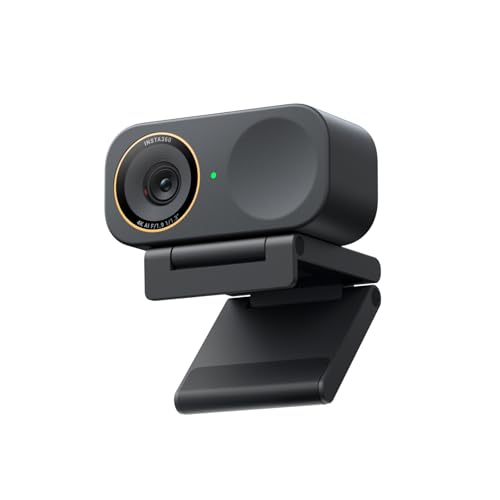
- 1/1.3-inch sensor for cleaner low-light video
- 4K capture with HDR and auto framing
- Directional dual mics and gesture/mobile control
Best For: Creators and professionals who want premium low-light quality
Reliable Office Low-Light Choice

- Sony sensor with 2K QHD video
- Low-light support for dim offices
- Noise reduction mic and privacy shutter
Best For: Remote workers who want a dependable meeting webcam
Balanced Low-Light Performer
Anker PowerConf C200 2K Webcam

- 2K video with strong low-light performance
- AI noise cancellation and dual mics
- Adjustable viewing angles with privacy cover
Best For: Users who want a simple, balanced webcam for dim rooms
Everyday low-light pick
Logitech Brio 101 Full HD 1080p Webcam

- RightLight boosts brightness by up to 50%
- USB-A plug-and-play for common meeting apps
- Built-in privacy cover and mic
Best For: Easy low-light video calls and remote work
Ultra-sensitive mini camera

- 0.01lux low-light performance
- Wide-angle 2.1mm lens with 93° view
- UVC plug-and-play for multiple systems
Best For: Very dim environments and specialized camera setups
Balanced pro webcam

- Autofocus and light correction for varied lighting
- Full 1080p video with glass lens
- Privacy shutter and dual microphones
Best For: Reliable everyday meetings and recordings in mixed light
EMEET Ring Light 4K Creator Cam
EMEET S600L 4K Webcam with 1/2.0" Sensor

- Large 1/2.0" sensor for better low-light capture
- Built-in ring light with 4 lighting modes
- PDAF autofocus and 4K/30 plus 1080p/60 support
Best For: Creators who want integrated lighting and stronger low-light video
NexiGo Ring Light 4K Pro
N680E Pro 4K Webcam with Tri-Tone Light

- Sony 1/2.5" 4K sensor with coated lens
- Tri-tone ring light with stepless brightness
- PDAF autofocus plus dual noise-reducing mics
Best For: Streamers and remote workers who want cleaner low-light video and built-in privacy
Flagship 4K Low-Light Pick – Insta360 Link 2C Pro 4K Webcam
If you want one of the most capable webcams for low light, the Insta360 Link 2C Pro stands out with its large 1/1.3-inch sensor, 4K capture, and HDR support. It is built to produce cleaner, more detailed video in dim rooms while also giving you useful creator-friendly tools for meetings, streaming, and content creation.
Best For: Streamers, remote workers, and creators who want premium low-light image quality with smart framing features.
Pros:
- 1/1.3-inch sensor is designed for cleaner video and better low-light performance.
- 4K capture with HDR helps keep detail and balance in challenging lighting.
- Auto framing, gesture control, and smartphone control add flexibility for calls or streams.
- Directional noise-canceling dual mics help isolate your voice in busy spaces.
Cons:
- Not compatible with ARM-based Windows systems.
- No Windows Hello Face Recognition support.
Overall, this is the most feature-rich choice here if your priority is strong low-light video plus advanced control options. It suits users who want a webcam that can do more than basic conferencing.
Built-In Light Value Pick – Angetube 4K Webcam with Ring Light
If you are shopping webcams for low light and want an easy fix, this Angetube model combines 4K video with a built-in three-level ring light. The result is a straightforward plug-and-play setup that helps brighten your face and reduce harsh shadows without needing an external lamp.
Best For: Users who want a webcam with its own light for quick improvement in dim rooms.
Pros:
- Built-in ring light offers three brightness settings for quick low-light improvement.
- 4K at 30 FPS or 1080p at 60 FPS provides flexible video quality options.
- PDAF autofocus keeps you in focus during calls or streams.
- Privacy shutter and dual mics add practical everyday convenience.
Cons:
- The added light may be unnecessary if you already have strong room lighting.
- USB-A connection may require the included adapter for USB-C-only setups.
This is a smart pick if you want the simplest path to better-looking video in a dark office or bedroom. The integrated light makes it especially appealing for people who do not want to buy extra accessories.
Reliable Office Low-Light Choice – Dell WB3023 2K QHD Webcam
The Dell WB3023 is a practical option for webcams for low light when you want solid image quality without moving up to a premium creator model. Its Sony sensor, 2K QHD resolution, and low-light support are aimed at giving you a cleaner picture for work calls, with a straightforward setup for office and home use.
Best For: Remote workers and everyday meeting users who want a dependable low-light webcam from a major brand.
Pros:
- Sony sensor with 2K QHD resolution for clear, vivid video.
- Low-light support helps improve image quality in dim rooms.
- Noise reduction mic is useful for clearer conversation.
- Sliding privacy shutter and monitor/tripod mounting clip add convenience.
Cons:
- 2K resolution is below the 4K options in this roundup.
- Only a 1/3-inch sensor, so it is less specialized than larger-sensor rivals.
For work-first buyers, this Dell keeps the feature set focused and useful. It is a strong choice if you want a stable, branded webcam that handles dim office lighting without extra complexity.
Balanced Low-Light Performer – Anker PowerConf C200 2K Webcam
The Anker PowerConf C200 is a well-rounded pick if you want webcams for low light with a simple, practical feature set. Its 2K resolution, low-light performance, and AI noise cancellation make it a good fit for everyday calls, especially when you need usable video in a dim home office without extra lighting.
Best For: People who want a balanced webcam for meetings and casual streaming in low light.
Pros:
- 2K resolution delivers sharp video for everyday conferencing.
- Low-light performance is designed to work without extra lighting.
- AI noise cancellation and dual mics help voice clarity.
- Adjustable viewing angles and a sliding privacy cover add versatility.
Cons:
- 2K is not as detailed as the 4K models in this group.
- No built-in light, so it depends on the camera’s low-light tuning.
This is the safest all-around choice if you want a straightforward low-light webcam from a trusted brand. It focuses on doing the essentials well rather than packing in extra creator features.
Everyday low-light pick – Logitech Brio 101 Full HD 1080p Webcam
If you want webcams for low light that are simple to set up and dependable for meetings, the Logitech Brio 101 is built around automatic brightness help. Its RightLight feature boosts brightness by up to 50% and reduces shadows, which makes it a practical choice for typical home offices and casual streaming when the room is not perfectly lit.
Best For: People who need an easy plug-and-play webcam with built-in low-light help for video calls and remote work.
Pros:
- RightLight auto-light balance boosts brightness and reduces shadows
- Plug-and-play USB-A connection works with major calling platforms
- Built-in privacy cover adds quick, reliable lens protection
- Built-in mic supports clear call audio without extra gear
Cons:
- Fixed-focus design offers less control than autofocus models
- Designed as a straightforward 1080p webcam, not a premium creator camera
Overall, the Brio 101 is a solid low-friction option if your priority is better visibility in ordinary indoor lighting rather than advanced camera tuning. It covers the basics well for meetings, remote work, and everyday streaming.
Ultra-sensitive mini camera – ELP Low Light 960P USB Camera
Among webcams for low light, the ELP Low Light USB Camera stands out for its stated 0.01lux performance and wide-angle 2.1mm lens. It is aimed less at polished office video and more at situations where visibility in dim conditions matters, such as monitoring, testing, live streaming, or other custom PC camera setups.
Best For: Users who need a compact USB camera for very dim environments, monitoring, or specialized computer projects.
Pros:
- 0.01lux low-illumination rating for dim-light visibility
- Wide 93-degree view from the 2.1mm lens
- UVC plug-and-play support with no extra drivers
- Compatible with Linux, Windows, Mac, Raspberry Pi, and Android devices
Cons:
- 960p resolution is lower than full HD webcams
- Bullet-style industrial design is less suited to desktop video calls
This is a niche pick, but it makes sense when low-light sensitivity is the top priority. If you need a small camera for practical capture in dark or mixed-light settings, the ELP is more specialized than a typical meeting webcam.
Balanced pro webcam – Logitech C920S HD Pro Webcam
If you want webcams for low light that still feel mainstream and polished, the Logitech C920S HD Pro is a strong all-around option. It combines HD autofocus and light correction with a glass lens and full 1080p video, so it is designed to keep your image sharp and usable when indoor lighting is less than ideal.
Best For: People who want a reliable everyday webcam for meetings, calls, and recording with automatic light correction.
Pros:
- HD autofocus and light correction help in different lighting conditions
- Full 1080p video with a glass lens for crisp recording
- Privacy shutter adds convenient lens protection
- Dual microphones provide stereo audio on calls and recordings
Cons:
- No included XSplit VCam license
- USB webcam format is straightforward rather than feature-heavy
The C920S is the most versatile pick here if you want a familiar, proven webcam with low-light help built in. It is a good fit for users who want better-than-basic video quality without moving into specialty hardware.
EMEET Ring Light 4K Creator Cam – EMEET S600L 4K Webcam with 1/2.0" Sensor
If you want webcams for low light that do more than just brighten the image, the EMEET S600L is built around a large 1/2.0" sensor and a built-in ring light to help preserve detail while keeping faces evenly lit. It supports true 4K at 30 FPS, 1080p at 60 FPS, and PDAF autofocus for fast, stable focus from close-up to full framing.
Best For: Creators and streamers who want integrated lighting plus sharper low-light video for desk setups, OBS, Twitch, YouTube, or podcast use.
Pros:
- 1/2.0" sensor captures more light for brighter low-light performance.
- Built-in ring light offers 4 modes: Cool White, Warm White, Natural White, and Ambient Light.
- PDAF autofocus locks in within 0.2 seconds from 10 cm to infinity.
- Software and physical dial controls make lighting and image tuning straightforward.
Cons:
- USB 2.0 connection is functional, but not the newest interface.
- The built-in light may be more than you need if you already use external studio lighting.
- Best results still depend on proper lighting and software settings.
Overall, the S600L is a strong pick if you want a webcam that improves low-light capture and adds adjustable fill light in one package. It is especially practical for creators who want a cleaner on-camera look without adding extra desk gear.
BKELHS Low-Light Ring Light Webcam – 4K UHD Webcam with Auto Light Correction
This is one of the more straightforward webcams for low light if you want automatic help without a complicated setup. It combines an 8MP CMOS sensor, built-in LED lighting with three color modes, and auto exposure technology that adjusts color temperature and corrects low light for conferencing and streaming.
Best For: Budget-minded users who want a simple plug-and-play webcam with lighting help for Zoom, meetings, and casual streaming.
Pros:
- 8MP CMOS sensor is designed for 4K video with enhanced low-light sensitivity.
- Built-in LED light offers 3 colors and stepless brightness adjustment.
- Auto light correction and phase detection autofocus help keep the image usable.
- Plug-and-play USB setup works across many common platforms and systems.
Cons:
- 4K output depends on both hardware and software support; otherwise it switches to 1080p.
- Brand and model support ecosystem appear simpler than more established creator-focused options.
- The notes emphasize conferencing more than advanced streaming controls.
For buyers who mainly need an easy webcam with built-in light correction, this model covers the basics well. It is a practical pick for everyday video calls where low-light performance matters more than elaborate customization.
NexiGo Ring Light 4K Pro – N680E Pro 4K Webcam with Tri-Tone Light
If you are comparing webcams for low light, the NexiGo N680E Pro stands out with a Sony 1/2.5" 4K sensor, a coated lens that improves light transmission, and a tri-tone ring light with stepless brightness control. It is designed to deliver clearer images in dim rooms while still supporting smooth 1080p at 60 FPS for streaming and calls.
Best For: Streamers, remote workers, and creators who want a polished low-light image with a built-in privacy shutter and strong autofocus.
Pros:
- Sony 1/2.5" 4K sensor and coated lens help improve image clarity and light transmission.
- Tri-tone ring light with stepless brightness makes it easier to tune lighting.
- PDAF autofocus provides fast, stable focusing as you move.
- Dual noise-reducing microphones and a privacy shutter add practical everyday value.
Cons:
- Output resolution depends on your camera software, including apps like OBS or PotPlayer.
- Wide 80° field of view may be broader than some users prefer for close framing.
- The built-in light is helpful, but users seeking full studio control may still want external lighting.
Overall, the N680E Pro is a well-rounded choice if you want low-light improvement plus stronger autofocus and privacy features. It makes sense for users who want a more refined webcam without adding extra accessories.
How We Picked the Best Webcams for Low Light
We focused on Webcams for Low Light that can deliver a cleaner image in dim offices, bedrooms, and home studios. Priority went to larger sensors, strong automatic exposure control, effective low-light correction, autofocus consistency, usable microphones, and features that reduce the need for extra gear.
We also considered ease of setup, compatibility with popular platforms, privacy features, and whether a webcam relies on software tuning or built-in lighting help to improve the picture.
Quick Comparison
In general, the strongest low-light performers are models with larger sensors and better image processing. Webcams with built-in ring lights can help if your room is very dark, while simpler 1080p models may be enough for standard office lighting. If you want the most natural look, choose a camera with good sensor size and automatic correction over one that simply boosts brightness aggressively.
Key Buying Factors for Webcams for Low Light
Sensor Size and Image Processing
A larger sensor usually captures more light and produces less noise. That matters most in dim rooms, where small sensors can make faces look muddy or overly sharpened. Good processing should balance exposure without blowing out highlights.
Low-Light Correction Versus Built-In Lighting
Some webcams improve the image through software alone, while others add a ring light for extra illumination. Low-light correction works best when you already have some ambient light. A built-in light can be useful if you often work in very dark spaces, but it should be adjustable so it does not look harsh.
Resolution, Autofocus, and Frame Rate
Higher resolution is helpful, but only if the camera can keep noise under control. Autofocus matters when you move around or show products on camera. For streaming, a smoother frame rate can make motion look better, but image clarity in low light should still come first.
Microphones and Privacy Features
Built-in mics are convenient for meetings, though many users will still prefer an external mic for better sound. Privacy shutters and covers are worth having if the webcam stays mounted on your monitor all day.
Who Should Buy Which Webcams for Low Light?
If you want the most balanced upgrade for work calls and streaming, look for a premium 4K option with a larger sensor and strong auto exposure. If your room is consistently dim, a webcam with a ring light may be the practical choice. For simple video meetings, a dependable 1080p model can still look good as long as it handles exposure and noise well. Budget buyers should prioritize reliable low-light correction over headline resolution.
For most shoppers, the best Webcams for Low Light are the ones that match your room conditions first and your resolution needs second. If your lighting is average, choose better sensor performance. If your lighting is poor, choose a camera with help built in.