Choosing the right Thunderbolt storage for recording studio work can make tracking, editing, and sample loading feel much smoother. The best options balance sustained speed, low latency, quiet operation, and the capacity your sessions actually need.
Below, we focus on studio-friendly drives and RAID systems that fit real-world DAW workflows, from portable project storage to high-capacity desktop setups.
Best 10 Thunderbolt Storage for Recording Studio Picks for 2026
Large-scale RAID storage
OWC ThunderBay 8 Eight-Bay Thunderbolt Storage Enclosure

- Eight bays for SSDs or HDDs
- Dual Thunderbolt 3 ports for daisy chaining
- SoftRAID Premium included
Best For: Large studios needing high-capacity Thunderbolt RAID storage
Ready-made desktop storage
SanDisk Professional G-Drive PRO 4TB
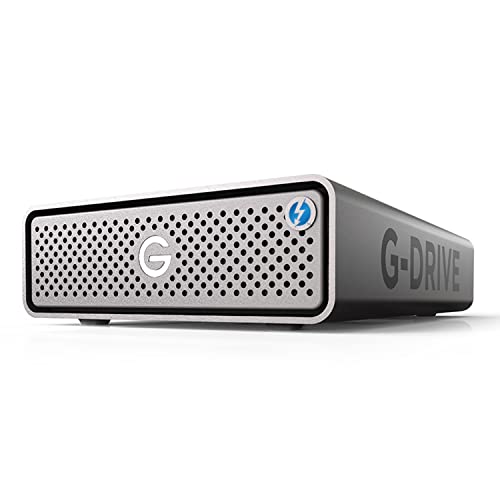
- 4TB enterprise-class 7200RPM drive inside
- Dual Thunderbolt 3 and USB-C ports
- All-aluminum enclosure with 5-year warranty
Best For: Studios wanting a simple desktop Thunderbolt drive
Mid-size RAID enclosure
OWC ThunderBay 4 0TB Thunderbolt Storage Enclosure

- Four bays for 2.5-inch or 3.5-inch drives
- Dual Thunderbolt ports with software RAID
- Quiet aluminum chassis
Best For: Home and project studios needing a compact RAID enclosure
Portable rugged SSD
SanDisk Professional PRO-G40 4TB SSD

- Up to 3000MB/s read and 2500MB/s write
- Thunderbolt 3 and USB-C compatibility
- IP68-rated dust and water resistance
Best For: Mobile recording setups needing fast rugged portable storage
Stackable All-in-One Hub
OWC miniStack STX 2TB Thunderbolt Storage

- Thunderbolt 4 hub with 3 USB-C ports
- Up to 96W power delivery
- 2TB NVMe drive with up to 770MB/s real-world speed
Best For: Mac studios needing compact storage plus hub expansion
Modular SSD Workflow Dock
SanDisk Professional PRO-Blade Station

- Thunderbolt 3 and USB-C compatibility
- Up to 3000MB/s read and 2600MB/s write
- Four-slot modular PRO-BLADE SSD design
Best For: Fast project swaps and modular studio SSD workflows
High-Capacity RAID Desktop
G-RAID 36TB Thunderbolt 3 Storage

- 36TB dual-drive RAID system
- Thunderbolt 3 and USB-C connectivity
- RAID 0, 1, or JBOD plus daisy chaining
Best For: Large studio libraries and desktop RAID storage
Portable SSD Pick
OWC Envoy Ultra 4TB Thunderbolt 5 SSD

- Over 6000MB/s speed for fast session work
- Bus-powered, fanless, and built-in cable
- Weatherproof IP67 and shock-resistant design
Best For: Portable recording studio storage and fast backups
Desktop RAID Hub
Glyph Blackbox PRO RAID Thunderbolt 3 Hub

- RAID 0 or RAID 1 switching on-board
- Built-in DisplayPort, SD, USB-A, USB-C, and TB3
- 7200 RPM dual-drive desktop enclosure
Best For: Fixed studio setups needing RAID plus hub expansion
Desktop RAID Storage
G-Technology G-RAID 8TB Thunderbolt

- 8TB dual-drive RAID 0 desktop system
- Dual Thunderbolt ports for daisy-chaining
- Plug-and-play setup on Mac OS
Best For: Desktop media storage with simple Thunderbolt expansion
Large-scale RAID storage – OWC ThunderBay 8 Eight-Bay Thunderbolt Storage Enclosure
If you need thunderbolt storage for recording studio sessions with lots of tracks, samples, and project files, the OWC ThunderBay 8 is built for heavy-duty desktop expansion. It gives you eight universal bays for 2.5-inch or 3.5-inch SATA drives, dual Thunderbolt 3 ports, and high sustained performance for a serious studio storage array.
Best For: Engineers and producers who want a large, configurable Thunderbolt RAID enclosure for high-capacity studio storage.
Pros:
- Eight drive bays support 2.5-inch and 3.5-inch SATA SSDs or HDDs.
- Dual Thunderbolt 3 ports support daisy chaining and backward compatibility.
- Includes SoftRAID Premium with RAID 0/1/4/5/1+0 (10) and JBOD support.
- Up to 2586MB/s performance and quick-swap trays for easier drive changes.
Cons:
- Requires you to add your own drives.
- It is a larger desktop enclosure, not a compact portable drive.
This is a strong choice when your studio needs scalable capacity and flexible RAID options in one Thunderbolt enclosure. Its real advantage is how much storage and workflow control it can provide in a single box.
Ready-made desktop storage – SanDisk Professional G-Drive PRO 4TB
For thunderbolt storage for recording studio use when you want a ready-to-go desktop drive, the SanDisk Professional G-Drive PRO 4TB offers built-in capacity in a durable all-aluminum enclosure. It combines dual Thunderbolt 3 ports, USB-C connectivity, and an enterprise-class 7200RPM Ultrastar drive inside for straightforward session storage.
Best For: Studios that want an easy desktop Thunderbolt drive with built-in storage and simple daisy chaining.
Pros:
- Includes a 4TB enterprise-class 7200RPM Ultrastar drive.
- Dual Thunderbolt 3 ports plus a USB-C port for flexible connectivity.
- Supports daisy chaining up to 5 additional devices.
- All-aluminum enclosure and 5-year limited warranty.
Cons:
- Single-drive design offers less expandability than multi-bay enclosures.
- Lower transfer speed than the fastest Thunderbolt-only storage options.
This model makes sense if you want a dependable desktop drive without building a RAID setup. It is a practical fit for smaller studio rigs or as a dedicated project and backup drive.
Mid-size RAID enclosure – OWC ThunderBay 4 0TB Thunderbolt Storage Enclosure
If you want thunderbolt storage for recording studio workflows but do not need eight bays, the OWC ThunderBay 4 keeps the setup more compact while still supporting serious RAID flexibility. It accepts four 2.5-inch or 3.5-inch SATA drives, uses dual Thunderbolt ports, and is designed for sustained performance in a quiet aluminum chassis.
Best For: Smaller studios and home studios that want a four-bay Thunderbolt RAID enclosure.
Pros:
- Four-drive enclosure supports 2.5-inch or 3.5-inch drives without adapters.
- Dual Thunderbolt ports and software RAID compatibility.
- Up to 1527MB/s sustained performance.
- Ultra-quiet, heat-dissipating aluminum chassis.
Cons:
- Drives are not included.
- Lower total capacity than eight-bay models.
This is a sensible middle ground for studios that need RAID flexibility and reliable desktop performance in a smaller footprint. It is especially appealing if you want the benefits of Thunderbolt expansion without moving to a very large enclosure.
Portable rugged SSD – SanDisk Professional PRO-G40 4TB SSD
For thunderbolt storage for recording studio work where portability matters, the SanDisk Professional PRO-G40 4TB SSD is a fast external drive with Thunderbolt 3 and USB-C compatibility. It is built for quick transfers, rugged travel, and session moving between machines, with a compact SSD design and strong environmental protection.
Best For: Mobile studios and producers who need a fast, rugged portable Thunderbolt SSD.
Pros:
- Up to 3000MB/s read and 2500MB/s write speeds over Thunderbolt 3.
- Dual-mode compatibility with Thunderbolt 3 and USB-C.
- IP68 dust/water resistance plus crush and drop resistance.
- Compact SSD form factor with an aluminum core for heat management.
Cons:
- Portable capacity is fixed at 4TB.
- Not intended as a multi-drive RAID expansion system.
This is the most travel-friendly option in the group if you need fast, durable storage that can move between studio and field use. It is ideal for transfers, session carrying, and quick access to large media files.
Stackable All-in-One Hub – OWC miniStack STX 2TB Thunderbolt Storage
If you want thunderbolt storage for recording studio work that also helps reduce cable clutter, the OWC miniStack STX is built around a Thunderbolt 4 hub with extra ports and up to 96W power delivery. It combines an integrated storage bay setup with a stackable footprint designed to sit neatly with a Mac Studio or Mac mini, making it a practical desktop expansion for session drives and studio peripherals.
Best For: Mac-based studios that want a compact Thunderbolt 4 storage and hub combo with strong device expansion.
Pros:
- Thunderbolt 4 storage solution with 3 Thunderbolt 4 ports
- Up to 96W power delivery to the host computer
- Stackable design sized for Mac Studio and Mac mini
- 2TB NVMe configuration with up to 770MB/s real-world tested performance
Cons:
- Speed is far below the fastest all-flash Thunderbolt options
- Drive bay setup may be more than some users need
- Best fit is clearly centered on Thunderbolt-equipped systems
This is a strong choice if you want one box to handle storage, hub duties, and desktop organization in a studio build. It is less about raw top-end transfer rates and more about balanced expandability around a compact workstation.
Modular SSD Workflow Dock – SanDisk Professional PRO-Blade Station
For thunderbolt storage for recording studio setups that prioritize fast project swaps, the SanDisk Professional PRO-Blade Station focuses on modular SSD mags and high throughput. It supports Thunderbolt 3 and USB-C, and its four-slot design is aimed at quickly editing, copying, and moving large session files in a desktop workflow.
Best For: Editors and studio users who want a modular SSD enclosure for fast project turnover.
Pros:
- Thunderbolt 3 compatibility with USB-C support
- Up to 3000MB/s read and 2600MB/s write
- Four PRO-BLADE SSD mag slots for project flexibility
- Flow-through active ventilation to help maintain performance
Cons:
- PRO-BLADE SSD mags are sold separately
- Storage capacity depends on the mags you add
- More of a modular enclosure than an all-in-one storage solution
Overall, this is a smart pick when your studio workflow depends on moving media quickly between projects and enclosures. It is best viewed as a flexible SSD station rather than a plug-and-forget bulk storage device.
High-Capacity RAID Desktop – G-RAID 36TB Thunderbolt 3 Storage
If your recording studio needs big, reliable bulk storage, this G-Technology G-RAID system is built around dual Ultrastar 7200RPM drives and Thunderbolt 3 connectivity. It supports RAID 0, 1, or JBOD, and its stackable all-aluminum enclosure is designed for desktop workflows where capacity and straightforward connectivity matter more than flash-level speed.
Best For: Studios that need large-capacity RAID storage for archives, multitrack projects, and general media storage.
Pros:
- Massive 36TB capacity for large session libraries
- Thunderbolt 3 plus USB-C connectivity
- RAID 0, 1, or JBOD configuration options
- Daisy chaining support for up to 5 additional devices
Cons:
- Mechanical drives are slower than SSD-based Thunderbolt storage
- Best suited to desktop use rather than portable workflows
- Performance will depend on the chosen RAID mode
This is a practical choice when the studio priority is capacity, backup flexibility, and a tidy desktop footprint. It makes the most sense for users who need room for a lot of audio and video assets and are comfortable with HDD-based storage.
Portable SSD Pick – OWC Envoy Ultra 4TB Thunderbolt 5 SSD
For thunderbolt storage for recording studio use, the OWC Envoy Ultra is built for fast project transfers, sample libraries, and mobile session backups. Its 4TB NVMe design, over 6000MB/s performance, and Thunderbolt 5 connectivity make it a strong fit when you want near-internal-drive speed in a compact bus-powered enclosure.
Best For: Engineers and producers who need a rugged, silent, high-speed portable SSD for tracking sessions, moving large multitrack projects, and backing up media on the go.
Pros:
- Over 6000MB/s read speed is fast enough for demanding creative workflows.
- Thunderbolt 5 compatibility works with Thunderbolt 4/3 and USB4 systems.
- Bus-powered, built-in Thunderbolt cable keeps the setup simple in a studio bag.
- Fanless aluminum design helps it stay silent during recording.
Cons:
- Portable SSD capacity tops out at 4TB in this version.
- Best speed depends on using a compatible Thunderbolt 5, 4, 3, or USB4 machine.
This is the most studio-friendly option here if portability, silence, and speed matter more than expansion features. It is especially compelling for fast-moving sessions where a rugged external drive needs to keep up with audio workloads.
Desktop RAID Hub – Glyph Blackbox PRO RAID Thunderbolt 3 Hub
If you need thunderbolt storage for recording studio workflows that also expands your desk, the Glyph Blackbox PRO RAID is aimed at heavier desktop use. Its dual-drive RAID design, 7200 RPM mechanism, and up to 550MB/s performance make it suited to larger project libraries, while the built-in hub adds DisplayPort, SD, USB-A, USB-C 3.2 Gen 2, and dual Thunderbolt 3 connectivity.
Best For: Studio users who want a desktop RAID drive with extra ports, quick access to connected gear, and the option to prioritize speed or mirrored protection.
Pros:
- RAID 0 or RAID 1 modes can be switched on the onboard controller without drivers or apps.
- Integrated I/O includes DisplayPort, SD reader, USB-A, USB-C 3.2 Gen 2, and dual Thunderbolt 3.
- 7200 RPM dual-drive design is built for creative workflows with up to 550MB/s transfers.
- Aluminum enclosure with active fan cooling supports nonstop studio use.
Cons:
- At 11.2 pounds, it is not a portable choice.
- Mechanical drives are slower and noisier than a modern SSD solution.
This makes sense for a fixed studio setup where storage and hub functionality matter equally. If you want one desktop unit to handle RAID duties and simplify peripheral connections, it is a practical fit.
Desktop RAID Storage – G-Technology G-RAID 8TB Thunderbolt
G-Technology G-RAID with Thunderbolt Professional Dual Drive Storage System 8TB (0G02272)
Check Price On AmazonFor thunderbolt storage for recording studio setups that favor straightforward desktop performance, the G-Technology G-RAID offers an 8TB dual-drive system with a Thunderbolt interface. Its RAID 0 focus, dual Thunderbolt ports, and support for daisy-chaining make it a useful fit for Mac-based production rooms and other workstation-style editing environments.
Best For: Mac or PC users who want a plug-and-play Thunderbolt RAID drive for fast media access and easy peripheral chaining.
Pros:
- Thunderbolt interface is built for high-performance transfers.
- RAID 0 mode is designed for maximum performance.
- Dual Thunderbolt ports support daisy-chaining up to 6 compatible peripherals.
- 8TB capacity suits larger project and media libraries.
Cons:
- It is a desktop AC-powered drive, not a portable option.
- RAID 0 prioritizes speed over redundancy.
This is a no-frills studio drive for users who want a simple Thunderbolt RAID with dependable desktop connectivity. It stands out most when your priority is quick access to large media files and easy expansion from one workstation port.
How We Picked the Best Thunderbolt Storage for Recording Studio
For Thunderbolt Storage for Recording Studio use, we prioritized sustained transfer performance over burst numbers, plus reliability, expandability, and noise control. We also looked for models that make sense for multitrack recording, sample libraries, and frequent project backups.
Only storage with clear Thunderbolt support, practical capacities, and studio-relevant form factors made the cut. Desktop RAID enclosures, fast SSDs, and hub-style solutions all serve different production needs, so the list is built to cover more than one workflow.
Quick Comparison
Think of the options in three groups: high-capacity RAID enclosures for shared or archive-heavy studios, fast SSDs for active sessions and mobile rigs, and hybrid or hub-based units for compact workstations. RAID can deliver better capacity and redundancy, while SSDs usually win for quiet operation and low-latency access.
Key Buying Factors for Thunderbolt Storage for Recording Studio
Sustained Speed
Look beyond peak read/write claims. Audio sessions benefit from stable sustained performance, especially when streaming many tracks or large sample instruments at once.
Capacity and Redundancy
If you store multitrack archives, virtual instruments, and long-term projects, choose a setup with enough headroom. RAID 1, RAID 5, or similar configurations can add protection, but they are not a substitute for backups.
Noise and Heat
Studios are often quiet rooms, so fan noise and drive acoustics matter. SSDs are typically quieter, while multi-bay HDD arrays may need better placement or isolation.
Connectivity and Compatibility
Match the enclosure to your computer’s Thunderbolt version and available ports. Some systems support Thunderbolt 4, USB4, or backward compatibility, which can help with future upgrades.
Workflow Fit
Portable SSDs suit engineers who move between rooms or sessions. Desktop RAID systems are better for fixed setups that need more space, more bays, or more robust project storage.
Who Should Buy Which Thunderbolt Storage for Recording Studio?
If you want the simplest upgrade for a home or project studio, a fast single-drive SSD is usually the easiest choice. If you run large session libraries or manage multiple artists, a multi-bay RAID enclosure is often the smarter long-term investment. If desk space is tight, a compact stackable solution can keep your workstation clean without sacrificing speed.
For most buyers, the best Thunderbolt Storage for Recording Studio work is the one that matches your session size, backup strategy, and noise tolerance—not just the fastest spec on the box.