Choosing the right switcher can make a studio feel faster, cleaner, and far more reliable on air. If you need an sdi video switcher for broadcast studio work, the best models balance low-latency input handling, dependable routing, and simple control.
This roundup focuses on practical options for multi-camera production, live streaming, ISO recording, and hybrid HDMI/SDI workflows so you can match the gear to your studio’s real-world needs.
Best 10 Sdi Video Switcher for Broadcast Studio Picks for 2026
Studio-Ready Budget Pick
Blackmagic ATEM SDI Live Production Switcher
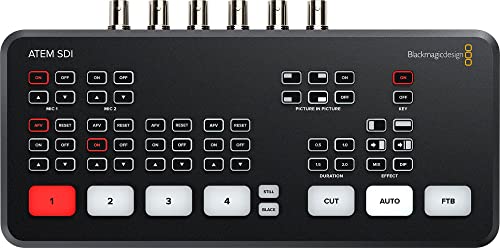
- 4 x 3G-SDI inputs with 10-bit HD support
- USB-C webcam output for easy streaming
- Ethernet control and Fairlight audio tools
Best For: Small studios and livestream crews
Portable Hybrid Choice
Roland V-1SDI 3G SDI Video Switcher
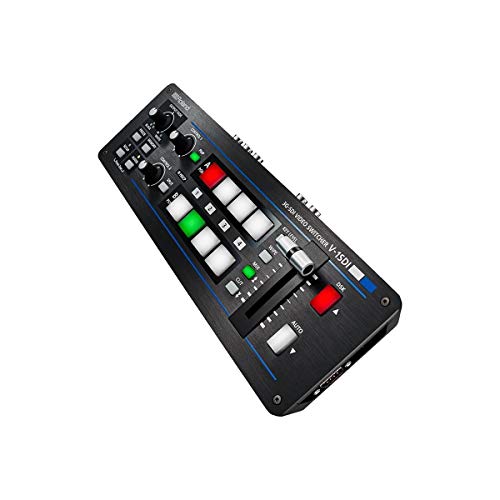
- 3 SDI inputs with transition effects
- 2 HDMI outputs for flexible monitoring
- Remote access and compositing support
Best For: Portable and hybrid SDI/HDMI productions
Streaming-Focused Pro Pick
Blackmagic ATEM SDI Pro ISO Live Stream Switcher

- 4 x 3G-SDI inputs with converters
- Ethernet streaming plus USB-C mobile backup
- Software control for Mac and Windows
Best For: Broadcast studios focused on live streaming
Signal Routing Value Pick
Wiistar 4x1 3Gb/s SDI Switcher

- 4 inputs and 1 output for simple routing
- Supports SD, HD, and 3G-SDI standards
- ReClock and equalizer functions improve stability
Best For: Basic SDI routing and long-run installs
ISO multicam SDI bundle

- 8 x 3G-SDI inputs with converters on every input
- Records 9 separate H.264 streams in real time
- 4 upstream keyers, 2 downstream keyers, 16-screen multiview
Best For: Multicam studios that want ISO recording and live streaming in one box
4K hybrid production mixer
Tenveo PC500 4K SDI/HDMI mixer

- 4 HDMI and 4 SDI inputs with PTZ camera control
- NDI|HX3, SRT, RTMP, RTSP, and UVC streaming options
- USB/SD recording plus a built-in 5.5-inch FHD screen
Best For: Studios needing hybrid HDMI/SDI switching with streaming and PTZ control
Compact hybrid stream switcher
Osee GoStream Duet SDI/HDMI switcher

- 4 SDI and 4 HDMI inputs plus USB-C and NDI HX source support
- Landscape and portrait support for inputs and outputs
- Built-in GUI, software, and Companion control options
Best For: Compact productions that need flexible SDI/HDMI switching and easy control
Flagship studio switcher
CINETREAK Stream Master SDI 10-inch switcher

- 4 HDMI/SDI inputs with 10-inch monitoring screen
- Dual RTMPS streaming and clean PGM/AUX outputs
- PTZ control for up to 4 cameras with IP access
Best For: Small studios needing strong monitoring and flexible live control
ISO recording pick
Osee GoStream Duet 8 ISO hybrid switcher

- 4 HDMI and 4 SDI inputs for mixed camera setups
- Records all 8 channels independently for ISO workflows
- Triple streaming with RTMP, SRT, and NDI HX support
Best For: Teams that need ISO recording and professional audio connectivity
Compact touchscreen switcher
RGBlink mini-mx SDI touchscreen switcher

- 4 HDMI 2.0 and 4 3G-SDI inputs
- 5.5-inch touchscreen with 16 scene presets
- Dual XLR/TRS audio with phantom power and Bluetooth
Best For: Compact studios and events needing touchscreen control and PTZ support
Studio-Ready Budget Pick – Blackmagic ATEM SDI Live Production Switcher
If you need an sdi video switcher for broadcast studio workflows, this Blackmagic ATEM model is built around clean HD switching, simple setup, and dependable signal handling. With 4 x 3G-SDI inputs, USB-C webcam output, and Ethernet control, it fits compact live production setups that need broadcast-style results without adding unnecessary complexity.
Best For: Small broadcast studios, livestream teams, and operators who want straightforward SDI switching with software control.
Pros:
- 4 x 3G-SDI inputs support 10-bit HD sources
- USB Type-C 2.0 webcam output simplifies streaming setup
- Ethernet control supports software updates and network panel integration
- Built-in audio mixer includes gain control and Fairlight processing
Cons:
- No ISO recording feature listed in the supplied notes
- Primarily focused on HD SDI workflows rather than broader I/O options
This is a practical choice when you want a compact SDI switcher with broadcast-oriented basics and solid real-time processing. It stands out for studios that value stable connectivity, simple live output, and integrated audio tools.
Portable Hybrid Choice – Roland V-1SDI 3G SDI Video Switcher
For buyers comparing an sdi video switcher for broadcast studio use, the Roland V-1SDI offers a compact hybrid layout that combines 3 SDI inputs with HDMI output flexibility. It is designed for simple switching, transition effects, remote access, and compositing, making it a good fit when you need a smaller production tool that can still handle mixed-source workflows.
Best For: Portable studios, event producers, and hybrid SDI/HDMI setups that need quick switching.
Pros:
- 3 SDI inputs support core live switching needs
- Two HDMI outputs add useful monitoring and routing flexibility
- Remote access can help with control in different production setups
- Includes transition effects and compositing
Cons:
- Fewer SDI inputs than larger studio switchers
- Audio mixer is specified by channel count, but advanced processing details are not listed
The V-1SDI makes sense when you want a straightforward switcher that bridges SDI and HDMI without a bulky footprint. It is especially appealing for compact productions where output flexibility matters as much as input switching.
Streaming-Focused Pro Pick – Blackmagic ATEM SDI Pro ISO Live Stream Switcher
If you’re shopping for an sdi video switcher for broadcast studio streaming, this ATEM SDI Pro ISO model is aimed at productions that need live output, direct internet streaming, and tighter control over source conversion. It adds 4 x 3G-SDI inputs with frame rate and format converters, Ethernet streaming support, and USB-C mobile internet backup, which makes it a strong fit for controlled studio environments.
Best For: Broadcast studios and live stream teams that want streaming tools plus ISO-oriented workflow support.
Pros:
- 4 x 3G-SDI inputs with frame rate and format converters
- Ethernet streaming and USB-C mobile internet connection support
- Included software control works with Mac and Windows
- 6-input audio mixer includes Fairlight compressor, gate, and EQ
Cons:
- Supplied notes do not specify the exact ISO recording workflow details
- Designed for camera-based workflows, so it may be more specialized than basic switchers
This model is the most feature-forward option here for streaming-centric studio work. It is a smart pick when you want SDI switching with integrated streaming paths and hardware conversion for mixed HD sources.
Signal Routing Value Pick – Wiistar 4×1 3Gb/s SDI Switcher
For a simple sdi video switcher for broadcast studio routing, the Wiistar 4×1 is built for straightforward input selection rather than full live production mixing. It supports SD, HD, and 3G-SDI, includes ReClock technology, and automatically switches between standards, making it useful when you need stable signal handling over long cable runs.
Best For: Basic SDI signal routing, long-run installations, and studios that only need 4-to-1 source selection.
Pros:
- Supports SD-SDI, HD-SDI, and 3G-SDI formats
- ReClock and equalizer functions help maintain signal integrity
- Memory function recalls the last input after restart
- Designed for long-distance use up to 1320 ft in the supplied notes
Cons:
- Not a live production mixer with transition effects or audio controls
- Single-output routing is more limited than studio switchers with multiple outputs
This is the most utility-focused option in the group, aimed at clean source switching rather than production features. It is a sensible fit when the main goal is reliable SDI selection and signal stability.
ISO multicam SDI bundle – ATEM SDI Extreme ISO bundle
If you need an sdi video switcher for broadcast studio workflows that also handles streaming and recording, the Blackmagic Design ATEM SDI Extreme ISO is built for high-output multicam production. It supports up to 8 x 3G-SDI inputs, multiple keyers, a 16-screen multiview, and real-time recording of nine separate H.264 streams, making it a strong fit when you want live switching plus post-production flexibility.
Best For: Studios, education, business presentations, and esports productions that want a compact multicam SDI switcher with ISO recording.
Pros:
- 8 x 3G-SDI inputs with frame rate, format, and re-sync converters on all inputs.
- Records 9 separate H.264 video streams in real time for ISO-style workflows.
- 4 upstream keyers, 2 downstream keyers, and support for up to 9 layers.
- Includes 4G/5G phone support and multiple output options, including SDI and USB-C.
Cons:
- Built around HD 3G-SDI inputs rather than 4K switching.
- Audio I/O is limited to basic stereo analog connections.
Overall, this is a practical choice if your broadcast studio values ISO recording, rich keying, and broad live-streaming support over higher-resolution input formats. The included cables and ties make it a ready-to-deploy bundle for a serious SDI production setup.
4K hybrid production mixer – Tenveo PC500 4K SDI/HDMI mixer
The Tenveo PC500 is an sdi video switcher for broadcast studio environments that need flexible input mixing, built-in monitoring, and streaming in one unit. It combines 4 HDMI and 4 SDI inputs, a 5.5-inch FHD screen, 1080p60 output, USB/SD recording, and NDI|HX3 certification, so it can handle live production, control, and distribution without extra boxes.
Best For: Broadcast studios, churches, conferences, and live events that want HDMI/SDI mixing with PTZ and network streaming support.
Pros:
- 4 HDMI inputs and 4 SDI inputs, with two HDMI inputs supporting 4K60FPS.
- Supports PTZ camera control and can detect PTZ cameras on the same LAN.
- Offers UVC, SRT, RTMP, RTSP, and NDI|HX3 streaming via Ethernet.
- Includes USB/SD recording and a built-in 5.5-inch FHD monitoring screen.
Cons:
- Outputs are limited to 1080P60FPS even though some inputs support 4K60FPS.
- Setup may be more complex than simpler switchers because of the feature set.
For productions that want a highly integrated control surface with streaming, recording, and camera management, the PC500 is a versatile option. Its mix of SDI, HDMI, and IP streaming support makes it especially useful when your studio has a variety of sources and delivery targets.
Compact hybrid stream switcher – Osee GoStream Duet SDI/HDMI switcher
Osee GoStream Duet Multiple Camera SDI and HDMI Live Stream Video Mixer Switcher
Check Price On AmazonIf you want an sdi video switcher for broadcast studio use that stays flexible across formats and control methods, the Osee GoStream Duet is worth a look. It supports 4 SDI and 4 HDMI inputs, USB-C, NDI HX source, and SD/SSD playback, while also handling landscape and portrait I/O for live events that need more than basic switching.
Best For: Small studios and live event crews that want a compact switcher with SDI, HDMI, NDI HX, and versatile control.
Pros:
- Enriched input selection with 4 SDI, 4 HDMI, USB-C, NDI HX, and SD/SSD playback.
- Supports both landscape and portrait for inputs and outputs.
- Multiple control options: built-in GUI, computer software, and Bitfocus Companion.
- Includes rich effects such as chroma key, pattern key, PIP, DSK, and multiple transitions.
Cons:
- Streaming is limited to up to 3 platforms at one time.
- Some NDI functionality requires unlocking via the latest firmware.
The GoStream Duet stands out for its mix of routing flexibility, creative effects, and control options in a compact package. It is a practical fit when you need a switcher that can adapt to different camera and output setups without adding too much bulk.
Flagship studio switcher – CINETREAK Stream Master SDI 10-inch switcher
If you need an sdi video switcher for broadcast studio use with lots of monitoring and control in one box, the CINETREAK Stream Master SDI is built for that kind of workflow. It combines 4 HDMI/SDI inputs, a 10-inch screen, dual streaming, and PTZ control so you can manage a compact studio without adding extra hardware.
Best For: Small broadcast studios, hybrid productions, and operators who want onboard monitoring plus remote control.
Pros:
- 10-inch screen with MV mode and meeting mode for multi-source monitoring
- Up to 4 HDMI and 4 SDI inputs, with 4K input support on HDMI 1 and HDMI 2
- Dual RTMPS broadcasting and clean PGM/AUX output options
- Built-in PTZ control for up to 4 cameras plus wireless IP control
Cons:
- NDI support is noted as an upcoming update, not a current guarantee
- Feature set may be more than needed for very simple single-camera setups
Overall, this model stands out when your studio needs a broad input mix, strong monitoring tools, and advanced production features in one switcher. It is especially appealing if you want broadcast-style flexibility without building a larger rack system.
ISO recording pick – Osee GoStream Duet 8 ISO hybrid switcher
For buyers comparing an sdi video switcher for broadcast studio production, the Osee GoStream Duet 8 ISO is focused on dependable multi-camera capture and streaming. It brings 4 HDMI and 4 SDI inputs, ISO recording of every channel, and triple streaming support, making it a strong fit for productions that need backup, flexibility, and clean post-production options.
Best For: Corporate AV, education, live events, and studios that want ISO recording with professional audio connections.
Pros:
- 8 physical inputs total: 4 HDMI and 4 SDI
- ISO records all 8 channels independently to external SSDs or SD cards
- Supports RTMP, SRT, dual USB, and NDI HX workflows
- Balanced XLR and 3.5mm audio inputs for more flexible audio integration
Cons:
- Onboard control is designed around an external monitor rather than a built-in large screen
- Some users may need Stream Deck or external workflow tools to unlock easier macro control
This switcher is a practical choice if your priority is capturing each camera cleanly while still streaming to multiple destinations. It is especially useful when production teams want a PC-free system with strong recording recovery options.
Compact touchscreen switcher – RGBlink mini-mx SDI touchscreen switcher
The RGBlink mini-mx SDI is a compact sdi video switcher for broadcast studio and live production setups that need touchscreen control, scene presets, and camera management in a smaller footprint. With 4 HDMI 2.0 inputs, 4 3G-SDI inputs, and a 5.5-inch touchscreen, it is aimed at operators who want fast switching and pro audio tools without a large control surface.
Best For: Broadcast studios, churches, events, and hybrid productions that want compact touchscreen switching with PTZ control.
Pros:
- 4 HDMI 2.0 and 4 3G-SDI inputs for multi-camera workflows
- 5.5-inch touchscreen with multiview, transitions, effects, and audio control
- Up to 16 scene presets plus built-in PTZ control for 4 cameras
- Dual XLR/TRS combo inputs with 48V phantom power and Bluetooth audio
Cons:
- NDI requires cloud subscription activation according to the notes
- Recommended USB-C power adapter requirements may add setup considerations
For compact productions that still need serious control, this model balances live switching, audio mixing, and remote browser control well. It is a strong fit when space is limited but you still want broadcast-style flexibility.
How We Picked the Best Sdi Video Switcher for Broadcast Studio
We looked for switchers that fit broadcast studio workflows, not just casual streaming. Priority went to SDI input support, stable signal conversion, recording or streaming options, audio integration, and controls that are manageable in fast-paced production environments. We also considered whether each unit suits small studios, fly-pack rigs, or more permanent control-room setups.
Quick Comparison
The simplest choices are compact 3G-SDI switchers for straightforward multi-camera switching. Midrange units add hybrid HDMI/SDI input flexibility, built-in screens, and live streaming tools. Higher-end models aimed at an Sdi Video Switcher for Broadcast Studio setup often add ISO recording, more inputs, better audio control, and network streaming features like RTMP, SRT, or NDI HX.
Key Buying Factors for Sdi Video Switcher for Broadcast Studio
Input Type and Signal Standard
Check whether you need 3G-SDI, 6G-SDI, or mixed HDMI/SDI support. A studio running cameras, graphics, and external playback gear may benefit from a hybrid switcher, while a pure SDI workflow usually rewards simpler routing and fewer conversion points.
Resolution and Output Workflow
Make sure the switcher supports the resolution and frame rate your production requires. Some units accept 4K inputs but output in 1080p, which may be perfectly fine for broadcast or live streaming, but not ideal if you need an end-to-end 4K workflow.
Recording and Streaming Features
ISO recording is useful when editors need separate camera files after the show. Built-in streaming support can reduce the need for an external encoder, while network options such as NDI HX, RTMP, or SRT help if your studio sends content to multiple destinations.
Audio Control and Monitoring
For broadcast work, audio flexibility matters as much as video switching. Dual XLR, embedded audio management, and clear monitoring tools can save time and reduce errors during live segments.
Who Should Buy Which Sdi Video Switcher for Broadcast Studio?
If you need a straightforward, budget-conscious studio switcher, choose a compact SDI model with the fewest complications. If you regularly mix HDMI sources with cameras, a hybrid unit is more practical. For teams that want postproduction flexibility, ISO recording is the standout feature. And if your studio depends on remote contribution or multi-platform delivery, prioritize models with strong network streaming and control options. The best Sdi Video Switcher for Broadcast Studio setup is the one that matches your camera count, routing needs, and production format without adding unnecessary complexity.